Any way to do a fast build when I just want to test a card implementation? I do run -Dskiptests but it still takes forever :)
 use
use
All 3 comments
You can just rebuild say Mage.Sets and not touch any of the other packages. It may just be me, but you can recompile-on-the-fly for some of the executables (say when you are modifying Mage.Client) but it doesn't seem to work for Mage.Server (I usually have to implement the card, rebuild Mage.Sets (with no tests), restart the Mage.Server and then reconnect from the Mage.Client (which doesn't need to be shut down). If I'm working on something in Mage.Client though, a recompile on the fly (aka 'Apply Code Changes' button in netbeans) seems to work ok.
 spjspj
on 10 Mar 2018
spjspj
on 10 Mar 2018
Use something like 'install -pl org.mage:mage-sets -am -DskipTests' as a Maven build. It'll recompile just what is needed and any upstream dependencies it finds. Makes my build for changing cards take like 15 seconds vs a full build at a bit over 2 minuets.
I haven't tried any kind of hot swapping with this. But I think all you can do if you do a hot swap is effects and all, text is in the cards database as far as I know.
 JRHerlehy
on 10 Mar 2018
JRHerlehy
on 10 Mar 2018
Use:
compile -DskipTests
It's build very fast, used only changes files. Place xmage files to SSD or memory disk to improve performance. As example: it's takes only 10-15 secs to compile server or client after changes for me (well, 80% of that time are resources copy, not compile -- need to optimize that moment in POM files someday).
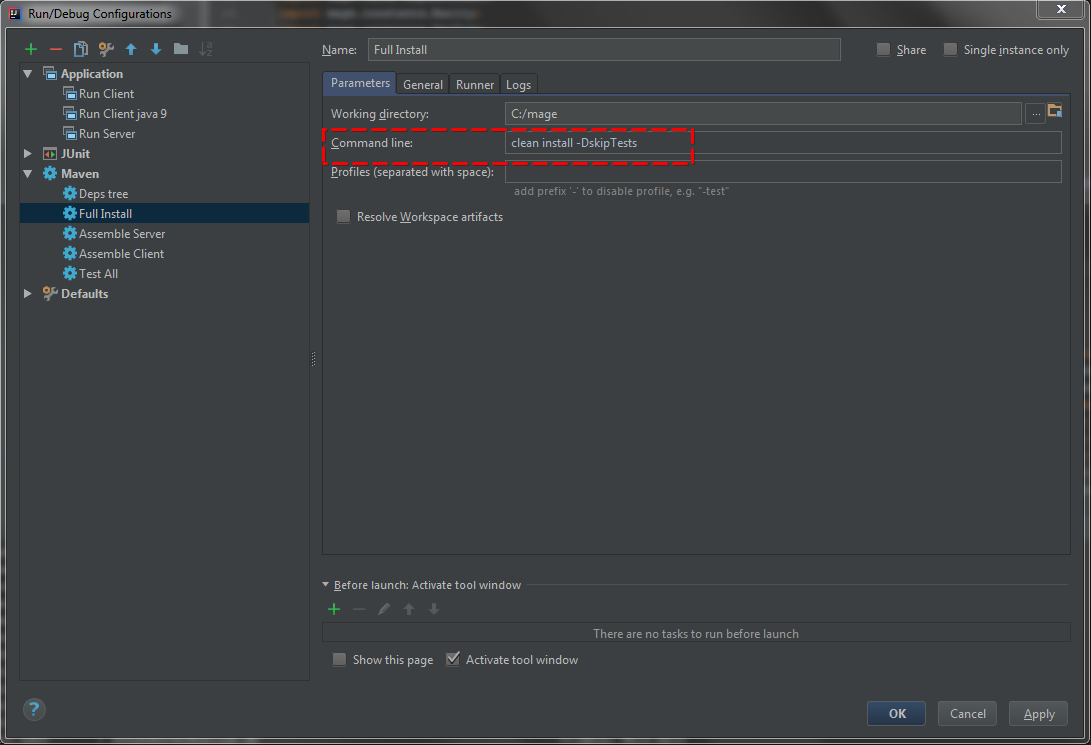
P.S. If you cleaned or deleted other files (e.g. by stopped "install" process) then run full build by:
clean install -DskipTests.
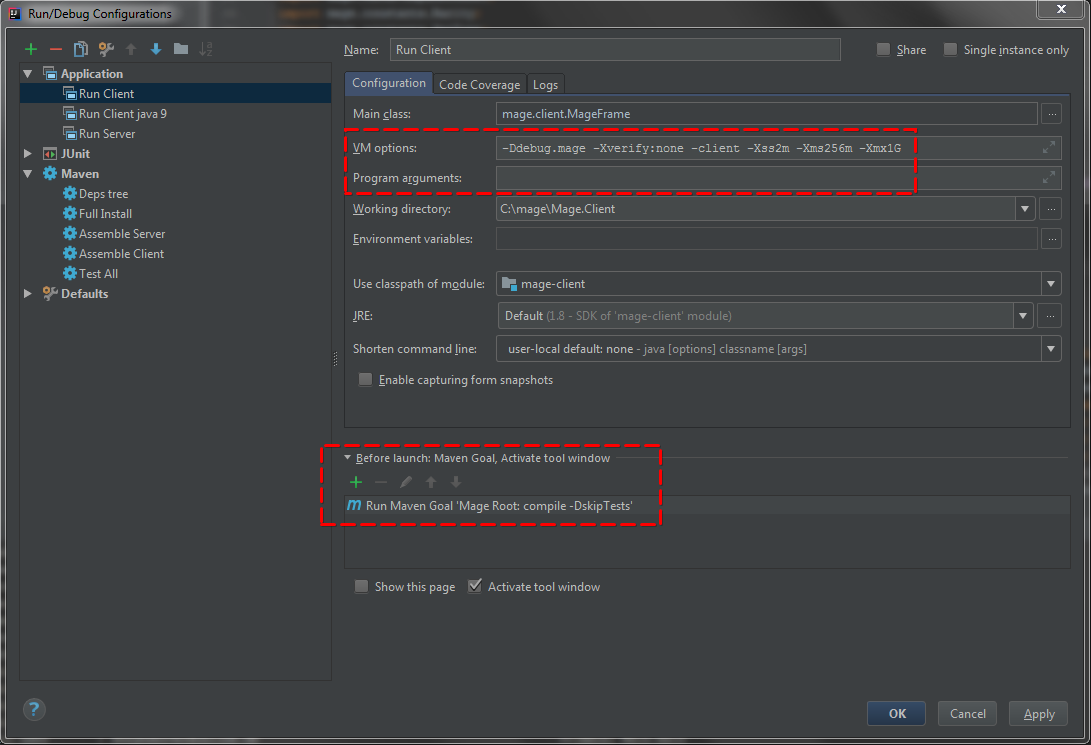
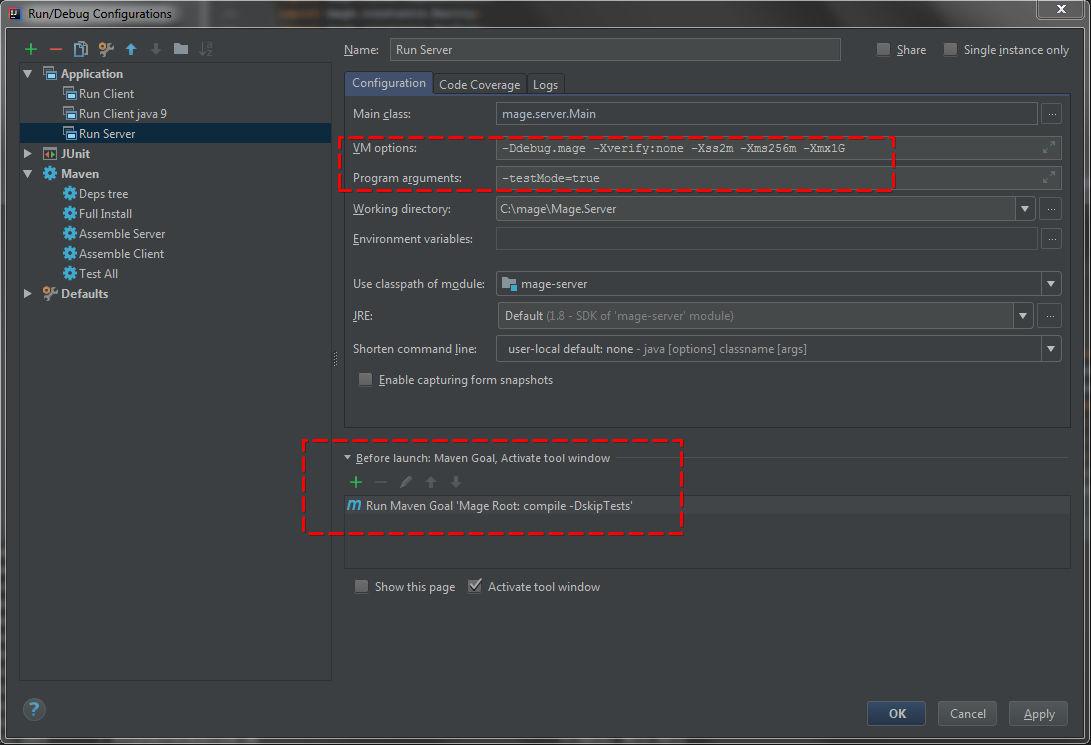
IntelliJ IDEA settings example:
Client start up:
Server start up:
Full build/install (if something goes wrong):
 JayDi85
on 10 Mar 2018
JayDi85
on 10 Mar 2018
Related issues
 ketsuban
·
3Comments
ketsuban
·
3Comments
 Iwasrunningoutofnamesatthispoint
·
3Comments
Iwasrunningoutofnamesatthispoint
·
3Comments
 drmDev
·
4Comments
drmDev
·
4Comments
 GrayedFox
·
9Comments
GrayedFox
·
9Comments
 dosfod
·
4Comments
dosfod
·
4Comments
Most helpful comment
Use:
compile -DskipTestsIt's build very fast, used only changes files. Place xmage files to SSD or memory disk to improve performance. As example: it's takes only 10-15 secs to compile server or client after changes for me (well, 80% of that time are resources copy, not compile -- need to optimize that moment in POM files someday).
P.S. If you cleaned or deleted other files (e.g. by stopped "install" process) then run full build by:
clean install -DskipTests.IntelliJ IDEA settings example:
Client start up:

Server start up:

Full build/install (if something goes wrong):
