Mage: Screen elements jump and draw randomly over game screen (graphic card driver issue)

Seems to happen when I play any deck that sees another player's hand or cares about the exile zone e.g. Storm and Bx Eldrazi.
I'm running Windows 10. Let me know if I can provide anything more to help.
 ianelletson
All 76 comments
I was using dual monitors but I tried with just one monitor and the error persisted. It happens frequently (but not 100% of the time) when viewing a pop-up zone of cards.
ianelletson
on 4 Feb 2016
I can remember some user having problems like that related to size and usage of background image and used screen resolution.
I would first try to switch off background image of xmage and check if that has any influence.
I guess graphics card driver is up-to-date?
 LevelX2
on 4 Feb 2016
LevelX2
on 4 Feb 2016
My GTX 970 drivers are up to date. I will try to switch off the background image and report back if that is a workaround.
ianelletson
on 4 Feb 2016
Not to jinx it but turning off the background image (in the options) has seemed to mostly fix the problem. However, the background image still exists while I play.
ianelletson
on 9 Feb 2016
The issue came back again yesterday. Seemed to come up the same way.
ianelletson
on 13 Feb 2016
I'm experiencing this whenever I cast Ancient Strrings.
 maalsol
on 2 Mar 2016
maalsol
on 2 Mar 2016
I'm having this same problem, It seems to be random. If someone finds a way to fix it, tell me pls.
 CplCuddles
on 4 Mar 2016
CplCuddles
on 4 Mar 2016
Please all people that encounter that problem should post operating system, version of OS, used screen resolution and used graphics card type.
Maybe we get some relations that help us to identify the problem.
LevelX2
on 4 Mar 2016
My resolution is 1920x1080 and 1080x1920 for my secondary
ianelletson
on 4 Mar 2016
Here are my specs.

CplCuddles
on 4 Mar 2016
@CplCuddles do you also have two displays?
 rkfg
on 4 Mar 2016
rkfg
on 4 Mar 2016
@rkfg I do not.
CplCuddles
on 4 Mar 2016
Here is a vid of it happening, if that helps.
https://www.youtube.com/watch?v=EcK5JCI_FIQ
CplCuddles
on 4 Mar 2016
Can you check if using the 3D setting for Java like shown here does help you?
LevelX2
on 5 Mar 2016
I don't have a selector as he did, I'm not running my integrated graphics at all, so it is irrelevant.
CplCuddles
on 5 Mar 2016
On a side note, these text glitches occur to me on Linux as well when I use SNA acceleration (it's on by default), after switching to UXA it's all good.
However, I'm of little help as I don't have windows installed anywhere. It would help to know the exact graphics driver version, just "up to date" isn't enough. There are beta drivers, you may try it. Certainly doesn't look like a game problem but could be related to JVM internals and/or drivers. For example, on Java 8 and Intel GPU I have a tiled image in the card preview panel (on the battlefield) and launcher, tiles are about 128x128 pixels I guess... On another PC with NVIDIA GPU it's all right on the same config. The game uses its own bundled Java so I don't think it's worth a report as it's an artificial environment.
rkfg
on 5 Mar 2016
The game I'm currently in it started when the "Permanent - Exile" window popped up. Which I can't seem to close either.
CplCuddles
on 5 Mar 2016
Is that related to the issue? This exile window can only be minimized, it doesn't have a close button.
rkfg
on 5 Mar 2016
It starts happening about half the time when that exile window pops up, if that would be considered related.
CplCuddles
on 5 Mar 2016
I think this issue is related to JVM. I encountered the same behavior while using a java-based P2P app yesterday, which is not related at all to XMage.
maalsol
on 7 Mar 2016
Well, I'd love to know how to fix it. It really have begun to irritate me quite badly. It happens almost every single game.
CplCuddles
on 8 Mar 2016
Well, I'd love to know how to fix it. It really have begun to irritate me quite badly. It happens almost every single game.
Probably you have to tweak/update/downgrade/setup your graphics card driver. It's nothing that we can do by changing xmage.
You can also try to start xmage manually without the launcher and user another (most current) java version. It's possible that this also can solve the problem.
LevelX2
on 8 Mar 2016
tweak/update/downgrade/setup is quite a broad spectrum of possibilities. I switched it to run from the newest java update (I think.) We'll find out how it plays out.
CplCuddles
on 8 Mar 2016
Running a different java type did not help.
CplCuddles
on 8 Mar 2016
So what's your exact videodriver version? Did you try beta version of it or downgrading it?
rkfg
on 8 Mar 2016
My current driver is 362.00, I updated last night. I will play with it and see if I encounter the problem again.
CplCuddles
on 9 Mar 2016
There's also 364.51, released just yesterday. Give it a try if 362.00 doesn't help.
rkfg
on 9 Mar 2016
It did end up happening again, I updated to 364.51. Testing now.
CplCuddles
on 9 Mar 2016
It happened to me, 1080p dual monitor. 980ti, running driver 364.51. All zones are default other than making chat smaller via the in match slider bar.
 eternalnami
on 14 Mar 2016
LevelX2
on 16 Apr 2016
eternalnami
on 14 Mar 2016
LevelX2
on 16 Apr 2016
I very highly doubt it's a graphics card issue as I have two monitors both running off the same graphics card. This issue only happens on my main monitor running at 1080p. When I drag it to my second monitor that is running 1440x900, the issue does not happen at all. It seems more like an issue with XMage adjusting to higher resolutions when certain things happen, but I have not been able to narrow down exactly what causes it to happen.
 Okiesmokie
on 28 Jul 2016
Okiesmokie
on 28 Jul 2016
Interesting... thanks for letting us know. Sounds like dual monitor setups are more likely to run into this problem looking back at the discussion above.
 drmDev
on 28 Jul 2016
drmDev
on 28 Jul 2016
From #2166 we have another report of another commonality being a dual monitor setup. How that would possibly interact so Java apps or XMage specifically causes this issue, I have no idea.
drmDev
on 14 Aug 2016
This issue seemed to be fixed in the previous version for me. Upon updating to 1.4.14 it has resurfaced.
Okiesmokie
on 14 Aug 2016
Don't believe there was any change relevant to the UI. More likely it was coincidental the issue resurfaced now than something introduced in this new version. Though again, still not sure what the cause of the issue is in the first place.
drmDev
on 15 Aug 2016
Yeah I went through the commits to see if I could find anything, but nothing seems relevant. Very strange though because the bug happens nearly every single game when it is surfacing, but it didn't happen at all under the previous version.
Okiesmokie
on 15 Aug 2016
Nothing from this thread seems to resolve this issue. Only using one single monitor at 2560x1440 resolution. No update on graphics card driver for the past month or so. Forced to move to old laptop running OSX. No problem there.
 kester13
on 16 Aug 2016
kester13
on 16 Aug 2016
@Navyguy330 if it was simple to fix, believe me, we would have already fixed that. To be sincere, I think we can't even fix that because it seems to be an issue with some particular video drivers.
 fwannmacher
on 16 Aug 2016
fwannmacher
on 16 Aug 2016
@Navyguy330 please don't be so rude, these people are providing a great free program and are working hard on it. You are free to (constructively) contribute.
ianelletson
on 16 Aug 2016
Could some one try this? https://www.youtube.com/watch?v=UWu3dyXlbAM
Just select the Java binary (jre) downloaded by the launcher.
fwannmacher
on 16 Aug 2016
@fwannmacher I am the person from #2166. I attempted to try what was in the video but it is not valid for my case. I am on an AMD card. I looked for equivalent settings in their drivers but could not find any.
 Fr33dan
on 17 Aug 2016
Fr33dan
on 17 Aug 2016
@Fr33dan please, install the latest java version. After that, go to your xmage installation folder. You should be able to navigate the following folders xmage/mage-client/lib.
Inside the lib folder, open a cmd and run xmage using: javaw -Xms256m -Xmx512m -XX:MaxPermSize=384m -XX:+UseConcMarkSweepGC -XX:+CMSClassUnloadingEnabled -jar .\lib\mage-client-1.4.14.jar
See if the new java version fixes the issue and post the result here :-)
fwannmacher
on 17 Aug 2016
I tried, it seemed like it might work for awhile, but then on my third match it started back up.
Fr33dan
on 17 Aug 2016
I downloaded and installed Java 8 Update 102. Didn't start using java 8 though, since i used xmage launched using the launcher. And I had selected to use the default image. The problem seems to have gone away for now. Not sure if any actually solve this. Just been watching some matches to test, so far the tearing problem has not resurfaced.
UPDATE: Too early to be happy I guess. The problem surfaced again. Will try out using java 8.
UPDATE: Testing using java 8 command prompt solution. Will update.
UPDATE: Tested and failed. It appeared that using java 8, the tearing surfaced quicker than using the java 7 (launcher). Tried that at least 3 times and they all appeared sooner than using java 7. With the launcher, the problem appears after some matches. Otherwise, it may seem to be totally random though.
kester13
on 17 Aug 2016
Not sure if this is relevant or may have clues to the cause. From what I had observed, the tearing issue had happened quite randomly in matches. Can be in middle of the first match, or the fifth match. I found that by scrolling up and down clears the tearing for awhile, just enough for me to see the board and play some targeting spells and have a view of the board. I guess, temporarily if anyone has the same problem, perhaps scroll up and down (using the mouse wheel) to perhaps play when the tearing appears mid-game. And restart XMage application again once the tearing has surfaced.
I also noticed that the tearing problem WILL definitely appears when I scrolled (up and down) the player list on Tables. So far, it happens to me all the time. Not randomly like those in matches.
Huge thanks for the devs for the support of this great app :+1:
kester13
on 17 Aug 2016
Having the same issue, but i don't run dual monitor...
 Quartz99
on 6 Sep 2016
Quartz99
on 6 Sep 2016
Created a launcher config to use Java 8.
Would be nice if some people with that problem could check if that helps.
Set your Xmage Home to "http://xmage.de/xmage1.4.15v1J8" in the Launcher settings to update Java and check if it helps you to run xmage with Java 8. Please report if you get the same errors or if it does resolve the problem.
LevelX2
on 14 Sep 2016
@Quartz99 Maybe this helps
http://www.slightlymagic.net/forum/viewtopic.php?f=70&t=18680&p=197408&hilit=Software%5CJavaSoft%5CPrefs#p197408
LevelX2
on 14 Sep 2016
I can try but that's not the same error in getting.
On Sep 14, 2016 2:33 PM, "LevelX2" [email protected] wrote:
@Quartz99 https://github.com/Quartz99 Maybe this helps
http://www.slightlymagic.net/forum/viewtopic.php?f=70&t=
18680&p=197408&hilit=Software%5CJavaSoft%5CPrefs#p197408—
You are receiving this because you were mentioned.
Reply to this email directly, view it on GitHub
https://github.com/magefree/mage/issues/1514#issuecomment-247111618, or mute
the thread
https://github.com/notifications/unsubscribe-auth/ATo2QdtYPGC5wHWL9jLzYAALPBLYy-Pvks5qqD4NgaJpZM4HSIm9
.
 Navyguy330
on 14 Sep 2016
Navyguy330
on 14 Sep 2016
nothing has changed. tried all of these methods. and even removed java, checked the PATH variables, and reinstalled. no avail.
Navyguy330
on 15 Sep 2016
Hasn't the graphics card some setting to act in a basic mode (e.g. without acceleration or so)?
Would be interesting to know if that has any influence.
At least I see no approach how we can solve your problem within XMage coding.
LevelX2
on 15 Sep 2016
It seems that downgrading the client to the beta version (1.4.12v0) stops this problem from occurring entirely. I've played a Lantern deck, one that pretty much always causes the screen tearing effect because of how much it causes hand checking and "top card of library is face-up" actions, and had no problems at all with the beta client.
The only issue with this, however, is that I am unable to play with Eldritch Moon and newer packs as they are not coded in with such an early version of XMage.
EDIT: Scratch that, it started occurring again, but it took a LOT longer than before with the recent versions before the screen tearing started happening.
 iRoxor
on 17 Sep 2016
iRoxor
on 17 Sep 2016
i've had these issues as well.
they usually appears when moving the scroll bar of the GY or exile zone. but i can also force it by scrolling through the users in the game windows.
but since the UI update last week. it did not occur yet.
 Roboreaper
on 29 Sep 2016
Roboreaper
on 29 Sep 2016
but since the UI update last week. it did not occur yet.
You mean the client update to 1.5.15v5?
LevelX2
on 29 Sep 2016
So I had stumbled upon something really interesting... and as it turns out...
It's not even XMage's fault at all. It's actually Java.
I've had this same bug occur on an entirely different game that is also coded in Java. The same screen tearing occurs whenever a pop-up window is involved (in this case with the game I was playing, it happened after trying to save/load).
There must be something wrong with the way Java handles new window pop-ups.
The only solution I can suggest is for the XMage devs to figure out a way to completely avoid creating new windows (such as the Exile zone window or the Graveyard/Library windows) which doesn't seem too likely at all. The only temporary fix I can give to players suffering from this bug is to unlock your taskbar and move it to the side and back to its original position. This should give you a couple more annoyance-free turns and it doesn't take long to do.
iRoxor
on 4 Oct 2016
We've been pretty sure it isn't related to the code in XMage for a while now. Even if we want to conclude it's a problem with Java, it still doesn't tell the full tale. Why does it only happen for certain users and why does it suddenly happen for them when they were fine before? The real cause is still unknown - some mix of Java and users individual environment (drivers, OS, etc). + hardware
drmDev
on 4 Oct 2016
Screen Tearing still an Issue? Any known fixes? Xmage 1.4.18v0 still happening. I can't use the launcher so I use the Zip files. Extract and open....Launch from there. Screen tears after a couple minutes into a match.
 Godless-Soldier
on 15 Nov 2016
Godless-Soldier
on 15 Nov 2016
From #2611 we have some stack traces when this may have occurred:
Reporter noted:
an occurrence... happened after deleting and redownloading all the symbols:
FATAL 2016-11-20 17:48:58,600 MAGE Client UI error                                                                       =>[AWT-EventQueue-0] EDTExceptionHandler.handle
java.lang.NullPointerException
    at mage.cards.repository.ExpansionRepository.getSetCodes(ExpansionRepository.java:64)
    at org.mage.card.arcane.ManaSymbols.loadImages(ManaSymbols.java:53)
    at mage.client.MageFrame.<init>(MageFrame.java:291)
    at mage.client.MageFrame$22.run(MageFrame.java:1296)
    at java.awt.event.InvocationEvent.dispatch(Unknown Source)
    at java.awt.EventQueue.dispatchEventImpl(Unknown Source)
    at java.awt.EventQueue.access$500(Unknown Source)
    at java.awt.EventQueue$3.run(Unknown Source)
    at java.awt.EventQueue$3.run(Unknown Source)
    at java.security.AccessController.doPrivileged(Native Method)
    at java.security.ProtectionDomain$JavaSecurityAccessImpl.doIntersectionPrivilege(Unknown Source)
    at java.awt.EventQueue.dispatchEvent(Unknown Source)
    at java.awt.EventDispatchThread.pumpOneEventForFilters(Unknown Source)
    at java.awt.EventDispatchThread.pumpEventsForFilter(Unknown Source)
    at java.awt.EventDispatchThread.pumpEventsForHierarchy(Unknown Source)
    at java.awt.EventDispatchThread.pumpEvents(Unknown Source)
    at java.awt.EventDispatchThread.pumpEvents(Unknown Source)
    at java.awt.EventDispatchThread.run(Unknown Source)
and
FATAL 2016-11-20 17:26:32,691 MAGE Client UI error                                                                       =>[Thread-1] EDTExceptionHandler.handle
net.java.truevfs.kernel.spec.FsSyncException: zip:file:/D:/Users/ksakw_000/Downloads/xmage/mage-client/plugins/images/OGW.thumb.zip!/
    at net.java.truevfs.kernel.impl.TargetArchiveController$$anonfun$close$2.apply(TargetArchiveController.scala:357)
    at net.java.truevfs.kernel.impl.TargetArchiveController$$anonfun$close$2.apply(TargetArchiveController.scala:349)
    at scala.Option.foreach(Option.scala:257)
    at net.java.truevfs.kernel.impl.TargetArchiveController.close(TargetArchiveController.scala:349)
    at net.java.truevfs.kernel.impl.TargetArchiveController.sync(TargetArchiveController.scala:253)
    at net.java.truevfs.kernel.impl.DefaultManager$BackController.net$java$truevfs$kernel$impl$ResourceController$$super$sync(DefaultManager.scala:158)
    at net.java.truevfs.kernel.impl.ResourceController$class.sync(ResourceController.scala:70)
    at net.java.truevfs.kernel.impl.DefaultManager$BackController.net$java$truevfs$kernel$impl$CacheController$$super$sync(DefaultManager.scala:158)
    at net.java.truevfs.kernel.impl.CacheController$class.sync(CacheController.scala:116)
    at net.java.truevfs.kernel.impl.DefaultManager$BackController.net$java$truevfs$kernel$impl$SyncController$$super$sync(DefaultManager.scala:158)
    at net.java.truevfs.kernel.impl.SyncController$class.doSync(SyncController.scala:172)
    at net.java.truevfs.kernel.impl.SyncController$class.sync(SyncController.scala:149)
    at net.java.truevfs.kernel.impl.DefaultManager$BackController.net$java$truevfs$kernel$impl$LockController$$super$sync(DefaultManager.scala:158)
    at net.java.truevfs.kernel.impl.LockController$$anonfun$sync$1.apply$mcV$sp(LockController.scala:96)
    at net.java.truevfs.kernel.impl.LockController$$anonfun$sync$1.apply(LockController.scala:96)
    at net.java.truevfs.kernel.impl.LockController$$anonfun$sync$1.apply(LockController.scala:96)
    at net.java.truevfs.kernel.impl.LockingStrategy.apply(LockingStrategy.scala:84)
    at net.java.truevfs.kernel.impl.LockController$class.sync(LockController.scala:96)
    at net.java.truevfs.kernel.impl.DefaultManager$BackController.sync(DefaultManager.scala:158)
    at net.java.truevfs.kernel.impl.ArchiveControllerAdapter.sync(ArchiveControllerAdapter.scala:37)
    at net.java.truevfs.comp.zipdriver.AbstractKeyController.sync(AbstractKeyController.java:147)
    at net.java.truevfs.kernel.spec.FsDecoratingController.sync(FsDecoratingController.java:117)
    at net.java.truevfs.kernel.impl.FalsePositiveArchiveController.sync(FalsePositiveArchiveController.scala:157)
    at net.java.truevfs.kernel.spec.FsControllerSyncVisitor.visit(FsControllerSyncVisitor.java:49)
    at net.java.truevfs.kernel.spec.FsControllerSyncVisitor.visit(FsControllerSyncVisitor.java:22)
    at net.java.truevfs.kernel.spec.FsAbstractManager$1AssembleExceptionVisitor.visit(FsAbstractManager.java:34)
    at net.java.truevfs.kernel.spec.FsAbstractManager$1AssembleExceptionVisitor.visit(FsAbstractManager.java:30)
    at net.java.truevfs.kernel.impl.DefaultManager$$anonfun$accept$3.apply(DefaultManager.scala:95)
    at net.java.truevfs.kernel.impl.DefaultManager$$anonfun$accept$3.apply(DefaultManager.scala:95)
    at scala.collection.Iterator$class.foreach(Iterator.scala:750)
    at scala.collection.AbstractIterator.foreach(Iterator.scala:1202)
    at scala.collection.IterableLike$class.foreach(IterableLike.scala:72)
    at scala.collection.AbstractIterable.foreach(Iterable.scala:54)
    at net.java.truevfs.kernel.impl.DefaultManager.accept(DefaultManager.scala:95)
    at net.java.truevfs.kernel.spec.FsAbstractManager.sync(FsAbstractManager.java:39)
    at net.java.truevfs.kernel.impl.DefaultManager.sync(DefaultManager.scala:87)
    at net.java.truevfs.kernel.impl.DefaultManager$$anonfun$1.apply$mcV$sp(DefaultManager.scala:37)
    at net.java.truevfs.kernel.impl.ShutdownFuse$$anonfun$net$java$truevfs$kernel$impl$ShutdownFuse$$onDisarm$2.apply$mcV$sp(ShutdownFuse.scala:55)
    at net.java.truevfs.kernel.impl.ShutdownFuse.net$java$truevfs$kernel$impl$ShutdownFuse$$onCondition(ShutdownFuse.scala:61)
    at net.java.truevfs.kernel.impl.ShutdownFuse.net$java$truevfs$kernel$impl$ShutdownFuse$$onDisarm(ShutdownFuse.scala:53)
    at net.java.truevfs.kernel.impl.ShutdownFuse$$anon$1.run(ShutdownFuse.scala:29)
    Suppressed: net.java.truevfs.kernel.spec.FsSyncException: zip:file:/D:/Users/ksakw_000/Downloads/xmage/mage-client/plugins/images/KLD.thumb.zip!/
        ... 41 more
    Caused by: java.nio.file.AccessDeniedException: D:\Users\ksakw_000\Downloads\xmage\mage-client\plugins\images\KLD.thumb.zip
        at sun.nio.fs.WindowsException.translateToIOException(Unknown Source)
        at sun.nio.fs.WindowsException.rethrowAsIOException(Unknown Source)
        at sun.nio.fs.WindowsException.rethrowAsIOException(Unknown Source)
        at sun.nio.fs.WindowsFileSystemProvider.newByteChannel(Unknown Source)
        at java.nio.file.spi.FileSystemProvider.newOutputStream(Unknown Source)
        at java.nio.file.Files.newOutputStream(Unknown Source)
        at net.java.truevfs.driver.file.FileOutputSocket$1Stream.<init>(FileOutputSocket.java:240)
        at net.java.truevfs.driver.file.FileOutputSocket.stream(FileOutputSocket.java:254)
        at net.java.truecommons.cio.IoSockets$OutputAdapter.stream(IoSockets.java:84)
        at net.java.truecommons.io.Streams.copy(Streams.java:82)
        at net.java.truecommons.cio.IoSockets.copy(IoSockets.java:43)
        at net.java.truevfs.driver.file.FileOutputSocket.close(FileOutputSocket.java:163)
        at net.java.truevfs.driver.file.FileOutputSocket$1Stream.close(FileOutputSocket.java:248)
        at net.java.truecommons.io.DecoratingOutputStream.close(DecoratingOutputStream.java:56)
        at net.java.truevfs.comp.zip.AbstractZipOutputStream.close(AbstractZipOutputStream.java:681)
        at net.java.truevfs.comp.zipdriver.ZipOutputService.close(ZipOutputService.java:272)
        at net.java.truevfs.kernel.spec.cio.MultiplexingOutputService.close(MultiplexingOutputService.java:155)
        at net.java.truecommons.cio.DecoratingOutputService.close(DecoratingOutputService.java:32)
        at net.java.truevfs.kernel.impl.DisconnectingOutputService.net$java$truevfs$kernel$impl$CheckedCloseable$$super$close(DisconnectingOutputService.scala:28)
        at net.java.truevfs.kernel.impl.CheckedCloseable$class.close(CheckedCloseable.scala:25)
        at net.java.truevfs.kernel.impl.DisconnectingOutputService.close(DisconnectingOutputService.scala:28)
        at net.java.truevfs.kernel.impl.LockOutputService$$anonfun$close$1.apply$mcV$sp(LockOutputService.scala:30)
        at net.java.truevfs.kernel.impl.LockOutputService$$anonfun$close$1.apply(LockOutputService.scala:30)
        at net.java.truevfs.kernel.impl.LockOutputService$$anonfun$close$1.apply(LockOutputService.scala:30)
        at net.java.truevfs.kernel.impl.LockOn$.apply(LockOn.scala:23)
        at net.java.truevfs.kernel.impl.LockAspect$$anonfun$locked$1.apply(LockAspect.scala:21)
        at net.java.truevfs.kernel.impl.LockAspect$$anonfun$locked$1.apply(LockAspect.scala:21)
        at net.java.truevfs.kernel.impl.LockOutputService.close(LockOutputService.scala:30)
        at net.java.truevfs.kernel.impl.TargetArchiveController$$anonfun$close$2.apply(TargetArchiveController.scala:351)
        ... 40 more
Caused by: java.nio.file.AccessDeniedException: D:\Users\ksakw_000\Downloads\xmage\mage-client\plugins\images\OGW.thumb.zip
    at sun.nio.fs.WindowsException.translateToIOException(Unknown Source)
    at sun.nio.fs.WindowsException.rethrowAsIOException(Unknown Source)
    at sun.nio.fs.WindowsException.rethrowAsIOException(Unknown Source)
    at sun.nio.fs.WindowsFileSystemProvider.newByteChannel(Unknown Source)
    at java.nio.file.spi.FileSystemProvider.newOutputStream(Unknown Source)
    at java.nio.file.Files.newOutputStream(Unknown Source)
    at net.java.truevfs.driver.file.FileOutputSocket$1Stream.<init>(FileOutputSocket.java:240)
    at net.java.truevfs.driver.file.FileOutputSocket.stream(FileOutputSocket.java:254)
    at net.java.truecommons.cio.IoSockets$OutputAdapter.stream(IoSockets.java:84)
    at net.java.truecommons.io.Streams.copy(Streams.java:82)
    at net.java.truecommons.cio.IoSockets.copy(IoSockets.java:43)
    at net.java.truevfs.driver.file.FileOutputSocket.close(FileOutputSocket.java:163)
    at net.java.truevfs.driver.file.FileOutputSocket$1Stream.close(FileOutputSocket.java:248)
    at net.java.truecommons.io.DecoratingOutputStream.close(DecoratingOutputStream.java:56)
    at net.java.truevfs.comp.zip.AbstractZipOutputStream.close(AbstractZipOutputStream.java:681)
    at net.java.truevfs.comp.zipdriver.ZipOutputService.close(ZipOutputService.java:272)
    at net.java.truevfs.kernel.spec.cio.MultiplexingOutputService.close(MultiplexingOutputService.java:155)
    at net.java.truecommons.cio.DecoratingOutputService.close(DecoratingOutputService.java:32)
    at net.java.truevfs.kernel.impl.DisconnectingOutputService.net$java$truevfs$kernel$impl$CheckedCloseable$$super$close(DisconnectingOutputService.scala:28)
    at net.java.truevfs.kernel.impl.CheckedCloseable$class.close(CheckedCloseable.scala:25)
    at net.java.truevfs.kernel.impl.DisconnectingOutputService.close(DisconnectingOutputService.scala:28)
    at net.java.truevfs.kernel.impl.LockOutputService$$anonfun$close$1.apply$mcV$sp(LockOutputService.scala:30)
    at net.java.truevfs.kernel.impl.LockOutputService$$anonfun$close$1.apply(LockOutputService.scala:30)
    at net.java.truevfs.kernel.impl.LockOutputService$$anonfun$close$1.apply(LockOutputService.scala:30)
    at net.java.truevfs.kernel.impl.LockOn$.apply(LockOn.scala:23)
    at net.java.truevfs.kernel.impl.LockAspect$$anonfun$locked$1.apply(LockAspect.scala:21)
    at net.java.truevfs.kernel.impl.LockAspect$$anonfun$locked$1.apply(LockAspect.scala:21)
    at net.java.truevfs.kernel.impl.LockOutputService.close(LockOutputService.scala:30)
    at net.java.truevfs.kernel.impl.TargetArchiveController$$anonfun$close$2.apply(TargetArchiveController.scala:351)
    ... 40 more
The reporter also noted:
The file that is referred to in the exception message is on the drive and does not seem to be corrupted (i.e. I can open it without any problems).
drmDev
on 6 Mar 2017
Also having this issue, Windows 10, AMD RX480. 2 monitor setup but I disconnected one and I still have the problem. Latest driver. Has there been any fix for the issue?
 weeurey
on 15 Mar 2017
weeurey
on 15 Mar 2017
I'm having this problem. I noticed, when it happens and I switch between two monitors and turning the 2nd on on or off. it fixes it temporarily. when it happens again I turn on the 2nd screen and its fixed again... very weird. But it's quite annoying to do this multiple times per match. It won't go away by itself.
Specs:
Win 7 Prof
I7-3820 @3.6GHz
16GB RAM
AMD Radeon HD5800
Xmage 1.4.22V0 (2017-03-11)
 Hygaradon
on 2 Apr 2017
Hygaradon
on 2 Apr 2017
I solved this for me with one of this actions (all at about the same time), sorted by likeliness highest to lowest:
- Checking 'Fall back to plain image based rendering' in the XMage Graphic Options
- Updating XMage to V4
- Updating GFX Card Drivers
As a workaround if the problem occurs to you, change your display resolution to a lower one. Always fixed it temporary for me so i could go on playing (once i found it).
edit:
Win 10 64 bit on a nvidia geforce 965M card, single display setup
 FreshDumbledore
on 17 Sep 2017
FreshDumbledore
on 17 Sep 2017
is there any chance for a fix? didnt have the problem two months ago.
i tried a clean uninstall of all gpu drivers, clean uninstall of java, removing and reinstalling xMage multiple times, tried various graphic resolutions, and played around in xMage preferences. nothing helped.
running a single moitor setup
radeon 280x
windows 7 64x
 racctor
on 23 Sep 2017
racctor
on 23 Sep 2017
I have the same problem on my pc, have had it forever:
Win 10 64x
AMD Radeon R7 200 Series
Driver Packaging Version
16.40.2311.1002-161121a-309377E
I do have my tv connected via HDMI and set to copy my screen but it's never on when I play.
super annoying, I too have to play on my laptop because it is unplayabel. Problem starts always during game 1, never have been able to finish a game.
 Akoras
on 26 Sep 2017
Akoras
on 26 Sep 2017
to finish all you have to do is ctrl alt del and force quit, and re open
you will usually auto reconnect to table. i have to do this maybe 5 times
every few games lol. some times 3-4 times PER GAME
On Tue, Sep 26, 2017 at 2:15 AM, Akoras notifications@github.com wrote:
I have the same problem on my pc, have had it forever:
Win 10 64x
AMD Radeon R7 200 Series
Driver Packaging Version
16.40.2311.1002-161121a-309377EI do have my tv connected via HDMI and set to copy my screen but it's
never on when I play.super annoying, I too have to play on my laptop because it is unplayabel.
Problem starts always during game 1, never have been able to finish a game.—
You are receiving this because you were mentioned.
Reply to this email directly, view it on GitHub
https://github.com/magefree/mage/issues/1514#issuecomment-332097124, or mute
the thread
https://github.com/notifications/unsubscribe-auth/ATo2Qd1qS1t-aja745-ZJpMDeJqloZIxks5smJaBgaJpZM4HSIm9
.
Navyguy330
on 26 Sep 2017
Navyguy330 commented
to finish all you have to do is ctrl alt del and force quit, and re open
you will usually auto reconnect to table. i have to do this maybe 5 times
every few games lol. some times 3-4 times PER GAME
I know about this "workaround" but it happens to me every minute or so...thats just not a viable option
Akoras
on 26 Sep 2017
yeah I have tried everything. you mention using a tv as a monitor, I am
too. but hdmi to a monitor vs television these days does not seem like it
could cause that (unless some odd driver bug combo with java screen
drawing) oddly enough my OLD computer, that I use at my gf, with another tv
does not do it, but that same computer did it to me here lmao.
On Tue, Sep 26, 2017 at 3:03 AM, Akoras notifications@github.com wrote:
Navyguy330 commented
to finish all you have to do is ctrl alt del and force quit, and re open
you will usually auto reconnect to table. i have to do this maybe 5 times
every few games lol. some times 3-4 times PER GAMEI know about this "workaround" but it happens to me every minute or
so...thats just not a viable option—
You are receiving this because you were mentioned.
Reply to this email directly, view it on GitHub
https://github.com/magefree/mage/issues/1514#issuecomment-332105648, or mute
the thread
https://github.com/notifications/unsubscribe-auth/ATo2Qbki19CMABeRBmXsFWl4zP7wzkfeks5smKGkgaJpZM4HSIm9
.
Navyguy330
on 26 Sep 2017
I installed XMage this week and this happened to me every single game I played.

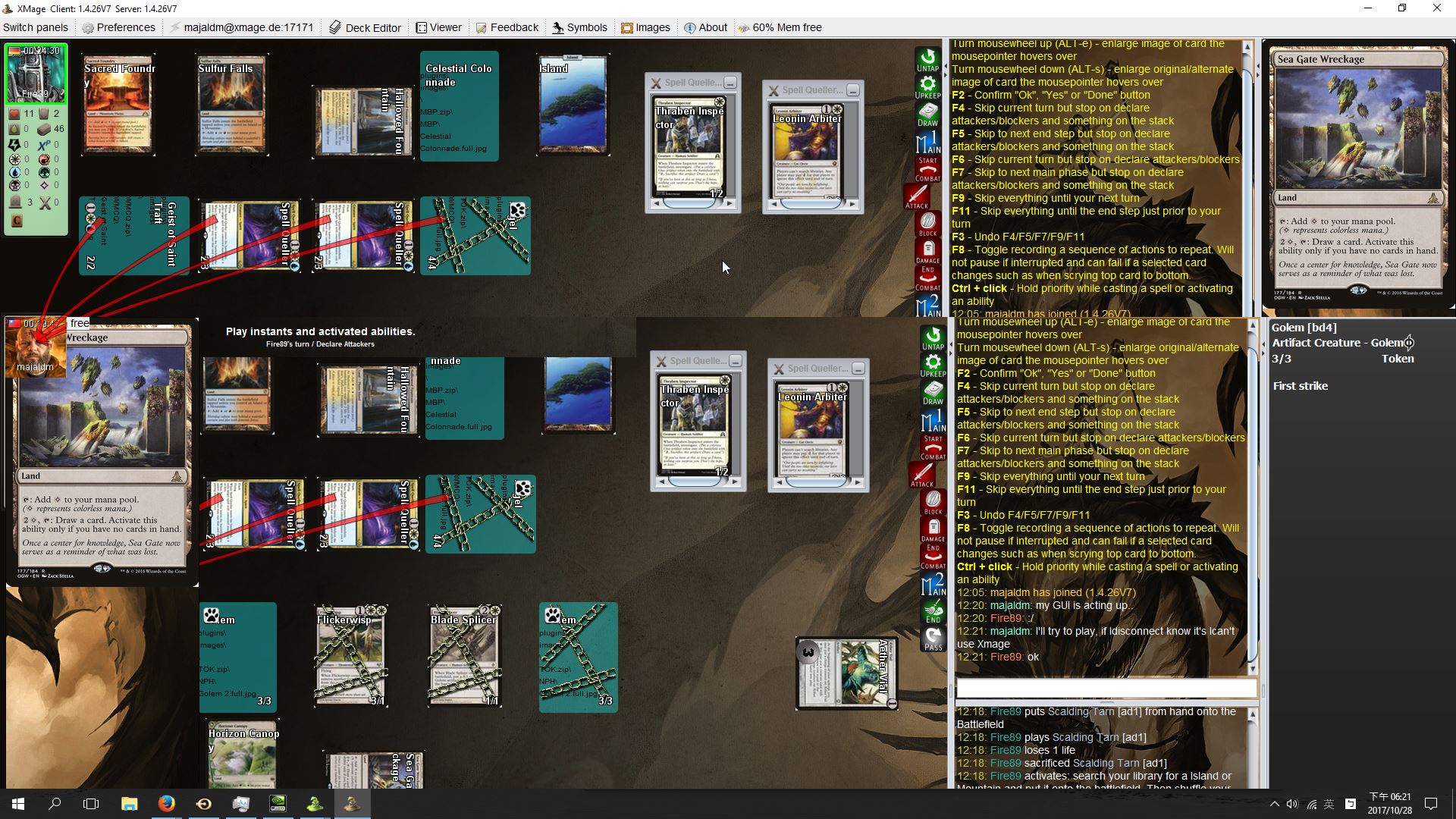
This are my specs, I'm using the recommended Java version

These are my settings on NVIDIA control panel (all off or minimum except shaders on):

Do you plan on working on this bug? Let me know if you need more information.
 majaldm
on 28 Oct 2017
majaldm
on 28 Oct 2017
We have not been able to establish a root cause of the issue to troubleshoot it. We cannot duplicate it ourselves either. Since it is not a problem for all users, it is related to user environments at the very least. In this thread we've found some commonalities but unsure how to proceed.
If someone with development experience is having this problem, you can help contribute to XMage and run it locally through a debugger to try to provide more details on where this is happening. It's possible somewhere in the code we have to account for differences in user environments than what is already done.
drmDev
on 28 Oct 2017
I am an IT student, but I don't have much time right now. As additional info: I have Chinese Zhuyin input on my system (it uses phonetic symbols like this: ㄋㄧˇ ㄏㄠˇ), inputting any of those symbols as a text in XMage will immediately cause this bug to appear.
majaldm
on 3 Nov 2017
It's not a graphic card issue at all. That's kind of bugs causing by windows loose his "handles" and can't to process system messages (e.g. panels and controls don't known when it must redraw, example, after change position or after remove another window over app).
You must checking every step from start to first bug appear. It may not nulled pointer access, broken resources, broken data, wrong actions, access to non exist cards or game elements, and etc.
Log all actions and isolate moment of the bug's begin (less steps is better).
 JayDi85
on 22 Nov 2017
JayDi85
on 22 Nov 2017
Please, try that test version and tell -- can it help you: download link (200 MB). Download, extract zip to somewhere and run XMageLauncher-0.3.8.jar from xmage-test folder (as your normal game).
JayDi85
on 22 Nov 2017
still an issue, 2 years later lol. its so annoying,
Navyguy330
on 24 Feb 2018
@Navyguy330 I think it's a java 2d problem, not xmage... You can find fixes here. Try one of this:
- add launcher param to client:
-Dsun.java2d.d3d=false(it's help me yesterday to fix graphic glitches and invisible panels); - or change nvidia driver settings for java apps;
- or other fixes from link above.
JayDi85
on 24 Feb 2018
This is also happening to me I found that changing the memory allocated helps some but it still tears when my memory usage goes over 30%
 jdavis8
on 27 Feb 2018
jdavis8
on 27 Feb 2018
i have this same error. it seems to be alleviated a bit when i allocate more memory to xmage but that still doesnt stop it completely from happening
jdavis8
on 5 Apr 2018
99% of all graphic glitches come from client errors (as example: broken images files/zips -- just delete zero size files or files from error message). Users must open client logs and research errors xxx\xmage\mage-client\mageclient.log (upload it to https://pastebin.com/ and create new issue with your problem).
1% of all graphic glitches come from old graphic card drivers. You must update it to latest version. If not helps then try to use -Dsun.java2d.d3d=false fix (see above).
JayDi85
on 21 Mar 2019
Related issues
 Iwasrunningoutofnamesatthispoint
·
3Comments
Iwasrunningoutofnamesatthispoint
·
3Comments
 AsterAether
·
5Comments
AsterAether
·
5Comments
 copperfield42
·
10Comments
copperfield42
·
10Comments
 acabaca24
·
5Comments
drmDev
·
13Comments
acabaca24
·
5Comments
drmDev
·
13Comments
Most helpful comment
@Navyguy330 please don't be so rude, these people are providing a great free program and are working hard on it. You are free to (constructively) contribute.