Macvim: Rows of text seem clipped at certain font sizes on Catalina
Running 8.1.950 on Catalina, when I start MacVim, some lowercase letters are getting clipped:
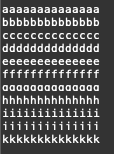
If I adjust the font size and then adjust it back, things are rendered correctly:

This started as soon as I upgraded to Catalina -- Mojave was fine. My font settings are English/Menlo/Regular/11
 twk
twk
All 33 comments
I will need to see if I can repro this under the new Xcode. Otherwise could be tricky as I don't have a beta Catalina install with me.
 ychin
on 11 Jun 2019
ychin
on 11 Jun 2019
Happens for me after upgrading to catalina, but, only with Core Text renderer enabled.
With Core Text renderer disabled things are actually considerably worse.

actual:

 AdamJacobMuller
on 14 Jun 2019
AdamJacobMuller
on 14 Jun 2019
I'd wait for first public beta. Before that point macOS is not really usable at all
 eirnym
on 14 Jun 2019
eirnym
on 14 Jun 2019
Aside from the MacVim issue my workflow is fine and I've just been running vim instead.
AdamJacobMuller
on 14 Jun 2019
I'm really surprised to read it! This release will be the first one with relatively stable betas, since it wasn't a case since macOS 10.7 Beta 1
eirnym
on 15 Jun 2019
Public Beta is out…
eirnym
on 26 Jun 2019
It's interesting, I can reproduce it with
guifont=Menlo-Regular:h11, but not with guifont=Fira\ Code\ Light:h12
eirnym
on 27 Jun 2019
This is a duplicate of #883.
 jjgod
on 28 Jul 2019
jjgod
on 28 Jul 2019
Oh, @eirnym, it's because the comparison sees that the new font Menlo-Regular:h11 is the same as the default font initialized by -[MMCoreTextView initWithFrame:] and skip rest of the initialization:
if (!(newFont && font != newFont))
    return;
That's why in this case fontDescent is still properly initialized.
jjgod
on 28 Jul 2019
(lldb) p font
(NSCTFont *) $0 = 0x0000000101c233e0
(lldb) p newFont
(NSCTFont *) $1 = 0x0000000101c233e0
(lldb) po font
"Menlo-Regular 11.00 pt. P [] (0x101c28300) fobj=0x101c233e0, spc=6.62"

(lldb) po newFont
"Menlo-Regular 11.00 pt. P [] (0x101a00860) fobj=0x101c233e0, spc=6.62"
I've tried it after Fira Code, to guarantee that it's a different one
eirnym
on 28 Jul 2019
That's why you are not hitting the problem with Fira Code.
jjgod
on 28 Jul 2019
and what's about Menlo?
I've set Fira Code first, then Menlo, and issue still exists. This doesn't neglect your issue on fontDescent, though. Probably, in macOS Catalina this parameter becomes more valuable to set if it's not.
eirnym
on 28 Jul 2019
How exactly did you do that? Did you execute multiple set guifont command?
jjgod
on 29 Jul 2019
I think this should now be fixed and will be released in the next update. If someone wants to confirm (I haven't installed the beta macOS yet) that would be great.
ychin
on 29 Jul 2019
I'll test it today
eirnym
on 30 Jul 2019
i'm happy to test but i don't particularly want to build this myself and it seems like the last release was 157, any chance of 158 being released to test?
AdamJacobMuller
on 24 Sep 2019
I just installed MacOS Catalina (version "10.15 (19A583)"). Now I get this issue:

The test-text: Qq Gg Yy
MacVim version "Custom Version 8.1.1722 (157)".
This is a severe issue. I hope it can get fixed soon.
:set guifont? says Menlo.
 tobireif
on 8 Oct 2019
tobireif
on 8 Oct 2019
I'm also surprised this wasn't fixed/released prior to Catalina's release.
 securitygeneration
on 9 Oct 2019
securitygeneration
on 9 Oct 2019
@securitygeneration This is an open source project. You could do a contribution of your time and knowledge.
eirnym
on 9 Oct 2019
@eirnym I was following this and saw that it seemed to be tentatively resolved (https://github.com/macvim-dev/macvim/issues/905#issuecomment-516080155), and so it didn't seem to need any additional attention (although yes, I could've tried to test it). ¯\_(ツ)_/¯
securitygeneration
on 9 Oct 2019
Next update will be out this weekend.
ychin
on 10 Oct 2019
Any updates on this?
 hoke-t
on 14 Oct 2019
hoke-t
on 14 Oct 2019
As per @eirnym, I am posting this here and closing my issue.
I can confirm this is still an issue after the weekend.
I am running the latest release:

And can confirm fonts still look strange:

And that the changing the font size back and forth fixes things:

My macOS version:
% sw_vers
ProductName:    Mac OS X
ProductVersion: 10.15
BuildVersion:   19A583
 isaki
on 14 Oct 2019
isaki
on 14 Oct 2019
@isaki Thank you for an addition, Please, write which distribution of MacVim do you use (e.g. GitHub, Homebrew, MacPorts, etc) and which font are you using (:set guifont?)
eirnym
on 15 Oct 2019
changing the font size back and forth fixes things
Here it fixes it temporarily for that one buffer/window, but not permanently.
(I'm using the distribution from https://github.com/macvim-dev/macvim/releases plus auto-updates.)
:set guifont? says guifont=Menlo:h16
tobireif
on 15 Oct 2019
I have the exact issue as well. I always have to increase and then decrease the font size upon opening a file to fix the clipping.
Using macOS 10.15 build version 19A583, Homebrew distribution of MacVim, and set guifont? gives guifont=Menlo-Regular:h11.
hoke-t
on 15 Oct 2019
@eirnym I am using the GitHub distribution of MacVim.
I apparently have no font set once so ever:

Also, commands are also being chopped off:

Finally, this is the font setup that seems to be in use when I run set guifont=*:

I hope this information helps!
isaki
on 15 Oct 2019
Thank you, this is fixed in HEAD. So I hope @ychin will find the time to prepare a release.
eirnym
on 15 Oct 2019
Thank you @eirnym and @ychin. It's fixed for me after building 8.1.2102 on Catalina.
 jimsiff
on 17 Oct 2019
jimsiff
on 17 Oct 2019
This should be fixed in snapshot-159. Let me know if it isn't.
ychin
on 17 Oct 2019
This has indeed fixed it, thank you!
isaki
on 17 Oct 2019
Can confirm as well. Thanks!
hoke-t
on 17 Oct 2019
Related issues
 PLG
·
4Comments
PLG
·
4Comments
 itsayellow
·
4Comments
itsayellow
·
4Comments
 romainl
·
5Comments
romainl
·
5Comments
 bdarfler
·
4Comments
bdarfler
·
4Comments
 alex-protean
·
3Comments
alex-protean
·
3Comments
Most helpful comment
Next update will be out this weekend.