Macvim: MacVim Snapshot 155, how to set default python to python3 ?
I download MacVim from https://github.com/macvim-dev/macvim/releases/tag/snapshot-155
I am having trouble setting python to python3 as default.
This is what I have tried:
in my .vimrc

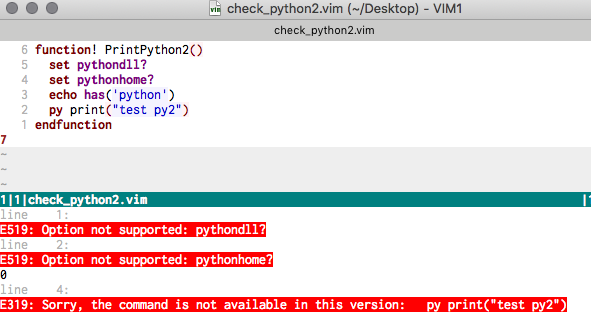
Result:


Obviously one of my plugin has called python2, and from this issue #818 I think I understand that I can not have two version of python.
And I am not sure how to unset pythondll and pythonhome, so that my python default to version 3.
But my previous MacVim which i installed via homebrew, I seem to have non of this problem (below output of same vim script with homebrew macvim):

Notice that python3 is default and no complain of:

As the result of this problem, the plugins I installed that depends of python3 no longer works!!
--
Here is version of MacVim (snapshot 155) on my mac:

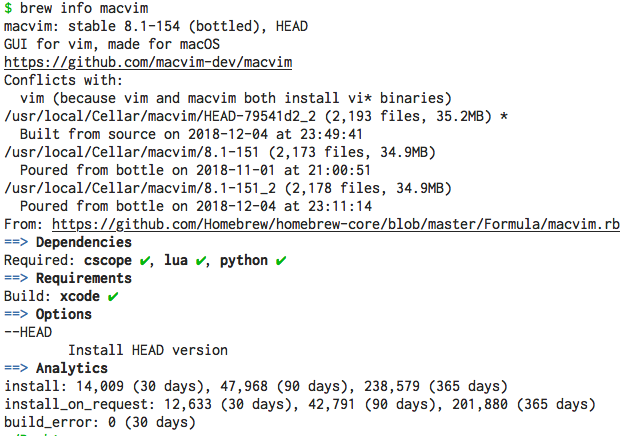
Here is version of MacVim I previously install via homebrew on my mac:

--
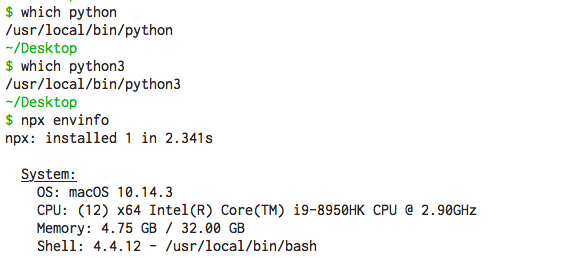
System info:
--
Thank again for helping.
 ApolloTang
All 6 comments
related ? https://github.com/python-mode/python-mode/issues/897#issuecomment-424646475
ApolloTang
on 21 Feb 2019
So, you have a plugin that calls Python 2 but you want to use Python 3? How does your plugin invoke Python and does it have a Python 3 mode (or does it use :pyx)? Because if it relies on Python 2 then I would imagine you need to disable that plugin…
Anyway, the main Python detection change that happened was 8.1.0950 (https://github.com/vim/vim/pull/3995). It fixed :pyx to work more properly so maybe that's the trigger of the issue.
Also, remember that a simple has('python') will trigger a Python 2 load and invalidates Python 3.
You could also do set pythondll in your vimrc to force Python 2 to not load, but as I said it's better if you find out what the offender is and don't load that plugin.
 ychin
on 22 Feb 2019
ychin
on 22 Feb 2019
So, you have a plugin that calls Python 2 but you want to use Python 3?
Well, is not that I want to use Python 3.
it wasn't me, I think it is one plugin call for python2 and the other call for python3.
Will MacVim allow plugins use their own version of python in the same instance ?
Also, is there a way to find out which plugin call which python version?
I don't know to check that, other than disable all plugins and enable one by one (which will be very time consuming, given that I have so many plugin installed).
For now I am sure that Denite used python 3.
and I am suspecting that it is YouCompleteMe that call for python 2 (but I don't know how to verify this)
ApolloTang
on 23 Feb 2019
it wasn't me, I think it is one plugin call for python2 and the other call for python3.
Sure, but my point is if you have a plugin that only relies on Python 2, you may need to disable that plugin.
Will MacVim allow plugins use their own version of python in the same instance ?
See #760. This isn't really a MacVim specific issue as Vim just decided to only allow loading one version of Python in. You have to try really really hard to run both versions together and I don't recommend it, since plugins should have migrated to using Python 3. For example, YouCompleteMe's README page claims to support both 2 and 3.
My guess of what actually happened to you is that one of your plugin has a choice to use either Python 2 or 3, and prioritized using Python 2, which IMO is a mistake.
In your vimrc, just call has('python3') before any plugin has a chance to do anything (look at :h has-python). This will actually load in Python 3 and disable Python 2 from then on (if you call echo has('python') after that you will notice it returns 0). This should solve your problem. If any plugin barks afterwards, that plugin is the offender that only works with Python 2.
Note: A newer way of handling 2 vs 3 is the :pyx command which will use either python version. Your Python code does need to be compatible with either version though.
Also see :h python-2-and-3
ychin
on 23 Feb 2019
After reading your comment:
YouCompleteMe's README page claims to support both 2 and 3.
this is my solution:
" Python Setting {
  set pythondll=/usr/local/Frameworks/Python.framework/Versions/3.7/Python
  set pythonhome=/usr/local/Frameworks/Python.framework/Versions/3.7
  set pythonthreedll=/usr/local/Frameworks/Python.framework/Versions/3.7/Python
  set pythonthreehome=/usr/local/Frameworks/Python.framework/Versions/3.7
" }
is not pretty, but works for now: all plugin exist happily and harmoniously :)
closing this issue.
ApolloTang
on 24 Feb 2019
Thanks again @ychin for your quick response
ApolloTang
on 24 Feb 2019
Related issues
 0xDP
·
5Comments
0xDP
·
5Comments
 bdarfler
·
4Comments
bdarfler
·
4Comments
 epheien
·
4Comments
epheien
·
4Comments
 J-Liu
·
4Comments
J-Liu
·
4Comments
 9mm
·
4Comments
9mm
·
4Comments
Most helpful comment
After reading your comment:
this is my solution:
is not pretty, but works for now: all plugin exist happily and harmoniously :)
closing this issue.