Macvim: Wide Character problem / Space Between Character problem
macvim version:
$ brew info macvim
macvim: stable 8.1-151 (bottled), HEAD
GUI for vim, made for macOS
https://github.com/macvim-dev/macvim
/usr/local/Cellar/macvim/8.1-151 (2,173 files, 34.9MB) *
  Poured from bottle on 2018-11-01 at 21:00:51
From: https://github.com/Homebrew/homebrew-core/blob/master/Formula/macvim.rb
macOS Mojave version 10.14.1
┌───────────────┐              ┌──────────────┐
│               │              │              │
│               │              │              │
│               │              │              │
│               ├─────────────▶│              │
│               │              │              │
│               │              │              │
│               │              │              │
│               │              │              │
└───────────────┘              │              │
                               └──────────────┘
where '┌' ,'└', ','┘', '┐', ' ─', and '▶' are wide character; while '│', and ' ' (space) are normal character.
The rendering in MacVim shows:

my font setting are:
guifont=Inconsolata:h14
guifontwide=
encoding=utf-8
ambiwidth=single
Inconsolata is fix width font the width of charecter should be identical, but the rendering clearly shown otherwise.
Expected correct behaviour
I am expected this to be displayed like:

The above is running vim in terminal that using the same font but different size: Inconsolata Regular 17pt.
I have tried:
set guifontwide=Menlo Regular:h14
Because help: guifontwide seem to indicates that macvim will use font specified in guifontwide when displaying wide character. But setting this does not help either.
I don't think this has to do with guifontwide, it is more likely due to the how macvim render the space between character and I believe that the rendering behaviour has changed since Mojave update..
Here is another example of where wide character display that result in misalignment:

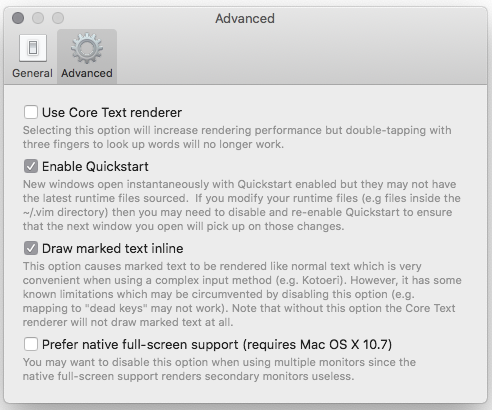
I am not using 'Core Text renderer', here is my preference for macvim:

 ApolloTang
All 13 comments
possibly relate to #455, #726 ?
ApolloTang
on 26 Nov 2018
What's the actual text you tried to display? Do you mind pasting it in a comment within a code block? It's a little hard to tell where the actual wide character is.
Also, are you using Core Text renderer?
 ychin
on 26 Nov 2018
ychin
on 26 Nov 2018
@ychin, I have update my description for the information you requested.
ApolloTang
on 26 Nov 2018
Thanks @ApolloTang. Did you turn off "Core Text renderer" to deal with the rendering issues in Mojave (#751)? Right now, the non-Core Text renderer doesn't deal with the CJK full-width characters in the exact same way as the Core Text renderer (which behaves more like how normal Vim) would.
In this case, I would recommend one of the following:
- Use the default font in MacVim instead of Inconsolata. That should work out of the box and the text in your code block is rendered properly.
- Wait for #751 to get fixed and then enable Core Text renderer.
- Just enable Core Text renderer now and use a build of MacVim built using High Sierra SDKs. You can build it yourself or use our release (https://github.com/macvim-dev/macvim/releases).
For (2). I was hoping to get it fixed by last week but it slipped so we should really be pushing out the rendering fixes by the end of this week.
ychin
on 27 Nov 2018
@ychin thanks for your response.
I will wait and watch for #751, since it is so close to release.
For now I'll keep this open for reference in case other search for the same issue, but will close it on the release of #751.
ApolloTang
on 28 Nov 2018
Thank you so much for everyone who is working on #751 !
ApolloTang
on 28 Nov 2018
Please ping me if this doesn't get fixed by end of week.
ychin
on 28 Nov 2018
757 fixed Core Text renderer in Mojave. Please turn that on and try again. The non-Core Text renderer is mostly used as a backup and therefore not all text layout features and functionalities are as supported. If it fixed the issue please close the issue.
ychin
on 4 Dec 2018
@ychin I brew upgrade macvim.
now using /usr/local/Cellar/macvim/8.1-151_2/bin/mvim
turn off core text rendering.
But it is still flashing :(

Am I missing something ? perhaps some dependency I have to update ?
ApolloTang
on 5 Dec 2018
This is indeed fixed, but has not added to brew yet. So
$ brew upgrade macvim
will not install the correct the latest fix version, you will need to install the HEAD
$ brew install macvim --HEAD
However, this is a problem, because ruby/config.h is missing after Mojave update:

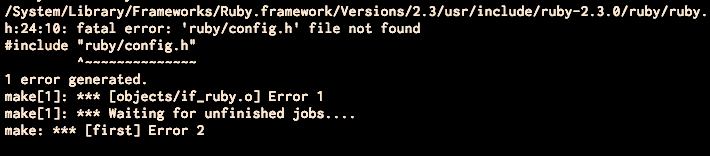
So for those of you like me, if you have the same problem you will have to download the correction version of Command Line Tool from https://developer.apple.com/download/more/ (for me this is Command_Line_Tools_macOS_10.14_for_Xcode_10.1) and install it.
But that does not give you ruby/config.h, you have to cd into
cd /Library/Developer/CommandLineTools/Packages/
and execute macOS_SDK_headers_for_macOS_10.14.pkg:
$ open macOS_SDK_headers_for_macOS_10.14.pkg
Now you can run $ brew install macvim --HEAD
Reference
https://stackoverflow.com/a/53194299/3136861
https://stackoverflow.com/a/53388305/3136861
https://github.com/flori/json/issues/255
https://github.com/macvim-dev/macvim/issues/751#issuecomment-444167716
ApolloTang
on 5 Dec 2018
Please let me know when the HEAD commit is added to brew, and I will close this issue.
ApolloTang
on 5 Dec 2018
Yeah you are right it's not deployed yet. I'll let you know when the official formula is updated.
ychin
on 5 Dec 2018
Homebrew should have been updated to snapshot 153. Feel free to verify.
ychin
on 20 Dec 2018
Related issues
 alexvanu
·
4Comments
alexvanu
·
4Comments
 raimue
·
4Comments
raimue
·
4Comments
 PLG
·
4Comments
PLG
·
4Comments
 flaugher
·
4Comments
flaugher
·
4Comments
 0xDP
·
5Comments
0xDP
·
5Comments
Most helpful comment
Thanks @ApolloTang. Did you turn off "Core Text renderer" to deal with the rendering issues in Mojave (#751)? Right now, the non-Core Text renderer doesn't deal with the CJK full-width characters in the exact same way as the Core Text renderer (which behaves more like how normal Vim) would.
In this case, I would recommend one of the following:
For (2). I was hoping to get it fixed by last week but it slipped so we should really be pushing out the rendering fixes by the end of this week.