Macvim: Can I build Macvim with RVM Ruby instead of System Ruby?
Here comes with my system versions:
My system is MacOS 10.14.1
Homebrew version is 1.8.2-96-g4021aa8
RVM version is 1.29.4
RVM ruby is 2.5.3
System Ruby is 2.3.7
I use the formula here https://github.com/macvim-dev/homebrew-macvim to build Macvim.
I want to build macvim with my RVM ruby, but always get system ruby installed.
:ruby print RUBY_VERSION
I always get 2.3.7.
Does there any way can let me build macvim with RVM ruby? Thanks!
 markwu
All 23 comments
Macvim from GitHub is compiled with +ruby/dyn configure option, thus you can set rubydll=... to use Ruby version you need.
 eirnym
on 18 Nov 2018
eirnym
on 18 Nov 2018
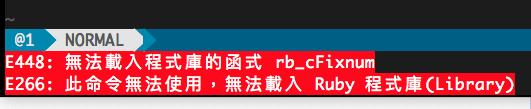
It's not working. Macvim just tell me can not load the ruby library, when I print version with :ruby print RUBY_VERSION.
markwu
on 20 Nov 2018
I saw vim patch 8.0.0163 http://download.openpkg.org/components/cache/vim/8.0.0163 fix it, but it's in compile time, not in runtime. So I still need a way to build macvim against with my RVM ruby.
markwu
on 20 Nov 2018
Patch 8.0.0163 is already in MacVim. It seems, you need to open an issue with ViM itself as it looks like it needs to be fixed there.
eirnym
on 29 Dec 2018
I think the problem is Macvim's build formula, maybe need a way to specify the ruby version.
markwu
on 29 Dec 2018
Does it well vim (not MacVim) from homebrew to blame MacVim?
eirnym
on 29 Dec 2018
I did not blame MacVim, I did say Macvim's build formula, maybe need a way to specify the ruby version.
I try to add the following code to the brew formula, it can compiled against with rvm ruby. Currently, there is no way to get the rvm ruby version information from environment. It is brew formula's restrictions.
ENV.append 'vi_cv_path_ruby', "/Users/mark/.rvm/rubies/ruby-2.5.3/bin/ruby"
But, with wrong dll path.
:set rubydll, it shows rubydll=libruby.2.5.dylib
After set the dll path again,
set rubydll=/Users/mark/.rvm/rubies/ruby-2.5.3/lib/libruby.2.5.dylib
The command :ruby print RUBY_VERSION works, it shows 2.5.3.
markwu
on 29 Dec 2018
I compare formula from macvim-dev/macvim-homebrew and this one and see that the first is quite outdated. Could you try formula from the homebrew-core repo?
eirnym
on 29 Dec 2018
No luck, the homebrew-core one still compiled against with system ruby 2.3.7, instead of rvm ruby 2.5.3.
markwu
on 30 Dec 2018
Okay. I just come out my personal formula for this purpose.
https://github.com/markwu/homebrew-personal/blob/master/Formula/macvim.rb
You can use the following command to install RVM version.
brew tap markwu/personal
brew install --HEAD --with-rvm-ruby=$MY_RUBY_HOME markwu/personal/macvim
It will add rubydll to default vimrc to make rvm ruby works.
The drawback of this method is no way to reinstall macvim, you have to brew uninstall macvim and brew install --HEAD --with-rvm-ruby=$MY_RUBY_HOME markwu/personal/macvim again.
markwu
on 30 Dec 2018
You may want to file an issue with homebrew/homebrew-core to see if they could add this. Your argument doesn't have to be --with-rvm-ruby though right? It could just be any Ruby binaries, not necessarily from RVM.
 ychin
on 30 Dec 2018
ychin
on 30 Dec 2018
It is for RVM only, because I can guess ruby dll's location from ruby command.
My formula fork from https://github.com/macvim-dev/homebrew-macvim made by macvim-dev team, I suppose this formula is more accurate than homebrew one.
markwu
on 31 Dec 2018
I suppose most people will install MacVim with formula from homebrew core, rather than from macvim-dev.
eirnym
on 31 Dec 2018
I do think most people use the Homebrew-core one which is quite actively maintained by the Homebrew team but it leaves a very good question why we maintain a mostly inactive MacVim Homebrew Tap.
The custom Homebrew Tap was before my time. Wonder if @splhack has input to why we added that in addition to the Homebrew Core formula?
ychin
on 1 Jan 2019
Ok, I think I found the problem, homebrew use the superenv environment to compile all Formulas, it cause homebrew lose all environment information include /usr/local/bin, ~/bin, your custom ruby path and a lot of stuffs ... :(
The only way to add it back is to pass these information as option arguments, or put them in your system environment with HOMEBREW_* prefix, or get them from pkg-config if exists. They will keep during building process.
So, I come out a new --with-custom-ruby for this purpose, it combine homebrew-core/macvim and also fix a homebrew python3 dynamic dll link problem come with MacVim default vimrc.
https://github.com/markwu/homebrew-personal/blob/master/Formula/macvim.rb
After these change I can get all correct version of language binding.
" with correct homebrew python2 version
:py import sys; print(sys.version)
" with correct homebrew python3 version
:py3 import sys; print(sys.version)
" with correct homebrew lua version
:lua print(_VERSION)
" with correct system perl version
:perl print $^V
" with correct rvm ruby version
:ruby print RUBY_VERSION
does modification of /etc/paths helps you? This file doesn't accept any environment variables during path building, but it's quite helpful for me.
eirnym
on 14 Feb 2019
@eirnym Thanks, I never know this. I'll try it.
markwu
on 27 Feb 2019
@markwu Does suggested solutions works for you?
You have been suggested to set:
- correct paths
- setting parameters within configure script
- setting
rubydllin yourvimrc
All these options are not MacVim-specific and can be done with the original version of vim.
eirnym
on 13 Jun 2019
None of them working for me, I have to pass the correct RVM ruby path through HOMEBREW_* system variables and compiled by my customized macvim formula.
You can see my formula here: https://github.com/markwu/homebrew-personal/blob/master/Formula/macvim.rb
markwu
on 13 Jun 2019
Did it solve your issue?
eirnym
on 13 Jun 2019
Homebrew has it's own MacVim formula anyway and MacVim authors have no ability to fix it. If you blame the formula itself, you should write a ticket there.
eirnym
on 13 Jun 2019
I am happy with my modified formula. The issue solved.
markwu
on 14 Jun 2019
Glad to see it resolved for you @markwu. There were a lot of back-and-forth here, so I just want to make sure I understand: You forked from https://github.com/macvim-dev/homebrew-macvim and did the modifications? Have you tried the latest official homebrew-core formula?
If homebrew-core's version is not working due to its usage of superenv and whatnot, have you filed an issue with them? If there are other users like you it may be a good idea to see if there's a common way to fix it for everyone.
The Macvim's own homebrew formula is quite outdated and since homebrew-core maintains an official MacVim formula I am not too inclined in keeping it up to date (more options to get MacVim = more complexities and more chances of things not working). I'll leave a note on the README there to make it clear it's no longer actively maintained.
ychin
on 17 Jun 2019
Related issues
 kiryph
·
4Comments
kiryph
·
4Comments
 bmulholland
·
5Comments
bmulholland
·
5Comments
 bdarfler
·
4Comments
bdarfler
·
4Comments
 flaugher
·
4Comments
flaugher
·
4Comments
 PLG
·
4Comments
PLG
·
4Comments