Macvim: FZF and MacVim rendering issue
Problem with rendering in FZF (Fzf.vim) and macvim terminal:

Also the same issue: https://github.com/junegunn/fzf/issues/1108
For terminal vim all works good.
 aliev
aliev
All 24 comments
I've got a pretty consistent repro case with just vanilla MacVim. Here's the steps:
:set columns=135 lines=80
:term
Now ensure your terminal is 39 rows, 135 columns. (echo $ROWS $COLUMNS to confirm).
$ gunzip fzf.out.gz
$ echo $ROWS $COLUMNS
39 135
$ script -p fzf.out
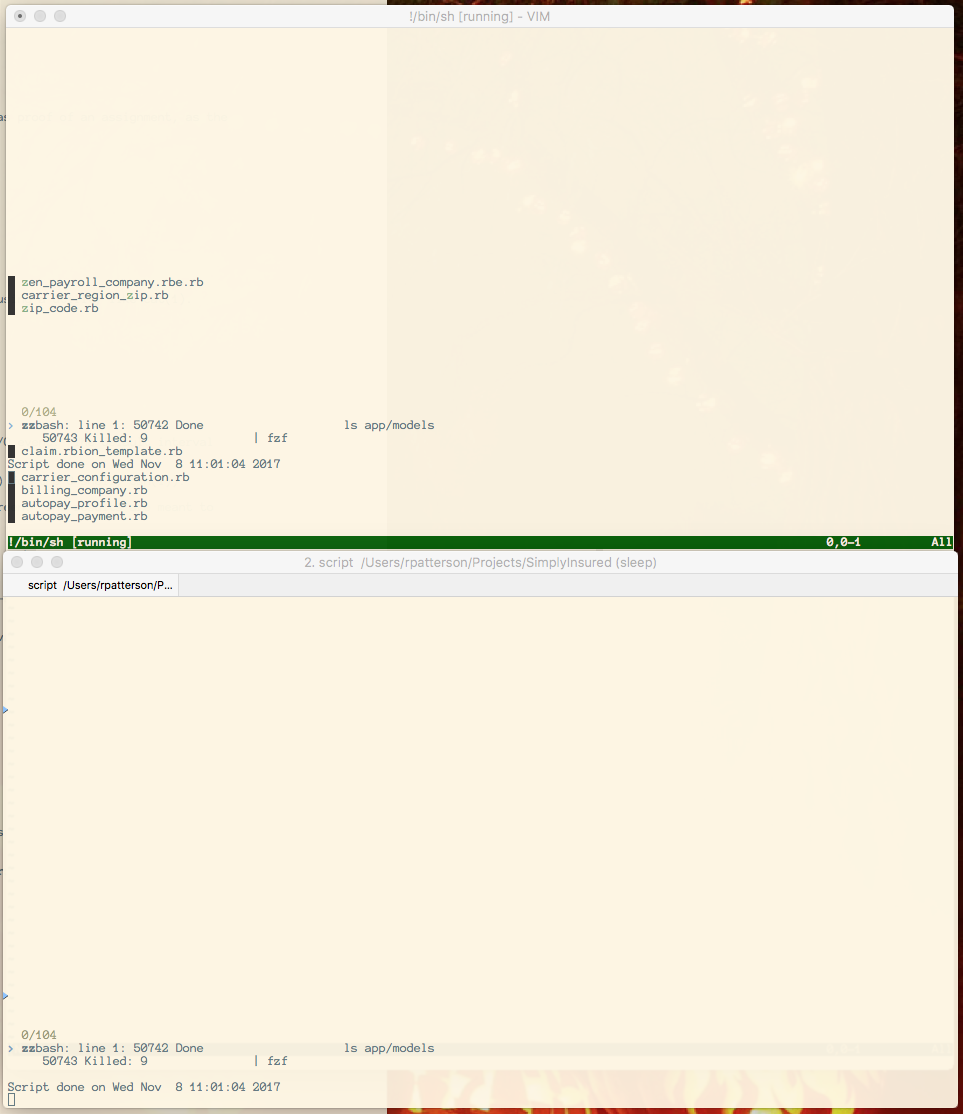
Run the commands in the MacVim terminal as well as in your iTerm2 with the same window size and compare the output. Here's a comparison of the final output, but the interactive repro is very clear.
 CGamesPlay
on 8 Nov 2017
CGamesPlay
on 8 Nov 2017
I see the same here. I also get spurious control characters inserted into the search string at the fzf prompt. MacVim 8.0.1272 (142), OSX 10.13.1.

 roefunc
on 9 Nov 2017
roefunc
on 9 Nov 2017
Is any progress on that? In my opinion, the problem is in MacVim. I have tried vim in a terminal, VimR, and fzf in the terminal itself and didn't get any errors. The problem appears only in MacVim.
 semanser
on 1 Dec 2017
semanser
on 1 Dec 2017
I have also tried iTerm and Hyper, and it renders fine in those terminal emulators as well. Seems to be just MacVim 😢
 jesseleite
on 7 Dec 2017
jesseleite
on 7 Dec 2017
Well, @semanser appears to have deleted his comment of "fixed" and I'd have to agree with that action. He got me to test though last night... No behavior change (still broken) with:
MacVim Custom Version 8.0.1420 (144)
FZF 0.17.3 (brew)
fzf.vim [not strictly versioned, but latest master - 17d24ae (Sun Jan 21 19:52:23 2018 +0900)]
 CJBridges
on 24 Jan 2018
CJBridges
on 24 Jan 2018
@CGamesPlay I have deleted a comment because I missed that I was working with VimR but not MacVim... In VimR everything is really ok :)
semanser
on 24 Jan 2018
Any news?
 sandro
on 9 Mar 2018
sandro
on 9 Mar 2018
I'm certainly no expert in the vim/macvim codebase, but have been trying to wade through it here to see if I can find anything. TLDR: haven't found anything, so far.
I'm going off the assumption that #599 is related, since it looks like some ANSI codes are not getting completely parsed (hence the text like ;2;0;0;95m), which could be a cause for this kind of garbage.
It looks like macvim pretty much directly draws whatever vim asks it to, and dropping into the xcode debugger as best as I can seems to confirm this. Besides, at the point of the drawing calls, it should be trying to interpret terminal output anyway—that should have happened in vim's internals.
The only apparently macvim-related code in vim's terminal handling is here:
https://github.com/macvim-dev/macvim/blob/master/src/terminal.c#L880
but that just flushes the msg queue from vim -> macvim....
Anyway, just documenting some observations on the off chance that it triggers inspiration in someone who's more familiar with the codebases.
 dhleong
on 14 Mar 2018
dhleong
on 14 Mar 2018
The latest working build of MacVim and FZF I found was MacVim Snapshot 138 - 8.0.1175. FZF breaks on the following build snapshot 139 (diff of 138/139).
 rickyc
on 14 Mar 2018
rickyc
on 14 Mar 2018
Great find @rickyc ! I can confirm that a fresh build of 06f8b8e6670490d6df2a1916bcda26cadad1cbe5 also fixes #599. I tried reverting just 6daeef1 on master since it sounded interesting, but still broken. When I get a chance I'll try building each commit and see exactly where it breaks (unless someone beats me to it!)
dhleong
on 14 Mar 2018
@dhleong in case you've never tried it before, this is a perfect use case for git bisect, which will binary search over the commits to find the problem. Here's a quick tutorial that explains it: http://webchick.net/node/99
I spent some time looking over the diff between those commits but didn't turn up anything that obviously looks like the culprit.
CGamesPlay
on 14 Mar 2018
I have not, but that looks amazing—thanks!
On Wed, Mar 14, 2018 at 12:30 PM Ryan Patterson notifications@github.com
wrote:
@dhleong https://github.com/dhleong in case you've never tried it
before, this is a perfect use case for git bisect, which will binary search
over the commits to find the problem. Here's a quick tutorial that explains
it: http://webchick.net/node/99I spent some time looking over the diff between those commits
https://github.com/macvim-dev/macvim/compare/06f8b8e...6daeef1 but
didn't turn up anything that obviously looks like the culprit.—
You are receiving this because you were mentioned.Reply to this email directly, view it on GitHub
https://github.com/macvim-dev/macvim/issues/579#issuecomment-373086844,
or mute the thread
https://github.com/notifications/unsubscribe-auth/AAx0Fu0hvINceLfiL0P5kDCE1OawQWMpks5teUW_gaJpZM4QOi0L
.
dhleong
on 14 Mar 2018
Thanks @CGamesPlay for that tip! Here's what I found:
f113a44867117eec1312baedc68971358cb01653 is the first bad commit
commit f113a44867117eec1312baedc68971358cb01653
Author: ichizok <[email protected]>
Date:   Wed Oct 18 02:15:24 2017 +0900

    Confirm channel is readable in event handler

:040000 040000 ed96081d4871728eed96f668a152217811c718aa 46eb69dce6898df31418bb343ea131a688af7bcf M  src
Running git revert f113a44867117eec1312baedc68971358cb01653 on latest master does appear to fix the issue.
dhleong
on 14 Mar 2018
Looks like reverting it would cause a bug related to channel_read calling ch_close_part_on_error if the situation described in the comment above channel_may_read happens.
I don’t have a build environment set up but from looking at that commit my best guess is that gui_macvim_add_channel is getting called more than once on the same channel, resulting in the channel having “already been read” in some situations.
CGamesPlay
on 14 Mar 2018
Yep, wasn't suggesting to revert it, just confirming the area as a place to start looking at fixes.
It looks like if we change the code here in channel_may_read: https://github.com/macvim-dev/macvim/commit/f113a44867117eec1312baedc68971358cb01653#diff-3eef145ca58a199bac70eef155e806aeR3569
from
    if (fd != INVALID_FD && channel_wait(channel, fd, 0) == CW_READY)
    channel_read(channel, part, func);
to
    if (fd != INVALID_FD && channel_wait(channel, fd, 0) != CW_ERROR)
    channel_read(channel, part, func);
that also fixes this issue. I'm not 100% certain that this doesn't cause a regression with whatever #560 fixed, but it seems sane. Maybe @ichizok has some insight here? I'd also be happy to put up a PR and move discussion there.
dhleong
on 14 Mar 2018
Since the channel would be closed if readlen == 0, it would likely bail still in whatever condition @ichizok was trying to prevent 😥
CGamesPlay
on 14 Mar 2018
I consider this problem was present since before and became obvious by #560 changes.
If so, the following patch will fix it (and some tests currently failing).
--- a/src/os_unix.c
+++ b/src/os_unix.c
@@ -5625,13 +5625,17 @@ mch_job_start(char **argv, job_T *job, jobopt_T *options)
        close(fd_err[1]);
     if (channel != NULL)
     {
-       channel_set_pipes(channel,
-               use_file_for_in || use_null_for_in
-                       ? INVALID_FD : fd_in[1] < 0 ? pty_master_fd : fd_in[1],
-               use_file_for_out || use_null_for_out
-                     ? INVALID_FD : fd_out[0] < 0 ? pty_master_fd : fd_out[0],
-               use_out_for_err || use_file_for_err || use_null_for_err
-                    ? INVALID_FD : fd_err[0] < 0 ? pty_master_fd : fd_err[0]);
+       int in_fd = use_file_for_in || use_null_for_in
+                       ? INVALID_FD : fd_in[1] < 0 ? pty_master_fd : fd_in[1];
+       int out_fd = use_file_for_out || use_null_for_out
+                     ? INVALID_FD : fd_out[0] < 0 ? pty_master_fd : fd_out[0];
+       int err_fd = use_out_for_err || use_file_for_err || use_null_for_err
+                     ? INVALID_FD : fd_err[0] < 0 ? pty_master_fd : fd_err[0];
+
+       if (err_fd >= 0 && out_fd == err_fd)
+           err_fd = INVALID_FD;
+
+       channel_set_pipes(channel, in_fd, out_fd, err_fd);
        channel_set_job(channel, job, options);
     }
     else
 ichizok
on 14 Mar 2018
ichizok
on 14 Mar 2018
@ichizok I did a quick test on my machine, and the patch seems to work. I used to have fzf look garbled and now I don't.
 patrkris
on 14 Mar 2018
patrkris
on 14 Mar 2018
Folks, any ETA on releasing a new version of MacVim and have this issue fixed??
 WayneYe
on 22 Mar 2018
WayneYe
on 22 Mar 2018
🙌
jesseleite
on 22 Mar 2018
If you have both Xcode and Homebrew installed, brew install macvim --HEAD will get you this fix now.
I also like to add the --with-override-system-vim flag to make sure CLI and MacVim match up, and you may need to switch to reinstall if you already have installed MacVim via Homebrew.
 rufo
on 22 Mar 2018
rufo
on 22 Mar 2018
Having this problem in the latest version:
❯ mvim --version
VIM - Vi IMproved 8.1 (2018 May 18, compiled Oct 30 2019 11:57:56)
macOS version
 yar00001
on 1 Nov 2019
yar00001
on 1 Nov 2019
@yar00001 Since this bug is quite old by now and the issue has been closed, can you make a new one with screenshot? It's likely a different issue.
 ychin
on 3 Nov 2019
ychin
on 3 Nov 2019
Related issues
 flaugher
·
4Comments
flaugher
·
4Comments
 samedson
·
4Comments
samedson
·
4Comments
 slonik-az
·
5Comments
slonik-az
·
5Comments
 9mm
·
4Comments
9mm
·
4Comments
 mathsaey
·
3Comments
mathsaey
·
3Comments
Most helpful comment
If you have both Xcode and Homebrew installed,
brew install macvim --HEADwill get you this fix now.I also like to add the
--with-override-system-vimflag to make sure CLI and MacVim match up, and you may need to switch toreinstallif you already have installed MacVim via Homebrew.