Macvim: Problems with Split-Screen in El Capitan
Vim doesn't work reliably in split screen mode. For example: Starting NerdTree causes the editor window to go black. I can use NerdTree but I have to press Ctrl-L to force a redraw. Same goes for BufferGator. Most of the time it just happens the first time the plugins are started.
 ghost
ghost
All 35 comments
It only happens on Split-Screen with Native Full-screen?
 splhack
on 28 Dec 2015
splhack
on 28 Dec 2015
This happens to me in a regular windowed version as well. It's been happening for a month or two now.


I keep trying to do updates of my vim plugins and of vim itself hoping there will be a fix.
note: I just upgraded to snapshot 88 of macvim when taking those screenshots
 wweaver
on 28 Dec 2015
wweaver
on 28 Dec 2015
@wweaver It doesn't happen with MacVim on Terminal.app?
splhack
on 28 Dec 2015
@splhack, no, it doesn't seem to happen when in the terminal.
Not sure if this info is helpful to you.
:version
VIM - Vi IMproved 7.4 (2013 Aug 10, compiled Dec 28 2015 13:43:12)
MacOS X (unix) version
Included patches: 1-979
Compiled by Homebrew
Huge version with MacVim GUI.  Features included (+) or not (-):
+acl             +cmdline_hist    +dnd             -footer          +linebreak       -mouse_gpm       +odbeditor       +rightleft       +tag_old_static  +virtualedit     +xim
+arabic          +cmdline_info    -ebcdic          +fork()          +lispindent      -mouse_jsbterm   +path_extra      +ruby            -tag_any_white   +visual          -xsmp
+autocmd         +comments        +emacs_tags      +fullscreen      +listcmds        +mouse_netterm   +perl            +scrollbind      -tcl             +visualextra     -xterm_clipboard
+balloon_eval    +conceal         +eval            -gettext         +localmap        +mouse_sgr       +persistent_undo +signs           +terminfo        +viminfo         -xterm_save
+browse          +cryptv          +ex_extra        -hangul_input    -lua             -mouse_sysmouse  +postscript      +smartindent     +termresponse    +vreplace        -xpm
++builtin_terms  +cscope          +extra_search    +iconv           +menu            +mouse_urxvt     +printer         -sniff           +textobjects     +wildignore
+byte_offset     +cursorbind      +farsi           +insert_expand   +mksession       +mouse_xterm     +profile         +startuptime     +title           +wildmenu
+cindent         +cursorshape     +file_in_path    +jumplist        +modify_fname    +multi_byte      +python          +statusline      +toolbar         +windows
+clientserver    +dialog_con_gui  +find_in_path    +keymap          +mouse           +multi_lang      -python3         -sun_workshop    +transparency    +writebackup
+clipboard       +diff            +float           +langmap         +mouseshape      -mzscheme        +quickfix        +syntax          +user_commands   -X11
+cmdline_compl   +digraphs        +folding         +libcall         +mouse_dec       +netbeans_intg   +reltime         +tag_binary      +vertsplit       -xfontset
   system vimrc file: "$VIM/vimrc"
     user vimrc file: "$HOME/.vimrc"
 2nd user vimrc file: "~/.vim/vimrc"
      user exrc file: "$HOME/.exrc"
  system gvimrc file: "$VIM/gvimrc"
    user gvimrc file: "$HOME/.gvimrc"
2nd user gvimrc file: "~/.vim/gvimrc"
    system menu file: "$VIMRUNTIME/menu.vim"
  fall-back for $VIM: "/Applications/MacVim.app/Contents/Resources/vim"
Compilation: clang -c -I. -Iproto -DHAVE_CONFIG_H -DFEAT_GUI_MACVIM -Wall -Wno-unknown-pragmas -pipe  -DMACOS_X_UNIX  -F/usr/local/Cellar/python/2.7.11/Frameworks -I/usr/local/Cellar/python/2.7.11/Fram
eworks/Python.framework/Versions/2.7/include/python2.7 -I/usr/local/Cellar/python/2.7.11/Frameworks/Python.framework/Versions/2.7/include/python2.7 -fno-strict-aliasing -fno-common -dynamic -isysroot /
Applications/Xcode.app/Contents/Developer/Platforms/MacOSX.platform/Developer/SDKs/MacOSX10.11.sdk -I/Applications/Xcode.app/Contents/Developer/Platforms/MacOSX.platform/Developer/SDKs/MacOSX10.11.sdk/
System/Library/Frameworks/Tk.framework/Versions/8.5/Headers -DNDEBUG -g -fwrapv -O3 -Wall -Wstrict-prototypes -isysroot /Applications/Xcode.app/Contents/Developer/Platforms/MacOSX.platform/Developer/SD
Ks/MacOSX10.11.sdk -mmacosx-version-min=10.11 -U_FORTIFY_SOURCE -D_FORTIFY_SOURCE=1
Linking: clang   -L. -L/usr/local/lib -L. -L/usr/local/lib -F/usr/local/Cellar/python/2.7.11/Frameworks -L/usr/local/Cellar/python/2.7.11/Frameworks/Python.framework/Versions/2.7/lib/python2.7/config -
lpython2.7 -framework CoreFoundation -Wl,-syslibroot,/Applications/Xcode.app/Contents/Developer/Platforms/MacOSX.platform/Developer/SDKs/MacOSX10.11.sdk -mmacosx-version-min=10.11 -L/usr/local/lib -o V
im -framework Cocoa -framework Carbon       -lm  -lncurses -liconv -framework Cocoa   -fstack-protector  -L/System/Library/Perl/5.18/darwin-thread-multi-2level/CORE -lperl -F/usr/local/Cellar/python/2.
7.11/Frameworks -framework Python   -framework Ruby
So far I'm having only problems in Split-Screem with Native Full-screen.
ghost
on 28 Dec 2015
@rogergl you mean it doesn't happen in Full-screen mode? only in Split View?
splhack
on 28 Dec 2015
It's been happening for a month or two now.
@wweaver could you specify the snapshot what introduced the issue?
splhack
on 28 Dec 2015
I'm sorry I don't have a specific snapshot that this started happening for me. I know it's been at least 3 or 4 updates.
wweaver
on 28 Dec 2015
@splhack. Yes it happens only in Split View.
ghost
on 28 Dec 2015
Just to make things clear. I'm not referring to Vims own Split-View but to the native Split-View from Mac OS X introduced with El Capitan.
ghost
on 28 Dec 2015
@wweaver @rogergl we need your help to investigate the issue, which snapshot introduced the issue?
splhack
on 28 Dec 2015
It seems as if El-Capitan Split View support never worked (at least on my machine). I tested down to Snapshot 77 and none of them worked.
ghost
on 28 Dec 2015
There's potential that for me it happened when I upgraded to El Capitan I just didn't put that correlation in my head.
wweaver
on 28 Dec 2015
Ok, I can reproduce the issue.
- Toggle Full Screen Mode, or
:set invfu - Drop the other app to the screen
:NERDTreeToggle
never happens if drop MacVim to a screen.
splhack
on 29 Dec 2015
Any updates on this issue? Would be fantastic if this could be fixed.
Additional info: it also happens when using the non-native fullscreen mode.
 mattijsbliek
on 26 Sep 2016
mattijsbliek
on 26 Sep 2016
Indeed, this still happens with MacVIm 8.
VIM - Vi IMproved 8.0 (2016 Sep 12, compiled Sep 14 2016 03:42:03)
MacOS X (unix) version
Included patches: 1-3
 aholtzma
on 29 Sep 2016
aholtzma
on 29 Sep 2016
Still happening for me too. If there's any info I can provide to help, let me know.
MacOS X version 10.12.3
Macvim 8.0.329
 captainvera
on 20 Feb 2017
captainvera
on 20 Feb 2017
I've narrowed it down to the Core Text Renderer Option.
Without it, works fine. Native and Non-Native fullscreen modes.
With Core Text it just stops working correctly.
MacVim just turns black, once you scroll through the program it will display only lines where the cursor has passed:

captainvera
on 20 Feb 2017
i have this issue too. macvim 8, el capitan, full or split screen
 nilsbecker
on 1 Mar 2017
nilsbecker
on 1 Mar 2017
in addition, when using the non-core text renderer in native split-screen, line heights are not always preserved. after some scrolling/editing one can end up with a line somewhere in the middle of the screen which is too tall, for example.
i would speculate that this may have to do with the fact that the fullscreen window height is not a multiple of the pixels-per-line?
nilsbecker
on 18 Mar 2017
Hi,
Is there any news about this issue?
 curiale
on 29 May 2017
curiale
on 29 May 2017
It looks like the scroll bar breaks everything. By adding set guioptions-=lrLR to gvimrc, the annoying black blocks no longer appears.
 gnattu
on 28 Jul 2017
gnattu
on 28 Jul 2017
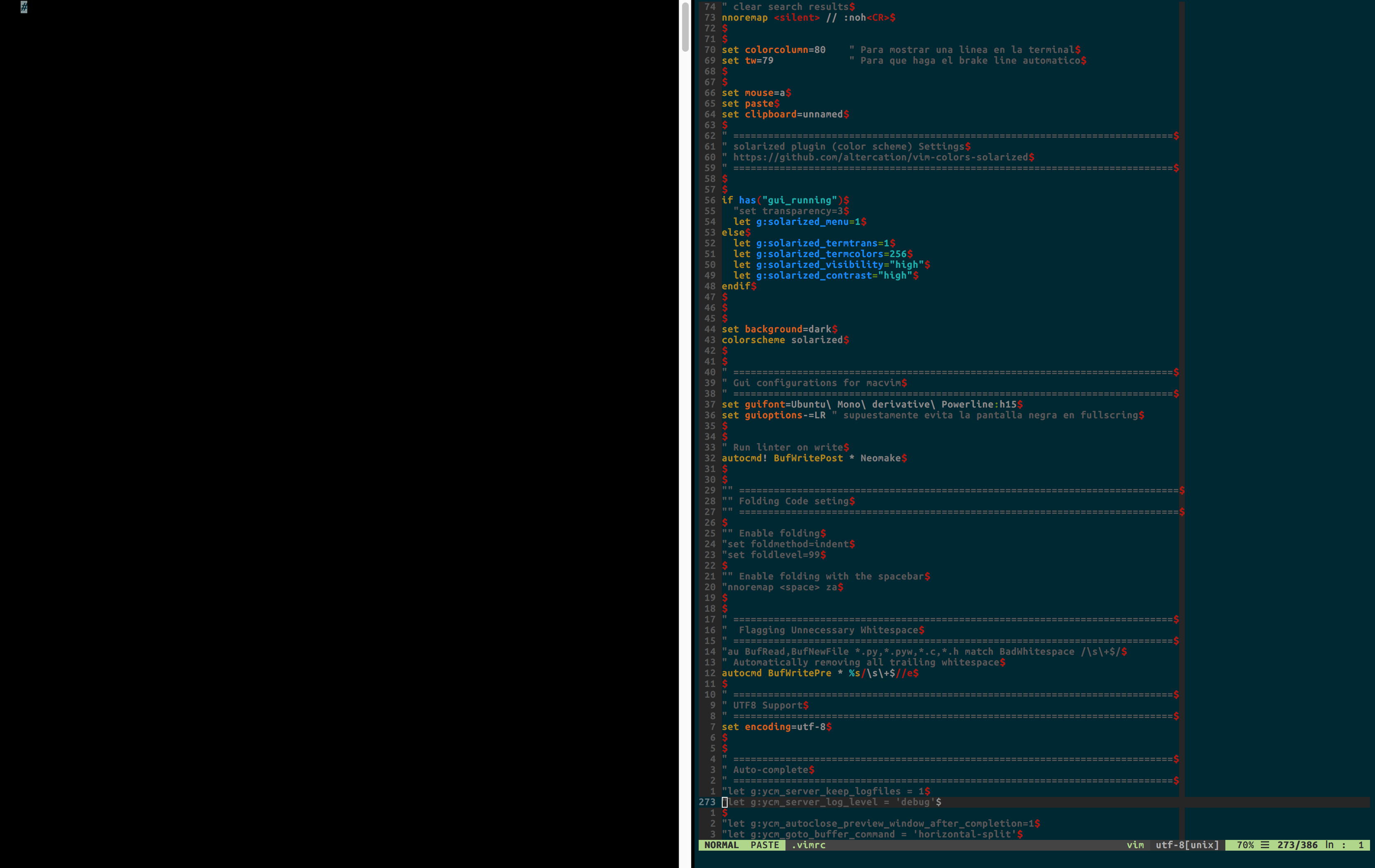
Hi @gnattu
Thanks for the suggestion but, It is not working for me (see the screenshot were the macvim window became totally black even when the guioption was set as you suggested).
curiale
on 28 Jul 2017
@curiale I can still see a scrollbar in you screenshot which is in the middle of the screen, or at least it looks like a scrollbar. I'm not sure why it's there. What's returned by :set guioptions? in your case? Mine is guitoptions=gtme, and works fine with nerd_tree plugin.
By the way, my option is written to gvrmic instead of vimrc, not sure if it is the case.
gnattu
on 28 Jul 2017
@gnattu you are totally right, the scrollbar is still appearing. In my case :set guioptin? returns guioption=egmrL, I'm going to dig a little bit about how to remove the scrollbar in my case. Thanks in advances.
curiale
on 28 Jul 2017
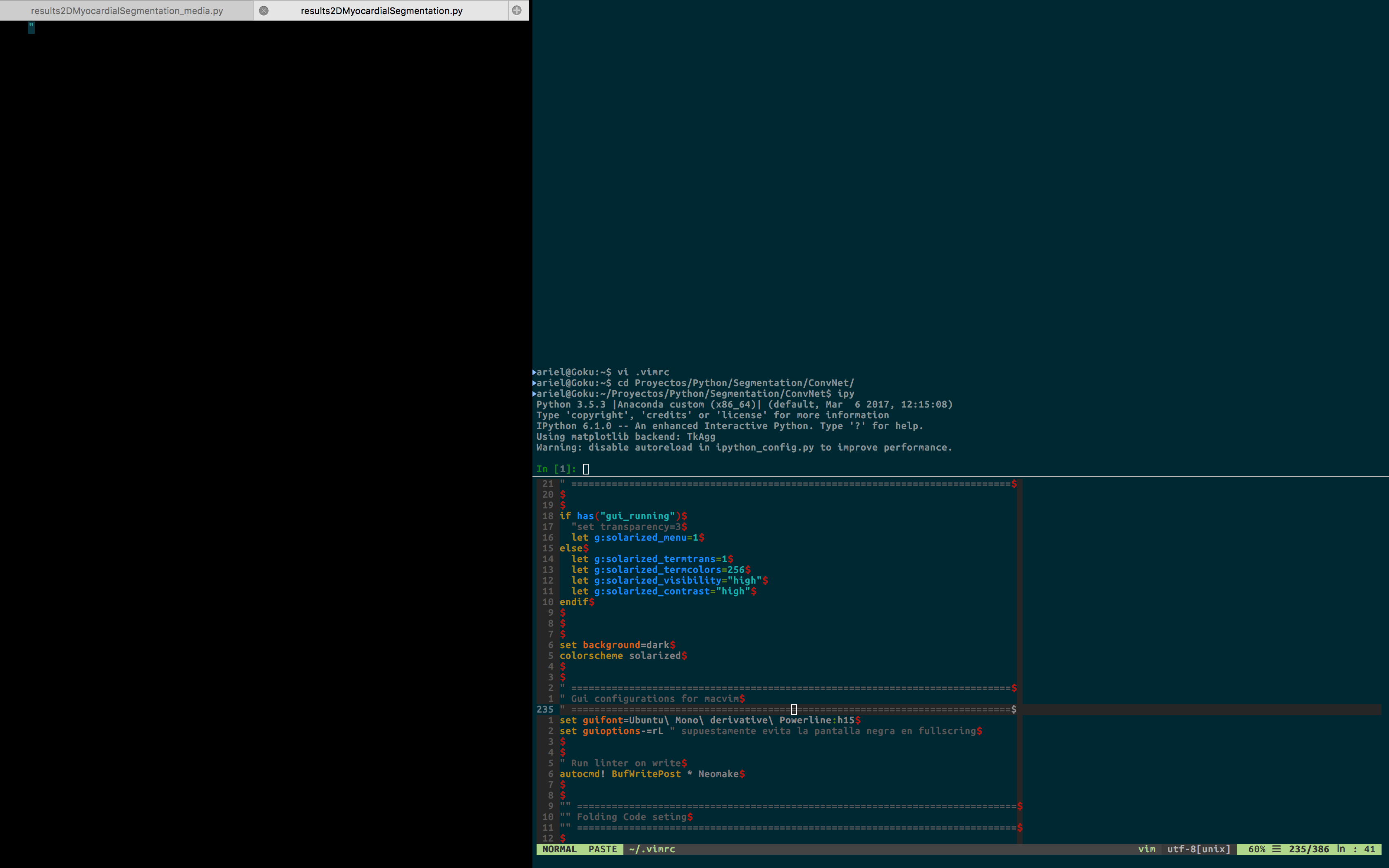
@gnattu I removed the scrollbar, however, the black issue is still happening for me.
curiale
on 28 Jul 2017
@curiale I tried to enter split view in a couple of ways. The only time I met this bug was that I opened macvim as a window, and move it directly to another full-screened app to enter split view. Make Macvim full screen using the green button first and then drag it to another full-screened app does not trigger the bug. Hope that will help you.
gnattu
on 28 Jul 2017
I'm having this issue without being in fullscreen and without scrollbars. Here's a command to automatically redraw every time MacVim is resized (put it in your .gvimrc). It's not a permanent solution but it works.
autocmd VimResized * redraw!
 micthiesen
on 25 Aug 2017
micthiesen
on 25 Aug 2017
I should clarify, in my case MacVim turns black sometimes when I resize the window. I don't know if this will fix the issues with NerdTree.
micthiesen
on 25 Aug 2017
Removing the scrollbar doesn't fix this issue. Has anyone found a proper solution to fix it ?
curiale
on 24 Oct 2017
I have the problem as well. Not only in native split-screen but in native fullscreen in general. It appears if I split the window in MacVim and move to another application.
 blochberger
on 26 Jan 2018
blochberger
on 26 Jan 2018
autocmd FocusLost * redraw!
works for me
 fftyjw
on 7 Jun 2018
fftyjw
on 7 Jun 2018
FocusLost didn't seem to do it for me, but
autocmd FocusGained * redraw!
works.
 yuriy-nyllabs
on 19 Nov 2018
yuriy-nyllabs
on 19 Nov 2018
actually, the last update (153) works without forsing a redraw
 eirnym
on 29 Dec 2018
eirnym
on 29 Dec 2018
Closing. The last two releases should have fixed this both on Mojave and pre-Mojave.
 ychin
on 30 Dec 2018
ychin
on 30 Dec 2018
Related issues
 0xDP
·
5Comments
0xDP
·
5Comments
 bdarfler
·
4Comments
bdarfler
·
4Comments
 9mm
·
4Comments
9mm
·
4Comments
 samedson
·
4Comments
samedson
·
4Comments
 epheien
·
4Comments
epheien
·
4Comments
Most helpful comment
Hi,
Is there any news about this issue?