Mactype: MacType works fine on some Chromium browsers (a good thing!)
Hi there, I’ve been a long-time MacType user. I saw a bunch of threads dating from 2016 when Chromium dropped its flag to disable Directwrite, making Chromium browsers’ type display more poorly. I was a Firefox (Waterfox, Cyberfox) user till 2017, when I switched to Vivaldi, and had no issues at all. It looked absolutely fine, and it was totally compatible with MacType out of the box, so I was surprised that others had an issue a year earlier. I kept it updated up to v. 2.5 in 2019, when it stopped issuing automatic updates.
However, it seemed that those issues finally got here when I updated manually to v. 2.10 in January 2020. It rendered exactly as those complaining about it described.
I switched to Opera GX, and that renders properly—but I understand that it, too, is now a Chromium-based browser. For me it’s absolutely fine, as well as a basic Opera browser with no plug-ins. But I definitely cannot get Vivaldi working with MacType any more.
There must be something unique about my system where I have been able to avoid the bug that others have reported.
I’m leaving this here in case any devs want to find out why, and maybe others can avoid the Chromium incompatibility that has been so widely reported.
Here is a comparison on my old monitor:
I only went back to Firefox recently because not every plug-in worked the same in Opera GX, with the subtle differences between Chromium browsers.
 Lucire
All 8 comments
CentBrowser welcomes you. It's chromium-based, and still with a Directwrite toggle.
Nowadays, almost every browser except firefox is more or less chromium based, and as for firefox, the only GDI based backend "cario" has been removed last year due to that no one was willing to fix the bugs of it.
Conclusion: all the first-party browsers are now DirectWrite powered. If you need browsers with GDI rendering, either go for third-party modifications or downgrade to old versions of those browsers which is not recommended for security concerns.
 snowie2000
on 3 Mar 2020
snowie2000
on 3 Mar 2020
Hi @snowie2000 , that’s why I wrote. Based on my experience, Vivaldi up to 2.9 was fine with MacType, and the latest Opera and Opera GX still are. I am running them now without any problems with MacType. Firefox is OK as well. Whatever the situation is, for me, Directwrite hasn’t taken over all Chromium browsers, so there must be something I am doing that has allowed your program to continue working with them.
After some experimentation, at least for Vivaldi, Chromium 77 was OK and 78 was not. I don’t know what version Opera and Opera GX are based on, but it’s probably an older one.
Put simply, for me your program is absolutely fine with the above-mentioned browsers, contrary to the reports others have filed since 2016.
Lucire
on 3 Mar 2020
Hi @Lucire , I have been browsing with Vivaldi rendered with MacType for quite a few years. For the recent version of Vivaldi 2.10, 2.11, you need to create a shortcut, and modify the command line, append the "--disable-lcd-text" parameter behind the executable name, and MacType will work on the web page content window. The "--disable-features=RendererCodeIntegrity" parameter is recommended by snowie2000.
my command line:
vivaldi.exe --disable-lcd-text --disable-features=RendererCodeIntegrity
 wmjordan
on 6 Mar 2020
wmjordan
on 6 Mar 2020
@wmjordan The registry way is my new recommendation now, check it out:
https://github.com/snowie2000/mactype/wiki/Google-Chrome#workaround-for-chrome-78
snowie2000
on 6 Mar 2020
@wmjordan Thank you, this is absolutely perfect! I will try it right now.
Lucire
on 6 Mar 2020
@snowie2000 Thank you!
Lucire
on 6 Mar 2020
@wmjordan I’ve just tried it but it makes no difference, so I wonder if I am doing it right. I go to the shortcut and in my case, I have put into the target:
"C:\Users\Name\AppData\Local\Vivaldi\Application\vivaldi.exe"--disable-lcd-text --disable-features=RendererCodeIntegrity
but the text still appears the same. Is this what you have done?
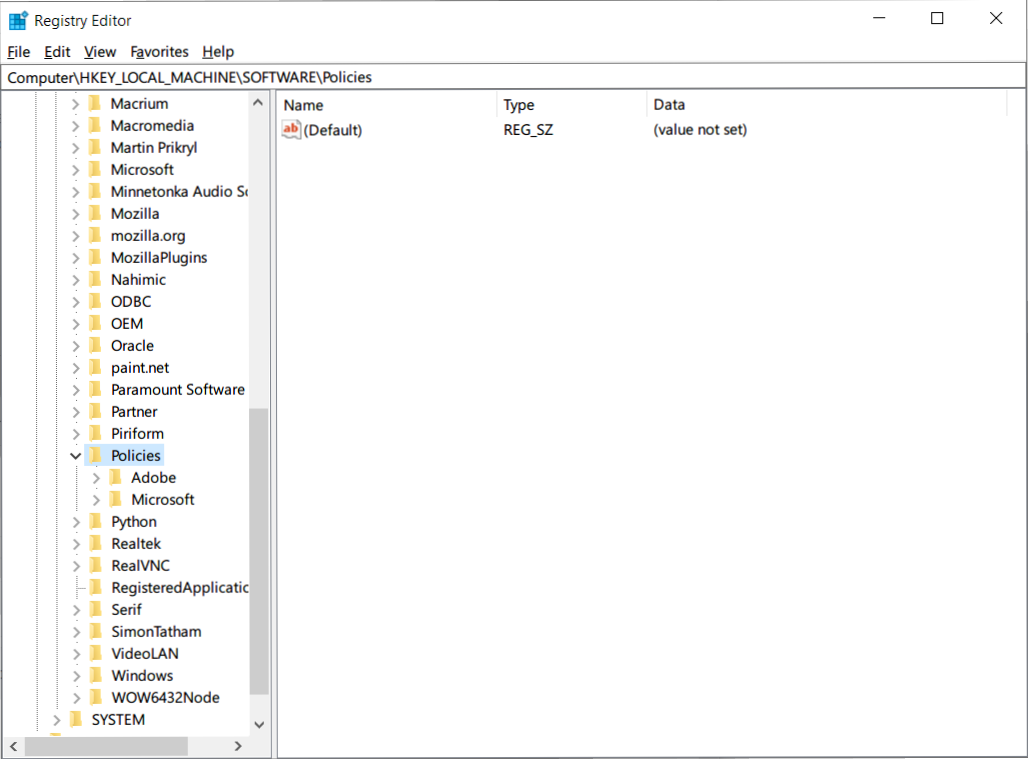
@snowie2000 Sorry, I can’t find the key in HKLM, is there somewhere else it might be?
Lucire
on 6 Mar 2020
Hi @wmjordan and @snowie2000: as I can’t find Vivaldi in the registry, I did what @wmjordan suggested but added one more thing, as found here:
https://support.google.com/chrome/thread/22780748?hl=en
I had to go into compatibility mode for Windows 8 and now Vivaldi is displaying as it did before! Thank you, solved after two months!
Lucire
on 6 Mar 2020
Related issues
 denysonique
·
7Comments
denysonique
·
7Comments
 Skyyblaze
·
5Comments
Skyyblaze
·
5Comments
 zhengbli
·
3Comments
zhengbli
·
3Comments
 Arrow-Li
·
3Comments
Arrow-Li
·
3Comments
 caulmseh
·
3Comments
caulmseh
·
3Comments
Most helpful comment
Hi @Lucire , I have been browsing with Vivaldi rendered with MacType for quite a few years. For the recent version of Vivaldi 2.10, 2.11, you need to create a shortcut, and modify the command line, append the "
--disable-lcd-text" parameter behind the executable name, and MacType will work on the web page content window. The "--disable-features=RendererCodeIntegrity" parameter is recommended by snowie2000.my command line:
vivaldi.exe --disable-lcd-text --disable-features=RendererCodeIntegrity