The MacType rendering engine is a long-term, mature project that has come a long way since it first began in 2012.
There is still a lot of work to do, however, especially in making MacType more accessible to the average user, and improving the apps surrounding MacType (for example, rewriting MacType Tuner and MacType Wizard to make them more modern and maintainable).
If you're an developer, translator, or tester, and you are interested – or know someone who might be interested – simply reply here, or message us directly at @snowie2000 or @sammilucia and let us know. We'd love to hear from you 😊.
 sammilucia
All 74 comments
for example, rewriting MacType Tuner and MacType Wizard to make them more modern and maintainable
The _Wizard_ appears to be decently good to me. I don't think it needs any rewriting.
For the _Tuner_, is it possible to monitor _MacType.ini_ and the AlternativeFile (user ini) and automatically reload after those files are modified, reflecting the changes immediately?
After that, it enables MacType enthusiasts to write their own "tuner" application, which provides better interface to edit the .ini files. Since the changes are automatically reloaded, the "tuner" application has no need to offer a preview window, which significantly reduces the technical requirements for the programmers, yet still serves good user experience.
 wmjordan
on 20 Jun 2019
wmjordan
on 20 Jun 2019
Monitoring a file and reload on change is not something hard to implement. However, it would be hard to sync all the switches and trackers on reload.
I'm thinking of adding another mode where users can type in a built-in editor freely and the preview windows will reflect what the profile would look like simultaneously.
 snowie2000
on 20 Jun 2019
snowie2000
on 20 Jun 2019
another mode where users can type in a built-in editor freely and the preview windows will reflect what the profile would look like simultaneously
This is a typical way of implementation. It is OK if the full preview feature is hard to implement.
On partial preview versus full preview, I have a VS extension which allows users to modify syntax highlight settings offers preview window. The scenario is somewhat similar to the one in MacType Tuner. However, the most intuitive way is to present the effects on the whole editor, where various syntax highlighters are working and the ultimate effects are demonstrated. Thus the users of my VS extension can not only see their changes immediately on the preview window, but also on the editor window, where they can then observe the overall effects.
The full preview is extremely useful and helpful since the user can switch to other windows and immediately see how his rendition settings will come.
I am sorry that I don't know about the implementation of MacType, and it is so difficult to "sync all the switches and trackers on reload".
wmjordan
on 20 Jun 2019
I was thinking long long long ago about a so-called debugging mode where mactype disables all the cache and hot reload the profile on-the-fly so that it can demonstrate what the final result looks like in real-time.
The problem is that:
- Without cache, mactype is very slow.
- Some settings require mactype to rebuild its alpha blending table which is also slow.
- Applications with sandbox such as Chrome don't allow mactype to read files from disk.
- It's easy to crash the system if you made a fatal mistake (especially like replacing a system font with an incompatible one, which happens from time to time)
So I eventually give up the idea.
snowie2000
on 20 Jun 2019
You don't have to abandon the cache.
The slowness makes sense. Full preview does not essentially mean to be real time preview.
Issue 1 and issue 2 are not big problem actually.
Do what it has to do, including cache. Tell the user to "be patient", and it is possible to optionally or temporarily suppress the preview if necessary in the Tuner. For instance, the full preview only occurs after pressing a button named "refresh", or a check box titled "full preview" being checked...
Problem 3, 4 are some problems. But they are irrelevant to the full preview.
If reading from disk is disallowed, it is disallowed by any means. With or without preview, it is the same. Thus it is another problem.
If it is to crash, it has to crash. A red-alert should be presented to the user what he is going to do is dangerous.
wmjordan
on 20 Jun 2019
If what you want is to reload the profile without unloading and loading the mactype, the "Restart" item in the context menu of the mactray is what all you need.
It calls an internal method to ask mactype to clear all its cache, reload settings from file and reinitialize everything necessary.
Replacing font is always dangerous. The problem is we don't know how dangerous it is until we apply it...
snowie2000
on 20 Jun 2019
The Wizard looks and works fine, the only problem with it is it's difficult to maintain (Delphi).
These are good ideas, and good ideas are certainly a big way of helping! What I'm looking for also is people who can / will help with programming, UX, translating, testing, etc.
sammilucia
on 21 Jun 2019
Anyone who would like to write a new wizard is totally welcome and possible. The interface current wizard used to generate thumbnails is open source. All the loading modes implementations are not secret either.
The reason I didn't publish the source of the wizard is that it relays on my private library and some modified commercial components and, it is a very early product of mine. It is so badly written that I'm not willing to do any large scale work on it.
The popular framework electron allows you to make beautiful and feature-rich applications which is great. However, it is way too big that it is sort of against the principle of MacType.
snowie2000
on 21 Jun 2019
Hi! Well it looks like Microsoft is up to its old tricks... They've made some changes in Notepad.exe; exactly what I'm not sure... but in the newest version released with Insider's Build 18963 the text in the edit window as well as the menu items themselves are not being rendered with MacType. I did some experimenting and found that the new Notepad's text and menus will not render at all if using Registry mode. However when running in Services mode the text will render, the menus as well, but the cursor must first be hovered across the menu items or the whole window minimized then restored. In MacTray mode the rendering seemed to work sometimes, but not others. This was true in both Stand Alone and Compatibility options.
I saved a prior copy of Notepad from Build 18941 that still functions properly with all text rendered by MacType. See below for samples of both, as you can see the difference is pretty obvious. I also included the only blurb Microsoft provided in the Insider's blog about the new Notepad, although there's no mention of any change in how text is handled...
Maybe you guys can make sense of it... 😁

 ChicoThorn
on 21 Aug 2019
ChicoThorn
on 21 Aug 2019
I think they have changed it to a metro app or a win32 transcoded UWP app which is, according to issue #494, not fully supported.
snowie2000
on 22 Aug 2019
@snowie2000, Interesting... crazy how they have so many different ways to do the same thing (open apps, render type, etc.). I guess I'll stick with my workaround of using an earlier "unbroken" version of Notepad. Any hope that this odd type of app will be supported in future MacType releases? It'd be great if it were, especially if Windows starts to use this scheme for more apps in the future... 😉
ChicoThorn
on 22 Aug 2019
@snowie2000 @ChicoThorn I think Microsoft's CEO Satya Nadella will move towards Metro for everything, and eventually deprecate the old systems in Windows (and other products). It makes sense from a business point of view
sammilucia
on 22 Aug 2019
That means we need to figure out how the metro processes are spawned internally.
snowie2000
on 22 Aug 2019
@sammilucia and @snowie2000. — I'm baffled as to why the new Notepad can be rendered by MacType in Service mode, but not in Registry mode. In my mind that would indicate that the necessary bits to make it work are present, but for some reason aren't being invoked in Registry mode... ? Is this a fair assumption? ...and if it can work in Service mode then it also seems there must be a way to get it to work in Registry mode as well.
Why am I so stuck on Registry mode? It seems to be the best and most complete way to enjoy MacType's rendering throughout the entire UI, without any unpleasant non-rendering surprises (that is until this new Notepad showed up on the scene). In Registry mode I don't have to fuss with hovering over a type element to invoke MacType's rendering (as is the case with several apps and programs when in Service mode; i.e., Task Manager, and the new Notepad). Registry mode's more seamless experience allows me to forget about font rendering issues and to focus on my work.
Any chance that maybe some tinkering would get Registry mode to work with the new Notepad? 😃
ChicoThorn
on 31 Aug 2019
@ChicoThorn it could be that the new Notepad has code injection protection. Registry mode uses AppInit_DLLs which is not a recommended method by Microsoft.
MS are trying to make their platform more secure so it would make sense if they stop supporting AppInit_DLLs as an educated guess.
Registry mode also won't work if you have Secure Boot enabled (and we recommend you do) - for the same reasons.
Technically Service and Tray modes are the OS friendly ways to implement the kind of integration MacType does. (But yes as you say - not quite as complete.)
@snowie2000 and I threw around the idea of implementing an API for MacType, so other software could choose to support MacType
sammilucia
on 31 Aug 2019
@sammilucia Ahhh... interesting about the AppInit_DLLs ... that explains a LOT! Basically I really like the Service mode too (except for the sometimes hovery-over-the-text-to-get-it-to-render thing). I've been running it about half and half the past week trying to settle on one or the other. But I'm going to do some screenshot comparisons to see if there's a real difference or just my imagination (...and I've been known to have an overactive imagination, so testing is essential, lol! 😁)
ChicoThorn
on 31 Aug 2019
@sammilucia, @snowie2000 — Hi! 😀 So after many screenshots I came to the following conclusions: Registry mode renders everything in the UI really well EXCEPT the new Notepad. Service mode renders everything in the UI really well EXCEPT some alert windows (UAC and registry warnings), and that annoying hover-first-see-rendering-after thing that happens in new Notepad and in Task Manager. So I use Notepad a lot more than I need to see some alert screens brilliantly rendered so I've opted to make Serice my new go-to mode.
On my wish list: Fix it so when in Service mode the user doesn't experience the hover-first-see-rendering-after issue by next release ?? 😊


ChicoThorn
on 4 Sep 2019
This is really great @ChicoThorn !
sammilucia
on 5 Sep 2019
Hi, @snowie2000, want to present my russian translation of macType. Pls, add it to installer
Russian.zip
 Fidelich
on 6 Sep 2019
Fidelich
on 6 Sep 2019
@Fidelich Thank you! We'll add it to the public release.
snowie2000
on 9 Sep 2019
@ChicoThorn The reason that Registry mode stopped working is simply that it doesn't work for all UWP apps from the beginning.
You may wonder that it works for almost all the UWP apps like paint, calculator. That's because normal UWP apps are created from a process called runtimebroker.exe which is a normal win32 executable and can be hooked with registry mode, the processes created by it get hooked automatically by parent-children hooking mechanism.
However, as I mentioned before, notepad is a win32 converted UWP. Those apps have a very special launch mode and I'm still very confused about how they are created. MacType's parent-children hooking mechanism doesn't work for it and nor does the registry mode.
The reason it "seems" to work in service and tray mode is that the tray application/service works as a process monitor, it detects newly created process and applies mactype to them. The affected application should refresh its interface automatically by design, but for some reason, this auto-refresh method doesn't work in service mode, you have to hover your mouse to the interface to trigger a repaint.
To see the speciality of win32 converted UWP apps, here is an experiment you may like to try:
- start another instance of
explorer.exe, there are many ways to do it, the simplest way is to runexplorer ,from run task dialog. You can start any amount of explorer instance as you like. - Launch win32 converted apps from the created explorer windows
- Check process tree via process explorer/process hacker
- You'll see that no matter which window you clicked the shortcut, they are all child processes of the very first explorer.exe
- Launch any application that can invoke an open file dialog
- Kill all the explorer instances
- Open an open file dialog
- type
*.*as a file filter so that you can see all the files - Find a win32 converted UWP app shortcut and right-click it, select "open" to run it
- You should see a message box telling you an error like "class not registered" or something, and the UWP application can't be launched.
- Launch explorer from task manager and redo the step above.
- You should be able to run those apps again.
Have fun.
snowie2000
on 9 Sep 2019
@Fidelich you are amazing! Thank you so much 😊 😊 I'm adding it right now. As @snowie2000 says, this will be in the next release 😊
sammilucia
on 11 Sep 2019
@snowie2000 I think Win32 converted apps would be virtualised wouldn't they?
Some initial evidence this may be the case https://social.msdn.microsoft.com/Forums/sqlserver/en-US/4f2bf36a-835a-443e-b4fb-97e97a98d141/uwp-desktop-bridge-virtualization-issues?forum=wpdevelop
sammilucia
on 11 Sep 2019
Some further research suggests there are several limitations of converted UWP apps, like they cannot be forced to run as Administrator. I haven't time to look into it in detail right now, but hopefully that helps?
sammilucia
on 11 Sep 2019
@snowie2000 list of APIs supported only in packaged UWP apps https://docs.microsoft.com/en-us/windows/apps/desktop/modernize/desktop-to-uwp-supported-api
sammilucia
on 11 Sep 2019
Thanks @snowie2000 ! — I'll give that experiment a try... should be interesting! 😊
ChicoThorn
on 12 Sep 2019
Hi @snowie2000 and @sammilucia ! 😊
In my never-ending quest to find the perfect settings that work in nearly any point size and in either Dark, Light or Mixed Mode I do believe I may be getting very close! Check out my latest screenshots and .ini file. ChicoThorn.ini is now at version 1.5! WooHoo! 😁
First samples of my new settings at 113% scaling:


And here's the same .ini settings applied at 100% scaling:


The rendering settings from v.15 of the ChicoThorn.ini file

The new ChicoThorn - 113% - v.15.ini
And finally a .zip file containing all this new stuff...
{ ChicoThorn MacType Settings· 2019.10.11.zip
Let me know what you think! — I notice that the rendering of the Taskbar Jumplist at 100% in Light Mode is a bit thin, but still clear and readable. The grayed subheads on the Settings Page are also a bit light, but again I think they're workable. 😀
Oh! And as for the changes they made in Notepad so it no longer renders... I gave up trying on that one! 😉 Instead I found myself a nice 3rd party Notepad replacement app, which you've probably heard of: TED Notepad. Apparently it's been around for years, and is still being updated from time to time!
Gotta love and admire these independent programmers and coders who devote so much of their own time on these great Windows enhancements – I'm looking at you guys! You're the best! 😊
Thanks again for MacType and for your dedication to developing it further!
—Thorn
ChicoThorn
on 11 Oct 2019
Hi again! So I was bothered by the fuzziness on the 100% rendering I sent above, especially in Light Mode, so I tweaked the settings a bit more and it's clearer now. That brings ChicoThorn to v.1.5.2 ! Since the fine-tuning changes I made will probably only be able to be seen in the original .png screenshot files, I'll just post the .zip with them in it and forego posting the screenshots here in the thread. 😀😁
The .zip file also contains the updated .ini file.
– Thorn
Screenshots .zip file:
ChicoThorn
on 12 Oct 2019
For 100% Scaling, I've made these adjustments in this ini file. Check them out, they're a bit sharper! 😊
—Thorn
ChicoThorn
on 12 Oct 2019
This one is actually really decent! even on my poor monitor, it is still really easy to read.

I'm wondering why did you set up a bunch of font replacement but left the fontsubtitution off?
snowie2000
on 12 Oct 2019
I did? Holy cow! I thought I had it turned on... 😮 It sure behaves on my computer like I have it turned on... I mean I'm seeing the Segoe UI font used everywhere like I like and not Tahoma or Arial. But I'm just guessing on most of this stuff, so if I messed up somehow it's not too big of a surprise, lol!
I currently have this value under the [General] heading: "FontSubstitutes=1". Is this the correct item which controls the font replacement? Should it have a value other than "0" or "1" ? (I thought "1" was on and "0" off?) I've not been using MacTuner lately when I do the fine tuning, just editing the .ini file directly. But when I do open the .ini file in MacTuner it shows I have 37 font substitutions listed... ? Doesn't that mean it's turned on? 🤔 UPDATE: So I think I figured this part out, 0=None, 1=Secure Replacement, and 2=Complete Replacement. Is that right? If so, then I've had it set to Secure Replacement all this time. Is that okay or should it be Complete Replacement? I experimented with it and didn't really notice a difference between the two so I changed it back to Secure Replacement.

Are "FontLoader=0" and "FontLink=1" also used for Font substitution?
After I first saw your comment I thought maybe having "FontSubstitutes=1" parameter under the [General] heading might be the wrong place for it, so I moved it to just below the [FontSubstitutes] heading in a test .ini file then restarted to check it. Everything still worked, I still was seeing Segoe UI everywhere but when I checked the .ini file in MacTuner it now showed that I had 38 font substitutes, not 37, because it apparently counted the moved entry "FontSubstitutes=1" as a font replacement. So I scrapped that idea and moved it back under [General].
So as is often the case when it comes to this sort of thing for me... I'm confused. lol!
As I said, it appears that my system is only displaying the Segoe UI fonts... but as you know I'm also using Font Substitutes in the Registry to assign Tahoma & Arial to use Segoe UI.

To further test this I opened a blank Word 2013 document to check if font substitution was indeed happening and these are the results:

This is the actual Word doc:
Microsoft Word 2013 FontSub & Replacement.docx
My intention was to have FontSubstitutes on and working. 😉 But if somehow I've managed to botch it and actually have it off, please tell me how I can turn it back on.
Thanks @snowie2000 ! 😀
ChicoThorn
on 12 Oct 2019
@ChicoThorn My bad.
I used an older version of your profile 🤣🤣🤣🤣
I switched to your new profile and it's definitely clearer!
snowie2000
on 14 Oct 2019
@ChicoThorn you're quite mad!
I've basically replaced parts of my profile until I've eventually ended up with your profile anyway, so I might as well switch!
Have you seen Source Sans from Adobe? Another really lovely font family designed for UIs https://github.com/adobe-fonts/source-sans-pro ... also a great monospaced font, probably my favourite
sammilucia
on 14 Oct 2019
Hahaha! @sammilucia , Mad as a Hatter for sure! lol! 😂 Thanks @snowie2000! Whew! I thought I was really losing it there! 😂 It was a good romp for me nonetheless, I learned a bit more along the way!
—Thorn
ChicoThorn
on 14 Oct 2019
@sammilucia That source-sans-pro font is great! Do you have any other good font recommendations? Maybe a real nice Helvetica/Segoe UI replacement? 😀
ChicoThorn
on 20 Oct 2019
For UI? Sure... Ideally for UI you want something with a pretty complete unicode set (including emoji) ... Apple San Francisco font is another good choice, or Google Roboto or Open Sans, but neither of them really do it for me. I really like Futura as a Windows UI font (there are many variants with many different x heights so experiment) although I'm not aware of one with full unicode.
Some people seem to like Ubuntu font but it hasn't dated well and is not to my taste.
Aktiv Grotesk was styled as a 21st century replacement to Helvetica ;) It's gorgeous in specimens but I haven't put it to use yet.
Proxima Nova and Gotham are two favourites of mine and used heavily in web apps, possibly not a fit for Windows but worth a try :)
These are all fairly "safe" and sane fonts for UI.
Love to hear what you come up with!
sammilucia
on 20 Oct 2019
Thank you! These all sound great! I'm a big fan of Futura myself (Segoe UI actually reminds me a bit of Futura, especially with the better MacType rendering).
I'd like to find replacement fonts for Tahoma and another one for Arial with about the same x-height as each but with better horizontal kerning and/or spacing and of much higher quality.
I'll do some testing of the ones you suggested and put up some samples! 😊
ChicoThorn
on 21 Oct 2019
@ChicoThorn @sammilucia Not sure if you have seen used Inter, its a good UI font, somewhat similar to Roboto
 IceMan81
on 22 Oct 2019
IceMan81
on 22 Oct 2019
hey so i saw this thread and i'd love to contribute! mactype is awesome. i don't know how to code but i can test and translate if that's ok
p.s. Cabin might be a nice font, I used to use it as a UI font in linux and macos, and it's free (libre) too
 kcohar
on 28 Oct 2019
kcohar
on 28 Oct 2019
hey so i saw this thread and i'd love to contribute! mactype is awesome. i don't know how to code but i can test and translate if that's ok
p.s. Cabin might be a nice font, I used to use it as a UI font in linux and macos, and it's free (libre) too
Any help is appreciated!
Cabin looks good, though I used to love Calibri a lot.
snowie2000
on 29 Oct 2019
Happy Holidays & Season Greetings everybody! I've been pretty busy lately... I've had quite a bit of success on a couple of fronts: I've hacked a copy of the Segoe UI font so that its cap height, x-height, and width match those of Tahoma. I renamed it's internal font name to "Microsoft Sans Serif" so that's it's used in all the Dialog boxes (In Registry's Font Substitution it's listed as "MS Shell Dlg" and "MS Shell Dlg 2") This font hack and substitute has really made a HUGE difference in the overall look of the entire UI! Much more consistent and uniform and pleasing to work with! I've also continued fine-tuning the ini settings, and have really liked what I came up with recently that I've actually been able to live with it without changing it for over a month (WooHoo! That's a long time for me, lol!). I'll send along screenshots once I find the time to set 'em all up and mark them. In the meantime, here's a copy of the hacked font I created (it also contains my customized glyphs). I named it "Segue" (get it? It's a segue from Segoe to Microsoft Sans Serif, Arial, and Tahoma!). In MacType's Font Substitute list I've replaced Arial, Tahoma, and Microsoft Sans Serif with my Segue font.
I also changed up the scaling with this latest incarnation. I'm leaving the overall system scaling at 100%, but set the Easy Access > Make Text Biger setting to 113%. This has a wonderful combined effect wherein many elements still remain the standard 9pt system font size, yet all of the UWP UI interfaces use the 113%, which really helps make them clearer and easier to render and read. I also use Winaero Tweaker (a great program developed by Sergey Tkachenko @winreview on Twitter) to change the default icon and File Explorer font size to 10pt, which is nearly identical to what is rendered with the Make Text Bigger Setting at 113%! If you haven't tried out Winaero Tweaker, I highly recommend it!
Oh! And by the way, Microsoft decided NOT to convert our good old friend Notepad to a bastardized Store version after all. As of Insider Build 19037 the OS supplied Notepad was back, and rendering beautifully as it had done before their ill-conceived trial. 😃
I'd love to hear what you think of my latest attempts... Cheers, @sammilucia and @snowie2000 and everyone else involved in helping MacType be the new Windows font rendering standard! Hope you all have a wonderful holiday! 😊
— Thorn
UPDATE: I re-uploaded the sample files .zip... I had forgotten to change the .ini files 'Name' field to be the same as the actual .ini filename. It is now correct.
ChicoThorn
on 23 Dec 2019
Thanks for all your hard work @ChicoThorn ... I'm very interested to see your version of Segoe 😊 Happy holiday season 😊 x
sammilucia
on 23 Dec 2019
I'm interested in improving mactype, however I couldn't even get it run on my toolchain.
After fiddling around some hours I managed to at least get it build, but it currently just instantly BSODs the test VM with CRITICAL_PROCESS_DIED.
Just some things I noticed that were somewhat significant or annoying:
- Hardcoded paths like this
- Files are not in UTF-8 (or UTF-16 for resource files). If I'd edit them with the wrong encoding the non-english comments would likely break. Considering I don't understand them I couldn't notice this either, nor guess the correct encoding.
- Lots of commented out / dead code that coudl've been handled better via version control, making the codebase hard to try and understand.
- I think https://github.com/snowie2000/mactype/issues/648 is self-explanatory
- EasyHook used is very old, the link library changed filename sometime and there's no version stated in the build guide
- (Trying not to come off as an asshole here, but the non-english comments don't exactly help understanding in my case either)
I think improving accessibility towards developers would significantly improve willingness to contribute.
PS: If the main issues that I cannot solve (encoding and getting it build on a "clean" up-to-date environment) would be fixed, I'd be willing to contribute on the rest
 namazso
on 8 Apr 2020
namazso
on 8 Apr 2020
This sounds sensible!
sammilucia
on 8 Apr 2020
Let me try to explain some of the problems:
- Hardcoded paths like this
This is a problem. I haven't used envs or macros to control the include directories and MacType does depend on some other components.
- Files are not in UTF-8 (or UTF-16 for resource files). If I'd edit them with the wrong encoding the non-english comments would likely break. Considering I don't understand them I couldn't notice this either, nor guess the correct encoding.
That's MacType comes from GDI++, a project by a Japanese author who used Shift-JIS for all file encodings. I haven't converted all the files back to utf-8 or unicode yet.
- Lots of commented out / dead code that coudl've been handled better via version control, making the codebase hard to try and understand.
MacType development is a kind of trial and error work. I used to comment old codes out and add new experimental codes and then borrow some of the old code back later. This happens all the time. So although doing a full version control makes the code cleaner, commenting and uncommenting is simpler for me. I should be using version control more often in the future.
- I think https://githubfast.com/snowie2000/mactype/issues/648 is self-explanatory
Sorry for this comment, I'll try to add a patch folder for patches needed for MacType compiling.
- EasyHook used is very old, the link library changed filename sometime and there's no version stated in the build guide
Easyhook is an independent component that you're free to upgrade. It's not coupled with MacType. So there is no version of easyhook that's too old and I didn't provided any link library for easyhook.
- (Trying not to come off as an asshole here, but the non-english comments don't exactly help understanding in my case either)
Me either. Lots of comments are derived from GDI++ and they are in Japanese which I don't understand as well.
Some of the early comments are written in Chinese, I do translation when I see them.
I'm glad to help you with building issues if you like.
There are some steps you could try to help you debug problems:
- Build a dll and don't use it with mactray, use with macloader.exe. It only loads mactype to the process you specified. If anything is wrong with your build, your system can stay intact.
- Build with debug profile. Debug mode gives you some messageboxes before runing so you can attach to the process to see what is happening inside.
- Build win32 version first. Most of the systems nowadays are x64. x86 version of mactype won't be injected in to x64 processes, so your system core processes won't be affected.
snowie2000
on 8 Apr 2020
That's MacType comes from GDI++, a project by a Japanese author who used Shift-JIS for all file encodings. I haven't converted all the files back to utf-8 or unicode yet.
Are you sure about this? Some files like ft.cpp look incorrect in Shift-JIS:

However in GB2312 (chinese) it looks like correct japanese:

But I don't know either of the languages to judge which one is the correct for all files. Converting them would help a lot!
There are also some odd ones with UTF-8-BOM instead of the more common UTF-8
MacType development is a kind of trial and error work. I used to comment old codes out and add new experimental codes and then borrow some of the old code back later. This happens all the time. So although doing a full version control makes the code cleaner, commenting and uncommenting is simpler for me. I should be using version control more often in the future.
Honestly, just a little bit of cleanup of the long-dead parts like Detours would already be good
Sorry for this comment, I'll try to add a patch folder for patches needed for MacType compiling.
thanks
Easyhook is an independent component that you're free to upgrade. It's not coupled with MacType. So there is no version of easyhook that's too old and I didn't provided any link library for easyhook.
I'm referring to these. Both the .lib name and the .dll name was changed to EasyHook(32|64).(lib|dll) sometime, so just adding the latest easyhook release download to the library path will produce linker errors.
Me either. Lots of comments are derived from GDI++ and they are in Japanese which I don't understand as well.
Oh. I assumed you do. I guess I could try and rewrite them as I figure out the underlying code
* Build a dll and don't use it with mactray, use with macloader.exe. It only loads mactype to the process you specified. If anything is wrong with your build, your system can stay intact.

* Build with debug profile. Debug mode gives you some messageboxes before runing so you can attach to the process to see what is happening inside.

* Build win32 version first. Most of the systems nowadays are x64. x86 version of mactype won't be injected in to x64 processes, so your system core processes won't be affected.
Thanks for these useful tips, I'll try another go at it soon.
namazso
on 8 Apr 2020
I'm referring to these. Both the .lib name and the .dll name was changed to EasyHook(32|64).(lib|dll) sometime, so just adding the latest easyhook release download to the library path will produce linker errors.
I don't remember I did that before...
Those names were changed from their original names intentionally. Some programs are distributed with their own easyhook dlls which usually have the same name and mactype would erroneously load their version and crash the program.
But I don't know either of the languages to judge which one is the correct for all files. Converting them would help a lot!
There are also some odd ones with UTF-8-BOM instead of the more common UTF-8
I don't know why Japanese hiraganas can be displayed correctly under Chinese locale...
I applied UTF-8 BOM to some files because, without the BOM, the visual studio just opens and parses the file locale by guessing, and it guessed incorrectly.
snowie2000
on 8 Apr 2020
I don't know why Japanese hiraganas can be displayed correctly under Chinese locale...
It could have something to do with native Windows language.
I maintain the installer for MacType and do some organizational stuff. I've been away for a bit due to illness and launching a company. I'm hoping I'll have more time soon.
I'd just like to step in and say that I think fixing some of these issues to make it easier to maintain MacType (for @snowie2000 and @namazso and anyone) is a big step in the right direction. MacType.
As snowie says MacType came from GDI++ and he's done a remarkable job keeping it working, but there are still some very outdated components that "work well enough" but at some point will need to be addressed. (MacWiz and some other tools are Delphi from memory).
Old stuff gets harder to maintain each year, especially as new generations of devs come onboard.
I'm not a dev for some 20 years. My normal work is as a CEO.
We probably need to have a high level discussion of where to go from here - i.e. what is worth maintaining (mactype.dll?) and what would be easier to just rebuild (MacWiz, Tuner, Tray?). I don't know any of them well enough to even cast a vote.
@namazso maybe that gives you a higher level view too?
I love MacType, Windows drives me crazy without it, it's seriously the first thing I install I'd go mental without it - even just for DirectWrite tuning 😂
sammilucia
on 12 Apr 2020
I love MacType, Windows drives me crazy without it, it's seriously the first thing I install I'd go mental without it - even just for DirectWrite tuning 😂
My two cents - MacType is amazing, it's literally why I don't need to use a Mac or Linux, why I've switched to Windows after years of not using Windows, and why I can both game and do my work on my computer now and not have to worry about vendor lock-in (or a lack of compatibility). It makes Windows incredibly comfortable to use, especially considering that it works perfectly in Microsoft Office and in Chromium, and Windows fonts look downright strange without it.
That said, as much as I love it the way it is, streamlining it is definitely not a bad idea.
By the way sorry to hear about your illness, hope you feel better soon!
kcohar
on 12 Apr 2020
I finally managed to build and run it on a completely clean Windows 10 (2004), with latest Visual Studio 2019, latest v142 toolkit, latest Windows 10 SDK. It actually didn't even need that much changes either.
@snowie2000 is Windows XP support really necessary for this project? The latest Visual Studio platform toolkit (v142 / VS 2019) dropped XP support, five years after it's EOL. If you also think it isn't really necessary anymore, I'd also include the platform toolkit change in a PR i'll soon send.
Edit: this is actually slightly more important than it looks, because the last XP supporting toolkit, v141_xp doesn't support (or at least list in VS) the Windows 10 SDK (only 8.1 and older) and this adds complexity to the building process.
namazso
on 12 Apr 2020
I don't xp either and I do think MacType doesn't work very well on XP. However, there are quite a few people who don't have modern computers or with some legacy hardware that has no Windows 7+ support.
I think we should at least release one more stable version for them and drop support afterward.
What do you think?
snowie2000
on 12 Apr 2020
I'd say the current release is probably good enough for XP users. Also remember that the v142 builds still support Vista, which is 13 years old at this point, most machines should be able to handle that. Since VS 2017 has both C++17 and XP support, retargetting and hacking together their toolchain would still be an option to compile for XP (which they will need to anyways, since EasyHook bins are also built with v142 now).
On the other hand, updating to v142 would allow us to focus on bringing mactype to new platforms, like the ARM64 builds of Windows.
namazso
on 12 Apr 2020
btw I just fixed the encoding on my branch (so I can edit and play around with the code without destroying the comments) by converting files both from Shift-JIS and GB2312 to UTF-8 and manually reviewing every single line and merging the correct interpretation. It was kind of tedious, but now I can edit code without destroying both kind of comments. Will PR after the current one is accepted since else it'd have some conflicts.
namazso
on 12 Apr 2020
@snowie2000 @namazso I agree, there are versions that work well on XP and Vista. we can keep those hosted for people who need them, but by your own statement the newer versions don't work well on XP... we need to drop support for future versions so we can move forward. we're a very small team we need to choose our battles, and supporting every OS adds a lot of overhead, bug testing, etc. to do properly.
sammilucia
on 12 Apr 2020
Hi everybody! I hope everyone is staying safe and staying well during the age of COVID−19 that we're all in. With all of us having more time on our hands, I thought I'd post my latest .ini file settings, my customized "Microsoft Sans Serif" font which I've used to replace both Tahoma & micross (Microsoft Sans Serif). My customized font is a duplicate of my glyph-customized SegoeUI font with widths and heights of U&lc being tweaked to provide a more eye-pleasing display on surfaces in the UI that default to Tahoma or micross. The result is a more unified experience across the UI.
My latest tweaks to the .ini file have proven so pleasing across so many different parts of the UI, that I haven't made any changes to it since February 21, 2020 (which is a long time relative to prior attempts). I have a series of steps I go through after each install of the Windows Insiders Fast Ring updates, and so far MacType continues to provide fantastic results (current Windows Insider Build is 19603.1000 released 2020.04.08). These steps are:
(1) Install my customized fonts for SegoeUI and Microsoft Sans Serif in particular.
(2) Run MacWiz to reset the Mode used to "Registry" (I still find this mode to be the best overall way to load and use MacType in my experience, and since it continues to work, I will continue to use it). I also reload/reselect my desired .ini profile (although this appears to be unnecessary since it seems to persist build to build).
(3) Load my customized font substitutions into the Registry at:
HKEY_LOCAL_MACHINESOFTWAREMicrosoftWindows NTCurrentVersionFontSubstitutes
I exported a registry file with my custom settings a while back, so now after each build I just run that registry file to update Font Substituions more quickly.
Thorn Custom Registry Font Subs.zip
(4) I double-check my scaling options in Windows Settings —
Settings > Display > Scaling and layout = 100% (this setting persists build to build)
Settings > Ease of Access > Make text bigger = 113% (this setting also persists build to build).
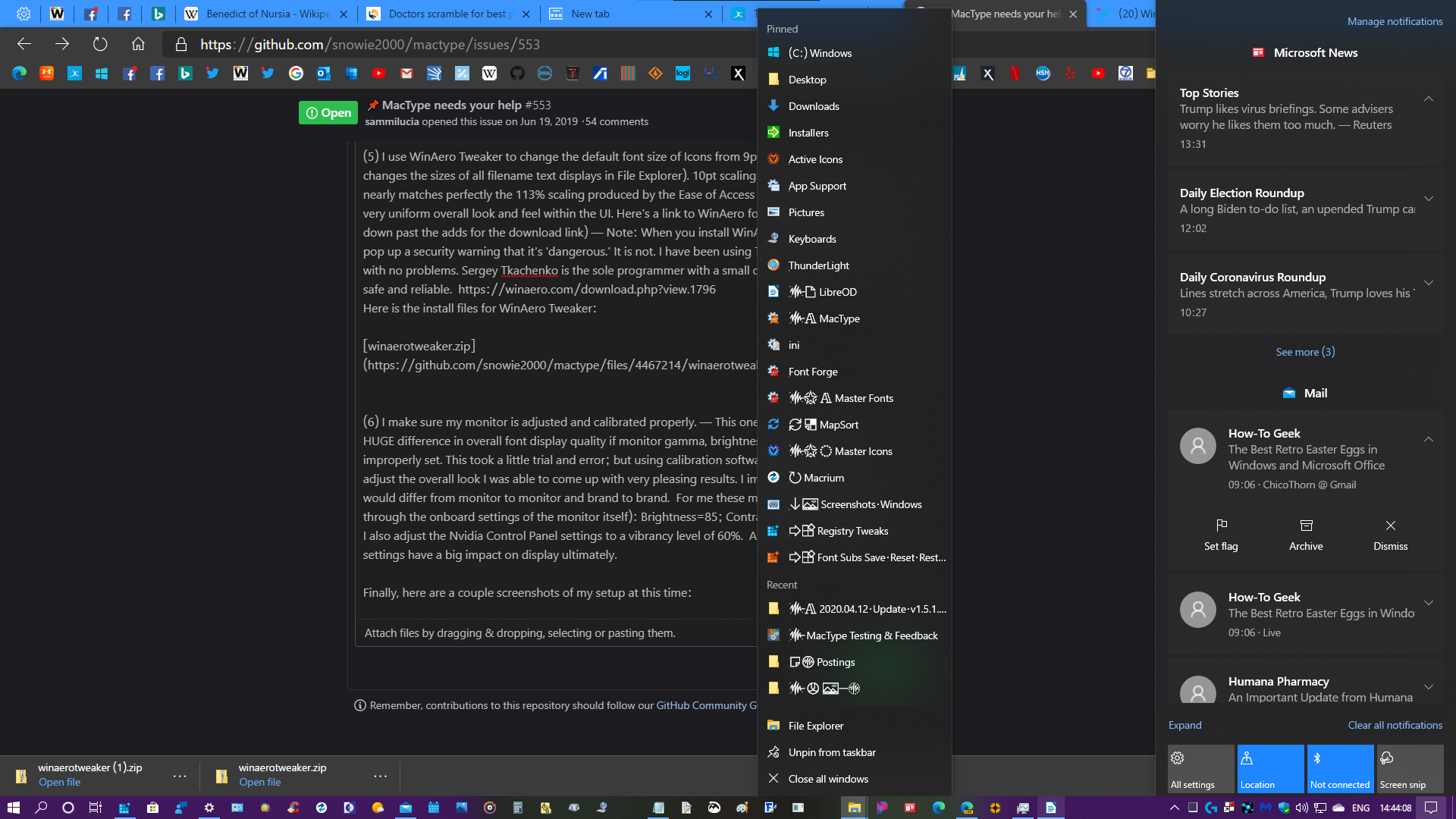
I've found that these scaling settings work really well for a number of reasons. First off the 100% scaling makes older .exe apps continue to function properly (case in point is Microsoft Keyboard Layout Creator, which I use to change my keyboard layout to accomodate my customized glyphs. If the scaling is set to anything other than 100% this app no longer displays properly and becomes unusable). The 113% "Make text bigger" setting enlarge most of the Directwrite renderings in the UI (at least I think it's Directwrite, that all gets so confusing to me), including the Taskbar Jumplists, Action Center flyout, the Start Menu, UWP apps, Chromium Edge Canary and others).
(5) I use WinAero Tweaker to change the default font size of Icons from 9pt to 10pt (which also changes the sizes of all filename text displays in File Explorer). 10pt scaling of the Icons and filenames nearly matches perfectly the 113% scaling produced by the Ease of Access setting, thus providing a very uniform overall look and feel within the UI. Here's a link to WinAero for the download (scroll down past the adds for the download link) — Note: When you install WinAero Tweaker Windows will pop up a security warning that it's 'dangerous.' It is not. I have been using Tweaker for over five years with no problems. Sergey Tkachenko is the sole programmer with a small operation. The software is safe and reliable. https://winaero.com/download.php?view.1796
Here is the install files for WinAero Tweaker:
(6) I make sure my monitor is adjusted and calibrated properly. — This one is important. It makes a HUGE difference in overall font display quality if monitor gamma, brightness, and contrast are improperly set. This took a little trial and error; but using calibration software (and my own eye) to adjust the overall look I was able to come up with very pleasing results. I imagine these settings would differ from monitor to monitor and brand to brand. For me these monitor settings are (input through the onboard settings of the monitor itself): Brightness=85; Contrast=75; Gamma=Medium. I also adjust the Nvidia Control Panel settings to a vibrancy level of 60%. All of these display/monitor settings have a big impact on display ultimately.
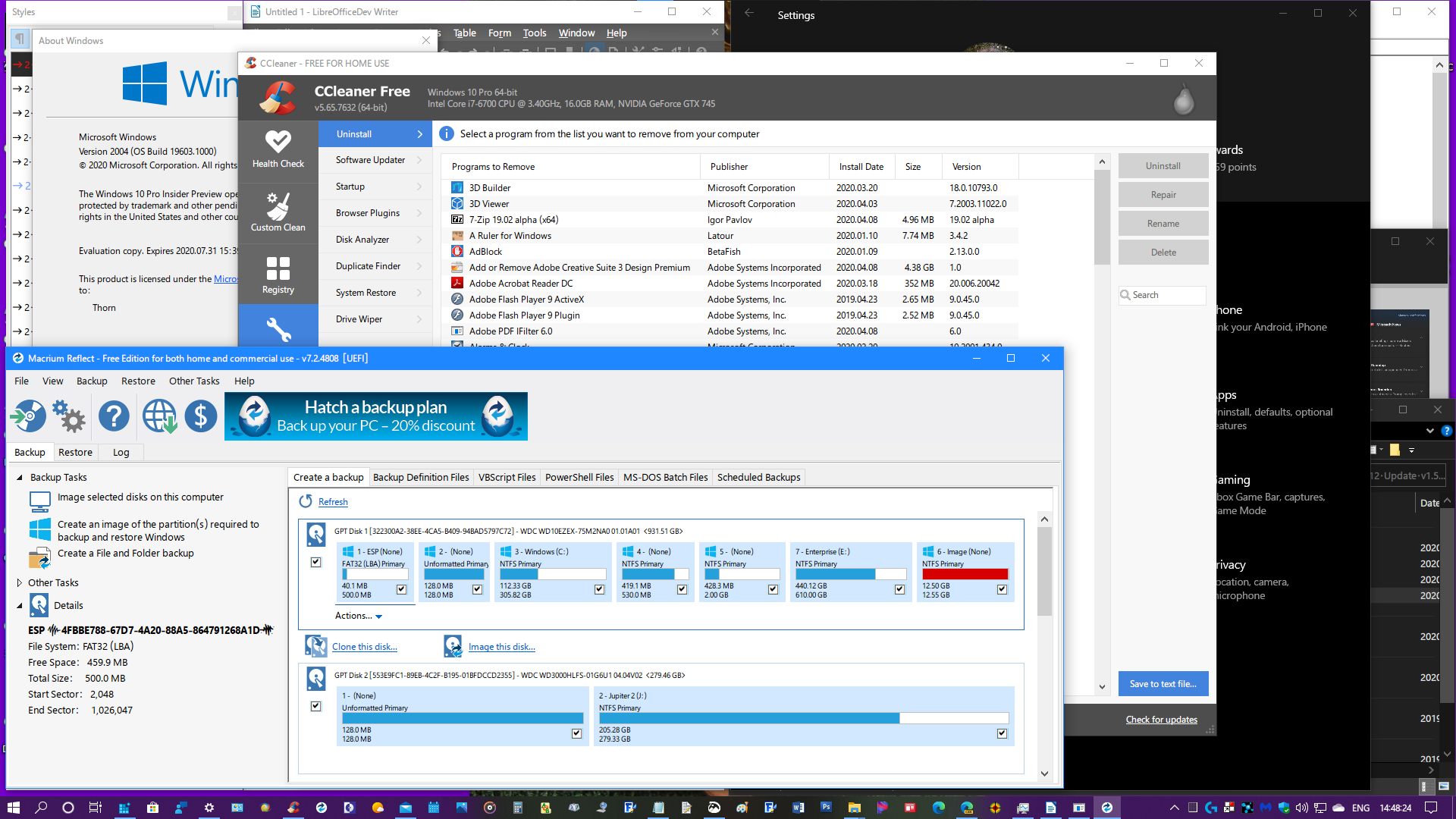
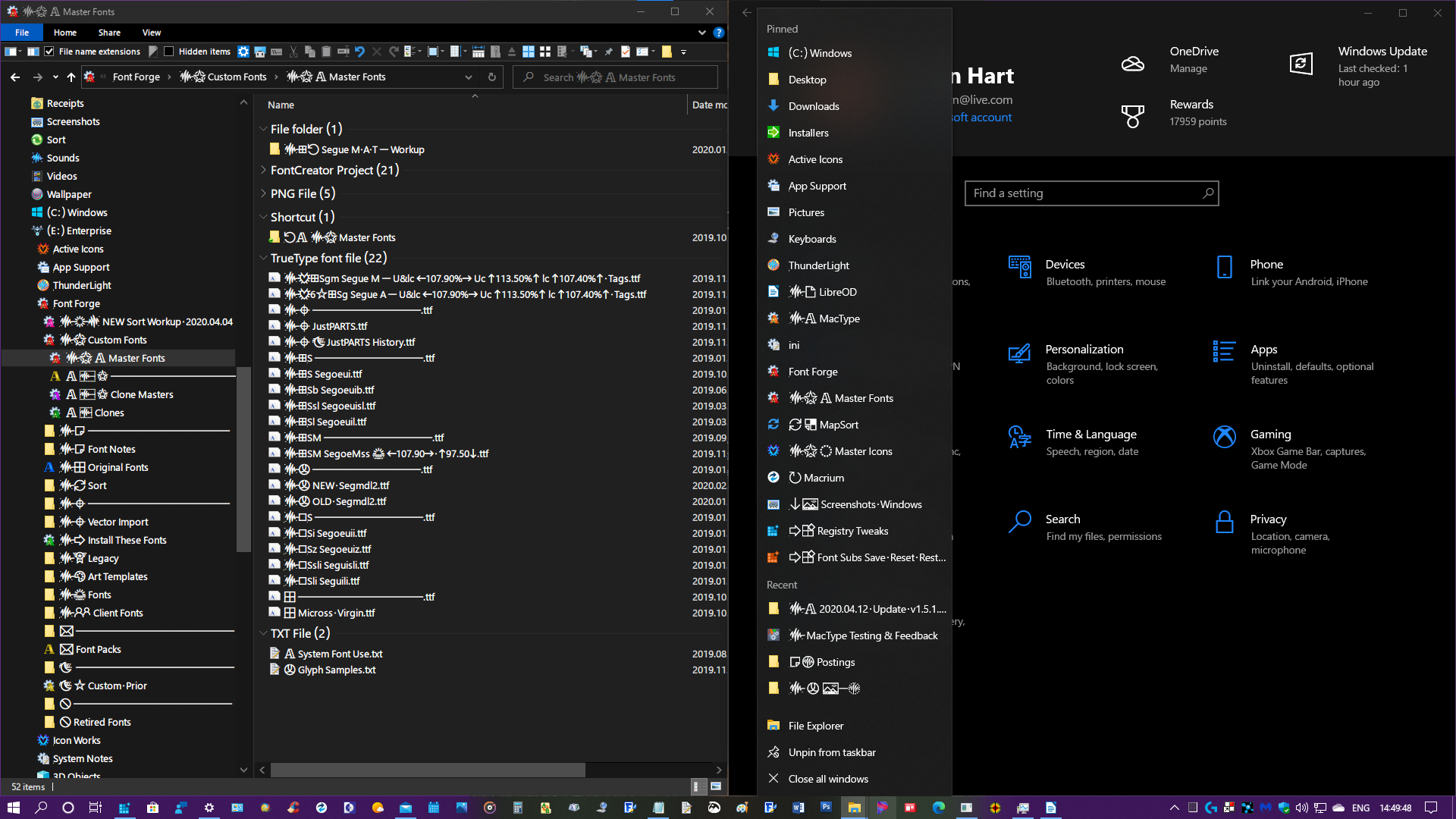
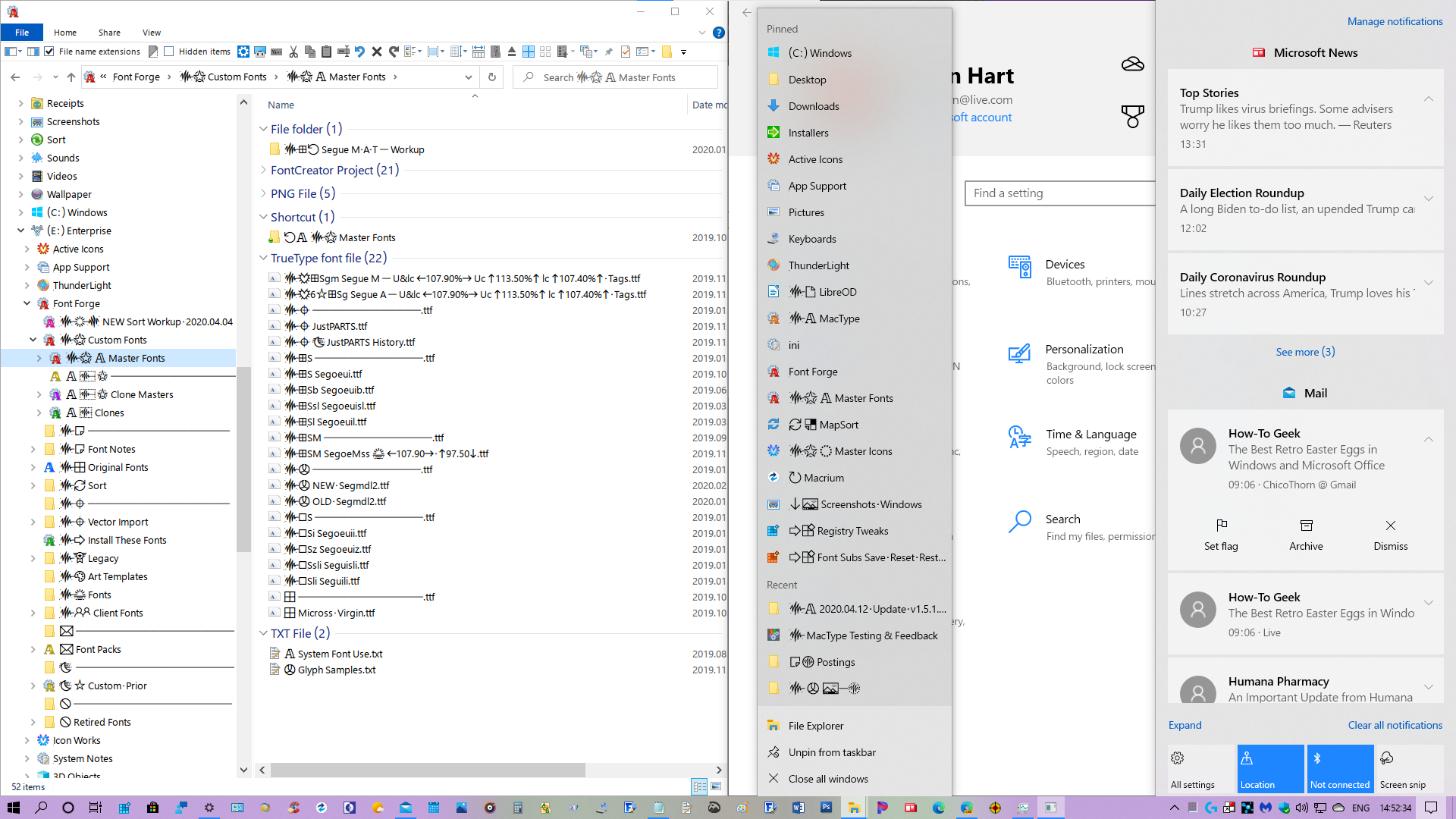
Finally, here are a few screenshots of my current setup at this time:
Edge Canary, Taskbar Jumplist, Action Center sample:
Custom MS Sans Serif Font UI samples:

File Explorer, Taskbar Jumplist, Settings samples:
Light Mode samples:

Thanks for all your hard work on MacType @snowie2000 and @sammilucia ! MacType continues to be the most important add-on to my PC and makes my everyday work so much more pleasurable and tolerable. I'm looking forward to helping out in the future as you develop new versions! Stay well everyone! 😊
ChicoThorn
on 13 Apr 2020
Thank you, everyone. I'm starting to do a cleanup job now whenever I have time.
I'll start by gradually translating every comment into English.
snowie2000
on 13 Apr 2020
Ok guy, we have a situation.
After merging the pr from the great @namazso, I have to rebuild mactype with easyhook32/64 instead of easyhk32/64, which means my previous easyhook needs a rebuild too.
After I rebuilt all the files, I discovered that the Chrome (Cent Browser) stopped working. MacType only applies to the mainframe but not the content. I then tried to debug by swopping files and turned out the easyhk64.dll is the key. When I used the old easyhk64 (renamed to easyhook64), chrome worked.
Then I compared the two versions of easyhook by asm, and they are basically the same except some differences made by the compiler which are not important at all.
I also managed to debug chrome and as I expected, LoadLibraryExW easyhook64.dll returned an error with error code 31 (ERR_GEN_FAILURE) which is really rare for this API.
I also clear the dllmain proc of easyhook and it still failed to load.
Also, everything back to work when I disabled the sandbox of Chrome.
Did anyone ever encounter similar problems? Are my old easyhook files sort of whitelisted?
Any thoughts are appreciated.
snowie2000
on 13 Apr 2020
When I used the old easyhk64 (renamed to easyhook64), chrome worked.
If there really are only compiler differences between the old easyhk and new easyhook then my immediate thoughts:
- Can't we just use the old easyhk and not worry about it?
- Why would Chrome/Chromium whitelist easyhk? A quick google of "chromium and easyhk" turned up no source code debates (I'd expect some discussions)... In which case the only logical answers are a) you missed something in the ASM differences, or b) Cent have indeed whitelisted easyhk in an effort to continue to support MacType/GDI ... (b) seems like the only logical answer to me.
- On this topic (of Cent Browser supporting MacType) we should try to establish a formal relationship for the sake of both parties. @snowie2000 have you a contact there? If not I can start this process
sammilucia
on 13 Apr 2020
Total noob here but is it possible that they could have *blacklisted *easyhook
instead of whitelisting easyhk?
Could this be a Cent-only problem or does it affect other Chromium-based
browsers, or Chromium itself?
That said, Cent may very well have whitelisted easyhk to enable MacType to
work... I would if I wanted to make my browser more visually appealing.
On Mon, Apr 13, 2020 at 7:47 PM Samantha Glocker notifications@github.com
wrote:
When I used the old easyhk64 (renamed to easyhook64), chrome worked.
If there really are only compiler differences between the old easyhk and
new easyhook then my immediate thoughts:
- Can't we just use the old easyhk and not worry about it?
- Why would Chrome/Chromium whitelist easyhk? A quick google of
"chromium and easyhk" turned up no source code debates (I'd expect some
discussions)... In which case the only logical answers are a) you missed
something in the ASM differences, or b) Cent have indeed whitelisted easyhk
in an effort to continue to support MacType/GDI ... (b) seems like the only
logical answer to me.- On this topic (of Cent Browser supporting MacType) we should try to
establish a formal relationship for the sake of both parties.
@snowie2000 https://github.com/snowie2000 have you a contact there?
If not I can start this process—
You are receiving this because you commented.
Reply to this email directly, view it on GitHub
https://github.com/snowie2000/mactype/issues/553#issuecomment-613010291,
or unsubscribe
https://github.com/notifications/unsubscribe-auth/ALJKQEZYOC2D6F5LDR2CUHDRMNF3RANCNFSM4HZOP6IQ
.
kcohar
on 13 Apr 2020
@sammilucia @namazso Mystery solved!
I tried several "mind-blowing" ways to see what has gone wrong with my easyhook, the here is the truth: The easyhook is blacklisted. @kcohar is actually right😆
Yes, it's not my previous easyhook that got whitelisted, it's the original easyhook that got blocked by all chrome variations. More specifically the dll whose original name is "easyhook64.dll" will be blocked no matter what it is.
My previous easyhook was built with the name "easyhk64.dll". Although its filename was later changed to easyhook64.dll due to our recent code refactor, its original filename was baked into the executable and didn't get modified along. My new easyhook, on the other hand, is built directly with the name "easyhook64.dll" and thus can't pass the barrier.
Proof: Change target name to anything other than easyhook64 and build and rename, the dll worked normally. Change target name back to easyhook64 and rebuild, chrome failed to work with it. Yeah, this is the fundamental difference I have discovered so far.
Based on the conclusion above, I think we should stay with my old "easyhk" solution.
snowie2000
on 14 Apr 2020
I think it is not blocked rather accidentally (them not knowing of it), and it could very well be blocked in the future.
I'd say figuring out how to build and have it run statically would be an overall better solution (unless you know of something that prevents us from doing this?)
namazso
on 14 Apr 2020
and this commit: https://github.com/chromium/chromium/commit/8cf80aa6d968cc6a6f7d438d2db23af7c1758010#diff-a1af1f033b583d4d0a1155fea5d0a087
snowie2000
on 14 Apr 2020
I meant that your build is only accidentally not blocked, however following the links to this it seems like they explicitly aren't blocking MacType, so it's probably all fine.
(regardless, I'll look into the possiblity of static linked easyhook, it would be nicer to do)
namazso
on 14 Apr 2020
@snowie2000 that's amazing! - that's very lazy blacklisting if just renaming can work around it.
Great sleuth work!
sammilucia
on 14 Apr 2020
I don't think it's good to embed all libs statically.
Mactype was mactype.dll/mactype64.dll before, and it's now a two-stage loaded program. The old mactype/mactype64.dll is now just a bootstrap and it loads the core.dll when necessary.
The bootstrap part and the core part shares the same easyhook library.
The reason it's now two dlls instead of one is because of the safety and performance. The bootstrap part only hooks APIs that create new processes. No font engine initialization happens in this first stage.
It greatly improved the performance of MacType for compilers because compilers tend to frequently create and exit new processes and they don't have any GUI.
snowie2000
on 14 Apr 2020
@snowie2000 that's amazing! - that's very lazy blacklisting if just renaming can work around it.
Great sleuth work!
As I stated in the previous post, renaming doesn't work. You have to rebuild it from source code. Of course, it has never been a problem for hackers.
snowie2000
on 14 Apr 2020
The bootstrap part and the core part shares the same easyhook library.
The reason it's now two dlls instead of one is because of the safety and performance. The bootstrap part only hooks APIs that create new processes. No font engine initialization happens in this first stage.
Oh okay, that's reasonable. Although I'd rather have a lazy initialization, since loading a bigger dll costs almost exatly the same (and cheaper than two) as long as it "does nothing" ie. no initialization happens, but I can already see how troublesome that would be if we wanted to not load things like GDI32 into non-gui processes
namazso
on 14 Apr 2020
I have stripped the bootstrap part to make it entirely depend on kernel32.dll only (which is loaded into any non-kernel mode processes). There is hardly any way to make the core part like this and lazy load dozens of system DLLs.
Plus, the MacType core does a lot of initializations upon dll attaching (although lots of initializations have already been delayed or moved during its development), it would be very difficult to extract all those functions and invoke them at the right time.
snowie2000
on 14 Apr 2020
As of CentBrowser 4.2 (Chrome 81) the easyhook* are now completedly blocked no matter which filename you built it with.
snowie2000
on 23 Apr 2020
What about regular Chrome (Canary) or Chromium?
On Thu, Apr 23, 2020 at 7:29 AM snowie2000 notifications@github.com wrote:
As of CentBrowser 4.2 (Chrome 81) the easyhook* are now completedly
blocked no matter which filename you built it with.—
You are receiving this because you were mentioned.
Reply to this email directly, view it on GitHub
https://github.com/snowie2000/mactype/issues/553#issuecomment-618186704,
or unsubscribe
https://github.com/notifications/unsubscribe-auth/ALJKQEZBYEWHIVOLIZSASS3RN7G2XANCNFSM4HZOP6IQ
.
kcohar
on 24 Apr 2020
I haven’t tested it yet. Cent is my daily driver.
snowie2000
on 24 Apr 2020
Hi @ChicoThorn
(2) Run MacWiz to reset the Mode used to "Registry" (I still find this mode to be the best overall way to load and use MacType in my experience, and since it continues to work, I will continue to use it). I also reload/reselect my desired .ini profile (although this appears to be unnecessary since it seems to persist build to build).
I've installed your updated fonts etc and indeed a bunch of things look much nicer, but alas your modified Segoe fonts do not seem to contain a large part of the Central European character set, so I now have random symbols appearing instead of the character such as čš in the text.
I would like to go back to the orignal Windows-supplied fonts. How can I do that?
 wigster
on 16 Oct 2020
wigster
on 16 Oct 2020
I would like to go back to the orignal Windows-supplied fonts. How can I do that?
Hi @wigster, Sorry about that, I forgot that many users would want to use the the Central European character set (which is where I embedded my custom glyphs). I'll need to create a version of my modified Segoe font that doesn't contain my custom glyphs in order for that to work properly. But in the meantime, it's fairly simple to return to the Microsoft supplied fonts and still enjoy MacType's amazing rendering.
(1) Reinstall the attached Microsoft default versions of the default Microsoft fonts for SegoeUI and MS Sans Serif (micross). Unzip them, then install these fonts into your system (both for single user and for all users)
Default Segoe & micross fonts.zip
(2) Unzip the attached "Default Registry Font Subs.zip"
Default Registry Font Subs.zip
— Open Regedit (Registry Editor) to the following address:
ComputerHKEY_LOCAL_MACHINESOFTWAREMicrosoftWindows NTCurrentVersionFontSubstitutes
— In the left navigation pane you will see the "FontSubstitutes" Key highlighted. Right-click it, and select "Delete"
— Now, load the "Default Registry Font Subs" that you unzipped by clicking on the .reg file. Follow the prompts to add this to your registry. After you load it, you will now find the Key "FontSubstitutes" is back, but the list is parred down to the original default values provided by Microsoft.
(3) Unzip the "ChicoThorn - v.1.5.1.2.3 (this is my latest and best ini settings to date) - MS Fonts" zip file and copy it to your MacType ini folder (located in Programs > MacType > ini)
ChicoThorn - v1.5.1.2.3 - MS Fonts.zip
(4) Run MacWiz. Select "Registry" mode. Click Next, then on the select profile window select the new ChicoThorn ini file you just copied.
— Restart your computer. You should now have Arial, Tahoma, and MS Sans Serif all displaying as they normally would in a default Microsoft setup. Of course, you can always modify your font substitution lists in both the registry and the MacType ini file. I've found it's best if these two lists match up.
Hope this helps! Give it a shot and let me know how it goes. 🙂
ChicoThorn
on 16 Oct 2020
The reason it "seems" to work in service and tray mode is that the tray application/service works as a process monitor, it detects newly created process and applies mactype to them. The affected application should refresh its interface automatically by design, but for some reason, this auto-refresh method doesn't work in service mode, you have to hover your mouse to the interface to trigger a repaint.
As you know Microsoft has indeed moved many of the Sys32 apps to the Store now... so I've revisited my Mode setting in MacType and have switched over to MacTray Standalone Mode. It works great even on those new converted 'old' apps. I'm still annoyed with the need to hover sometimes first for the rendering to kick in, but on the other hand it's a lot better than not having it render at all as is the case in Registry Mode on those particular apps. Thanks again @snowie2000 and @sammilucia for the insight you provided on this in 2019... it just took me awhile to come to the party! 😊
ChicoThorn
on 29 May 2021
Related issues
 Arrow-Li
·
3Comments
Arrow-Li
·
3Comments
 Skyyblaze
·
5Comments
Skyyblaze
·
5Comments
 l19980623
·
5Comments
l19980623
·
5Comments
 AhaoAile
·
7Comments
AhaoAile
·
7Comments
 zhengbli
·
3Comments
zhengbli
·
3Comments
Most helpful comment
Hi everybody! I hope everyone is staying safe and staying well during the age of COVID−19 that we're all in. With all of us having more time on our hands, I thought I'd post my latest .ini file settings, my customized "Microsoft Sans Serif" font which I've used to replace both Tahoma & micross (Microsoft Sans Serif). My customized font is a duplicate of my glyph-customized SegoeUI font with widths and heights of U&lc being tweaked to provide a more eye-pleasing display on surfaces in the UI that default to Tahoma or micross. The result is a more unified experience across the UI.
My latest tweaks to the .ini file have proven so pleasing across so many different parts of the UI, that I haven't made any changes to it since February 21, 2020 (which is a long time relative to prior attempts). I have a series of steps I go through after each install of the Windows Insiders Fast Ring updates, and so far MacType continues to provide fantastic results (current Windows Insider Build is 19603.1000 released 2020.04.08). These steps are:
(1) Install my customized fonts for SegoeUI and Microsoft Sans Serif in particular.
Thorn Custom Fonts.zip
(2) Run MacWiz to reset the Mode used to "Registry" (I still find this mode to be the best overall way to load and use MacType in my experience, and since it continues to work, I will continue to use it). I also reload/reselect my desired .ini profile (although this appears to be unnecessary since it seems to persist build to build).
ChicoThorn-v1.5.1.0.8.zip
(3) Load my customized font substitutions into the Registry at:
HKEY_LOCAL_MACHINESOFTWAREMicrosoftWindows NTCurrentVersionFontSubstitutes
I exported a registry file with my custom settings a while back, so now after each build I just run that registry file to update Font Substituions more quickly.
Thorn Custom Registry Font Subs.zip
(4) I double-check my scaling options in Windows Settings —
Settings > Display > Scaling and layout = 100% (this setting persists build to build)
Settings > Ease of Access > Make text bigger = 113% (this setting also persists build to build).
I've found that these scaling settings work really well for a number of reasons. First off the 100% scaling makes older .exe apps continue to function properly (case in point is Microsoft Keyboard Layout Creator, which I use to change my keyboard layout to accomodate my customized glyphs. If the scaling is set to anything other than 100% this app no longer displays properly and becomes unusable). The 113% "Make text bigger" setting enlarge most of the Directwrite renderings in the UI (at least I think it's Directwrite, that all gets so confusing to me), including the Taskbar Jumplists, Action Center flyout, the Start Menu, UWP apps, Chromium Edge Canary and others).
(5) I use WinAero Tweaker to change the default font size of Icons from 9pt to 10pt (which also changes the sizes of all filename text displays in File Explorer). 10pt scaling of the Icons and filenames nearly matches perfectly the 113% scaling produced by the Ease of Access setting, thus providing a very uniform overall look and feel within the UI. Here's a link to WinAero for the download (scroll down past the adds for the download link) — Note: When you install WinAero Tweaker Windows will pop up a security warning that it's 'dangerous.' It is not. I have been using Tweaker for over five years with no problems. Sergey Tkachenko is the sole programmer with a small operation. The software is safe and reliable. https://winaero.com/download.php?view.1796
Here is the install files for WinAero Tweaker:
winaerotweaker.zip
(6) I make sure my monitor is adjusted and calibrated properly. — This one is important. It makes a HUGE difference in overall font display quality if monitor gamma, brightness, and contrast are improperly set. This took a little trial and error; but using calibration software (and my own eye) to adjust the overall look I was able to come up with very pleasing results. I imagine these settings would differ from monitor to monitor and brand to brand. For me these monitor settings are (input through the onboard settings of the monitor itself): Brightness=85; Contrast=75; Gamma=Medium. I also adjust the Nvidia Control Panel settings to a vibrancy level of 60%. All of these display/monitor settings have a big impact on display ultimately.
Finally, here are a few screenshots of my current setup at this time:
Screenshot Samples.zip
Edge Canary, Taskbar Jumplist, Action Center sample:

Custom MS Sans Serif Font UI samples:

File Explorer, Taskbar Jumplist, Settings samples:

Light Mode samples:

Thanks for all your hard work on MacType @snowie2000 and @sammilucia ! MacType continues to be the most important add-on to my PC and makes my everyday work so much more pleasurable and tolerable. I'm looking forward to helping out in the future as you develop new versions! Stay well everyone! 😊