Mactype: 🚩DirectWrite powered version test feedback
If you would like to contribute your valuable time to test the "currently-work-in-uncertainty" version of MacType with enhanced DirectWrite support, I sincerely thank you and here is what you need to do to opt-in.
Please report all the bugs you found with this version in this issue. Don't open new ones unless you are sure that it's a common problem not subject to this version only.
Steps
- Disable MacType and disable any loading mode you're using. (In case your system crashed after enabling MacType, you can safely reboot and have your normal system back)
- Download this file:
MacType-1107-DW-b1.zip - Unzip and overwrite old files.
- Cross your fingers and start MacType.
- Clean the residues of the explosion happened just now. 😜😝😛
Changes and features
Basically, this version is the latest source combined with the PR from @extratype https://github.com/snowie2000/mactype/pull/449
- Office 2016 support
- Font substitution for DirectWrite support. (Not available for all UIs yet)
- FontSubstitutesDW is removed, FontSubstitutes is still used for all the font substitution since I believe it is not too hard to build a per-app setting for DW applications.
- All the latest universal mactype bug fixes.
Known issue:
- Not compatible with the latest version of Microsoft Edge (Due to the enhanced protection)
- UWP hooking is only available in registry mode (currently, will be improved later)
 snowie2000
All 49 comments
Testing.
So what are the changes with this one?
 sammilucia
on 7 Nov 2018
sammilucia
on 7 Nov 2018
Testing.
So what are the changes with this one?
Updated with features and changes.
snowie2000
on 7 Nov 2018
I had tested on Windows 10 1803 x64 before I submitted the PR. I had Windows 7 in my mind while coding but I didn't test on that.
 extratype
on 7 Nov 2018
extratype
on 7 Nov 2018
@snowie2000 that's very vague 😜
Working fine here on Win8.1 x64. Will test on Win10 32-bit
sammilucia
on 7 Nov 2018
@snowie2000 that's very vague
Working fine here on Win8.1 x64. Will test on Win10 32-bit
Basically, more DirectWrite hooking points were added, and @extratype made the whole code much more readable and easier to maintain.
Plus, the original EasyHook isn't compatible with Edge, so the version in the archive has been modified to fix it. It is still incompatible with edge, but at least won't crash it either.
snowie2000
on 7 Nov 2018
Okay that makes more sense
sammilucia
on 7 Nov 2018
@snowie2000 Should I just unzip this over the latest beta?
 IceMan81
on 7 Nov 2018
IceMan81
on 7 Nov 2018
Yes, of course.
snowie2000
on 7 Nov 2018
Installed, so far so good. Font substitution indeed worked on Office 2019. Issue #462 is also gone.
 kailiu42
on 7 Nov 2018
kailiu42
on 7 Nov 2018
It seems the substitution is not complete, i.e. some chars are but some not. See below.
These are the text on Excel 2019 UI, without substitution.

These are with substitution, Microsoft JhengHei -> Microsoft YaHei, Segoe UI -> Roboto.

Compare the two pics you can see that all digits and alphabets are substituted, but for Chinese chars, only 级, 测, 试 and 绩 are substituted, 启, 蒙, 班, 升, 成 are not.
BTW, is there a way to tell what font is used on a window, instead of by using my sharp eyes? Like the inspector of the browsers.
BTW2, could you let me know how to config another substitution profile besides of the global one? For example, how to apply a global substitution for all exes and another set of substitution for some specific exes?
kailiu42
on 7 Nov 2018
@kraml you can use process explorer from Windows Sys internals to see what fonts have been loaded by a process not sure if there is a way to see for a window of the process.
IceMan81
on 7 Nov 2018
Ok it seems the problem in my last comment is due to that line actually used two different CJK fonts, substitute only Microsoft Jhenghei is not enough.
Thanks @IceMan81 for the process explorer tip.
kailiu42
on 7 Nov 2018
BTW2, could you let me know how to config another substitution profile besides of the global one? For example, how to apply a global substitution for all exes and another set of substitution for some specific exes?
There had been such option like this
[[email protected]]
Alternative=Office
[[email protected]]
Alternative=Office
[[email protected]]
Alternative=Office
but it was removed at 8560e3d.
extratype
on 7 Nov 2018
@extratype did I? I didn't.
The settings you wrote just defined a group named office. You need to define rules for the group to make it work.
@kraml you can define per-app settings by either direct quote
[[email protected]]
Some settings...
Or indirectly by defining a group like extratype did and define rules for the group like an app
[fontsubtitute@office]
Settings go here
@snowie2000 I can't find Alternative in settings.cpp, so I guess it's not working now. Please follow the commit link to see the change.
extratype
on 7 Nov 2018
Yep @extratype is correct, the Alternative + per group way does not work. The per exe way works. Could we bring the per group way back? It is quite convenient.
kailiu42
on 7 Nov 2018
So I think it's a bug confirmed.
I haven't noticed it so far.
No worries, I'll bring it back.
snowie2000
on 7 Nov 2018
@snowie2000 I notice that the behavior when using HintingMode=0 and AntiAliasMode=4 has changed. With this DirectWrite powered version, when HintingMode=0 it feels like the fonts are very aggressively grid fitted and as a result some fonts shapes have changed.
HintingMode=3 with AntiAliasMode=4 is fine.
Did something change with the interpretation of the HintingModes?
IceMan81
on 10 Nov 2018
@snowie2000 Any ideas on the above behavioral change with the hinting modes?
fyi, this is on Win 7
IceMan81
on 13 Nov 2018
@snowie2000 Any ideas on the above behavioral change with the hinting modes?
fyi, this is on Win 7
I switched back to the version on 11/2 and see no noticeable difference.
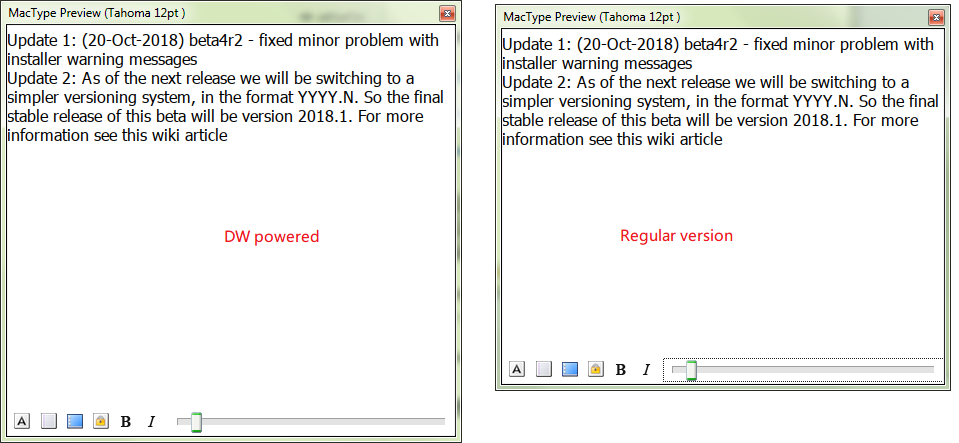
Which version are you comparing to?
snowie2000
on 13 Nov 2018
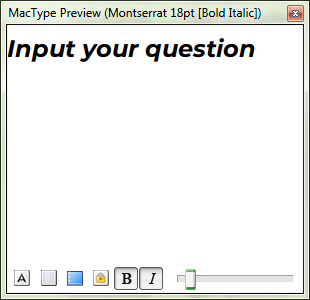
"q" can't display with Montserrat font.

Switch to other font has no this issue

 fonlan
on 13 Nov 2018
fonlan
on 13 Nov 2018
@fonlan No problem has been observed.
Which font and program were you using?
snowie2000
on 14 Nov 2018
@snowie2000 Any ideas on the above behavioral change with the hinting modes?
fyi, this is on Win 7I switched back to the version on 11/2 and see no noticeable difference.
Which version are you comparing to?
I was comparing to the previously released beta - but it looks like I'm only seeing an impact on PragmataPro which is what I use as my monospace font. On the flip side, the discussion here about the vertical antialias is no longer an issue with the DW version. I do not see any artifact when ligatures are enabled.
IceMan81
on 14 Nov 2018
@snowie2000 Any ideas on the above behavioral change with the hinting modes?
fyi, this is on Win 7I switched back to the version on 11/2 and see no noticeable difference.
Which version are you comparing to?I was comparing to the previously released beta - but it looks like I'm only seeing an impact on PragmataPro which is what I use as my monospace font. On the flip side, the discussion here about the vertical antialias is no longer an issue with the DW version. I do not see any artifact when ligatures are enabled.
Yes, I fixed the vertical anti-aliasing bug existed long ago.
snowie2000
on 14 Nov 2018
@fonlan No problem has been observed.
Which font and program were you using?
Font name is Montserrat. I found it's not installed font Montserrat in my PC. But the PPT copy from others used Montserrat font. So I think Montserrat was fallback to some other font. That cause this issue. How can I know which font it will fallback to? Win10 EN.
fonlan
on 14 Nov 2018
@fonlan There is such an option to see the font substitution used in Word, but I didn't find the same option in PowerPoint.
snowie2000
on 15 Nov 2018
As far as I know font families in PowerPoint 2016 are chosen the same way as Word.
extratype
on 15 Nov 2018
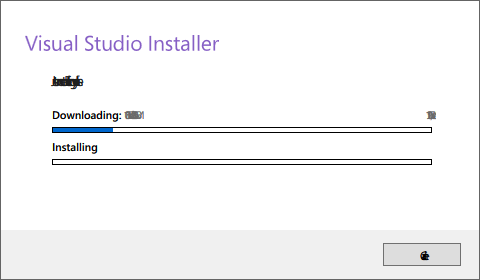
I had an issue like below after overwriting files withMacType-1107-DW-b1.zip:
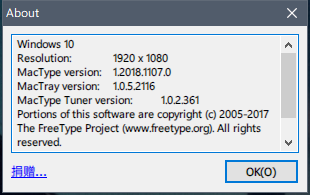
Below is the version information:
Don't know if here is the right place to post this issue, won't encounter this problem after a fresh installation of MacTypeInstaller_2018_1019_beta4r2.exe.
 chawyehsu
on 15 Nov 2018
chawyehsu
on 15 Nov 2018
@h404bi You don't have to. The archive has covered all the necessary files, so it should be no major difference.
I think the problem with your vs installer is that you replaced fonts. Some programs are not compatible with font replacement. They are designed to work with a specific font (monospaced font for example).
Try to disable the font substitution and try again.
snowie2000
on 16 Nov 2018
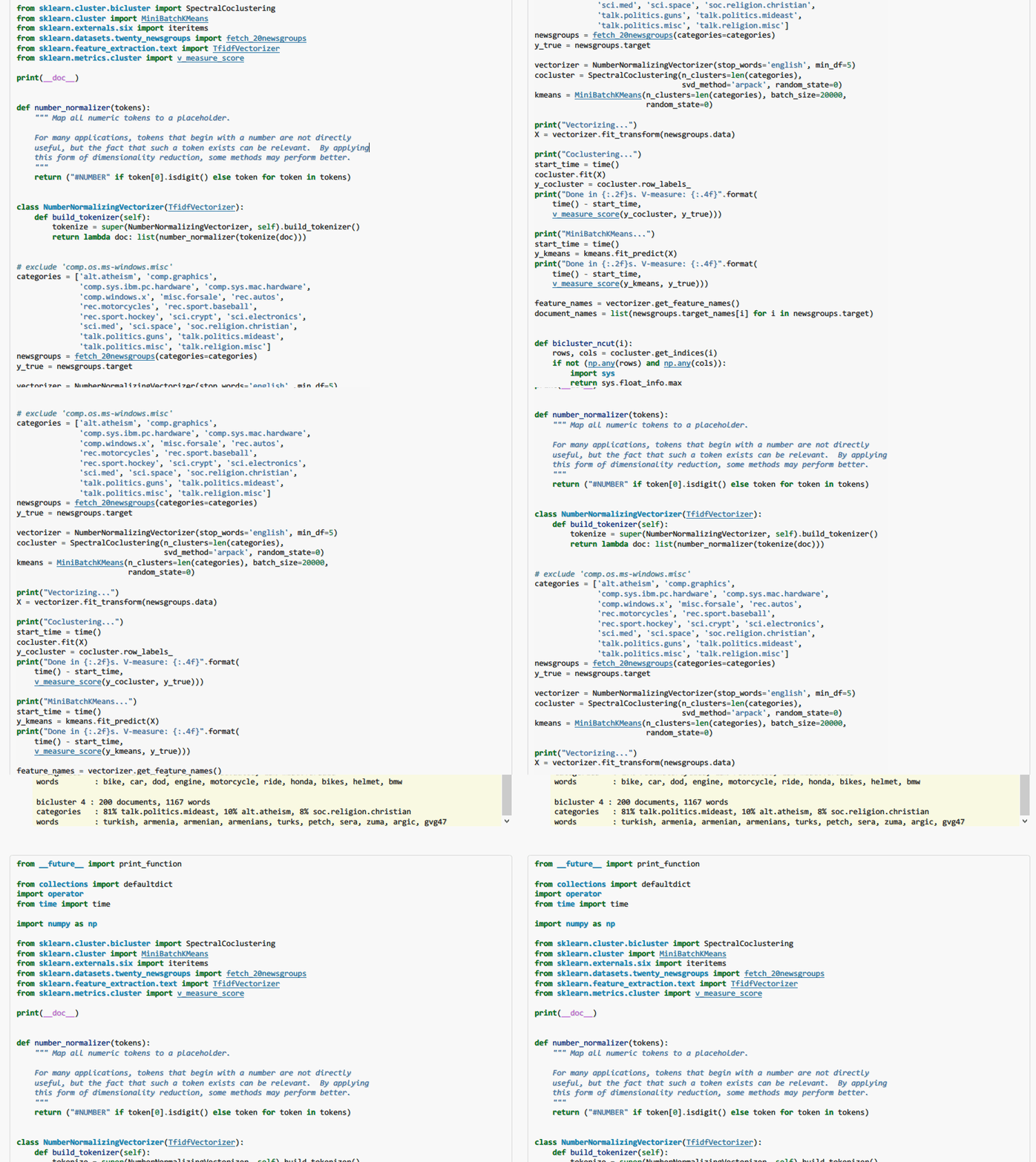
Very strange render for this url. After open below link and scroll to certain position it will lost render. But if scroll to any other position it's correct. Detail show as the gif.
https://scikit-learn.org/stable/auto_examples/bicluster/plot_bicluster_newsgroups.html
fonlan
on 21 Nov 2018
Looks like you only lost your shadows but the texts are still affected since their shapes were pretty much the same.
snowie2000
on 21 Nov 2018
Looks like you lost your shadow but the texts are still affected since their shapes were pretty much the same.
But in my profile the shadow are all 0. Also no customized style used in Firefox.
Shadow=0,0,0,0x0,0x0
fonlan
on 21 Nov 2018
No shadow has been seen on my firefox.
Could you please show us your profile?
snowie2000
on 21 Nov 2018
No shadow has been seen on my firefox.
Could you please show us your profile?
[General]
Name=Default
Icon=..\mactray.exe.ico,0
HookChildProcesses=1
HintingMode=1
AntiAliasMode=4
NormalWeight=16
BoldWeight=3
ItalicSlant=0
UseMapping=0
GammaMode=0
GammaValue=1.4
Contrast=1.4
RenderWeight=1.6
DirectWrite=1
TextTuning=0
TextTuningR=1
TextTuningG=1
TextTuningB=1
BolderMode=0
FontLoader=0
FontLink=2
FontSubstitutes=1
MaxHeight=0
Shadow=0,0,0,0x0,0x0
LcdFilter=2
LoadOnDemand=1
CacheMaxFaces=256
CacheMaxSizes=33554432
CacheMaxBytes=67108864
EnableKerning=1
HintSmallFont=0
MaxBitmap=0
[ExcludeModule]
[Experimental]
ColorFont=1
[[email protected]]
clipboxfix=1
[[email protected]]
Invertcolor=1
[[email protected]]
clipboxfix=1
[UnloadDll]
AdaptiveSleepService.exe
AMI.Scanner.Client.exe
ApplicationFrameHost.exe
AppVClient.exe
AppVStreamingUX.exe
armsvc.exe
atieclxx.exe
atiesrxx.exe
audiodg.exe
AuthManSvr.exe
avgnt.exe
AxureRP.exe
backgroundTaskHost.exe
bleachbit.exe
CcmExec.exe
csrss.exe
dasHost.exe
DataExchangeHost.exe
dwm.exe
dxlservice.exe
fcag.exe
fcags.exe
fcagswd.exe
fcagte.exe
Fetion.exe
FileCoAuth.exe
FontCreator.exe
FontCreator.cn.exe
Fontforge_TC.exe
Fontforge_SC.exe
Fontforge_EN.exe
fontview.exe
gnucash-bin.exe
HP3DDGService.exe
hpservice.exe
IEMonitor.exe
LockApp.exe
macmnsvc.exe
macompatsvc.exe
masvc.exe
MBAMAgent.exe
mcshield.exe
mctray.exe
mfeatp.exe
mfecanary.exe
mfeesp.exe
mfefire.exe
mfefw.exe
mfehcs.exe
mfemactl.exe
mfemms.exe
mfetp.exe
mfevtps.exe
msdtc.exe
mspdbsrv.exe
notecaselauncher.exe
notecase.exe
ollyice.exe
PlantsVsZombies.exe
ProcessGovernor.exe
RadeonSettings.exe
RAVBg64.exe
reader_sl.exe
redirector.exe
RtkAudioService64.exe
RtkNGUI64.exe
RtsCM64.exe
sc2.exe
scPrintClient.exe
SearchFilterHost.exe
SearchIndexer.exe
SearchProtocolHost.exe
SecomSDK.exe
SecureConnector.exe
SecurityHealthService.exe
SelfServicePlugin.exe
SettingSyncHost.exe
sihost.exe
smartscreen.exe
SynTPEnh.exe
SynTPEnhService.exe
SynTPHelper.exe
TabTip32.exe
taskhostw.exe
TeamViewer_Service.exe
TiWorker.exe
tv_w32.exe
tv_x64.exe
unsecapp.exe
UpdaterUI.exe
virtualbox.exe
vmware-usbarbitrator64.exe
vpnagent.exe
war3.exe
wbxcOIEx.exe
wfcrun32.exe
wlanext.exe
WmiApSrv.exe
WmiPrvSE.exe
WUDFHost.exe
xdict.exe
[exclude]
[FontSubstitutes]
[Individual]
XSong=,,30,,,
XSong SimSun=,,30,,,
XSong Mono=,,30,,,
新宋体=,,30,,,
华文宋体=,,30,,,
华文中宋=,,30,,,
Batang=,,30,,,
MingLiU=,,30,,,
PMingLiU=,,30,,,
PMingLiU_HKSCS=,,30,,,
MingLiU_ExtB=,,30,,,
PMingLiU_ExtB=,,30,,,
PMingLiU_HKSCS_ExtB=,,30,,,
MS Mincho=,,30,,,
MS PMincho=,,30,,,
[ExcludeSub]
javaw.exe
PPLive.exe
QQGame.exe
devenv.exe
[DirectWrite]
RenderingMode=5
GammaValue=1.8
Contrast=1.6
ClearTypeLevel=1
fonlan
on 21 Nov 2018
No ghost shadow, no rendering loss, nothing strange happened.
snowie2000
on 21 Nov 2018
No ghost shadow, no rendering lose, nothing strange happened.
Which browser do you use? I only find this issue with Firefox. Currently I'm using Firefox 63.03 X64.
fonlan
on 21 Nov 2018
Firefox 63.0.3 x64, the latest.
snowie2000
on 21 Nov 2018
OK. My firefox may be sick. T_T
fonlan
on 21 Nov 2018
Is it the same problem with issue #439
snowie2000
on 21 Nov 2018
Looks like the same. In my Firefox I can reproduce it permanently.
fonlan
on 21 Nov 2018
You can reproduce the bug #439 easily and consistently?
snowie2000
on 21 Nov 2018
I'm not sure whether my issue and bug #439 are the same root cause or not. But for my issue I can reproduce it permanently.
fonlan
on 21 Nov 2018
This build could not render WPS Office version 11.1.0.7989 on Windows 10, 64bit, 1809 (with the latest Windows Update).
MacType was loaded by service.
I checked the processes and found that the status of wps.exe was disabled. I tried to click the Enable buttont to turn it on, but failed, none of any wps.exe processes could be changed to enabled.
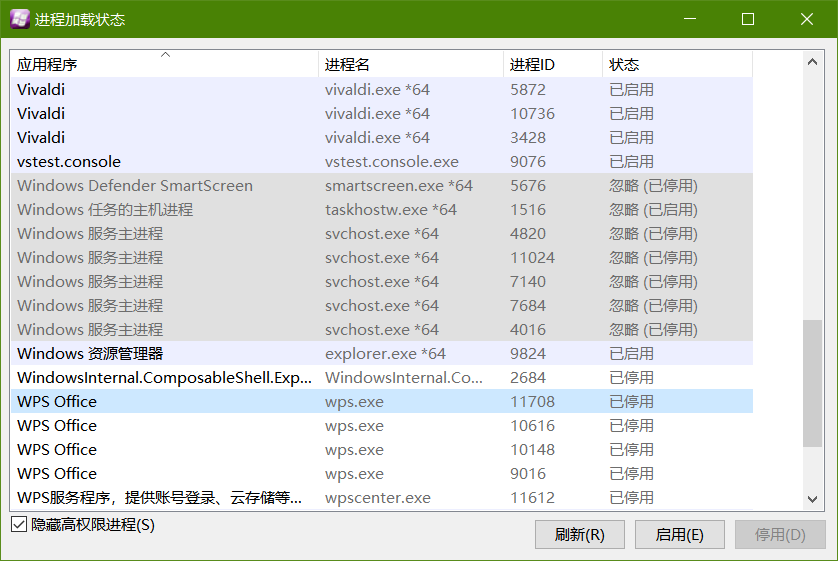
The following is my configuration file:
Default.zip
 wmjordan
on 28 Nov 2018
wmjordan
on 28 Nov 2018
@wmjordan If you can't manually enable rendering by the wizard, your wps processes are protected, probably by the Kingsoft Anti-virus software. Check that.
snowie2000
on 28 Nov 2018
I did not have Kingsoft Anti-virus installed, and Windows Defender has also been disabled. I use the protector from huorong.cn, which works with MacType very well these years.
I could see that EasyHook was loaded by the wps.exe process.
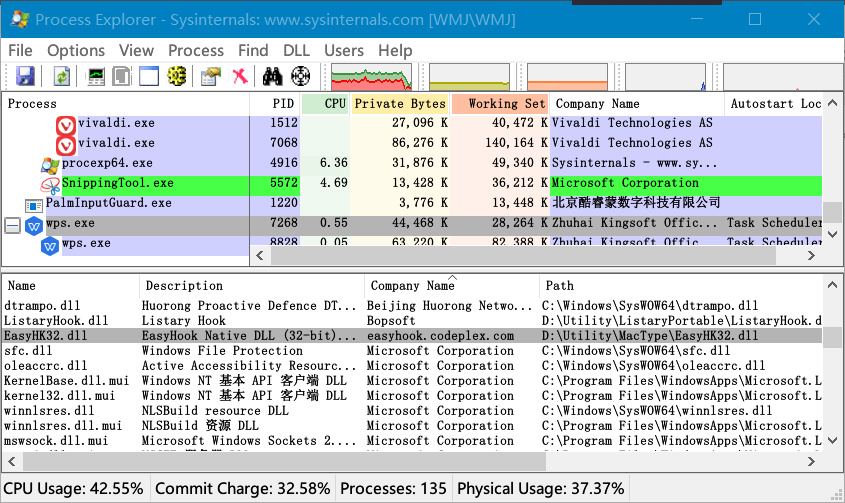
Have you updated the WPS to the latest version? Could it be possible that the WPS people added protection layer to the wps.exe processes in their recent new versions?
Or, shall I install MacType to the Program Files directory?
wmjordan
on 28 Nov 2018
Since the easyhk32.dll was loaded, it is clear that MacType bootstrap decided not to apply mactype to the WPS process for some reason.
I'll try to release the next beta ASAP as it will definitely improve the loading logic.
snowie2000
on 28 Nov 2018
@snowie2000 beta release expected soon??
IceMan81
on 5 Dec 2018
@IceMan81 Yes, I am on it right here right now. I just have some trouble pushing files to my publish git.....🤣
snowie2000
on 5 Dec 2018
Closed as the DirectWrite version is now the main released version.
snowie2000
on 6 Dec 2018
Related issues
 aridzephyr
·
5Comments
aridzephyr
·
5Comments
 TianLi-520
·
3Comments
TianLi-520
·
3Comments
 denysonique
·
7Comments
denysonique
·
7Comments
 Arrow-Li
·
3Comments
Arrow-Li
·
3Comments
 caulmseh
·
3Comments
caulmseh
·
3Comments
Most helpful comment
Since the easyhk32.dll was loaded, it is clear that MacType bootstrap decided not to apply mactype to the WPS process for some reason.
I'll try to release the next beta ASAP as it will definitely improve the loading logic.