Mactype: MacType profile not applying on reboot
In years of using MacType I haven't seen this issue, not sure where to start looking...
To reproduce:
- Use Windows 8.1 x64
- Use MacType in Service Mode as usual
- Restart Windows
- Log in
- MacType is not applied to any software
- Run MacWiz.exe
- Re-select Service Mode, and the same profile
- Close and re-open software
- MacType is now applied
Expected outcome:
- Mactype is applied automatically after restarting Windows
Observed outcome:
- MacType isn't applied until MacWiz.exe is re-run
 sammilucia
All 76 comments
mactype.ini

sammilucia
on 30 Sep 2018
There is a deadlock bug in the new tray app and it is much more likely to trigger in service mode.
I'll upload a fix later today.
 snowie2000
on 30 Sep 2018
snowie2000
on 30 Sep 2018
MacTray.zip
Okay, here is the promised file. Hope it can fix the problem.
snowie2000
on 30 Sep 2018
thank you!
sammilucia
on 30 Sep 2018
Unfortunately it's still occurring for me in service mode
Straight after logging in:

After re-running MacWiz.exe next > next >finish (no settings changed

sammilucia
on 1 Oct 2018
@sammilucia Okay, so it only happens in service mode?
Could you please do a memory dump of the mactray.exe when the rendering stopped so that I can figure out what's going on inside it?
I know the memory dump will be very huge, you could upload it to somewhere like google drive and just give me the link.
snowie2000
on 8 Oct 2018
ServiceMode - I'm not sure, I'll disable secure boot and find out
Memdump - sure thing
I'll get back to you
sammilucia
on 8 Oct 2018
@snowie2000 yes it still does it in registry mode... No change. Most bizarre!
sammilucia
on 9 Oct 2018
Okay, that's cool.
Then there is, in theory, nothing to do with the mactray app. It should be the problem with mactype itself.
Here is one thing you can try:
Download the process explorer from Microsoft.
Open it and select explorer.exe or any other application that you expected it to be rendered and search through its loaded dll list for MacType related Dlls.

You're expecting to see at least mactype.dll (mactype64.dll) and easyhk32(64).dll. If not, either the registry mode doesn't work at all or you enabled include-only mode.
snowie2000
on 9 Oct 2018
@snowie2000 @sammilucia I have the same issue. Mactype is set to registry mode but on reboot mactype is not applied. When you manually start the tray app, you can see that the settings is set to disable even thought that’s not what was originally set. I know this because I always use mactype in registry mode. I think I started observing this issue after starting to use the new tray app that you recently put out.
 IceMan81
on 9 Oct 2018
IceMan81
on 9 Oct 2018
@snowie2000 done in Registry Mode straight after a restart. Chrome is currently not rendering with MacType.

MacWiz process manager seems to think it's running?

sammilucia
on 10 Oct 2018
@sammilucia Only chrome.exe is not rendered or everything is not rendered?
What is the parent process of chrome?
snowie2000
on 10 Oct 2018
good question... hmm...
renders correctly
explorer.exe -> procexp64.exe
services.exe -> svchost.exe -> mullvad
explorer.exe -> fireworks.exe
explorer.exe -> explorer windows / window titles
explorer.exe -> nexusclient.exe
explorer.exe -> greenshot.exe
services.exe -> tinywall.exe
explorer.exe -> phraseexpress.exe
explorer.exe -> flashbackplayer.exe
explorer.exe -> startisbackcfg.exe
explorer.exe -> flux.exe
explorer.exe -> mpc-hc64.exe
explorer.exe -> macwiz.exe
doesn't render correctly
explorer.exe -> mactuner.exe (mactype.core.dll, mactype.dll, easyhk32.dll)
explorer.exe -> chrome.exe -> chrome.exe (mactype64.core.dll, mactype64.dll, easyhk64.dll)
explorer.exe -> brackets.exe -> brackets.exe (UI=yes, content=no... mactype.core.dll, mactype.dll, easyhk32.dll)
explorer.exe -> githubdesktop.exe -> githubdesktop.exe (mactype64.core.dll, mactype64.dll, easyhk64.dll)
explorer.exe -> loot.exe -> loot.exe (mactype.core.dll, mactype.dll, easyhk32.dll)
it looks like all the processes (except mactuner.exe) that aren't rendering correctly, are the ones that are spawning their own child processes:

brackets UI is rendered correctly but content is not (assuming content is in the brackets.exe child process):

sammilucia
on 10 Oct 2018
chrome.exe is centbrowser of course btw @snowie2000
sammilucia
on 10 Oct 2018
mactunner is naturally unrenderable. It disables mactype from the internal control center.
snowie2000
on 10 Oct 2018
yes thought so. wonder what's going on with the other 3 apps and child processes then..?
sammilucia
on 10 Oct 2018
Ok, I tried registry mode on my system, and it worked flawlessly.
I'll add some debug code to see the result why it decided to stop working.
Does changing your profile make any help?
snowie2000
on 10 Oct 2018
Nope! Different profiles (Default, iOS) do the same thing. In addition my profile (Clean) hasn't changed, the only thing that changed was I reinstalled my Win8.1 x64.
sammilucia
on 11 Oct 2018
duplicate #320?
sammilucia
on 12 Oct 2018
@sammilucia I don't know, seems not related. That's a problem with the autostart of the tray app.
snowie2000
on 12 Oct 2018
seems like #320 is probably not a bug but a windows / UAC / AV problem, i'll keep it closed, but feel free to reopen
sammilucia
on 12 Oct 2018
That is probably because he/she had set a compatibility flag for the tray app to require an administrative elevation as Windows with UAC turned on doesn't allow any application with elevation requirement to autostart.
snowie2000
on 12 Oct 2018
Could not reproduce on other systems. This is something peculiar with my system and not caused by MacType. Closing issue!
sammilucia
on 19 Oct 2018
@snowie2000 I have new info about MacType not auto-applying on my Win 8.1 x64 in Registry Mode or Service Mode.
In either of those modes MacType starts at startup, but as per my Process Explorer screenshot, MacType doesn't load into subprocesses (like Cent Browser tabs)
However in Tray mode it does! In either Compatibility Mode or Standalone Mode, if I set MacTray to start with Windows, MacType works for all subprocesses straight away.
In Registry and Service Mode after a restart, it doesn't load into sub processes, until I've run MacType Wizard (and simply click Next > Finish without changing anything)
I realise this is really weird, but does that provide any clues?
sammilucia
on 7 Nov 2018
I have no clue why it happened. Try the new version to see if it persists.
snowie2000
on 7 Nov 2018
I have... yes it does
sammilucia
on 7 Nov 2018
I got an idea for that. Wait for the version I'll release tonight (private repo). (Don't use the version I submitted last night, it's buggy).
snowie2000
on 8 Nov 2018
@sammilucia Could you try it for me?
After you reboot, click start menu->Run->mactype.dll,see if it gives you an error like
Windows cannot find 'mactype.dll' Make sure you typed the name correctly... blah blah
Re-run macwiz and redo it see if the error changes.
snowie2000
on 9 Nov 2018
Is there a new private build?
Tried with the current beta straight after reboot and got:

... This was with MacType in Tray Mode (as Administrator).
sammilucia
on 9 Nov 2018
It did the same thing in Registry Mode (and also didn't change after MacWiz) ... But still doesn't load subprocesses in Registry or Service Mode (but does in any Tray Mode)
:confused:
sammilucia
on 9 Nov 2018
I (also with my classmate) have the same problem.
I use MacType in Registry Mode and my system is Windows 10 x64 Ver.1089, everytime when I restart my computer I have to run "MacTray.exe" or "MacWiz.exe" manually to apply MacType.
 MrAru
on 9 Nov 2018
MrAru
on 9 Nov 2018
Hello, same issue:
windows 8.1 x86
mactype v20170628
centbrowser v3.6.8.99 and v3.5.3.25
.ini:
DirectWrite=1
FontSubstitutes=1
Use MacType in Service Mode
Restart Windows
Log in
Run total commander, Everything, 火绒, centbrowser
MacType is applied to any software except centbrowser and 火绒's hipsmain.exe
Find mactype.dll, mactype.core.dll, easyhk32.dll loaded in chrome.exe
Find mactype.dll, mactype.core.dll, easyhk32.dll not loaded in hipsmain.exe
Run MacWiz.exe and DO NOTHING
Close and re-open centbrowser
MacType is now applied to centbrowser
Close and re-open 火绒
MacType is not applied to 火绒's hipsmain.exe
In MacWiz's process manager, hipsmain.exe status disabled and can not start
 txbsywcq
on 10 Nov 2018
txbsywcq
on 10 Nov 2018
hipsmain is an anti-malware software which definitely has self-protection builtin. It's designed to not let anything to hijack it.
This problem looks much more common than I thought.
snowie2000
on 10 Nov 2018
In registry mode i hard-replace simsun.ttf with simhei.ttf using ttfname.exe and mactype do render hipsmain.exe;

By the way, aliwangwang's aliim.exe has same issue like centbrowser;
txbsywcq
on 10 Nov 2018
@sammilucia @txbsywcq I would like you to try the software PCHunter to check for the hooks in the affected applications.
Since it is a Chinese site, I'll just give you the link. http://www.xuetr.com/download/PCHunter_free.zip
After downloading the software, launch the one matching your arch, and do as the following picture:

The green box on the right-hand side is the hooks you're expected to see and are necessary to make MacType functional. Check all the affected processes to see if they are present.
Thank you.
snowie2000
on 15 Nov 2018

kernel32.dll vs. kernelbase.dll
txbsywcq
on 18 Nov 2018
after run macwiz.exe and re-open centbrowser:

txbsywcq
on 18 Nov 2018
No major difference as I could see.
Which process were you checking? The one works or the one doesn't?
snowie2000
on 18 Nov 2018
The one works, using PID.
txbsywcq
on 18 Nov 2018
Please check the one doesn't work but with mactype dll loaded.
snowie2000
on 18 Nov 2018
The first pic: MacType is not applied to centbrowser;
After running macwiz.exe and re-open cent, the second pic: MacType is applied to centbrowser;
txbsywcq
on 18 Nov 2018
Tampermonkey process:


txbsywcq
on 18 Nov 2018
@snowie2000 hi sorry for the delay I'm just in the middle of launching a company. I'll complete this in the next couple of days.
sammilucia
on 19 Nov 2018
@sammilucia It's okay as the MacType project is used to evolve slowly 🤣🤣🤣
@txbsywcq Is the picture the situation when the MacType didn't work? 'Cause it looks so normal.
snowie2000
on 19 Nov 2018
@sammilucia not any more!! 😂 😜
sammilucia
on 19 Nov 2018
@snowie2000 The first and the third picture i post is the situation when mactype didn't work on centbrowser, the second picture i post is the situation when mactype work.
txbsywcq
on 19 Nov 2018
@snowie2000 I have new info about MacType not auto-applying on my Win 8.1 x64 in Registry Mode or Service Mode.
In either of those modes MacType starts at startup, but as per my Process Explorer screenshot, MacType doesn't load into subprocesses (like Cent Browser tabs)
However in Tray mode it does! In either Compatibility Mode or Standalone Mode, if I set MacTray to start with Windows, MacType works for all subprocesses straight away.
In Registry and Service Mode after a restart, it doesn't load into sub processes, until I've run MacType Wizard (and simply click Next > Finish without changing anything)
I realise this is really weird, but does that provide any clues?
@txbsywcq Your result conflicts with what @sammilucia observed, as she stated that MacType didn't load into sub-processes of the centbrowser opposed to what you witnessed.
snowie2000
on 20 Nov 2018
And one more question:
Does centbrowser work well with DirectWrite enabled? 'Cause there are fewer checks in DirectWrite hooking.
snowie2000
on 20 Nov 2018
@snowie2000 i'm a giirrrrlllll 😜
sammilucia
on 20 Nov 2018
😝😝😝😝😝😝😝😝🙏🏻👱🏻♀️👱🏼♀️👱🏽♀️👱🏾♀️👱🏿♀️
Just listed all the color versions of girls in case I made another mistake.😜
snowie2000
on 20 Nov 2018
😂😂 @snowie2000 lol
okay so this is a chrome.exe subprocess immediately after reboot in registry mode, with the DirectWrite test version of MacType:

and chrome.exe after running macwiz.exe:

But here's the problem ... it's not doing it any more! MacType is properly installing after reboot!
sammilucia
on 20 Nov 2018
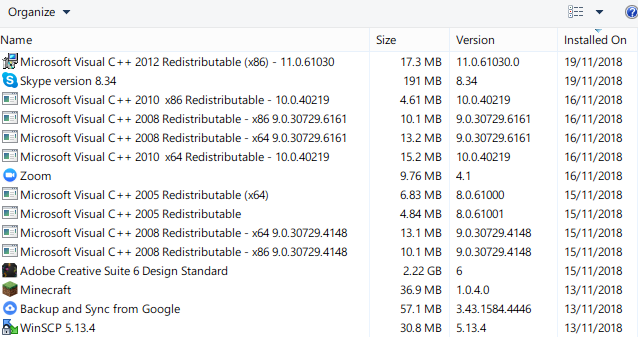
Yep it's working perfectly in service and registry mode. That's so weird, I tested it right after I installed the DirectWrite version and it wasn't working. The only thing that's changed is I installed Adobe CS6 which installed a bunch of Visual C packages ???
sammilucia
on 20 Nov 2018
So the problem is gone and everything is working flawlessly now? Even after a reboot? Everything else is still the same excepted those runtimes you installed?
snowie2000
on 20 Nov 2018
Correct.
sammilucia
on 20 Nov 2018
Oops...
snowie2000
on 20 Nov 2018
¯\_(ツ)_/¯
sammilucia
on 20 Nov 2018
Mactype is compiled dependency free, including easyhook. So installing runtimes should makes no difference.
snowie2000
on 20 Nov 2018
Yeah.... really weird... It does sound like @txbsywcq has seen the same problem though
sammilucia
on 20 Nov 2018
On my win 8.1 x86 lite version, MacType is applied to any software except centbrowser after reboot.
I wonder if it's because lacking some font file, because @sammilucia said she installed Adobe CS6, i think that will install many font to system.
txbsywcq
on 20 Nov 2018
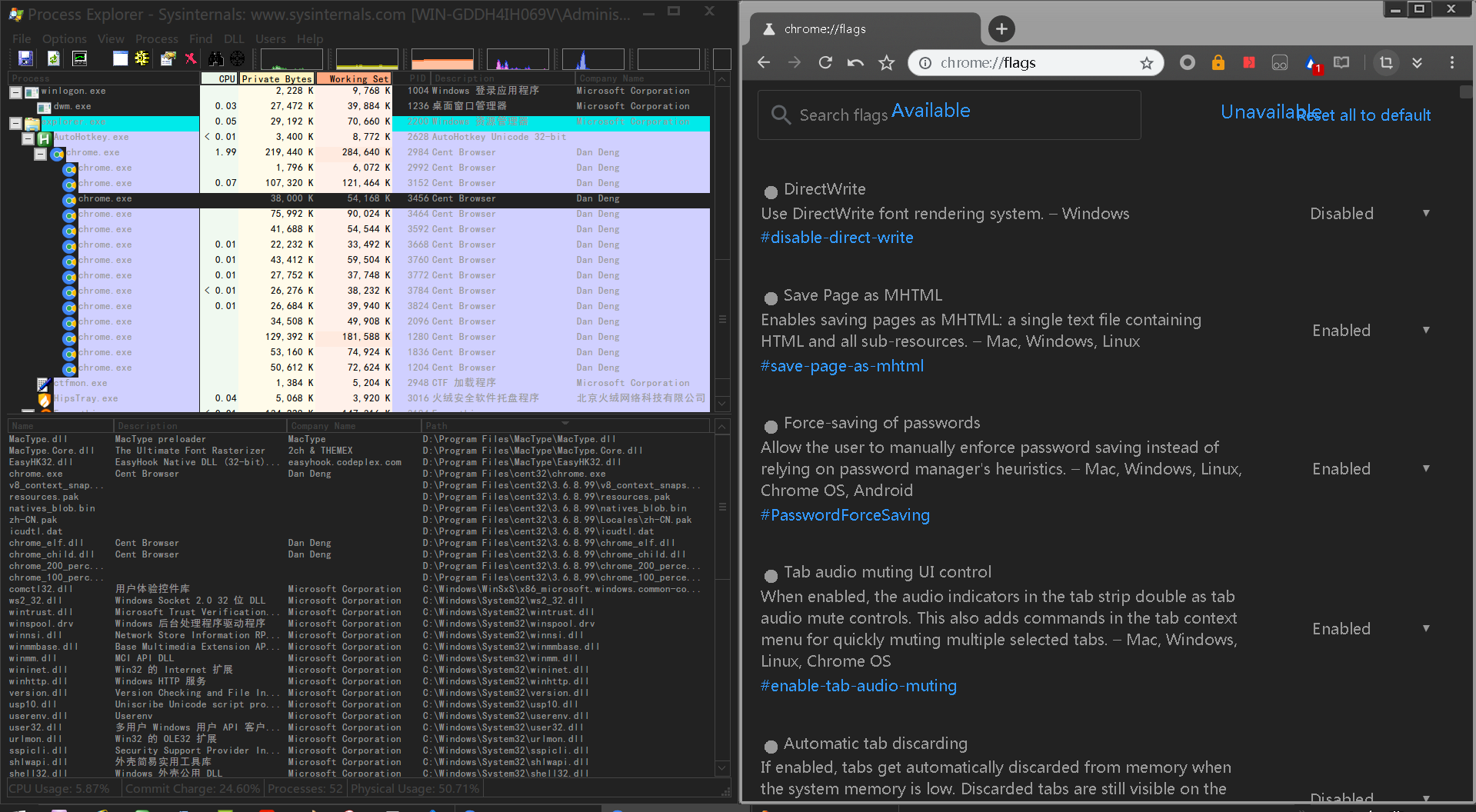
Could you please try chrome or cent browser with directwrite enabled?
snowie2000
on 20 Nov 2018
txbsywcq
on 20 Nov 2018
OK and I noticed a problem. You and @sammilucia have all turned the cleartype off. please turn it back on and try again to see if it works.
snowie2000
on 20 Nov 2018
Done, and yes it's because cleartype off.
txbsywcq
on 20 Nov 2018
So you mean it's working now?
snowie2000
on 20 Nov 2018
Yes, i reboot and mactype applied to centbrowser.
Happy!
txbsywcq
on 20 Nov 2018
Very good so we found the root of the cause. I'll check out the details tomorrow.
Thank you very much
snowie2000
on 20 Nov 2018
How do I turn cleartype on? (How did I turn it off?? 😜)
sammilucia
on 21 Nov 2018
search cleartype in control panel.
txbsywcq
on 21 Nov 2018
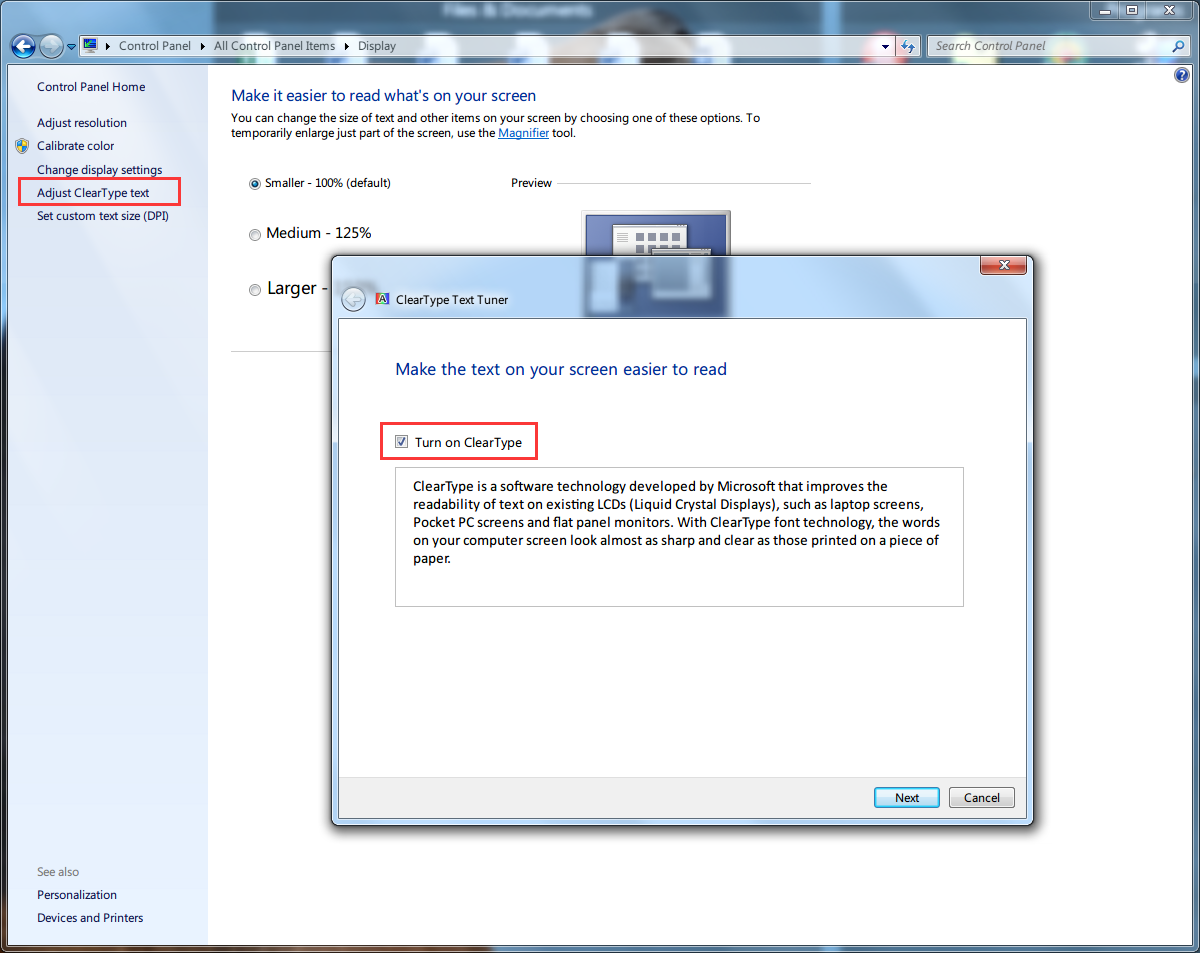
You can find cleartype tuner in the display property dialog.
snowie2000
on 21 Nov 2018
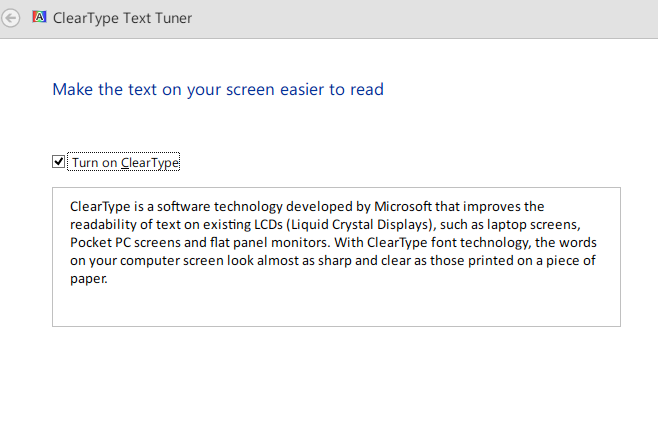
Yes I did that's why I'm confused ... Mine says its enabled
sammilucia
on 21 Nov 2018
@sammilucia That's why your Mactype is working now.
Look at the third picture here https://github.com/snowie2000/mactype/issues/441#issuecomment-428483840 and here https://github.com/snowie2000/mactype/issues/441#issuecomment-425777244, the ClearType was definitely off.
snowie2000
on 21 Nov 2018
HMMM, let me test, I'll disable, leave MacType in Registry Mode and restart.
sammilucia
on 21 Nov 2018
I tested it on Windows 10 with ClearType off, but it still works.
Maybe things are different on the latest Windows.
As far as I know, turn on/off ClearType alters the way GDI works.
Normally, all the text APIs will eventually call ExtTextOutW for final drawing, but if you turn ClearType off, some of the APIs will directly interact with the kernel and paint text without calling ExtTextOutW.
Because the way MacType works depends on this behavior, you have to keep ClearType on even it doesn't do any output.
Similar things happened to XP users before. When you didn't have a so-called Asian language support pack installed, API TextOutA/W will directly draw text out without calling ExtTextOutW. This has been fixed by hooking TextOut and redirect it to ExtTextOut.
snowie2000
on 21 Nov 2018
Ahh right!
Okay I disabled ClearType, changed to Registry Mode, restarted ... The problem appeared!
I wonder if MacWiz should enable ClearType on Windows XP - 8.1 to avoid this problem in the future?
sammilucia
on 21 Nov 2018
Of course I can, but some users just thought it's not necessary to have both MacType and ClearType turned on and decided to turn it back off.
snowie2000
on 21 Nov 2018
Maybe it just needs a warning
On Wed, 21 Nov 2018 at 18:10, snowie2000 notifications@github.com wrote:
Of course I can, but some users just thought it's not necessary to have
both MacType and ClearType turned on and decided to turn it back off.—
You are receiving this because you were mentioned.
Reply to this email directly, view it on GitHub
https://github.com/snowie2000/mactype/issues/441#issuecomment-440566800,
or mute the thread
https://github.com/notifications/unsubscribe-auth/ADJINmBZlgMqt7YZ5znNAD0TKm0FZIM5ks5uxQN8gaJpZM4XAzSm
.
sammilucia
on 21 Nov 2018
Related issues
 AhaoAile
·
7Comments
IceMan81
·
3Comments
AhaoAile
·
7Comments
IceMan81
·
3Comments
 vkyzmsj
·
4Comments
vkyzmsj
·
4Comments
 zzrcxb
·
8Comments
zzrcxb
·
8Comments
 cricrazy
·
4Comments
cricrazy
·
4Comments