Mactype: 📌Known software conflicts with MacType
A place to collect all known conflicts, e.g:
- EXE won't start
- BSOD / GSOD / CTD
- EXE starts but errors
- Completely unreadable/unusable
For minor font rendering defects, please log against #427.
Unconfirmed problems:
- Cannot Start VM with Oracle VirtualBox
- AoEDE.exe (Age of Empires - Definitive Edition, "rendering failed, displayed strangely" from #406)
- PaintDotNet.exe (suspected direct2d injection problem, from #412)
Evernote Desktop version (from #430)works correctly as at 19-Oct-2018- Telegram Desktop 1.0.29 random exceptions on Win10 (#271)
- Call of Duty 4 doesn't open with MacType enabled (#453)
Confirmed problems:
- Many anti-virus packages will block MacType injection
- Registry Mode will not work with Secure Boot enabled
Confirmed resolved:
TranslucentTB random appcrash (#210)(resolved by v1.2018.10.19-beta4)Electron apps(resolved by 2018.1-beta5)
VS Code InsidersDiscordSlackSpotify
Ableton Live 10.0.6 (see below https://github.com/snowie2000/mactype/issues/426#issuecomment-480960758, #519)works correctly as of beta6
 sammilucia
All 58 comments
Cannot Start VM with Oracle VirtualBox
 ShintakuNobuhiro
on 27 Aug 2018
ShintakuNobuhiro
on 27 Aug 2018
@ShintakuNobuhiro VM is known to be incompatible with any dll injection.
You have to add VirtualBox.exe to unloaddll section to avoid it.
 snowie2000
on 11 Sep 2018
snowie2000
on 11 Sep 2018
TranslucentTB is also affected by random crashes when MacType is injected, see https://github.com/TranslucentTB/TranslucentTB/issues/210
 sylveon
on 18 Sep 2018
sylveon
on 18 Sep 2018
UWP is always a mystery. No one knows what happened, even those Microsoft guys.
snowie2000
on 18 Sep 2018
It's not really a UWP only problem: as noted later in the thread, the desktop build experiences the same issue. Furthermore, the version distributed on the Store is just a Win32 app packaged with the Desktop Bridge (which creates an .appx file holding conventional Win32 programs).
sylveon
on 18 Sep 2018
Random crashes are really annoying for debugging.
Even it's just a wrap for Win32 app, it runs under the UWP isolated environment which is known to be affected by MacType.
snowie2000
on 18 Sep 2018
@sylveon Can you do a mini dump when this app crashes? For I don't have a Windows 10 PC for daily working, and I can't use my virtual pc for daily normal use.
snowie2000
on 18 Sep 2018
A memory dump from the desktop build (so UWP shouldn't be messing stuff) was provided in the issue, you can use it to debug.
sylveon
on 18 Sep 2018
Good, I see it. Thanks.
snowie2000
on 18 Sep 2018
@sylveon I adjusted the code a little and merged some of the assemblers from the latest Easyhook.
Let's see if it make the crash situation any better.
-- Use the one below instead --
snowie2000
on 18 Sep 2018
@snowie2000 should this be used with the 20180917 beta or it doesn't matter?
sammilucia
on 18 Sep 2018
It's version independent.
snowie2000
on 18 Sep 2018
easyhook-20180918-2.zip
Try this one instead although I believe the previous one has already fixed the problem. (I re-fixed a problem that does not exist)
snowie2000
on 18 Sep 2018
I don't have a VM to test this on, but I'll set one up when I have time, so probably this weekend (I wish that enabling Hyper-V on my machine doesn't makes it get stuck on the spinning rings)
sylveon
on 19 Sep 2018
Ok, after installing MacType in a VM, I first had issues with opening TranslucentTB's context menu, and then with opening the color picker. Never crashing at startup (unlike reported in my issue tracker).
After replacing the EasyHook DLLs, both issues where fixed.
sylveon
on 22 Sep 2018
That's really a good news.
Could you please try a little longer to see if there are any other crash issues with TranslucentTB or Windows 10 so that we can sure the bug has truly been fixed?
Thanks.
snowie2000
on 22 Sep 2018
And while there are no more crash problems with translucentTB, does MacType still have the effect on it?
snowie2000
on 22 Sep 2018
Yes, it still applies correctly. I can't do much playing around, as TranslucentTB's interface is basically just a context menu.
sylveon
on 22 Sep 2018
That's interesting as the code indicates that the problem should only occur when the hook fails. :thinking:
So you won't get locked in the Windows 10 logon screen anymore. Are you using the latest beta or just the public version I released last year with patched dlls?
snowie2000
on 22 Sep 2018
I'm using the latest Skip Ahead build, but I only use MacType (with the EasyHook dll updated by the ones on https://github.com/snowie2000/mactype/issues/426#issuecomment-422296797) by starting the tray app manually, so it doesn't applies to the lock screen.
sylveon
on 22 Sep 2018
Could you try the MacType beta version in the release section with the Registry mode? (With patched dlls of course)
Many thanks.
snowie2000
on 22 Sep 2018
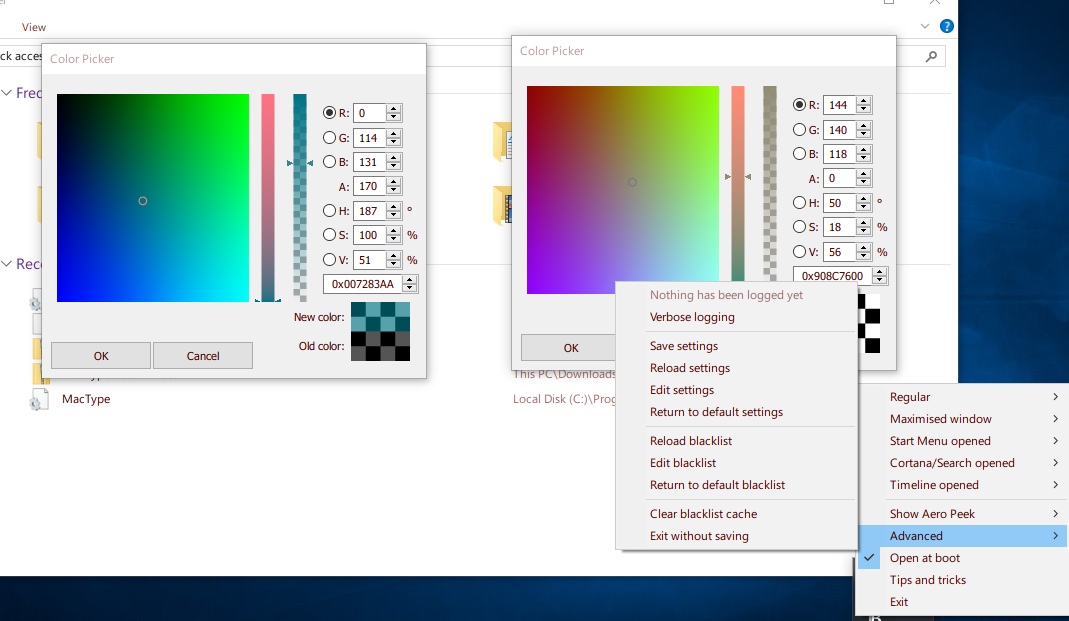
I've extracted the beta over the latest release, replaced the EasyHook dlls with the ones in this thread, ran MacWiz, set it to Registry (and created+set a profile with red text to clearly see the difference) and restarted.
I noticed it wasn't working at all, so I disabled Secure Boot for the VM because the registry mode is probably using AppInit_DLL, which is not working with Secure Boot on. After that it worked.
So far so good, nothing seems to be crashing (including TranslucentTB and the lock screen) and the text stays in an obnoxious red no matter what I try.
sylveon
on 22 Sep 2018
Yes, secure boot must be disabled for registry mode to take effect or Windows will ignore the AppInit_DLL value.
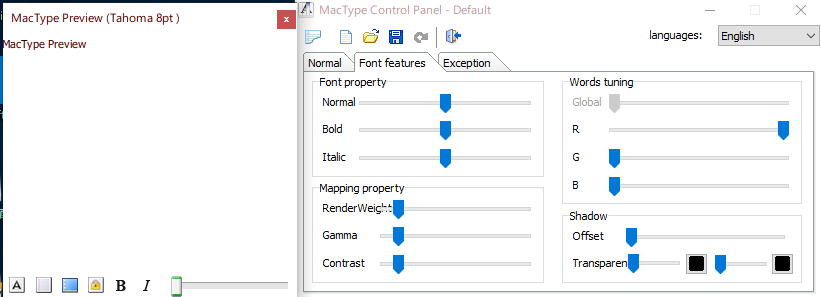
The text color is really weird. Does the weird text color appear with the old MacType too?
snowie2000
on 22 Sep 2018
That's the profile I made. It's voluntarily in a blatant red, so as to easily detect if the effect disappears just by looking at the text color.
sylveon
on 22 Sep 2018
Thanks @sylveon that reminded me - I've updated the Readme with the info about Secure Boot. Thanks so much for your work confirming TranslucentTB is working!
sammilucia
on 22 Sep 2018
@snowie2000 20180917 beta + easyhook-20180918-2 is working flawlessly for me on win8.1. I think we may have a new RC if no one has any problems. great work! 😊
sammilucia
on 22 Sep 2018
@snowie2000 20180917 beta + easyhook-20180918-2 is working flawlessly for me on win8.1. I think we may have a new RC if no one has any problems. great work!
Locked and loaded, ready to fire. :laughing:
snowie2000
on 22 Sep 2018
Can't apply MacType to VS Code Insiders 1.28.0 and Discord (both use Electron). Im starting to think this is impossible to do, any updates on compatibility with Chrome/Chromium? Any secret flags?
 justablob
on 28 Sep 2018
justablob
on 28 Sep 2018
You can enable DirectWrite basic support through directive, but it's still very primitive.
snowie2000
on 30 Sep 2018
The new COD wont launch with MacType enabled lol.
 Plaer1
on 17 Oct 2018
Plaer1
on 17 Oct 2018
@snowie2000 regarding some Java apps (IDEA, etc.) and some games e.g. CoD4 maybe we should develop a standard list of apps to be added to the exclusions, and clipboxfix.
I'm not talking about directwrite apps, just apps that don't work because they don't do fonts properly so MacType either needs to be disabled or the clipbox workaround.
sammilucia
on 19 Oct 2018
@sammilucia Maybe we could build a "cloud" app list that needs special treatment. :smile:
snowie2000
on 19 Oct 2018
haha
sammilucia
on 19 Oct 2018
Windows 10 built-in Mail app crashes either on loading or soon after with MacType enabled. What mode do I run it in to disable it for certain apps?
 guytanium
on 26 Jan 2019
guytanium
on 26 Jan 2019
What you should do is to disable the directwrite support.
snowie2000
on 26 Jan 2019
If you're still using the old version, not the beta 5 please upgrade
snowie2000
on 26 Jan 2019
If you're still using the old version, not the beta 5 please upgrade
Sorry I was on the old version. Thankyou that fixed my issue.
guytanium
on 26 Jan 2019
Forza Horizon 4 can't launch with MacType beta-5 with Windows 10 Version 1809.
Fix:Change to standalone mode and exclude Forza Horizon 4 in the process manager.
(I'm Japanese. I used Google Translate. Sorry.)
ShintakuNobuhiro
on 26 Jan 2019
If you can't start the game with it in the exclude list, please add it to the unloaddll list as MacType will still be injected into the process when it is "excluded"
snowie2000
on 26 Jan 2019
If you can't start the game with it in the exclude list, please add it to the unloaddll list as MacType will still be injected into the process when it is "excluded"
Add ForzaHorizon4.exe to the unloaddll list works in 2018_1019_beta4r2 with Windows 10 Version 1809, but not work in 2018.1-beta5. Forza Horizon 4 still can't launch after I add it to the unloaddll list.
I found a workaround, I add svchost.exe in unloaddll list and Forza Horizon 4 start.
 114514hon
on 10 Feb 2019
114514hon
on 10 Feb 2019
MacType is conflict with VirtualBox (starting from 5.0), and you need to whitelist VirtualBox, otherwise every virtual machines won't start.
 GNU-Linuxer
on 21 Feb 2019
GNU-Linuxer
on 21 Feb 2019
In the Windows 10 1809 release, the MacType 2018.1-beta5 EasyHK64.dll module conflicts with Taskmgr.exe, the dump log shows attempting to read and write virtual addresses, but no permissions.
 Stzx
on 5 Apr 2019
Stzx
on 5 Apr 2019
That will be very helpful if you can upload the dump log.
snowie2000
on 5 Apr 2019
This seems to occur with Ableton Live 10's Ableton Index.exe and Ableton Web Connector.exe with the newest version (2018.1-beta5). I uploaded the minidumps to Mega (too big for github, over 10MB):
https://mega.nz/#!P1YjkKbZ!dgIZG8lhZpVWsQZ3uFuYP5C9Gn3tr4EEuYtxLpNzdCQ
Adding them to the UnloadDll section of MacType.ini doesn't fix the issue.
 w-biggs
on 8 Apr 2019
w-biggs
on 8 Apr 2019
Hi @w-biggs, could you please also try the latest Live beta (10.1b18) as they've made a lot of fixes to the font rendering and I have not had this problem since updating.
You can sign up here https://www.ableton.com/en/beta/.. You can install the beta separately if you depend on Live for production.
Thank you
sammilucia
on 9 Apr 2019
I actually already am a part of the beta, I just didn't have it installed - and it works! Odd. It's probably still worth looking at why the crashing occurred, but this definitely works as a workaround.
w-biggs
on 9 Apr 2019
This seems to occur with Ableton Live 10's
Ableton Index.exeandAbleton Web Connector.exewith the newest version (2018.1-beta5). I uploaded the minidumps to Mega (too big for github, over 10MB):https://mega.nz/#!P1YjkKbZ!dgIZG8lhZpVWsQZ3uFuYP5C9Gn3tr4EEuYtxLpNzdCQ
Adding them to the
UnloadDllsection ofMacType.inidoesn't fix the issue.
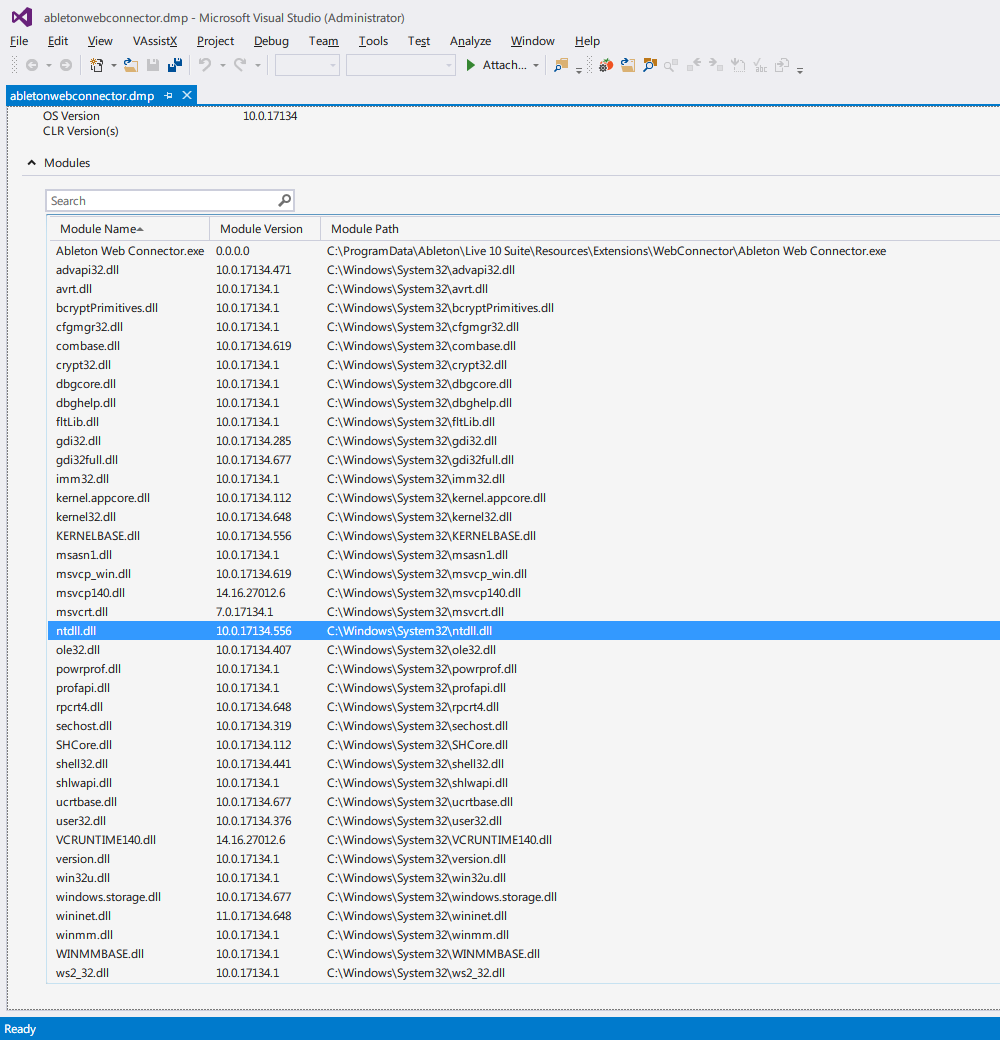
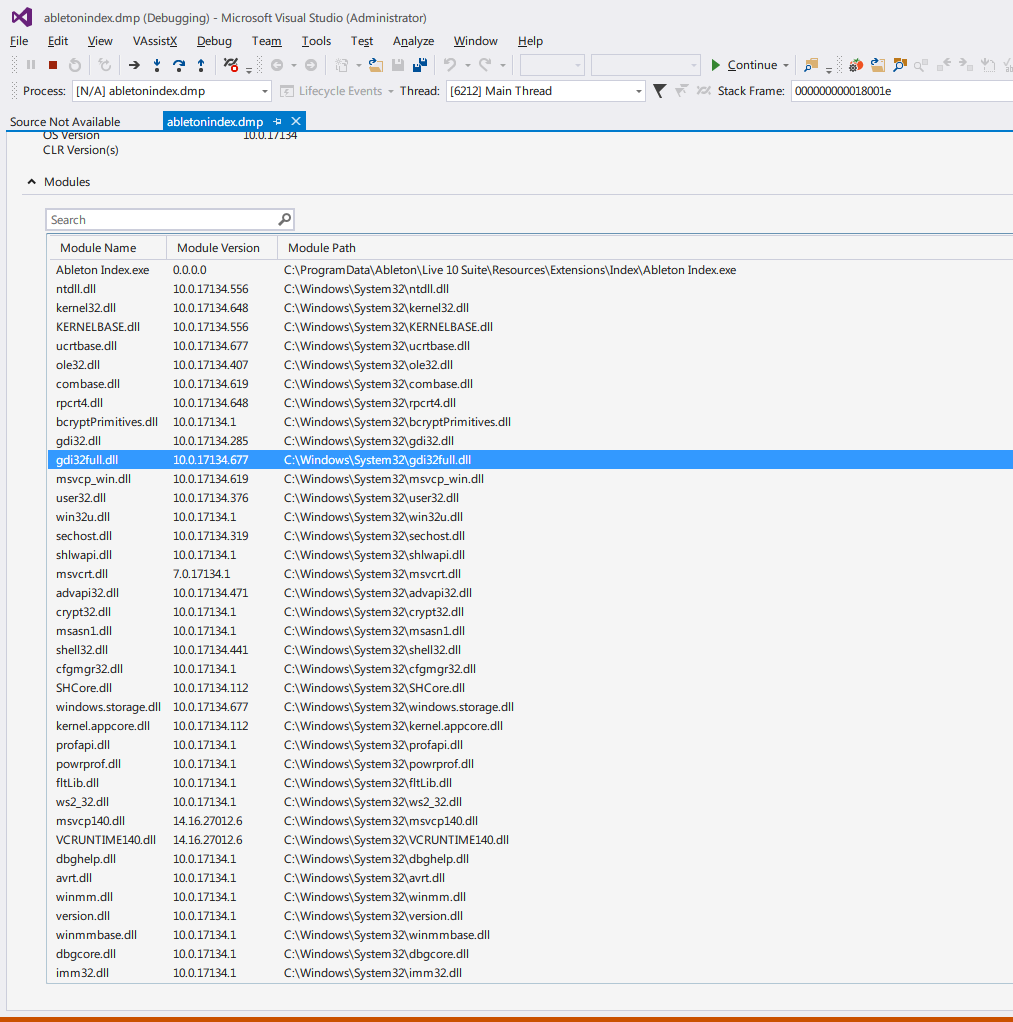
Thank you for mini dump.
As we can see from your dump, none of the MacType component (core, easyhook) had been loaded into the ableton indexer and connector. So I really have no idea why it didn't start.
snowie2000
on 9 Apr 2019
There is however another possibility that the problem was about the program which spawned the indexer.
Try to disable the option HookChildProcesses and remove abelton from the unloaddll section, and try again to see if the indexer could back to work.
snowie2000
on 9 Apr 2019
HookChildProcesses=0 didn't help fix the issue either unfortunately. From what I can tell from analyzing the minidumps (I'm not an expert at this so I could be misinterpreting it) MacType seems to be using or overwriting some memory that Ableton is trying to access, which is throwing the following error:
EXCEPTION_RECORD:  (.exr -1)
ExceptionAddress: 00007ff9c785db00
   ExceptionCode: c0000005 (Access violation)
  ExceptionFlags: 00000000
NumberParameters: 2
   Parameter[0]: 0000000000000008
   Parameter[1]: 00007ff9c785db00
Attempt to execute non-executable address 00007ff9c785db00
This same exact error is occurring with both the Indexer and Web Connector.
It's definitely related to MacType - disabling MacType altogether causes the issue to go away - but excluding the Ableton, Ableton Indexer, or Ableton Web Connector exes doesn't seem to fix the issue.
Let me know if there's anything more I can do to help debug this.
w-biggs
on 9 Apr 2019
Or it's related to Ableton 😉. Can you try Ableton beta 10.1.b18 please?
On Wed., 10 Apr. 2019, 00:43 W Biggs, notifications@github.com wrote:
HookChildProcesses=0 didn't help fix the issue either unfortunately. From
what I can tell from analyzing the minidumps (I'm not an expert at this so
I could be misinterpreting it) MacType seems to be using some memory that
the Indexer is trying to access, which is throwing the following error:ExceptionAddress: 00007ff9c785db00
ExceptionCode: c0000005 (Access violation)
ExceptionFlags: 00000000
NumberParameters: 2
Parameter[0]: 0000000000000008
Parameter[1]: 00007ff9c785db00
Attempt to execute non-executable address 00007ff9c785db00```It's definitely related to MacType - disabling MacType altogether causes the issue to go away - but excluding the Ableton, Ableton Indexer, or Ableton Web Connector exes doesn't seem to fix the issue.
Let me know if there's anything more I can do to help debug this.
—
You are receiving this because you were mentioned.
Reply to this email directly, view it on GitHub
https://github.com/snowie2000/mactype/issues/426#issuecomment-481307342,
or mute the thread
https://github.com/notifications/unsubscribe-auth/ADJINvJyBe6cLEC9LC_EwwoOnuRmzRTXks5vfLUngaJpZM4WD0tI
.
sammilucia
on 10 Apr 2019
As I noted in https://github.com/snowie2000/mactype/issues/426#issuecomment-481078258, the beta does work. I'm not sure why, though, as the crash doesn't seem to be due to font rendering, but by both processes trying to use the same memory somehow (I think). I figured it was still worth investigating the cause of the issue, since this specific issue may not be limited to Ableton.
w-biggs
on 10 Apr 2019
Hmm, Ableton did a lot of work to the font engine in this release,
including masses of bug fixes, and it's a very custom interface. I think if
we haven't seen this problem by now with other software we should close
this as Ableton using invalid memory space. However the final call is up to
@snowie2000
On Wed., 10 Apr. 2019, 22:29 W Biggs, notifications@github.com wrote:
As I noted in #426 (comment)
https://github.com/snowie2000/mactype/issues/426#issuecomment-481078258,
the beta does work. I'm not sure why, though, as the crash doesn't seem to
be due to font rendering, but by both processes trying to use the same
memory somehow (I think). I figured it was still worth investigating the
cause of the issue, since this specific issue may not be limited to Ableton.—
You are receiving this because you were mentioned.
Reply to this email directly, view it on GitHub
https://github.com/snowie2000/mactype/issues/426#issuecomment-481690993,
or mute the thread
https://github.com/notifications/unsubscribe-auth/ADJINgJyumHeJNjws0r2gF-1cj-hTZbJks5vfecegaJpZM4WD0tI
.
sammilucia
on 10 Apr 2019
I’ll try my best to replicate this issue on my system. I’m quite a bit busy these days so I have to push it to the next month I think.
snowie2000
on 10 Apr 2019
I knew I delayed a lot of things especially the development of the Mactype. It’s just that I’m super busy these months and I’ve got a lot of work from my company and I had to make them come true first. I’m very sorry for that.
snowie2000
on 10 Apr 2019
I would suggest forget the issue with Ableton @snowie2000, and focus on
other parts of MacType. Ableton have fixed the issue and they're about to
launch the new version - so no point.
On Wed., 10 Apr. 2019, 22:28 snowie2000, notifications@github.com wrote:
I knew I delayed a lot of things especially the development of the
Mactype. It’s just that I’m super busy these months and I’ve got a lot of
work from my company and I had to make them come true first. I’m very sorry
for that.—
You are receiving this because you were mentioned.
Reply to this email directly, view it on GitHub
https://github.com/snowie2000/mactype/issues/426#issuecomment-481714351,
or mute the thread
https://github.com/notifications/unsubscribe-auth/ADJINhVlc8ZjgkMnWnj9Fj33RUymfL-5ks5vffUDgaJpZM4WD0tI
.
sammilucia
on 11 Apr 2019
Electron apps are now working correctly - though they're rendered with DirectWrite, you are still able to modify their rendering using MacType Beta5's DirectWrite parameters.
sammilucia
on 24 Apr 2019
Modern Warfare ( includes earlier games in CoD ) conflicts with MacType 2019.1-beta6.
Relative link:
http://unote.hatenablog.com/entry/20161116/1479326383
 Mahayu
on 30 Mar 2020
Mahayu
on 30 Mar 2020
Modern Warfare ( includes earlier games in CoD ) conflicts with MacType 2019.1-beta6.
Relative link:
Don’t use Mactype on games. Simply unload them.
For games,
- I don’t have the game your mentioned.
- Even if I have, my computer is not powerful enough to run those modern games.
- Even if my computer is powerful enough, I can’t debug those games cuz they all have kinda of anti-debug system built in which prevent regular debugger to attach and debug. And they don’t give you a chance to see the crash log most of the time.
Conclusion: unload them.
snowie2000
on 30 Mar 2020
Related issues
 caulmseh
·
3Comments
caulmseh
·
3Comments
 kiravi
·
8Comments
kiravi
·
8Comments
 CHN-STUDENT
·
3Comments
CHN-STUDENT
·
3Comments
 AhaoAile
·
7Comments
AhaoAile
·
7Comments
 TianLi-520
·
3Comments
TianLi-520
·
3Comments
Most helpful comment
That's the profile I made. It's voluntarily in a blatant red, so as to easily detect if the effect disappears just by looking at the text color.