Mactype: Problem with horizontal lines using latest mactype
Hey there folks, I'm using the latest mactype 1.17.0628 on a 64bit Windows 10 ver. 1709. The ini I'm using is the "LCD.W7.默认字体.仿Mac.ini".
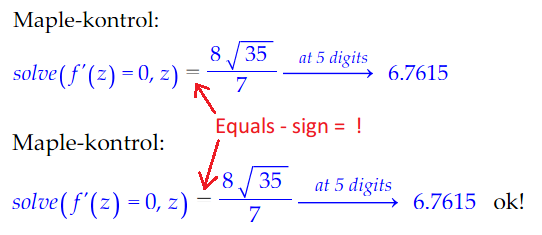
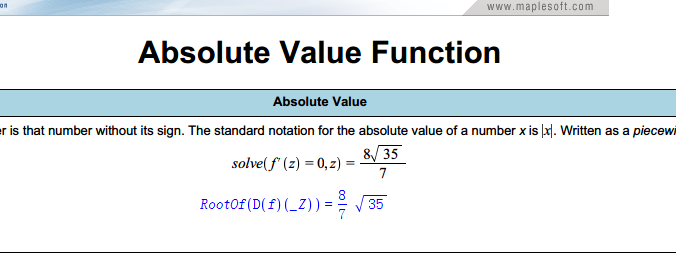
We use the Mathematics program "Maple" extensively at my workplace, and - depending on the zoom used on the screen - the equals signs become illegible, ie. the second of the 2 horizontal lines fades away. As you might expect, this can pose a problem when showing my students how to solve a problem in Maple...
- I can't disable mactype for Maple, because the fonts then look hideous.
- I won't use another ini, as this one suits my preferences for the rest of my work on this computer perfectly.
- It would be a huge help if the equals sign is legible for all zoom factors.
So my question: is there a particular setting in the ini file I can tinker with to make the equals signs more legible?
Thanks in advance
Matthew A.
 matthewadamsdk
All 10 comments
Actually, I don't know how to use this software, but looks like it's working fine in my beta test version and I think you could get your equal mark back with clipboxfix=1
 snowie2000
on 18 Apr 2018
snowie2000
on 18 Apr 2018
Thanks a lot for your reply - I haven't seen the clipboxfix option before. I'll give it a try. 😊
matthewadamsdk
on 18 Apr 2018
@snowie2000 Would be more than happy to test your Beta build.
 IceMan81
on 19 Apr 2018
IceMan81
on 19 Apr 2018
I tried really hard to make new clipboxfix implementation compatible with every application and now I have to say, some programs are born to be not compatible with this option.
They simply arrange text layout strictly with clip box of every letter and character. Any tiny change of clip box will affect their display. You can't maintain the clipbox of the font unchanged while you want your font display unhinted.
Yes, I'm talking about "Wolfram Mathematica". And there should be plenty of them.
Anyway, I'll still deliver the new implementation in the new release for it at least increased its effective range, but I wonder if I should set it enabled as the default option.
snowie2000
on 20 Apr 2018
@snowie2000 Are you saying that the new implementation will be better than the existing one but there will still be a bunch of programs that are going to have clipped fonts?
IceMan81
on 20 Apr 2018
I meant to create a solution that fits all scenarios. It will fix the font clip problem while maintaining its compatibility. But looks like it is not gonna happen anytime soon or it is impossible from the beginning.
Fonts will, of course, be clipped if the option is off as what it is right now. If the option is on, fonts won't get clipped, but some of the programs will have unexpected behavior.
As far as I know, the program "Wolfram Mathematica" will have a taller line gap than it should be as stated in issue #151. While other programs I tested so far behavior normally, there is really no guarantee.
snowie2000
on 20 Apr 2018
And text actually not just got clipped on top and bottom, it also got clipped on left and right.
See image in this issue #282.
Currently, MacType only enlarges the Y value of API GetGlyphOuline, I don't know what will be the impact to other programs if I modify the X value at the same time.
snowie2000
on 20 Apr 2018
Ah yes, you are referring to the issue I had with PragmatPro ligatures!
I'll be more than happy to test your new impl when you are ready with it.
IceMan81
on 20 Apr 2018
I'm having the same problem in matlab
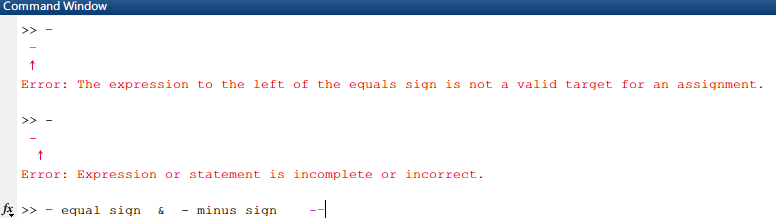
clipboxfix didn't work for me, edited mactype.ini and default profile.
 rudolphos
on 8 May 2018
rudolphos
on 8 May 2018
I really want to help, but Matlab is real real real too big for me to install (over 18GB for installation+ over 9GB for installer).
Sorry for that. :crying_cat_face:
snowie2000
on 10 May 2018
Related issues
 l19980623
·
5Comments
l19980623
·
5Comments
 Skyyblaze
·
5Comments
Skyyblaze
·
5Comments
 zzrcxb
·
8Comments
zzrcxb
·
8Comments
 vkyzmsj
·
4Comments
vkyzmsj
·
4Comments
 kyler719
·
4Comments
kyler719
·
4Comments
Most helpful comment
Actually, I don't know how to use this software, but looks like it's working fine in my beta test version and I think you could get your equal mark back with clipboxfix=1
