Mactype: Render problem in JetBrain IDEs (eg. WebStorm)
After installing the latest version (2017/6/28) of MacType, the font in JetBrains IDEs renders abnormal.
But the previous version of MacType is OK (2016/9/2).
Situation
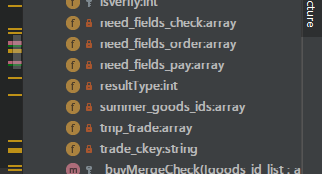
The top of every character was cut (especially Courier New).
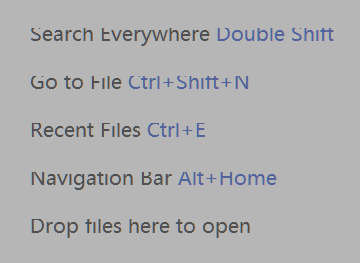
My WebStorm IDE
Build #WS-172.3544.34, built on July 31, 2017
JRE: 1.8.0_152-release-915-b6 amd64
JVM: OpenJDK 64-Bit Server VM by JetBrains s.r.o
Windows 10 10.0.14393
 AnClark
All 19 comments
Me too
Phpstorm2017.2.1
 lepig
on 21 Aug 2017
lepig
on 21 Aug 2017
281
That may help you.
 Mahayu
on 22 Aug 2017
Mahayu
on 22 Aug 2017
https://github.com/snowie2000/mactype/issues/313#issuecomment-312309772
Written in Chinese, but not hard to understand the code.
 snowie2000
on 25 Aug 2017
snowie2000
on 25 Aug 2017
OK, thanks a lot. Those threads work well.
AnClark
on 25 Aug 2017
But my advice is to support JetBrains IDE with a patch distributed together with the latest release of MacType.
AnClark
on 25 Aug 2017
But my advice is to support JetBrains IDE with a patch distributed together with the latest release of MacType.
Well, my suggestion is making a better version of clipboxfix so that it can be turn on by default :smiley:
snowie2000
on 25 Aug 2017
Yeah, waiting for a better release. Cheers!
AnClark
on 25 Aug 2017
thanks snowie!
 NeKJ
on 25 Aug 2017
NeKJ
on 25 Aug 2017
@AnClark @lePig @Nek80 I believe this issue is fixed wit the latest build, can you please let me know if it's working for you now?
 sammilucia
on 1 Oct 2018
sammilucia
on 1 Oct 2018
OK, I will install the latest build soon.
Uh-oh, my current version is the newest one with customized "clipboxfix" to all the JetBrains softwares... Should I remove those "clipboxfixes"?
AnClark
on 2 Oct 2018
@snowie2000 is away for a few days ... just rename any files you replace so you can put them back if you need. This will tell us where the problem is either way for when he gets back 😊
sammilucia
on 3 Oct 2018
The problem still exists in other apps based on Java. (e.g. Logisim)
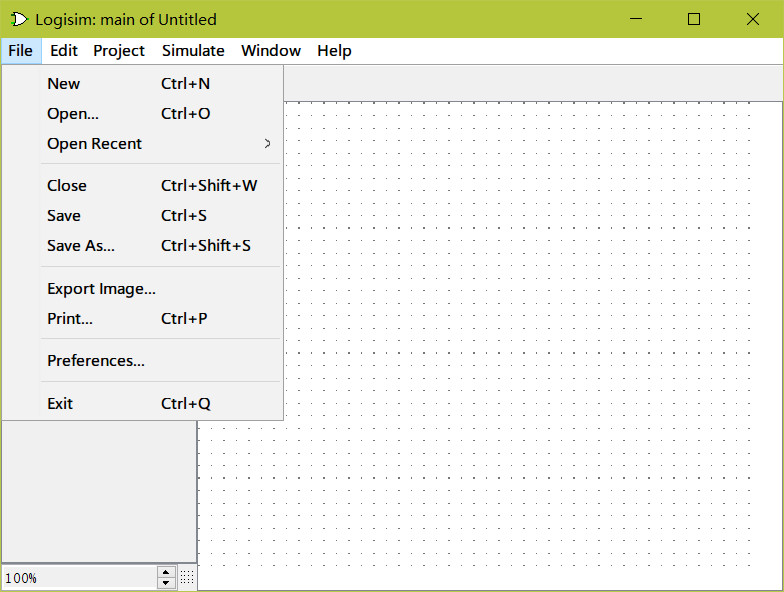
AnClark
on 5 Oct 2018
@AnClark This is because you're using a HiDPI display with about 200% scale up (I guess), I'll adjust some parameters to better fit it.
snowie2000
on 7 Oct 2018
Hi @AnClark, this should be resolved in beta4 just released 😊 https://github.com/snowie2000/mactype/releases/tag/v1.2018.10.19-beta4 can you please give it a go and let us know how you go?
sammilucia
on 19 Oct 2018
OK! I will have a try.
AnClark
on 20 Oct 2018
The former release is installed with Windows Installer, but your latest release is using NSIS instead. It may occur some compatibility issues.
AnClark
on 20 Oct 2018
This new installer will uninstall all the previous ones so there should be no problems in theory.
snowie2000
on 20 Oct 2018
Hi @AnClark ... yes it's not NSIS. It will uninstall the old installer and do its own cleanup. There's nothing to worry about - I've thought of everything!! 😊 Just run it and let it do it's magic
In the extremely rare case where I haven't thought of everything, just let me know and I'll fix it 😊
sammilucia
on 20 Oct 2018
New issue: In Registry Mode, MacType cannot automatically apply to all programs (e.g. Explorer), and DirectWrite hack doesn't work. I will go back to the last stable one.
Also I discovered that the two versions didn't use the same installer, causing ↓
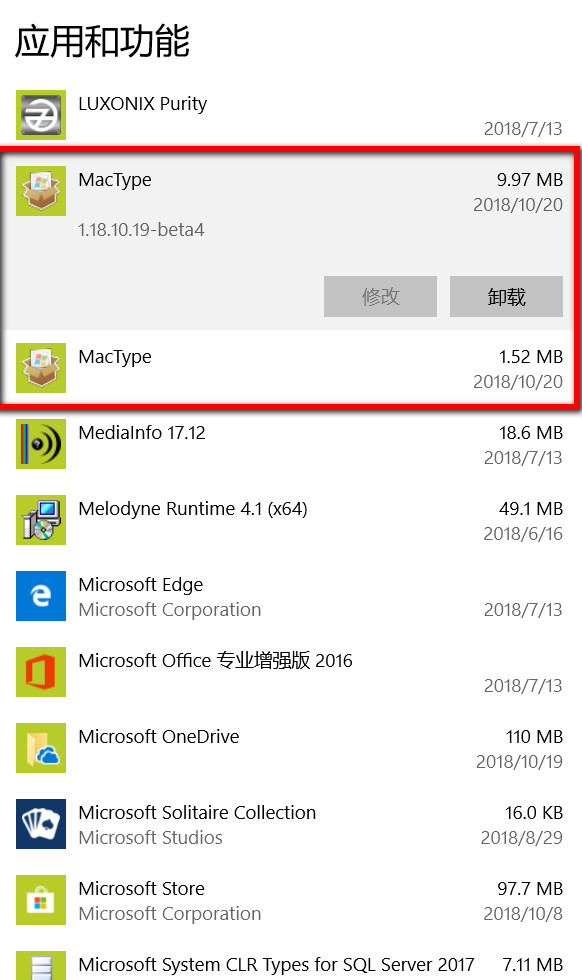
AnClark
on 20 Oct 2018
Related issues
snowie2000
·
4Comments
 Skyyblaze
·
5Comments
Skyyblaze
·
5Comments
 TianLi-520
·
3Comments
TianLi-520
·
3Comments
 AhaoAile
·
7Comments
AhaoAile
·
7Comments
 caulmseh
·
3Comments
caulmseh
·
3Comments
Most helpful comment
Well, my suggestion is making a better version of clipboxfix so that it can be turn on by default :smiley: