Mactype: MacType causing random slient crash on Telegram Desktop
Version: Windows 10 1703 15063.138, MacType 1.2016.904.0 with CTP_170307_W10 patch
Configration: Tray loading, Config file
Telegram Desktop 1.0.29 (both installer version and UWP store version) crashes randomly.

 Jamesits
All 55 comments
Hi @Jamesits. Sorry we missed this issue.
Thank you for reporting this issue, can you please confirm whether the latest version fo MacType is working in Pinegrow http://www.mactype.net/station/Release/MacTypeInstaller_2017_0628_0.exe
or you can try the newer .dll files here http://www.mactype.net/station/MacType_CTP_171017.rar.
Please also note the Important notice! in the readme here: https://github.com/snowie2000/mactype
 sammilucia
on 28 Aug 2018
sammilucia
on 28 Aug 2018
Cannot reproduce on 1.2017.628.0.
Jamesits
on 28 Aug 2018
Thanks so much @Jamesits 😊
Closing as resolved
sammilucia
on 28 Aug 2018
Actually this is still happening. I'm just used to the random crashes. Today I reinstalled my OS and without MacType, Unigram stopped crashing randomly.
Jamesits
on 10 Sep 2018
Thanks for your additional diagnostic work @Jamesits and for letting me know. I've added this to the list of known problems in #426. Since you've reinstalled Windows and the problem doesn't exist without MacType I've added it as a confirmed problem.
Have you tried just ignoring the exceptions and continuing running Telegram? Does it continue to work properly (other than the exceptions)?
sammilucia
on 11 Sep 2018
I've switched to Unigram (a 3rd party Telegram UWP impl) and it is affected too. I'm doing more experiments.
Jamesits
on 11 Sep 2018
It seems MacType is causing issues with all UWP programs written in WinRT XAML. Microsoft Edge randomly stopped responding (not responsive to all click events, but scrolling works fine; unable to recover webpage) after enabling it.
MacType version: 1.2017.628.0
MacTray version: 1.0.5.2048
MacTuner version: 1.0.2.350
Jamesits
on 11 Sep 2018
Microsoft has reported to me a lot of crash issues (with bug reports pointing to easyhook), however, because they only collect basic stack traces instead of memory dumps, although I identified the specific line of the crash, it doesn't seem to be possible to crash at that line.
And I tried mactype on Windows 10, trying to reproduce some of the key API calls that cause the crash with no luck.
I reported the problem back to Microsoft and that's all for now. They said they will reach me again once their technical guys work it out, but they didn't.
 snowie2000
on 11 Sep 2018
snowie2000
on 11 Sep 2018
@Jamesits can you please try the latest beta https://github.com/snowie2000/mactype/releases/tag/1.2018.917.0-beta2 which has an updated EasyHook and let us know if the problem still occurs? Ty 😊
sammilucia
on 22 Sep 2018
@sammilucia The new beta version caused more halts on UWP apps than any version before... I experienced Explorer/Start menu stopped responding, Explorer failed to initialize taskbar, and Edge rendering process failure after minutes enabling the new version. Tried rebooting but nothing changes. I wanted to debug some processes but VS2017 is affected too. Can you give me some guidance on how to at least record a debug trace? I have no idea now.
Jamesits
on 23 Sep 2018
@Jamesits What loading mode are you using?
If you're using registry mode, try other modes instead as they offer an easier way to enable MacType for a single process so that you can do memory dump or things like that.
To create memory dumps for crashed applications, you can try methods mentioned in this thread:
https://stackoverflow.com/questions/30121822/how-to-generate-windows-memory-dump-when-application-crashes
snowie2000
on 23 Sep 2018
Plus, please disable mactype-patch before going any further as it will bring more uncertainty to problems.
snowie2000
on 23 Sep 2018
@snowie2000 I'm always using tray (standard) loading mode without Admin privileges. I haven't used mactype-patch.
Thanks for the hint on getting a dump, but I need a way to debug the system when most windows are not responding or just inoperable...
Jamesits
on 23 Sep 2018
@Jamesits thanks for baring with us thru this... Three questions just to eliminate some things:
- Have you tried a clean install of MacType following the beta2 instructions (https://github.com/snowie2000/mactype/releases)?
- Can you please try a plain ini like the attached
No Hinting.zip - Just for clarity, does everything stop responding only when UWP is running ... or even when UWP is not running?
sammilucia
on 23 Sep 2018
@Jamesits Please try tray mode with admin priviledge as the tray mode w/o admin priviledge is not well tested.
snowie2000
on 23 Sep 2018
One more hint.
To debug when everything is inoperable, just add vs2017 and taskmgr to unloaddll list so that you always have a change to call out the task manager and start vs from there.
snowie2000
on 23 Sep 2018
@sammilucia
This is a clean install. The OS is recently reinstalled (I formatted the disk because the filesystem failed, so there should be no problems from Windows upgrade process), and this is the first time this OS had MacType installed.
Tried the no hinting config:
- MacType tray immediately stopped responding
- Explorer restarts every few seconds
- Edge reports the page renderer process stopped responding; switching tabs not possible
- Task Manager seems to be working fine
- I didn't notice mouse input problems (When using my own config, the mouse stopped moving every few seconds)
- At least some UWP applications stopped working for me. I don't know how to eliminate every UWP program in this version of Windows 10 since the explorer is part UWP.
Jamesits
on 23 Sep 2018
If you eventually failed to debug it yourself, please check your eventlog and see if there is anything meaningful there.
snowie2000
on 23 Sep 2018
Now on tray loading w/ admin privilege.
The explorer will crash once and restart itself.
Faulting application name: Explorer.EXE, version: 10.0.17134.165, time stamp: 0x4031a9f8
Faulting module name: ntdll.dll, version: 10.0.17134.254, time stamp: 0xa5a334d4
Exception code: 0xc00000fd
Fault offset: 0x0000000000012f28
Faulting process id: 0x18ec
Faulting application start time: 0x01d4534f3908adb2
Faulting application path: C:\Windows\Explorer.EXE
Faulting module path: C:\Windows\SYSTEM32\ntdll.dll
Report Id: 1241a2a8-b670-40d5-809f-b88b0b53da7b
Faulting package full name:
Faulting package-relative application ID:
The edge tab on the front when tray is started will hang.
The program MicrosoftEdgeCP.exe version 11.0.17134.48 stopped interacting with Windows and was closed. To see if more information about the problem is available, check the problem history in the Security and Maintenance control panel.
 Process ID: 37ec
 Start Time: 01d4534f449d27b5
 Termination Time: 8
 Application Path: C:\Windows\SystemApps\Microsoft.MicrosoftEdge_8wekyb3d8bbwe\MicrosoftEdgeCP.exe
 Report Id: c70741a7-3aab-4a2a-8916-6fbea7b27f67
 Faulting package full name: Microsoft.MicrosoftEdge_42.17134.1.0_neutral__8wekyb3d8bbwe
 Faulting package-relative application ID: ContentProcess
Every few seconds the mouse stopped moving for ~0.1s.
I guess the tray is in a deadlock or something so it stopped hooking other new processes. This explains why other UWP processes didn't fail.
FYI, I'm at Windows 10 1803 17134.285 now.
Jamesits
on 23 Sep 2018
Looks like the crash report is not anything useful at all. A memory dump is necessary then.
Also, according to the screenshot you provided in your first post, mactype is faulty before it loads its substantial part into the telegram.
snowie2000
on 23 Sep 2018
What's so strange is others don't seem to be having this issue (?), something may be different or unique on your Windows, so thanks for working thru this @Jamesits it's really helpful
sammilucia
on 23 Sep 2018
@sammilucia I think maybe because I have one 100% and one 200% screen connected? I'll fire up a VM and see if I can reproduce this problem.
(Have to go to a business trip, expect my result after a week :)
Jamesits
on 24 Sep 2018
@Jamesits it could well be!
Diagnostically;
- if something was working and it stopped - something changed
- if it never worked for you but works for everyone else - something's different / unique
Find that thing and we've found the root cause!
All the best on the trip! 😊
sammilucia
on 24 Sep 2018
@Jamesits You can try to only overwrite easyhook of the old install with the patched one to see if the crash persists.
Have a good day on your trip!
snowie2000
on 25 Sep 2018
Hi @Jamesits, can you please try the new beta4 https://github.com/snowie2000/mactype/releases/tag/v1.2018.10.19-beta4 and let us know if the problem is resolved. This includes the changes to easyhook.
sammilucia
on 19 Oct 2018
@sammilucia With the new version it seems doesn't work at all. The fonts are not being substituted.
Also when setting FontLink=1:
Not a config issue, but the MacTray.exe has a lot of problems in the first few minutes.
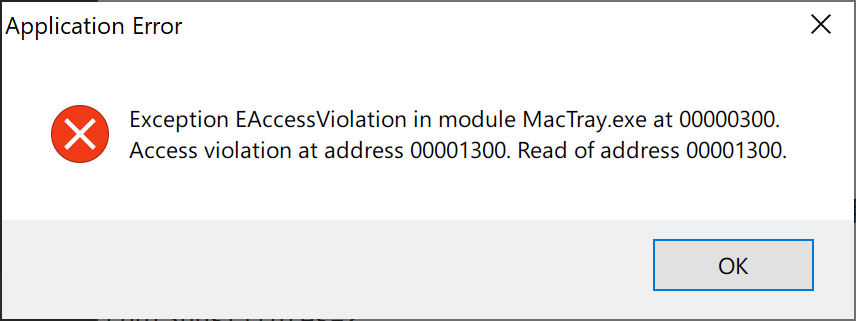
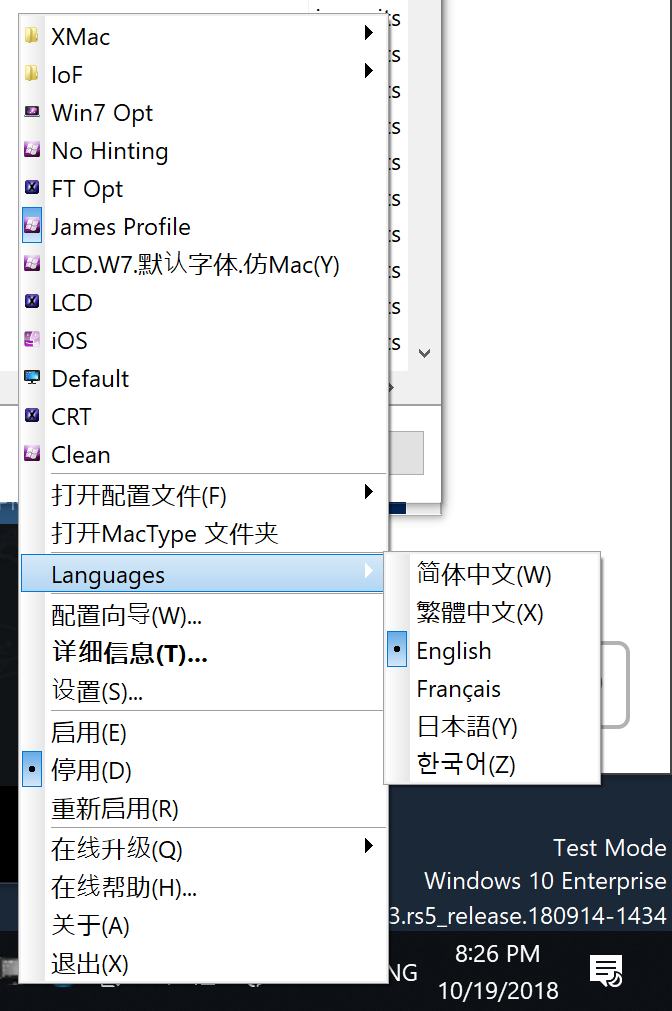
And there seems to be more problems regarding to the MacTray.exe. Sometimes the language config doesn't work (UI become Chinese), sometimes more access violation dialogs.
Jamesits
on 19 Oct 2018
More about the language issue:
Jamesits
on 19 Oct 2018
Ok, I think you need to grant full control permission to "everyone" to the installation folder.
snowie2000
on 19 Oct 2018
@snowie2000 granted. Now I can start via MacTray which I think have no actual use, and I cannot either stop, restart. Quitting MacTray after started will cause it to stop responding. I think something's wrong while starting.
Jamesits
on 19 Oct 2018
Did you run mactype as administrator?
If not, try it.
snowie2000
on 19 Oct 2018
@snowie2000 Tried running as Administrator.
Before launching MS Edge:
- Can start/stop/restart
- At least some fonts are being substituted (notably the IME and MacTray details dialog; but font of MacTray context menu is not substituted)
- DirectWrite not working at all (enabled in config)
After launching MS Edge:
- MacTray stopped responding
- Edge render processes stopped responding at the first frame they draw
Jamesits
on 19 Oct 2018
Interesting result as the DirectWrite hasn't been modified at all.
snowie2000
on 19 Oct 2018
Please disable dw support to see if mactray still stops responding after the launch of Edge.
Thank you.
snowie2000
on 19 Oct 2018
- Can start
- Can stop, though a little bit slow (responds ~30s later)
- Can quit, but will still kill one or two edge render process
- Font substitution still only working for limited dialogs
Jamesits
on 19 Oct 2018
I may need to set up a win10 VM to test all the problems next monday.
Could you please try to extract the old mactray.exe from 2017.628 to see if can work with the new dlls correctly? So we can narrow down the problem to mactype or just the tray app.
snowie2000
on 19 Oct 2018
It behaves the same as the new MacTray.
Jamesits
on 19 Oct 2018
Also I've set up a few Windows 10 VMs but cannot really reproduce all the problems I'm currently experiencing. If you can't reproduce them too, maybe we can schedule a time to let you connect to my PC and have a look?
Jamesits
on 19 Oct 2018
So it's the problem with mactype.core then.
As I don't have any Windows10 machine available this weekend, I have to delay all the investigation and tests to the next week.
Does the previous beta work for you?
snowie2000
on 19 Oct 2018
No, it never worked after Windows 10 RS4. I have a VM running Windows 10 2016 LTSB and MacType 1.2017.628.0, and it worked really well.
Jamesits
on 19 Oct 2018
So it's a problem introduced by RS4.
looks like a Vm running the specific version is a must to reproduced all the problems. sign....
snowie2000
on 19 Oct 2018
I can't reproduce with Win10 32-bit (1803)
James I don't think this is related but it would be useful to know Windows is in a consistent state on the PC you're having problems with. Have you tried a DISM restore?
If you do this please ensure you have a backup.
From an elevated cmd prompt do:
dism /online /cleanup-image /restorehealth
Which will check the Windows image (source files) is consistent. Once that's done do:
sfc /scannow
Which will verify the live Windows files are consistent.
You may need to do each command a few times until they complete without errors... if that's the case it's a good indication there were problems.
sammilucia
on 19 Oct 2018
Bad news is that I've tried VMs running RS4/RS5 but cannot reproduce the problem.
Jamesits
on 19 Oct 2018
edge is well known for its defense and Microsoft is keeping adding barriers to the edge so I believe the edge is the toughest process across the windows 10 os.
Anyway try to exclude the edge process and see if the mactype is working well for your other programs so that we can concentrate on the one specific program.
snowie2000
on 19 Oct 2018
Every Windows 10 is unique. You can't reproduce one's problem on another one's machine. So creative .
snowie2000
on 19 Oct 2018
Yes, I'm pretty sure it's not MacType, it's something to do with your Windows install. You can try the DISM and SFC I suggested above. I'd be surprised if this will fix it but it will eliminate a corrupt Windows install as the cause.
The new installer does go looking for EasyHk.dll in a few locations (e.g. System32 and SysWOW) but it doesn't do a comprehensive search. You could use something like SearchMyFiles to do a comprehensive search of your Windows folder for any left over MacType.dll files or EasyHk*.dll files. If they are in your Windows folders (or in your Path) anywhere, they will get loaded before the new MacType files.
sammilucia
on 19 Oct 2018
@snowie2000 yeah this is my problem with Win10 ... How are we supposed to maintain "known good" installs if it keeps modifying itself. It goes against basic engineering principles.
sammilucia
on 19 Oct 2018
We don't know. Nobody knows. It's called rolling update, or rolling bug - a bug that's rolling like a snowball - gets bigger on every roll.
I'm just kidding. it's just that the win10 don't like my sound card and kills it every time I reboot. :haha
snowie2000
on 19 Oct 2018
I've checked my OS for multiple times and even formatted the disk and reinstalled everything and the problem continues :(
Also searched the disk for any MacType or EasyHK file... found nothing.
Maybe it is time to do the ultimate experiment: capture my OS disk and boot it inside a VM and see if the problem can be reproduced. Gonna grab an old HDD...
Jamesits
on 19 Oct 2018
Thank for your extraordinary unbelievable work. Before you start cloning your system to a VM, could you please take a minute and try to exclude edge to see if mactype is fully working for your other programs?
By exclude, I mean writing to the unloaddll section.
snowie2000
on 19 Oct 2018
[UnloadDll]
; ... a long list of other Windows things
MicrosoftEdge.exe
MicrosoftEdgeCP.exe
MicrosoftEdgeSH.exe
I think it is working perfectly now. DirectWrite support is working too.
It is still worth noticing that on other Windows 10 systems I've tested, not excluding Edge processes doesn't cause MacTray to hang...
Jamesits
on 19 Oct 2018
Just contacted a Microsoft person and they said Edge content process has a special UMCI policy that your process need a Windows signature or WHQL signature to be able to inject DLLs into it. Hope this helps.
Jamesits
on 19 Oct 2018
Normally you need to sign the dll to make it injectable, but the there is an exception, the edge is allowed to load dll from program files and system32 folder without verifying signatures.
I don't know if they have removed this "feature" in the rs4 update though.
snowie2000
on 19 Oct 2018
So weird @Jamesits .... there's something unique about that Windows build ... we just don't know what!
sammilucia
on 20 Oct 2018
I captured my Windows installation overnight and started an copy in a VMWare VM. Inside the VM Edge can be started without expliclt unloading config. So I suspect one of the following differences are the cause:
- A hardware driver
- An internet connection (my system is domain joined so I cannot connect the VM to the network too)
- Some UWP programs (the change of hardware id caused all UWP programs to lose license)
Anyway I think this particular issue can now be closed. Really thanks for your help and patience.
Jamesits
on 20 Oct 2018
hmm interesting...
the first thing that comes to mind is Intel software guard extensions (SGX) or mayyybee Intel management engine (ME) ... both of these intercept software calls and both aren't emulated in a VM unless passthrough is enabled.
it won't be a domain/group policy because those are enforced after virtualisation.
things you can try on your physical PC:
- uninstall or disable Intel SGX driver
- uninstall or disable Intel ME driver
Thanks so much James for helping us identify the root cause of this - you've gone above and beyond!! I'll close this just so we can track our own issues, but please do keep replying to this thread if you want to work together to fix it on your physical PC 😊
sammilucia
on 20 Oct 2018
Related issues
 11igors11
·
6Comments
11igors11
·
6Comments
 kyler719
·
4Comments
kyler719
·
4Comments
 caulmseh
·
3Comments
caulmseh
·
3Comments
 denysonique
·
7Comments
denysonique
·
7Comments
 aridzephyr
·
5Comments
aridzephyr
·
5Comments