Mactype: Firefox stopped working with the new release.
Hey,
Since Firefox 53 that was released today bookmarks bar and the rest of the UI is not rendered by mactype, looks as default. Previous release was working fine.
Regards
 wasd--
All 26 comments
Looks like Firefox enabled the skia graphics library by default.
Disable it by removing skia from gfx.canvas.azure.backends and gfx.content.azure.backends under about:config.
 Enchiridion
on 21 Apr 2017
Enchiridion
on 21 Apr 2017
Looks like Firefox enabled the skia graphics library by default.
Disable it by removing skia from gfx.canvas.azure.backends and gfx.content.azure.backends under about:config.
It's #165 and maybe not related to this issue because reporter says this affect _UI_ (NOT _content_?) since 53 (_previous release was working fine_).
Firefox use _skia_ rather than _cairo_ since 52.
 nanake
on 21 Apr 2017
nanake
on 21 Apr 2017
Affects UI and content and as @nanake said skia was enabled on previous release(52).
wasd--
on 21 Apr 2017
I can confirm that after disabling skia like @Enchiridion said Firefox is working fine with mactype again.
wasd--
on 22 Apr 2017
I experienced this in v54.0a2 (2017-04-18) of the Developer version and the workaround of removing the skia value no longer works as neither the UI nor content is affected by MacType. Posted in the #165 issue though I'm not sure which issue I should be commenting in.
Update: turns out that enabling Hardware Acceleration in Options>Advanced forces skia rendering. Disabling HA fixes the issue. I knew there was a reason I had it disabled until yesterday.
 Fironet
on 23 Apr 2017
Fironet
on 23 Apr 2017
With the last mactype update Firefox is supposed to work with skia enabled or we have to disable it anyways?
For me at least it's not working with skia enabled.
wasd--
on 28 Jun 2017
@wasd-- it works with skia enabled.
if you suffered from any rendering problem, try using default profile for your profile may miss some needed settings.
 snowie2000
on 28 Jun 2017
snowie2000
on 28 Jun 2017
@snowie2000 I uninstalled completely mactype, installed again using Default profile and the same. As long as I activate Skia I can see how Bookmarks fonts are not rendered and if I deleted the Skia option I see Firefox well rendered .
Skia disabled: http://i.imgur.com/WOaI6FH.png
Skia Enabled: http://i.imgur.com/dzMhKLX.png
wasd--
on 28 Jun 2017
DirectWrite can never be the same as GDI no matter what params you used.
You should compare it with skia without mactype
snowie2000
on 28 Jun 2017
@snowie2000 without mactype both options(Skia enabled and disabled) look exactly the same.
wasd--
on 28 Jun 2017
Looks like you enabled hinting.
DirectWrite with hinting looks very similar with Microsoft ClearType.
You'd better try some asian sites to compare.
snowie2000
on 29 Jun 2017
@snowie2000 With skia and mactype enabled looks like the only the bookmarks bar and few other things are not rendered, the web looks fine weird
wasd--
on 29 Jun 2017
Snapshot comparison preferred. :framed_picture:
snowie2000
on 29 Jun 2017
@snowie2000 sure!
Skia Enabled: http://i.imgur.com/YeFVMtc.png
Skia Disabled: http://i.imgur.com/ymDFINp.png
wasd--
on 29 Jun 2017
Please upload a snapshot with skia enabled and mactype disabled.
Please restart firefox after disabling mactype to fully reset DirectWrite parameters.
snowie2000
on 29 Jun 2017
Firefox Skia enabled(Default) and mactype disabled, restarted Firefox(I did in the last post as well)
wasd--
on 29 Jun 2017
Please check the text of the web navibar in the last two screenshot, they are surely different.
snowie2000
on 29 Jun 2017
What do you mean
wasd--
on 29 Jun 2017
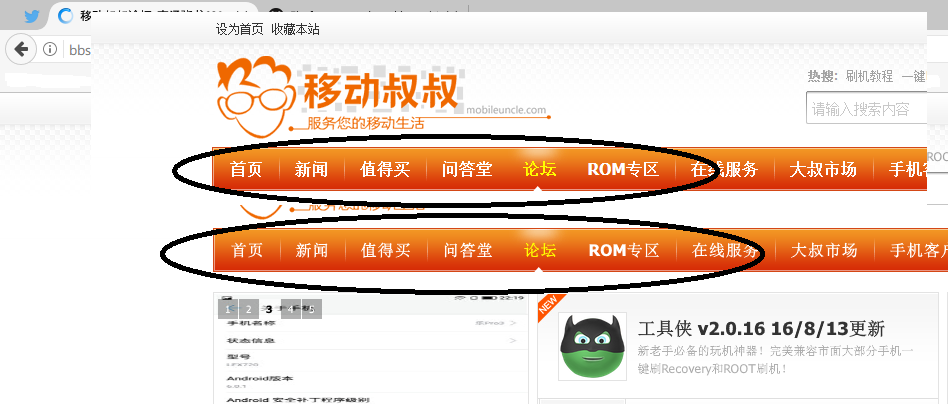
Please check the marked parts,
the top part : skia: on mactype: on
the bottom part: skia: on mactype: off.
It's easy to see their difference.
snowie2000
on 29 Jun 2017
Oh yeah but what happen with bookmarks and titles in tabs?
wasd--
on 29 Jun 2017
You should understand that although DirectWrite can be now interpreted, it is still DirectWrite who does the actual render while GDI is fully replaced with FreeType. Their outputs can never be the same.
snowie2000
on 29 Jun 2017
As I said, you enabled hinting.
With hinting enabled (in DirectWrite, only cleartype style hinting can be applied, no freetype auto hinting available), tweaked DirectWrite (i.e. dw with mactype) is very similar with normal DirectWrite. Also, mactype is unable to embolden any font in DirectWrite mode which is one of most important feature to make serif font look better.
snowie2000
on 29 Jun 2017
@snowie2000 I have the default profile(HintingMode=1)
wasd--
on 29 Jun 2017
Did you do a gasp hack to Microsoft yahei?
@snowie2000 https://github.com/snowie2000 I have the default
profile(HintingMode=1)
—
You are receiving this because you were mentioned.Reply to this email directly, view it on GitHub
https://github.com/snowie2000/mactype/issues/269#issuecomment-312002081,
or mute the thread
https://github.com/notifications/unsubscribe-auth/ALONla6T3aOClioa1n4qm0ig-OdcHxBUks5sI8JIgaJpZM4NB7cy
.
snowie2000
on 29 Jun 2017
So no solution for now, I'll continue with skia disabled then ;)
Thanks
wasd--
on 29 Jun 2017
This is the solution now and in the near future.
If you're not satisfied, stay with skia disabled and hope it will last for long.
snowie2000
on 29 Jun 2017
Related issues
 Skyyblaze
·
5Comments
Skyyblaze
·
5Comments
 aridzephyr
·
5Comments
aridzephyr
·
5Comments
 MariuzM
·
5Comments
MariuzM
·
5Comments
 TianLi-520
·
3Comments
snowie2000
·
4Comments
TianLi-520
·
3Comments
snowie2000
·
4Comments
Most helpful comment
Looks like Firefox enabled the skia graphics library by default.
Disable it by removing skia from
gfx.canvas.azure.backendsandgfx.content.azure.backendsunder about:config.