Mactype: Mactype + patch = doesn't work
I installed latest Mactype (2016 September) with latest 1.23 Mactype patch which is released for Creators Update.
silight.hatenablog.jp/entry/MacTypePatch
I did everything that was written in readme file, but this is the result


Chrome is also crashing and some other programs.
 rudolphos
All 23 comments
I have the same issue, except I successfully uninstalled MacType through the Settings app, and for some reason directwrite hooks (i think that's it, because chrome and metro apps were smoothed) were still working fine. I'll try rebooting my pc to see what happens.
Edit: It didn't seem to uninstall (hard to see when the text just goes away, + I had clicked "don't uninstall". welp), and on rebooting all non-DirectWrite programs just lost their text:

(Discord, Spotify and Chrome still display their text fine.)
 Jeremiidesu
on 18 Apr 2017
Jeremiidesu
on 18 Apr 2017
using the CTP builds in #221 work well for me. you should try them
Jeremiidesu
on 19 Apr 2017
@Jeremiidesu I installed the CTP build, almost everything works except Chrome.
rudolphos
on 21 Apr 2017
Chrome works fine for me. Make sure you have DirectWrite=1 in the [General] section of your profile's ini file.
Jeremiidesu
on 21 Apr 2017
I also have the com surrogate error with 1.23
 chr0max
on 24 Apr 2017
chr0max
on 24 Apr 2017
MY WHOLE DESKTOP TEXT IS HIDDEN.
IT WAS LITERALLY UNUSEABLE
Plus Programs crashed... (i don´t know if that was about the font rendering)
 Craftplacer
on 1 May 2017
Craftplacer
on 1 May 2017
I finally had a time to make a comparison
- is MacType before Creators Update with 2016 September 4. version.

- is with CTP March 3, 2017 version

The difference is clearly visible, 1. has font smoothed, 2nd one just has ClearType it seems.
rudolphos
on 31 May 2017
If you are using edge as your browser, it is not supported any more.
 snowie2000
on 31 May 2017
snowie2000
on 31 May 2017
@snowie2000
Wow.. That was fast response.
I'm using Chrome Dev, latest version.

I see there is this patch (MacType非公式パッチ (MacType Unofficial Patch)) being updated all the time, despite that someone here said that it wouldn't work with CTP release.
I'm wondering which version are they using for this to work?..
EDIT: @snowie2000 Finally!.. Just found out they have added the compatibility for CTP version.

rudolphos
on 31 May 2017
What does your profile look like?
snowie2000
on 31 May 2017
@snowie2000 It's the default one

This is after installing MacType Patch which is updated now to support CTP build

So I guess my problem is fixed now, this can be closed.
rudolphos
on 31 May 2017
Alright, the mactype-patch author has just updated to be compatible with CTP version. If your are using his patch together with CTP, you should get it up to date.
snowie2000
on 31 May 2017
@snowie2000 Any idea if the patch works with Java applications like Intellij. The patch instruction says I need to set ClipBoxFix=0. Without the patch I'm currently using ClipBoxFix=1 in the Experimental section.
Any reason why you wouldn't incorporate the patch into MacType?
 IceMan81
on 1 Jun 2017
IceMan81
on 1 Jun 2017
@IceMan81 There is a known bug about pre-app basis profile recognition and also there is another known bug about profile parsing that the last line of the profile will be omitted.
Thus, to make ClipBoxFix work, you have to set the option in the expertimental section and put it in place other than the last line.
snowie2000
on 1 Jun 2017
@snowie2000 You had already explained the bug in the per-app profile parsing.
I was asking about ClipBoxFix if using mactype-patch? For mactype-patch, it says ClipBoxFix should be set to 0. So, I was wondering if mactype-patch fixes clipping issue in Intellij even when ClipBoxFix=0.
IceMan81
on 1 Jun 2017
@IceMan81 Yes, the patch fixes the clipbox "bug" by default and there is no way to turn it off.
The fix will cause some programs to flicker or laggy, that's why I turn it off by default in CTP version.
snowie2000
on 1 Jun 2017
@snowie2000 Do you happen to know what the ForceNoHinting option in the patch ini file means? Sorry, I don't have a way to raise questions to the patch author. Thought you might know the answer. ForceNoHinting seems to be one of the differences between the Win 7 and Win8+ versions of the ini file.
IceMan81
on 1 Jun 2017
Sure.
Force no hinting will turn font hinting off by turning off grid fit mode of directwrite.
But as you can see, there is no such setting in win7's directwrite 'cause Microsoft has never updated directwrite for win 7.
Therefore, this setting does nothing in win7
snowie2000
on 1 Jun 2017
If you wanna turn off hinting in win7, the only way is set rendering mode to 6. And this is only valid for direct2d. As for directwrite, there is no way to turn off hinting in win 7
snowie2000
on 1 Jun 2017
Wow, that's fast! I don't want to turn off hinting mode but good to know what those options mean. Thanks for quick responses!
IceMan81
on 1 Jun 2017
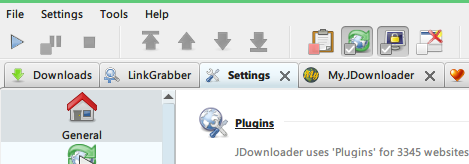
@IceMan81 I think it's working with java apps
Here's a screenshot of jdownloader
rudolphos
on 13 Jun 2017
I am sorry to hear that! This is the most unfortunate case ever.
 gengyu89
on 13 Oct 2018
gengyu89
on 13 Oct 2018
@gengyu89 What do you mean by "This is the most unfortunate case ever."?
snowie2000
on 14 Oct 2018
Related issues
 Skyyblaze
·
5Comments
Skyyblaze
·
5Comments
 cricrazy
·
4Comments
cricrazy
·
4Comments
 TianLi-520
·
3Comments
IceMan81
·
3Comments
TianLi-520
·
3Comments
IceMan81
·
3Comments
 aridzephyr
·
5Comments
aridzephyr
·
5Comments
Most helpful comment
I have the same issue, except I successfully uninstalled MacType through the Settings app, and for some reason directwrite hooks (i think that's it, because chrome and metro apps were smoothed) were still working fine. I'll try rebooting my pc to see what happens.

Edit: It didn't seem to uninstall (hard to see when the text just goes away, + I had clicked "don't uninstall". welp), and on rebooting all non-DirectWrite programs just lost their text:
(Discord, Spotify and Chrome still display their text fine.)