Macpass: [Info] macOS Big Sur - no issues so far
I tried MacPass on macOS 11. So far all the functionality seems to work. However, permission dialogs for Accessibility don't get triggered. I had to manually add MacPass, but that being said. This was true for 2 other apps I tested that require similar permissions for Accessibility. Those didn't present the prompts in my initial testing.
so this is promising. 👍
Tested items:
Global Autotype
Autotype
AutotypeURL
Create new database
Add entries
 georgesnow
All 16 comments
I've tested MacPass 0.7.12 on Apple Silicon in Rosetta2 and every toolbar button is disabled.
Re-building for Apple Silicon resolved the issue.
 mstarke
on 2 Jul 2020
mstarke
on 2 Jul 2020
Apple has added the QuickType feature for macOS 11. This would be a good addition instead of safari extension. A few other iOS ports of KeePass support this feature and it is really nice.
https://developer.apple.com/documentation/authenticationservices/ascredentialidentitystore
georgesnow
on 6 Jul 2020
Tested MacPass 0.7.12 on my 2019 16" MacBook Pro, I also experience here that every toolbar button is disabled including the search bar.
 xBytez
on 23 Jul 2020
xBytez
on 23 Jul 2020
Same here on iMac (Retina 5K, 27-inch, 2017) with Big Sur Version 11.0 Beta (20A5323l)
All Toolbar buttons are disabled.
 capjan
on 27 Jul 2020
capjan
on 27 Jul 2020
Update, rebuilding from source as instructed in the README fixes the issue, looks like the toolbar issue has already been fixed just not released yet.
xBytez
on 29 Jul 2020
@xBytez I raised the deployment target for 0.8 to 10.13 so the 10.15 SDK might have some issue on macOS 11.0 with a deployment target of 10.10. A did not have time to rebuild on intel and check with the current code.
Did you rebuild on Xcode 12 with 10.16 (11.0) SDK or did you compile with 10.15 as SDK?
mstarke
on 30 Jul 2020
@mstarke I rebuild using Xcode 12 but didn't change any config. I cloned the repository and followed README instructions on how to be build.
xBytez
on 30 Jul 2020
@xBytez With Beta 6 of Big Sur and Xcode I already stuck at carthage bootstrap --platform macOS
* Checking out KeePassKit at "2.4.7"
Checking out HNHUi at "3.0"
Checking out Sparkle at "1.22.0"
Checking out KissXML at "5.3.1"
Checking out TransformerKit at "b28de3a7de9249dd886979cae4985092523b6dd1"
xcodebuild output can be found in /var/folders/1f/j2_861xd3n75_j88kwbdnqzh0000gn/T/carthage-xcodebuild.t1vEdV.log
Downloading KissXML.framework binary at "Version 5.3.1"
Downloading Sparkle.framework binary at "Many small improvements"
Building scheme "HNHUi" in HNHUi.xcodeproj
* Building scheme "KeePassKit macOS" in KeePassKit.xcodeproj
Build Failed
Task failed with exit code 65:
/usr/bin/xcrun xcodebuild -project /Users/arm/sources-pub/MacPass/Carthage/Checkouts/KeePassKit/KeePassKit.xcodeproj -scheme KeePassKit\ macOS -configuration Release -derivedDataPath /Users/arm/Library/Caches/org.carthage.CarthageKit/DerivedData/12.0_12A8189n/KeePassKit/2.4.7 ONLY_ACTIVE_ARCH=NO CODE_SIGNING_REQUIRED=NO CODE_SIGN_IDENTITY= CARTHAGE=YES archive -archivePath /var/folders/1f/j2_861xd3n75_j88kwbdnqzh0000gn/T/KeePassKit SKIP_INSTALL=YES GCC_INSTRUMENT_PROGRAM_FLOW_ARCS=NO CLANG_ENABLE_CODE_COVERAGE=NO STRIP_INSTALLED_PRODUCT=NO (launched in /Users/arm/sources-pub/MacPass/Carthage/Checkouts/KeePassKit)
This usually indicates that project itself failed to compile. Please check the xcodebuild log for more details: /var/folders/1f/j2_861xd3n75_j88kwbdnqzh0000gn/T/carthage-xcodebuild.t1vEdV.log
As far as I understand this is due to the fact that xcode automatically adds the arm64 architecture to the list of standard architectures for KeePassKit while KissXML does not provide that platform.
Any suggestion how to get the build succeed?
 arnemoor
on 6 Sep 2020
arnemoor
on 6 Sep 2020
@arnemoor I'll have to take a look into this since I have no x86 machine running the betas
mstarke
on 7 Sep 2020
0.8 will raise the deployment target to 10.13. Using this build settings I was able to get MacPass to run without any issues on macOS Big Sur 11.0
mstarke
on 12 Oct 2020
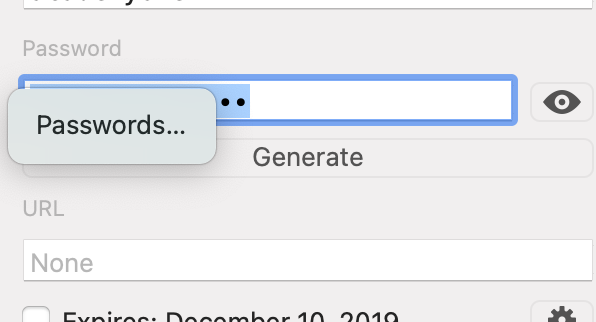
Since upgrading to Big Sur 11.0.1 (20B5022a), occasionally the search bar becomes unresponsive. I've not been able to pin down when or how to reproduce it. The only way I've found to work around it is to close and re-open that database. Also, there is now an OS-level "Passwords" popup option that appears over top of the password box.
 veasnalkj
on 9 Nov 2020
veasnalkj
on 9 Nov 2020
After searching for something and then selecting one record, the top search bar becomes disabled and I have to exit and start again to perform the next search.

 verhas
on 13 Nov 2020
verhas
on 13 Nov 2020
I am about to release 0.8 by moving some planned features up to later versions to get a working release for macOS Big Sur. This should also include a native ARM version.
mstarke
on 13 Nov 2020
I am about to release 0.8 by moving some planned features up to later versions to get a working release for macOS Big Sur. This should also include a native ARM version.
Great! In Big Sur I also have the problem of the toolbar becoming disabled after doing a search. Have to restart the app for the toolbar to become usable again.
Update: Found a way to unblock the toolbar: Edit > Find... (or Cmd + F)
 ghufby
on 13 Nov 2020
ghufby
on 13 Nov 2020
Hi everybody,
are there any news regarding the update? I need to press CMD+F 4-6 times until I get the search to work which is really frustrating :(
 error401de
on 5 Jan 2021
error401de
on 5 Jan 2021
The current continuous development build should run without any issues. I have to finish some things to be able to release it so it will take a couple of days at least until 0.8 is officially released.
mstarke
on 5 Jan 2021
Related issues
 CoderJason123
·
4Comments
CoderJason123
·
4Comments
 bokysan
·
6Comments
mstarke
·
3Comments
bokysan
·
6Comments
mstarke
·
3Comments
 Winter84
·
6Comments
Winter84
·
6Comments
 rathisarov
·
7Comments
rathisarov
·
7Comments
Most helpful comment
I am about to release 0.8 by moving some planned features up to later versions to get a working release for macOS Big Sur. This should also include a native ARM version.