Macpass: No items is show after clearing the search box
When searching, removing the content of the search field will show no items.
To Reproduce
Steps to reproduce the behavior:
- Write some stuff in the search box
- Erase those stuff
- No item is shown
Expected behavior
Has the search box is empty, I except to see all the items
Desktop (please complete the following information):
- macOS: 10.14.5
- Version 0.7.9
Additional context
I believe we should not have a two listing view (search and "normal") but only one, simply display all the item when the search box is empty. I noticed a lot of strange behaviors in "search mode" like when i try to add an item by drag&drop from the browser. Also suddenly showing the "group" is kind of strange as I do not use this features.
 gagarine
All 19 comments
Reworking how search is handled is something that might be done combined with some more interface changes. This also could add search for groups in the outline view and much more other things.
About the "Search mode" this seemed to be the reasonable solutions (and I was trying to mirror the behaviour of the Finder).
Regarding an empty but active search I would consider the current setup correct, otherwise a simple "display everything if search is empty" might work as well.
 mstarke
on 17 Jun 2019
mstarke
on 17 Jun 2019
I would definitely prefer the “display everything if search is empty” 😬
 georgesnow
on 17 Jun 2019
georgesnow
on 17 Jun 2019
The Finder as a search function (you execute a query and it return the result) but in MacPass it should be a filter (you have list of things and you start filtering it).
About the "Search mode" this seemed to be the reasonable solutions (and I was trying to mirror the behaviour of the Finder).
If you look at the Keychain or Console, they do not have two modes (as they are filter and not search).
Regarding an empty but active search I would consider the current setup correct, otherwise a simple "display everything if search is empty" might work as well.
Again, it's because it's a filter that when empty it should display everything.
gagarine
on 17 Jun 2019
@gagarine the search in finder is a "filter on all your files" so I guess one could argue both ways. And the UI clearly marks this as "Search" not "Filter list" so I would again argue that the search should only yield results if there are any (that is, matches). I'm considering changing the behaviour.
mstarke
on 17 Jun 2019
Now it's even worst (Version 0.7.10 (22740)). You can clear close search mode.
How to reproduce:
- write "abc4" in the search box
- delete "abc" in the search box
- you end up without any result, and no X in the search box to "close the search mode".
=> only way to solve is to write some in the search box and click on the X.
It's not how search in app is supposed to works. Look at the MacOS contact app for example.
gagarine
on 30 Oct 2019
@gagarine this is not the intended behaviour. Seems like a regression. See comment https://github.com/MacPass/MacPass/issues/942#issuecomment-547920020
mstarke
on 30 Oct 2019
@mstarke It should not be fixed by https://github.com/buddax2/MacPass/commit/5a4eb302280410c7dd52e9f5bd5b09bc94c51db5 ?
gagarine
on 30 Oct 2019
Not really. The PR allows for ESC to cancel the search. If you clear and exit search, then type again you re-enter it. I am very happy with the way Finder does it and the only thing not correctly working is the missing clear button when the string is empty.
mstarke
on 30 Oct 2019
Now it's even worst (Version 0.7.10 (22740)). You can clear close search mode.
To clarify, this is no regression. The behaviour is exactly the same in 0.7.9
mstarke
on 30 Oct 2019
I think the finder way of doing it is super confusing for most user. Yet for the finder, their are some reasons for that (you can search not only using the search fields but with some other filter).
In my opinion, when you only have a search field and this one is empty, search mode should go away like any other macOS app. And of course, go back to search mode as soon as you start typing again. Why do you want to keep the search mode with an empty search field?
gagarine
on 30 Oct 2019
Also, MacPass keep the active entry in the right panel active even if it's not listed in the search result. Again the Contact app has better behaviour in this case also by switching to the first result
EDIT: actually MacPass display the top entry in the search result. But I'm typing to fast, so MacPAss don't have the time to show me that... It's another issue.
gagarine
on 30 Oct 2019
Please open separate issue for the wrong entry in inspector. This is something that persists in other scenarios as well since the binding for selections does not always get updates as expected.
mstarke
on 30 Oct 2019
MacPass does seem to operate slightly different than the Finder. When you delete the string from the search box in finder. The matched files stay visible or revert back to showing "Recents". MacPass just clears the results even if a previous folder is selected.
georgesnow
on 30 Oct 2019
in Finder if you have folder selected and clear the entry and press ESC. it reverts the focus back to the folder you had selected in the left pane
georgesnow
on 30 Oct 2019
I just implemented "exit search when search box is empty" and I think this is an awfull user experience. E.g. if you search something, change your mind, delete everything and then want to type a new search, you have to re-enter the search again. If, however you want to exit the search if the box is empty, you explicitly have to pres Esc. I do not think this is the correct way. Leaving the box empty and with active focus is clearly better. Now, this brings us to the second thing: What to do, when the box is empty. Currently MacPass displays nothing, as nothing matches. This is in line with the 10.14 Finder. Maybe 10.15 has changed this, but in 10.14 if you clear the search box, there are no results to display. If you hit Esc then you are where you started, exactly like in MacPass.
Now you bring up Contacts as an example that work differently. It shows everthing with an empty search box. The problem I see is, that MacPass behaves like Finder, but shows the UI like Contact. (Search is written in the box, the cancel button dissapears…)
Since search is somewhat badly designed currently, I am not sure I can quickly change the behaviour to a good middle ground. I would hence keep the current state with the addition to be able to exit the search if the string is empty by pressing `Esc
mstarke
on 30 Oct 2019
I just merged #946 so at least one can exit the search via Escall the time.
mstarke
on 30 Oct 2019
@mstarke you are right in Mail.app the behavior matches 0.7.10. when you press ESC it never lets you leave the search box. so what's the best way....🤷♂️
georgesnow
on 30 Oct 2019
you search something, change your mind, delete everything and then want to type a new search, you have to re-enter the search again.
Ok this is the misunderstanding we have. I'm not saying the cursor should go away of the search field! Just the search mode (the view of the entry) should display all entries when the search field is empty.
Yes like the standard "Contacts" app in macOS.
Since search is somewhat badly designed currently, I am not sure I can quickly change the behaviour to a good middle ground. I would hence keep the current state with the addition to be able to exit the search if the string is empty by pressing `
Esc
Ok! :)
gagarine
on 31 Oct 2019
You can quickly end up in this situation (add some keyword, then delete them). I don't see how this can be user-friendly.
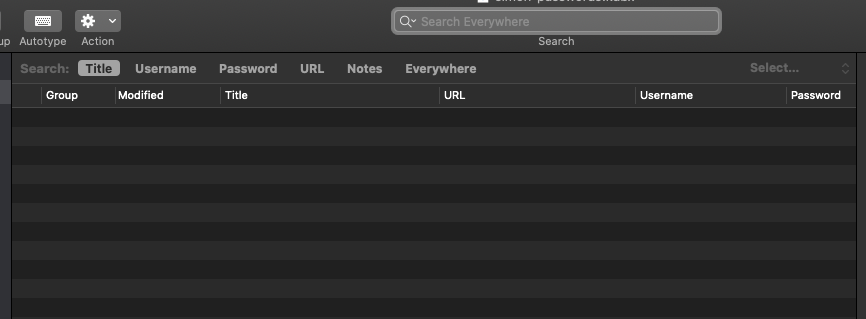
I'm very confident that the correct way is to apply a similar pattern than the Apple Contacts.app. Is there any downside? I can't see one.
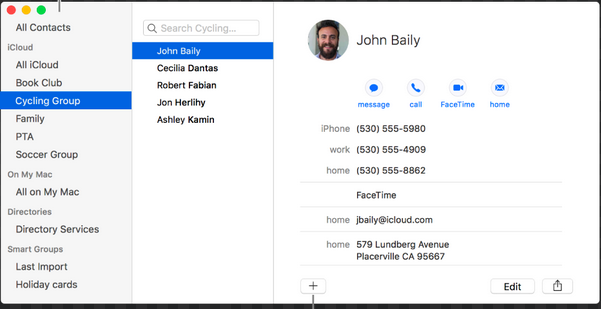
Why this Search Fields is not a search?
Because searchs are functions than go outside of their context. Take the finder -> you do not filter element in the windows but search either you entire mac or all the subfolder of the current folder. In this case, it's logic that without user input you display nothing.
In the case of MacPass, we have a list of item that we want to filter.
It's the difference between "grep" (The grep utility searches any given input files) and "find" ( The find utility recursively descends the directory tree for each path listed).
The only question would be related to groups. I have no group.
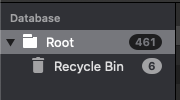
So do you want to filter only the selected group? I guess so, like Contact.app. Why using groups otherwise?
gagarine
on 13 Feb 2020
Related issues
 magebarf
·
3Comments
magebarf
·
3Comments
 packplusplus
·
5Comments
packplusplus
·
5Comments
 aliok
·
7Comments
aliok
·
7Comments
 Winter84
·
6Comments
Winter84
·
6Comments
 rathisarov
·
7Comments
rathisarov
·
7Comments