Macpass: [Feature Request] exclude look-alike characters in password generator
In the keepassx (https://www.keepassx.org/) there is very nice feature which is called "Exclude look-alike characters" in password generator.
It allows to avoid similar characters like:
- "I" (ASCII 108) and "I" (ASCII 73)
- "O" (ASCII 79) and "0" (ASCII 48)
etc.
Depending on used fonts it's sometimes difficult to distinguish such characters which can lead to errors.
 r0bj
r0bj
All 8 comments
Thinking about this, the solution 1Password chose comes to mind. They use color coding to help you understand the Password better:
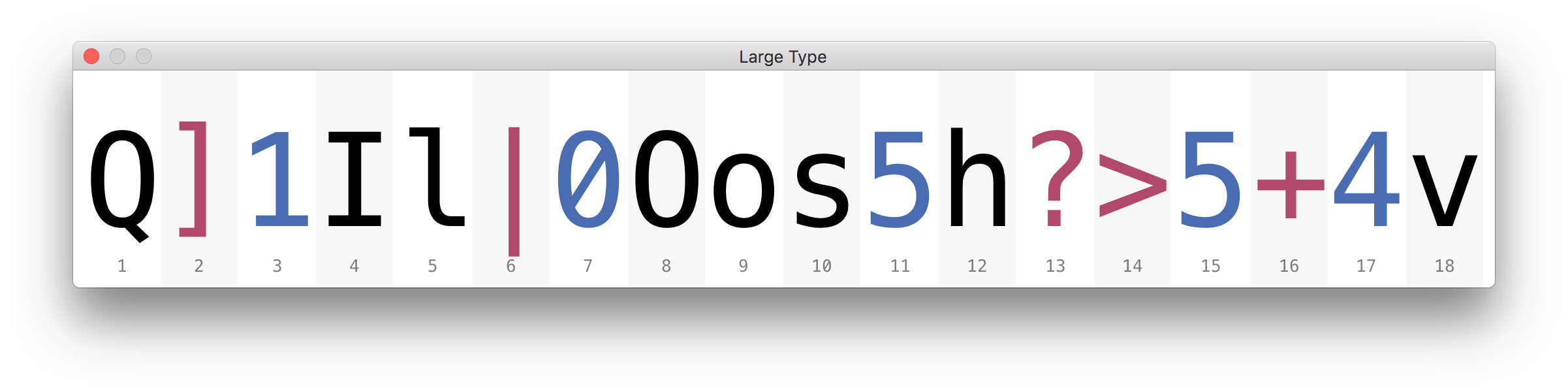
 mstarke
on 6 Sep 2017
mstarke
on 6 Sep 2017
Color-coding works but integration into the password fields is a bit harder than I anticipated. But it's making progress.
mstarke
on 8 Dec 2017
Yes, an option to exclude look-alike characters would be handy. I often catch myself recreating a password when it contains to many similar characters, especially when I know there might be chances that I will have to enter that password by hand.
 tflo
on 8 Dec 2017
tflo
on 8 Dec 2017
The colour coding would be a beautiful solution, but it's a fair bit of work to implement and it would fail when the end user can only display the password in a monochrome typeface which doesn't properly distinguish between letters.
A simple and elegant solution would be to add an option to say simply:
Exclude Characters: o 0 O i l | 1 L
I would go as far as saying that this should be the default - how many times have we been unable to copy/paste the password and had to squint at it to try and try to guess what the letters are. Loss of a couple of bits of key space is a small price to pay.
Danke!
 mwright-oss
on 21 Jun 2018
mwright-oss
on 21 Jun 2018
I still wasn't able to fully implement this but here's a dev-peek. Colors are not ideal :)
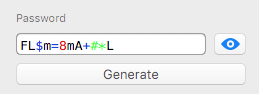
mstarke
on 21 Jun 2018
Like the colourisation, but would it not be simpler(for now) to just force the font for this field to be one of the fixed width clear fonts?
 FerretDave
on 21 Jun 2018
FerretDave
on 21 Jun 2018
The font is monospaced already. But only on the password and username filed. The custom fields use normal fonts. It might be usefull to switch all fields to a monospaced font.
mstarke
on 21 Jun 2018
Looks good. Try using #006600 for the green so the contrast is better when it's displayed on a white background.
Mono fonts are a good choice, my old Mac favourite from many years ago was Monaco. DejaVu Sans Mono is very good too.
It would be good to see the feature to Exclude Characters: o 0 O i l | 1 L - we can't do much about existing passwords but it would be good to avoid generating random passwords with potentially ambiguous characters because not everyone is fortunate/smart enough to have clear typefaces to display it.
mwright-oss
on 22 Jun 2018
Related issues
 markushausammann
·
3Comments
markushausammann
·
3Comments
 rathisarov
·
7Comments
rathisarov
·
7Comments
 packplusplus
·
5Comments
packplusplus
·
5Comments
 martinl
·
6Comments
martinl
·
6Comments
 btxtiger
·
7Comments
btxtiger
·
7Comments
Most helpful comment
The colour coding would be a beautiful solution, but it's a fair bit of work to implement and it would fail when the end user can only display the password in a monochrome typeface which doesn't properly distinguish between letters.
A simple and elegant solution would be to add an option to say simply:
Exclude Characters: o 0 O i l | 1 L
I would go as far as saying that this should be the default - how many times have we been unable to copy/paste the password and had to squint at it to try and try to guess what the letters are. Loss of a couple of bits of key space is a small price to pay.
Danke!