Machinelearningnotebooks: Whats the recommended way to update an AksWebservice OR reclaim disk space before / after service.update?
I apologize in advance if this is not the correct place to have this conversation. Every time I call AksWebservice.update, the new deployment takes up more disk space on the k8s node instances and the disk space for old versions is never reclaimed. What are the best practices to update an AksWebservice and to reclaim this disk space?
Problem:
- there is no clear definition regarding how to clean up disk space before or after calling service.update AND calling service.update does not clean up the previously installed images & artifacts
- the disk drives on the k8s node instances eventually fill up and run out of disk space b/c old artifacts are never removed
- we have to manually scrub our drives on the node instances or re-provision instances
Overview:
- I have created a multi model deployment that downloads 2 models - the docker image is ~6gb total and includes both models
- In the init method of score.py we call Model.get_model_path(name='model1') followed by joblib.load(model1_path)
- In the run method of score.py we call predict on model1 and model2, mash up the results, and return the response
- I am using a k8s cluster on v 1.16.9 that has 1 node based on a vmss using Standard_D8s_v3 images
- the docker container "should be" relatively stateless, eg download the models, load them into memory, start the web service, accept http requests, return the responses
- I am using v 1.8 of the azureml sdk to deploy and update the service
I have used two flavors of service.update to deploy changes. The first includes an array of models, the second simply sets models=None. Regardless which variant I use, the hard drives still fill up.
I have inspected the drives of the node instances, and typically what happens is that mount: /dev/sdb1 fills up dir /mnt/amlMount with exact copies of what should be in the docker container. I do not know if this is the expected behavior.
Expected Behavior
- Calling service.update (or something in the sdk) cleans up old assets
- OR provide a way to cleanup /mnt/amlMount w/o having to ssh into node instances
- OR document if we should be building on a compute instance, then pushing to azure container registry, then deploying updated images to k8s
Code used for deployment:
from azureml.core.model import Model
from azureml.core.webservice import AksWebservice
service = AksWebservice(ws, service_name)

m1 = Model(ws, name='model1')
m2 = Model(ws, name='model2')

service.update(inference_config=inference_config, models=[m1,m2], cpu_cores=1, memory_gb=20, autoscale_enabled=True, autoscale_min_replicas=1,
               autoscale_max_replicas=10, autoscale_refresh_seconds=10, autoscale_target_utilization=80, enable_app_insights=True,
               namespace='my-project-namespace')

# service.update(inference_config=inference_config, models=None, cpu_cores=1, memory_gb=20, autoscale_enabled=True, autoscale_min_replicas=1,
#                autoscale_max_replicas=10, autoscale_refresh_seconds=10, autoscale_target_utilization=80, enable_app_insights=True,
#                namespace='my-project-namespace')


service.wait_for_deployment(show_output = True)
Our init method
If you are curious this is what the code in our init method looks like... its pretty generic
def init():
    global model1, model2, ws
    print(f'running version: {version}')

    # do this for aks deploy
    sp = ServicePrincipalAuthentication(tenant_id=os.getenv('AML_TENANT_ID'),
                                        service_principal_id=os.getenv('AML_PRINCIPAL_ID'),
                                        service_principal_password=os.getenv('AML_PRINCIPAL_PASS'))

    ws = Workspace.get(name=os.getenv('AML_WORKSPACE_NAME'), subscription_id=os.getenv('AML_SUBSCRIPTION_ID'), auth=sp)

    # this is the ms documented way....
    model1_path = Model.get_model_path(model_name='model1') #5gb model
    model2_path = Model.get_model_path(model_name='model2') #1gb model
    model1 = joblib.load(model1_path)
    model2 = joblib.load(model2_path)
 cbertolasio
All 14 comments
Hey @cbertolasio, thanks for report the issue. We have opened a work item and will prioritize the fix for this issue. In the meantime, the workaround is to run kubectl apply adminClusterRole.yml in your cluster. see adminClusterRole.yml in attachment
adminClusterRole.zip
 Bozhong68
on 2 Sep 2020
Bozhong68
on 2 Sep 2020
@Bozhong68 , thanks for the reply. Can you elaborate a little bit? If I understand correctly, kubectl apply will simply change the rbac permissions for the ClustRole, enabling the "delete" permission for the "deployments" resources. Am I then expected to go run some kubectl command to delete deployments or will setting these permissions somehow cause all the old deployments to get cleaned up? Thanks again for your time.
cbertolasio
on 2 Sep 2020
@cbertolasio , after service.update, it is supposed that daemonset in the cluster will garbage collect directory used by deleted service every 20 minutes, but garbage collector might not be running due to permission issue. Applying adminClusterRole will resolve the permission issue.
Bozhong68
on 3 Sep 2020
Thank you for the explanation. That makes sense. I will give it a shot.
cbertolasio
on 3 Sep 2020
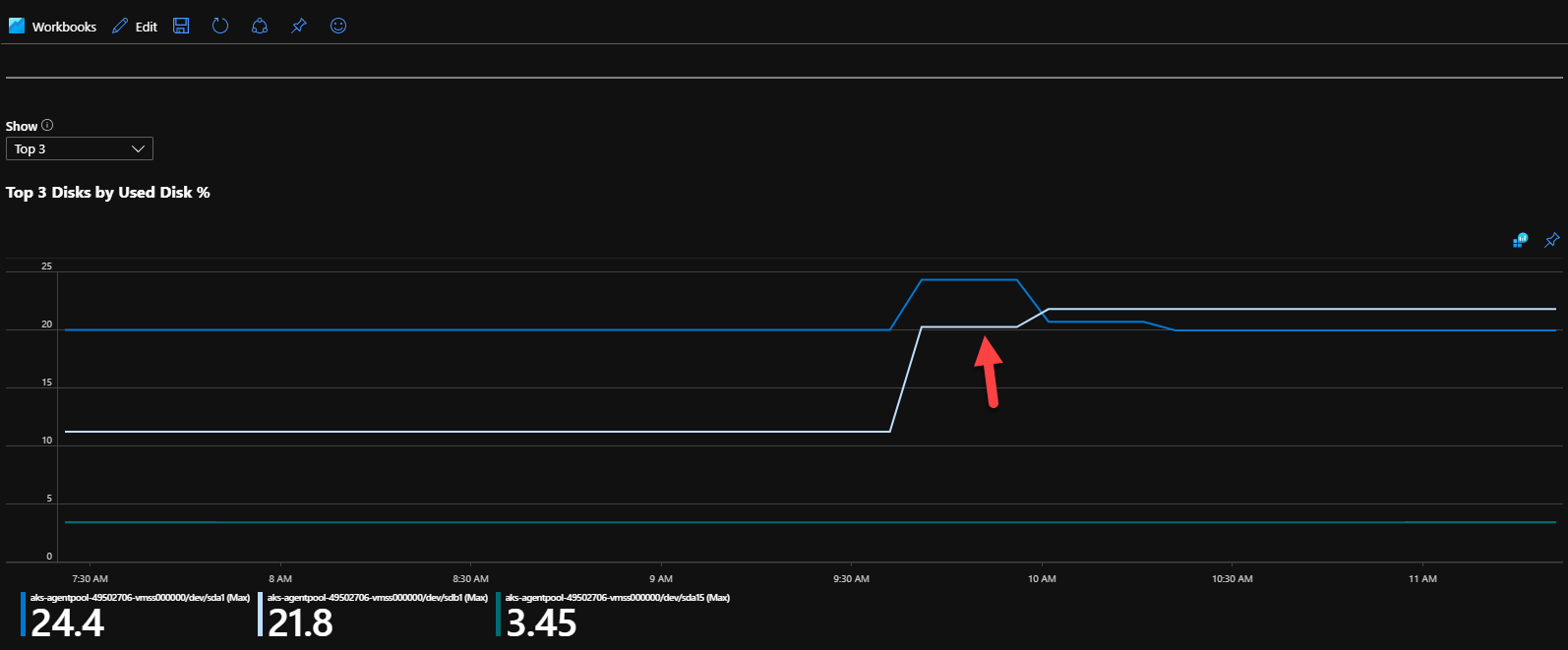
@Bozhong68 , thanks for the suggestion. I ran kubectl apply with the provided script. I verified the settings were applied. I then redeployed two services using service.update. I monitored the file system for a while and the disk space was never reclaimed. Two new folders were created in amlMount (as expected) and the existing 2 folders from the previous deployment remained on sdb1.
I'd be happy to try any other ideas.
Here is a screen shot of the disk usage for the node instance:
cbertolasio
on 4 Sep 2020
Thanks @cbertolasio , I have re-opened the issue and we will take a closer look. @mjaow do you have any idea about this?
Bozhong68
on 7 Sep 2020
@cbertolasio Sorry for late reply, we did several repo , after kubectl apply -f adminClusterRole.yaml and service.update for a while, the data for original pod was garbage-collected successfully.
I'm not quite sure about your scenerio, but several steps may be helpful
- make sure run
kubectl apply -f adminClusterRole.yamlsuccessfully, after that , you can see object when executekubectl get clusterRoleBinding |grep cleanup-modelmanagement-deploymentsandkubectl get clusterRole |grep cleanup-modelmanagement-deployments. - make sure there is a daemonset named "volume-monitor" in default namespace and there are N pods running with prefix volume-monitor (N = number of nodes), each volume-monitor pod controlls the host path of each node
- Suppose you want to clean the model asset in node1 , you can get monitor pod name which controlls node1 (you can find it by
kubectl get pods -o wide |grep node1) - then you can the pod name volume-monitor-xxx, you can run
kubectl exec -it volume-monitor-xxx bashto login the pods. It shares directory /mnt with node1 - using
ls -l /mnt/amlMount/to ensure if the original directory is cleaned
 mjaow
on 14 Sep 2020
mjaow
on 14 Sep 2020
@cbertolasio I will close the issue for now as we have verified the workaround works. Please feel free to re-open if you like.
Bozhong68
on 14 Sep 2020
Cool, thanks for the update, I will give those things a try. I am pretty confident there are volume-monitors for each node / node instance. Maybe the monitor for the root instance is acting strange.
cbertolasio
on 14 Sep 2020
I followed the instructions provided. The volume monitor pod exists for the node in question but lists 0 files or directories in /mnt/amlMount. When I bash into the other 2 volume-monitor pods, I can see two directories listed. Each of these directories match the directories that I would expect to exist for the currently deployed web services.
Is the volume-monitor pod something that my team is supposed to manage or is this a pod that is created by k8s or is this a pod that is managed by the Microsoft Azure k8s or AML team? I do not really see any relavent information on the internet related to the origin of this pod or what the expectations are or how to correct it if it gets into the state it is currently in.
TLDR Details:
our k8s cluster has 1 node pool with a vmss having 3 node instances
the primary node is named aks-agentpool-49502706-vmss000000 (lets refer to it as vmss0 for short)
there are 3 volume monitor pods associated with 1 daemonset, one pod for each node instance
the volume-monitor pod that is associated with node vmss0 is named volume-monitor-8zkbm
using kubectl to describe the volume monitor we can see the following details:
Containers:
volumemonitor:
... details omitted
Mounts:
/mnt/amlMount from localvolume (rw)Volumes:
localvolume:
Type: HostPath (bare host directory volume)
Path: /mnt/amlMount
HostPathType: DirectoryOrCreate
From this point I use kubectl and the interactive terminal to bash into the volume-monitor pod for node vmss0, at which point I can see that:
- ls -l /mnt/amlMount returns
total 0 AND- df -h | grep /dev/sdb1 returns:
/dev/sdb1 63G 14G 47G 22% /mnt/amlMount
So this is an interesting tidbit, b/c volume-monitor lists 0 directories or files, however when I ssh into vmss0 and run ls -l /mnt/amlMount I get different results. It shows 4 directories when there should only be two, but volume-monitor apparently knows nothing about any of these directories. These directories listed in /mnt/amlMount on vmss0 are the ones that I have to manually delete. You can see from the dates below, that deployments done on 24-AUG were not cleaned up after the deployment on 4-SEP. Also interesting is that when I bash into the other two volume-monitors and run ls -l /aml/amlMount I can see the two folders related to the deployments from 4-SEP.
azureuser@aks-agentpool-49502706-vmss000000:~$ ls -l /mnt/amlMount
total 16
drwxr-xr-x 3 root root 4096 Sep 4 15:43 2d41787c644e4cc4b722db96a9175127
drwxr-xr-x 3 root root 4096 Aug 24 19:29 a07f6215d6af4b5284b33d7a6edd04d5
drwxr-xr-x 3 root root 4096 Aug 24 19:28 d6f95c086dff4ceaafdedf379c0debde
drwxr-xr-x 3 root root 4096 Sep 4 16:01 ec8e98a4ed0840c5b45ad1a3847d536d
cbertolasio
on 16 Sep 2020
@cbertolasio
Thanks for message , you offer some message very important. The difference between volume-monitor pod and node shows
that there must be something wrong with it. I'm update to you if I get some clue
BTW, volume-monitor is system component of AML , a daemonset which controlls volume gc of all nodes , each pod controlls one node.(As a system component,it's now still in default namespace, but soon it will be place into kube-system namespace). So you couldn't find anything about it on the internet
mjaow
on 17 Sep 2020
@cbertolasio Could you help give a screentshot of result of kubectl get pods -o wide |grep volume-monitor, to see if there is some clue from it
And here is one way may help you work around , not quite sure , but you can give a try. Since there is something wrong with volume-monitor, let's recreate it to see:
- Remember the yaml of volume-monitor daemon set ,
kubectl get ds volume-monitor -o yaml > volume-monitor.yaml - delete the volume-monitor with
kubectl delete -f volume-monitor.yaml - create a new volume-monitor with
kubectl apply -f volume-monitor.yaml - watch to see if there is still difference between view of volume-monitor pods and nodes. If there is no difference , volume gc should work fine
mjaow
on 17 Sep 2020
Thanks, I will check it out and report back.
cbertolasio
on 18 Sep 2020
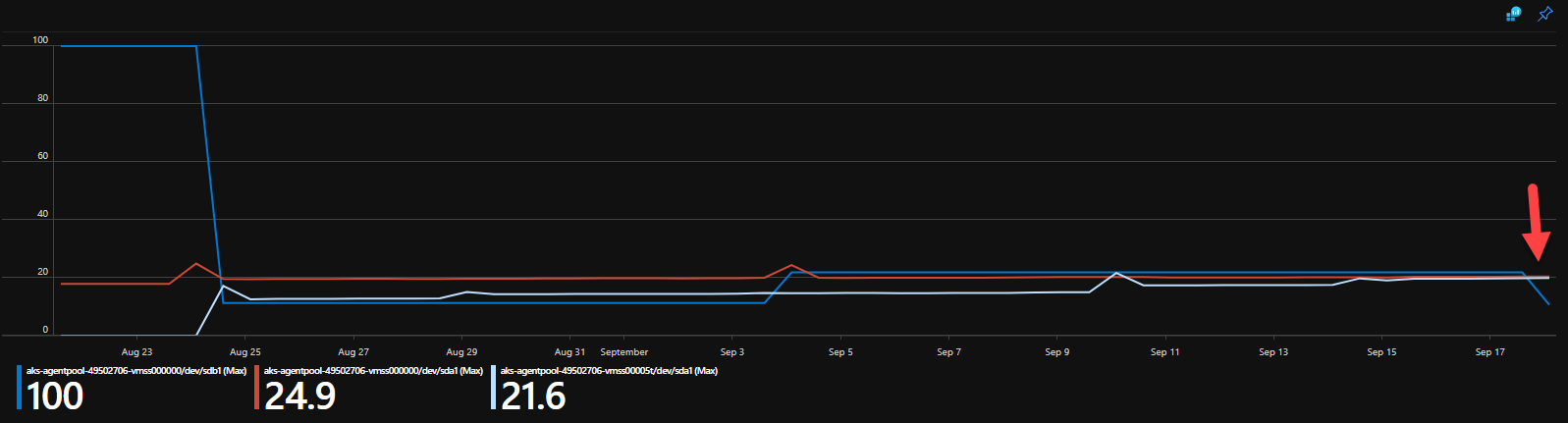
@mjaow deleting the volume monitors and recreating them worked. Thanks for that. You can see below that our disk space has now gone back to what it was supposed to be, all on its own. Deleting the reapplying the volume-monitor pods did the trick. Thanks again.
cbertolasio
on 18 Sep 2020
Related issues
 vineetgarhewal
·
3Comments
vineetgarhewal
·
3Comments
 casieo
·
4Comments
casieo
·
4Comments
 chengyu-liu-cs
·
3Comments
chengyu-liu-cs
·
3Comments
 lefaivre
·
5Comments
lefaivre
·
5Comments
 wagenrace
·
3Comments
wagenrace
·
3Comments