Machinelearningnotebooks: Error: TimeSeriesImputer object has no attribute '_known_df'
Hi azure ml,
Thanks for the great work.
I am running below notebook using azure ml and getting the error during forecast command. Please guide.
Command
The featurized data, aligned to y, will also be returned.
This contains the assumptions that were made in the forecast
and helps align the forecast to the original data
y_predictions, X_trans = fitted_model.forecast(X_test)
Error:
AttributeError Traceback (most recent call last)
2 # This contains the assumptions that were made in the forecast
3 # and helps align the forecast to the original data
----> 4 y_predictions, X_trans = fitted_model.forecast(X_test)
/anaconda/envs/azureml_py36/lib/python3.6/site-packages/azureml/automl/runtime/shared/model_wrappers.py in forecast(self, X_pred, y_pred, forecast_destination, ignore_data_errors)
2969 test_feats = self._recursive_forecast(X_copy, ignore_data_errors)
2970 else:
-> 2971 test_feats = self._regular_forecast(X_copy, ignore_data_errors)
2972 # Order the time series data frame as it was encountered as in initial input.
2973 if X_pred is not None:
/anaconda/envs/azureml_py36/lib/python3.6/site-packages/azureml/automl/runtime/shared/model_wrappers.py in _regular_forecast(self, X_copy, ignore_data_errors)
2790 # FIXME: Work item #400231
2791 if type(self.pipeline.steps[i][1]).__name__ == 'TimeSeriesTransformer':
-> 2792 test_feats = self.pipeline.steps[i][1].transform(X_copy)
2793 # We do not need the target column now.
2794 # The target column is deleted by the rolling window during transform.
/anaconda/envs/azureml_py36/lib/python3.6/site-packages/azureml/automl/runtime/featurizer/transformer/timeseries/timeseries_transformer.py in transform(self, df, y)
803
804 """
--> 805 df = super(TimeSeriesTransformer, self).transform(df, y)
806
807 # if we have applied STL transform, we need to make sure that leading np.NaNs are removed
/anaconda/envs/azureml_py36/lib/python3.6/site-packages/azureml/automl/core/shared/logging_utilities.py in debug_log_wrapped(self, args, *kwargs)
226 f.__name__, self.__class__.__name__)
227 )
--> 228 r = f(self, args, *kwargs)
229 self._logger_wrapper(
230 log_level, "{} {} operation complete.".format(
/anaconda/envs/azureml_py36/lib/python3.6/site-packages/azureml/automl/runtime/featurizer/transformer/timeseries/abstract_timeseries_transformer.py in transform(self, df, y)
467 self._check_phase(tsdf, scoring_freq, exception_text, False)
468 # preserve the index because the input X_test may not be continuous
--> 469 transformed_data = self.pipeline.transform(tsdf)
470
471 # We are doing inner join, which will remove the imputed rows and preserve the rows order
/anaconda/envs/azureml_py36/lib/python3.6/site-packages/azureml/automl/runtime/featurizer/transformer/timeseries/forecasting_pipeline.py in transform(self, X)
429 """
430 return self.execute_pipeline_op(AzureMLForecastPipelineExecutionType.transforms,
--> 431 X, y=None)
/anaconda/envs/azureml_py36/lib/python3.6/site-packages/azureml/automl/runtime/featurizer/transformer/timeseries/forecasting_pipeline.py in execute_pipeline_op(self, execution_type, X, y, **fit_params)
274
275 elif execution_type == AzureMLForecastPipelineExecutionType.transforms:
--> 276 Xt = self.__execute_pipeline__preprocess_transforms(X)
277 if hasattr(last_step, 'transform'):
278 Xt = last_step.transform(Xt)
/anaconda/envs/azureml_py36/lib/python3.6/site-packages/azureml/automl/runtime/featurizer/transformer/timeseries/forecasting_pipeline.py in __execute_pipeline__preprocess_transforms(self, X)
286 for name, transform in self._pipeline.steps[:-1]:
287 if transform is not None:
--> 288 Xt = transform.transform(Xt)
289 return Xt
290
/anaconda/envs/azureml_py36/lib/python3.6/site-packages/azureml/automl/core/shared/logging_utilities.py in debug_log_wrapped(self, args, *kwargs)
226 f.__name__, self.__class__.__name__)
227 )
--> 228 r = f(self, args, *kwargs)
229 self._logger_wrapper(
230 log_level, "{} {} operation complete.".format(
/anaconda/envs/azureml_py36/lib/python3.6/site-packages/azureml/automl/runtime/featurizer/transformer/timeseries/time_series_imputer.py in transform(self, X)
694 elif self.option == 'fillna':
695 kwargs = {'method': self.method, 'value': self.value,
--> 696 'limit': self.limit, 'known_df': self._known_df, 'time_index': X.time_colname}
697 else:
698 msg = 'The imputation option {} is not supported.'
AttributeError: 'TimeSeriesImputer' object has no attribute '_known_df'
 joshidp
All 12 comments
@joshidp Thanks for the feedback. We are investigating the issue and will update you shortly.
 RohitMungi-MSFT
on 29 Jun 2020
RohitMungi-MSFT
on 29 Jun 2020
@Aniththa Kindly confirm when fix for this issue will be available? Thanks!
joshidp
on 30 Jun 2020
@joshidp This issue has been fixed. Please try again by installing the latest version of the SDK. Feel free to reach out if you have any other questions.
 Aniththa
on 30 Jun 2020
Aniththa
on 30 Jun 2020
@Aniththa Im facing the same issue, running on Azure Notebooks with SDK version 1.8.0
 kkkkkaran
on 1 Jul 2020
kkkkkaran
on 1 Jul 2020
@Aniththa issue has been fixed, thanks for the help. I am facing another issue now with dnn enabled TimeSeries forecasting run. I am getting below error, can you please help with this?
UserError: User program failed with JSONDecodeError: Expecting value: line 1 column 653 (char 652)

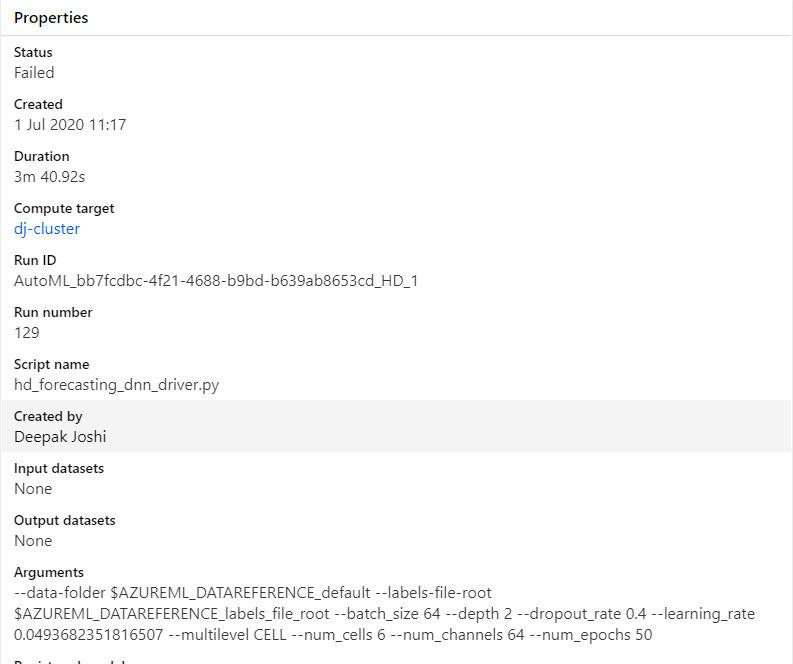
Please guide.
joshidp
on 1 Jul 2020
@joshidp We are sorry you are facing this error. Our team is currently investigating and will reach out to you when we identify the reason for failure.
Aniththa
on 2 Jul 2020
Hi @Aniththa , Any update on this issue?
Thanks!
joshidp
on 8 Jul 2020
Hi @joshidp checking in on this - are you still facing issues with forecasting DNN's?
 cartacioS
on 5 Aug 2020
cartacioS
on 5 Aug 2020
Hi, Yeah issue still exists. Thanks
joshidp
on 6 Aug 2020
For the error around TimeSeries forecasting with DNN's can you ensure that you set all the required params mentioned in this notebook: https://github.com/Azure/MachineLearningNotebooks/blob/master/how-to-use-azureml/automated-machine-learning/forecasting-beer-remote/auto-ml-forecasting-beer-remote.ipynb
_i.e. set enable_dnn=True_
Documentation: https://docs.microsoft.com/en-us/azure/machine-learning/how-to-auto-train-forecast#configure-a-dnn-enable-forecasting-experiment
cartacioS
on 6 Aug 2020
Hi,
Issue has been resolved
Thanks
joshidp
on 9 Aug 2020
please-close
cartacioS
on 26 Aug 2020
Related issues
 dumbledad
·
3Comments
dumbledad
·
3Comments
 nswitanek
·
4Comments
nswitanek
·
4Comments
 ahyerman
·
3Comments
ahyerman
·
3Comments
 swanderz
·
5Comments
swanderz
·
5Comments
 lefaivre
·
5Comments
lefaivre
·
5Comments
Most helpful comment
@joshidp This issue has been fixed. Please try again by installing the latest version of the SDK. Feel free to reach out if you have any other questions.