Machinelearningnotebooks: AutoMLEnsembleException: Could not find any models for running ensembling.
I'm facing this exception with ensemble in AutoML:
AutoMLEnsembleException: Could not find any models for running ensembling.
This exception is showing up in the voting ensemble child run.
@CESARDELATORRE
AutoML Settings:
automl_settings = {
    "featurization": "auto",
    "primary_metric": "AUC_weighted",
    "max_concurrent_iterations": vm_max_nodes-1,
    "max_cores_per_iteration": 4,
    "model_explainability": False,
    "debug_log": "automl.log",
    "experiment_timeout_hours": 5,
    "iteration_timeout_minutes": 120,
    "iterations": 40,
    "enable_early_stopping": True,
    "enable_voting_ensemble": True,
    "enable_stack_ensemble": True}
SDK Info:
- Python version: 3.7.6
- AzureML SDK version: 1.1.5.1
Traceback:
Type: System
Class: AutoMLEnsembleException
Message: AutoMLEnsembleException: Could not find any models for running ensembling.
Traceback: File "fit_pipeline.py", line 158, in fit_pipeline
remote)
File "pipeline_run_helper.py", line 323, in run_pipeline
raise status.with_traceback(status.__traceback__)
File "limit_function_call_spawn.py", line 129, in execute
**kwargs)
File "spawn_client.py", line 120, in run_in_proc
raise err
 jadhosn
All 15 comments
@jadhosn Thanks for the question. We will update you shortly.
 ram-msft
on 12 May 2020
ram-msft
on 12 May 2020
It looks like we the download of models required for ensembling procedure didn't finish within the default timeout of 5 minutes. Please increase that timeout by setting this parameter in the AutoMLConfig: ensemble_download_models_timeout_sec to a larger value.
 rtanase
on 12 May 2020
rtanase
on 12 May 2020
Hi @jadhosn , can you provide the RUN ID for further analysis, please?
Also the run's log files (you can send it to me with a link through email or teams)
 CESARDELATORRE
on 12 May 2020
CESARDELATORRE
on 12 May 2020
Sure thing @CESARDELATORRE. @rtanase can you please share more on how ensemble_download_models_timeout_sec works as it's not mentioned in the AutoML Config doc page?
i.e. Is this timeout per single model? What is the maximum allowed time? What is it by default?
jadhosn
on 12 May 2020
During Ensemble generation we download the fitted models from the previous child runs. By default we allocate 5 minutes for downloading these models in parallel, which seems not enough for your models. The timeout is for all the models to be downloaded. There is no maximum AFAIK.
If the timeout is hit and there are models downloaded then the ensembling proceeds with as many models it has downloaded (it's not required that all of them to finish within that timeout).
rtanase
on 12 May 2020
@jadhosn - Looks like that parameter ensemble_download_models_timeout_sec is not public.
We'll document the behavior and analyze if we should make it public for custom configuration.
CESARDELATORRE
on 12 May 2020
@jadhosn But I think you could still provide this parameter through kwargs as discussed with Razvan. So you still can try that configuration.
This parameter is comparable to the other ensemble related parameters explained here:
https://docs.microsoft.com/en-us/azure/machine-learning/how-to-configure-auto-train#ensemble
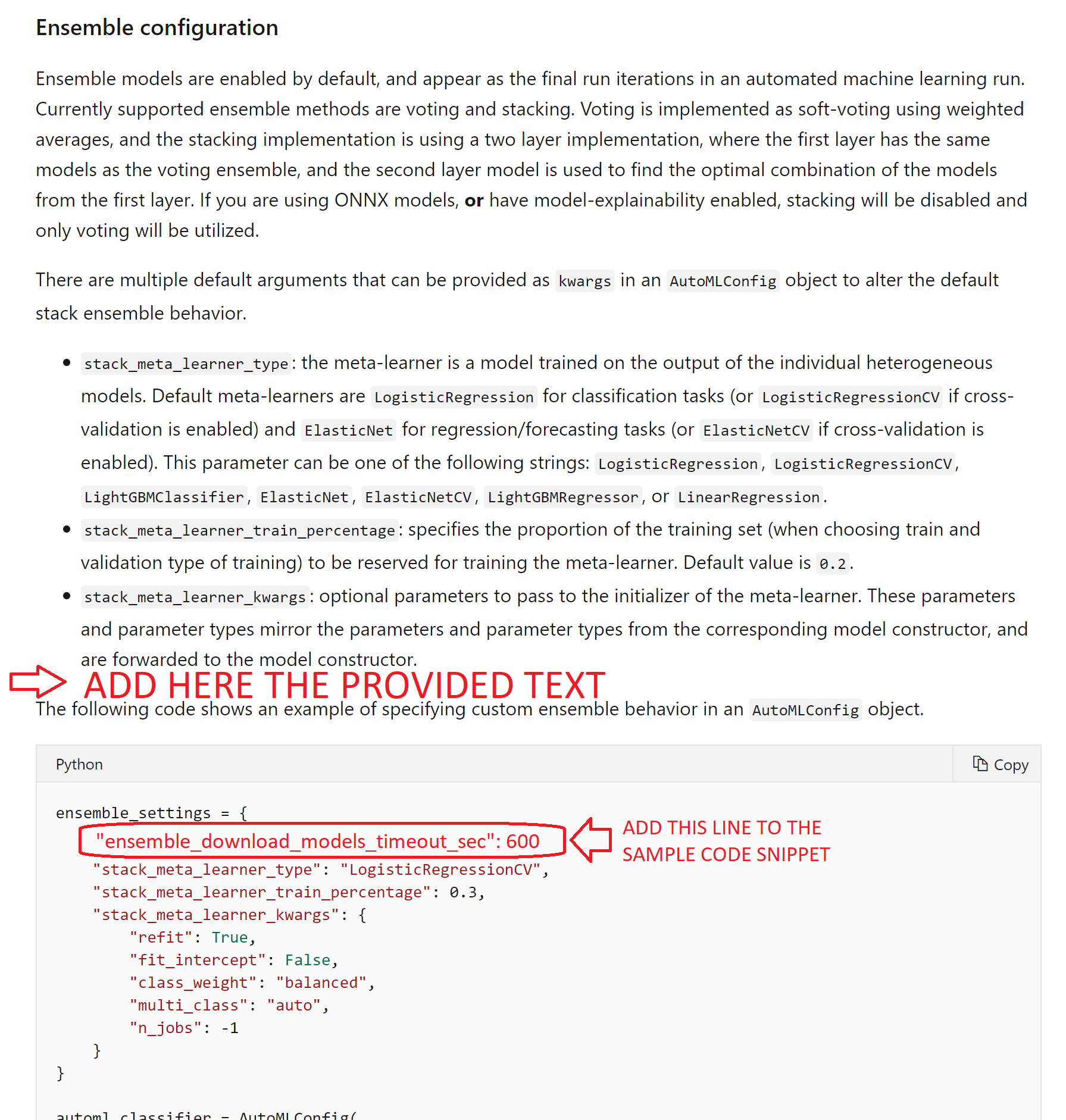
There are multiple default arguments that can be provided as kwargs in an AutoMLConfig object to alter the default stack ensemble behavior.
Like: stack_meta_learner_type, stack_meta_learner_train_percentage, etc.
We need to document ensemble_download_models_timeout_sec in that section, too.
Setting it like the following in kwargs, the timeout will be set to 10 minutes, for instance:
"ensemble_download_models_timeout_sec": 600
CESARDELATORRE
on 12 May 2020
This is the proposal for the docs update here, in case you'd like to provide feedback:
https://docs.microsoft.com/en-us/azure/machine-learning/how-to-configure-auto-train#ensemble
Section to be added in that doc page:
"
- ensemble_download_models_timeout_sec: During ensemble model generation AutoML downloads the multiple fitted models from the previous child runs. By default it allocates 5 minutes for downloading all these models in parallel. If that time out is not enough to download your models you might get an error/exception such as "
AutoMLEnsembleException: Could not find any models for running ensembling". In order to provide more time for the models to be downloaded, configure this parameter with a higher value than 300 secs (5 min). There is no maximum timeout. If the timeout is hit and there are models downloaded then the ensembling proceeds with as many models it has downloaded (it's not required that all the models need to be downloaded to finish within that timeout).
Note that when using these extended kwargs parameters you will get warnings such as:
WARNING - Received unrecognized parameters
But hose parameters are still being considered.
"
CESARDELATORRE
on 12 May 2020
I'd separate in two sections, kwargs specific to StackEnsemble and kwargs applicable to both Stack & Voting ensemble. The ensemble_download_models_timeout parameter is common to both, while the rest that are already in the docs are only applicable to Stack Ensemble.
rtanase
on 12 May 2020
@rtanase I changed the suggested argument to 1 hour, some of the runs are still failing with the same exception (_could not find any models for running ensembling_) so I'm going to push that timeout higher. On the runs where some models were downloaded, the VotingEnsemble is failing on iteration timeout (120 minutes), so I'm also going to push that higher.
For some reason, although enable_stack_ensemble is True, it doesn't run! Only the VotingEnsemble is running.
jadhosn
on 13 May 2020
About "_For some reason, although enable_stack_ensemble is True, it doesn't run! Only the VotingEnsemble is running_", is model-explainability enabled for those models?
Note that as mentioned in the doc, "_If you are using ONNX models, or have model-explainability enabled, stacking will be disabled and only voting will be utilized_."
If that's not the case, I'd like to follow up on it and isolate why stacking is not being used.
On the "_some of the runs are still failing with the same exception_" let's try a higher timeout and follow up afterwards. We'd like to isolate if that was the only reason or if there could be any additional cause. Thanks for the feedback! 👍
CESARDELATORRE
on 13 May 2020
is model-explainability enabled for those models?
No, it's disabled. I added the AutoML settings I'm using below:
automl_settings = {
    "featurization": "auto",
    "primary_metric": "AUC_weighted",
    "max_concurrent_iterations": vm_max_nodes,
    "max_cores_per_iteration": 4,
    "model_explainability": False,
    "debug_log": "automl.log",
    "experiment_timeout_hours": 5,
    "iteration_timeout_minutes": 5*60,
    #"iterations": 40,  # we can limit the number iterations
    "enable_early_stopping": True,
    "enable_voting_ensemble": True,
    "enable_stack_ensemble": True,
    "ensemble_download_models_timeout_sec": 180*60}  # by default 5 minutes
If that's not the case, I'd like to follow up on it and isolate why stacking is not being used.
I'll share the run ids and logs where stacking didn't run
let's try a higher timeout and follow up afterward
Will keep you posted as the runs complete
jadhosn
on 13 May 2020
Interesting. We are actively investigating what can be the cause on why stacking is disabled.
I'll follow up on this one.
CESARDELATORRE
on 14 May 2020
@jadhosn, I believe we have already fixed the underlying issue which was preventing the stack ensemble flag to be passed down to the pipeline. Can you please confirm?
rtanase
on 30 Jul 2020
I didn't get a chance to try it on my end, but Harsh gave it a try on our repro from the AML side so it should be good to go. I'll close this issue and re-open if I face something similar or if the change didn't propagate.
jadhosn
on 30 Jul 2020
Related issues
 swanderz
·
5Comments
swanderz
·
5Comments
 dumbledad
·
3Comments
dumbledad
·
3Comments
 nswitanek
·
4Comments
nswitanek
·
4Comments
 chengyu-liu-cs
·
3Comments
chengyu-liu-cs
·
3Comments
 jarandaf
·
4Comments
jarandaf
·
4Comments
Most helpful comment
I'd separate in two sections, kwargs specific to StackEnsemble and kwargs applicable to both Stack & Voting ensemble. The ensemble_download_models_timeout parameter is common to both, while the rest that are already in the docs are only applicable to Stack Ensemble.