Machinelearningnotebooks: Bug: Error in connecting to registered dataset (made from SQL datastore) in python script?
Hello,
I am using Azure ML. Have created a datastore from Azure SQL database. Then registered a dataset using SQL from this datastore.
Able to view data in the dataset, but when trying to read this dataset from a python script, I get the error as below:
_"Exception=DatasetExecutionError; Could not connect to specified database"_
Below is the sample code:
dataset = Dataset.get_by_name(workspace=ws, name='ds_test')
df_rawest = (dataset.to_pandas_dataframe())
Where:
ds_test = my registered dataset
and ws = Azure workspace
 swaticolab
All 11 comments
@MayMSFT
 swanderz
on 30 Dec 2019
swanderz
on 30 Dec 2019
By "able to view data in dataset", does it mean preview/profile UI shows the expected result?
What kind of authentication was used for the SQL datastore?
 shuyums2
on 30 Dec 2019
shuyums2
on 30 Dec 2019
Yes correct. The Preview UI shows the expected result.
I am using ServicePrincipal Authentication for the SQL datastore.
Also , below are logs from 70_driver_log.txt, when I run the python script:
Starting the daemon thread to refresh tokens in background for process with pid = 155
Entering Run History Context Manager.
all args:
{'input_dir': 'C:\\temp',
'n_rows': 5,
'output_dir': '/mnt/batch/tasks/shared/LS_root/jobs/avadevitsmlsvc/azureml/f9bd2ce3-20a6-481d-9059-a33a0e87b598/mounts/deal_pipeline_blob/azureml/f9bd2ce3-20a6-481d-9059-a33a0e87b598/extracted_data',
'remote_run': True,
'sys_updates': True}
processing first 5 rows
Using ds_MLInsightsOppty dataset version 1
start_time 2019-12-30 07:13:02
2019-12-30 07:13:05.763685 | ActivityCompleted: Activity=to_pandas_dataframe, HowEnded=Failure, Duration=3361.1 [ms], Info = {'activity_id': 'eba75377-8f04-453b-9ae4-ba223426d436', 'activity_name': 'to_pandas_dataframe', 'activity_type': 'PublicApi', 'app_name': 'TabularDataset', 'source': 'azureml.dataset', 'version': '1.0.74', 'completionStatus': 'Success', 'durationMs': 0.05}, Exception=DatasetExecutionError; Could not connect to specified database.|session_id=l_45cf9995-9458-4388-8e80-9443d1bb988e
The experiment failed.
Finalizing run...
Cleaning up all outstanding Run operations, waiting 300.0 seconds
2 items cleaning up...
Cleanup took 0.002043008804321289 seconds
Starting the daemon thread to refresh tokens in background for process with pid = 155
Traceback (most recent call last):
File "extract.py", line 272, in
main(args.output_dir, args.sys_updates, args.n_rows, dataset)
File "extract.py", line 99, in main
df_rawest = (dataset_sample.to_pandas_dataframe())
File "/azureml-envs/azureml_f17a8c366d6b8c07b2467588f5e8bfd8/lib/python3.6/site-packages/azureml/data/_loggerfactory.py", line 78, in wrapper
return func(args, *kwargs)
File "/azureml-envs/azureml_f17a8c366d6b8c07b2467588f5e8bfd8/lib/python3.6/site-packages/azureml/data/tabular_dataset.py", line 140, in to_pandas_dataframe
df = _try_execute(dataflow.to_pandas_dataframe)
File "/azureml-envs/azureml_f17a8c366d6b8c07b2467588f5e8bfd8/lib/python3.6/site-packages/azureml/data/dataset_error_handling.py", line 85, in _try_execute
raise DatasetExecutionError(str(e))
azureml.data.dataset_error_handling.DatasetExecutionError: Could not connect to specified database.|session_id=l_45cf9995-9458-4388-8e80-9443d1bb988e
2019/12/30 07:13:10 mpirun version string: {
Intel(R) MPI Library for Linux* OS, Version 2018 Update 3 Build 20180411 (id: 18329)
Copyright 2003-2018 Intel Corporation.
}
2019/12/30 07:13:10 MPI publisher: intel ; version: 2018
swaticolab
on 30 Dec 2019
Could you try another run with azureml-telemetry and azureml-dataprep installed in the remote run environment and share the driver.log? It will have more debug information.
Here is how to specify additional pip packages for remote run;
src = ScriptRunConfig(source_directory=script_dir, script=main_script, arguments=[])
src.run_config.environment.python.conda_dependencies = CondaDependencies('cd.yml'))
# cd.yml
name: project_environment
dependencies:
- python=3.6.8
- pip:
  - azureml-defaults==1.0.74
  - azureml-dataprep==1.1.33
Below is the driver log with updated packages:
Starting the daemon thread to refresh tokens in background for process with pid = 155
Entering Run History Context Manager.
all args:
{'input_dir': 'C:\\temp',
'n_rows': 5,
'output_dir': '/mnt/batch/tasks/shared/LS_root/jobs/avadevitsmlsvc/azureml/665bffe0-030f-4e45-9568-ec1f32b499c0/mounts/deal_pipeline_blob/azureml/665bffe0-030f-4e45-9568-ec1f32b499c0/extracted_data',
'remote_run': True,
'sys_updates': True}
processing first 5 rows
Using ds_MLInsightsOppty dataset version 1
start_time 2019-12-31 05:40:34
2019-12-31 05:40:38.322776 | ActivityCompleted: Activity=to_pandas_dataframe, HowEnded=Failure, Duration=3603.44 [ms], Info = {'activity_id': '2353aa24-6196-45ca-b3b3-aeb767e2d399', 'activity_name': 'to_pandas_dataframe', 'activity_type': 'PublicApi', 'app_name': 'TabularDataset', 'source': 'azureml.dataset', 'version': '1.0.74', 'completionStatus': 'Success', 'durationMs': 0.1}, Exception=DatasetExecutionError; Could not connect to specified database.|session_id=l_fb843ca9-a102-4a75-ae10-3a62ae7c470c
The experiment failed. Finalizing run...
Cleaning up all outstanding Run operations, waiting 300.0 seconds
2 items cleaning up...
Cleanup took 0.0034935474395751953 seconds
Starting the daemon thread to refresh tokens in background for process with pid = 155
Traceback (most recent call last):
File "extract.py", line 272, in
main(args.output_dir, args.sys_updates, args.n_rows, dataset)
File "extract.py", line 99, in main
df_rawest = (dataset_sample.to_pandas_dataframe())
File "/azureml-envs/azureml_9fbdc79de6328d24aa2362a4c81a799b/lib/python3.6/site-packages/azureml/data/_loggerfactory.py", line 78, in wrapper
return func(args, *kwargs)
File "/azureml-envs/azureml_9fbdc79de6328d24aa2362a4c81a799b/lib/python3.6/site-packages/azureml/data/tabular_dataset.py", line 140, in to_pandas_dataframe
df = _try_execute(dataflow.to_pandas_dataframe)
File "/azureml-envs/azureml_9fbdc79de6328d24aa2362a4c81a799b/lib/python3.6/site-packages/azureml/data/dataset_error_handling.py", line 85, in _try_execute
raise DatasetExecutionError(str(e))
azureml.data.dataset_error_handling.DatasetExecutionError: Could not connect to specified database.|session_id=l_fb843ca9-a102-4a75-ae10-3a62ae7c470c
2019/12/31 05:40:44 mpirun version string: {
Intel(R) MPI Library for Linux* OS, Version 2018 Update 3 Build 20180411 (id: 18329)
Copyright 2003-2018 Intel Corporation.
}
2019/12/31 05:40:44 MPI publisher: intel ; version: 2018
swaticolab
on 31 Dec 2019
Sorry I missed to specify azureml-telemetry in the prior post of conda yml. It is supposed to be:
# cd.yml
name: project_environment
dependencies:
- python=3.6.8
- pip:
  - azureml-defaults==1.0.74
  - azureml-telemetry==1.0.74  // missed in prior post
  - azureml-dataprep==1.1.33
Once the telemetry package is there, the session id printed along with exception will not have "l_" as prefix. That will enable troubleshooting from our side.
azureml.data.dataset_error_handling.DatasetExecutionError: Could not connect to specified database.|session_id=l_fb843ca9-a102-4a75-ae10-3a62ae7c470c
Right now there is very few clue for the database connectivity issue. Is there any IP based access control for the database?
Meanwhile could you try store = Datastore.get(ws, sql_store_name) from Python and see if the correct ServicePrincipal credential is returned there by checking following fields? (do not post the output credential info here)
store = Datastore.get(ws, sql_store_name)
print(store.tenant_id)
print(store.client_id)
print(store.client_secret)
And ultimately, if possible, could you setup a dummy database with a dummy ServicePrincipal that can be shared with MSFT to repro this issue? I cannot repro it using my own database and ServicePrincipal.
shuyums2
on 2 Jan 2020
- Below are the driver logs with updated package:
Starting the daemon thread to refresh tokens in background for process with pid = 155
Entering Run History Context Manager.
all args:
{'input_dir': 'C:\\temp',
'n_rows': 5,
'output_dir': '/mnt/batch/tasks/shared/LS_root/jobs/avadevitsmlsvc/azureml/0b6ae748-3cb3-4e45-86b4-1dca3c1ad3f2/mounts/deal_pipeline_blob/azureml/0b6ae748-3cb3-4e45-86b4-1dca3c1ad3f2/extracted_data',
'remote_run': True,
'sys_updates': True}
processing first 5 rows
Using ds_MLInsightsOppty dataset version 1
start_time 2020-01-06 04:50:59
The experiment failed. Finalizing run...
Cleaning up all outstanding Run operations, waiting 300.0 seconds
2 items cleaning up...
Cleanup took 0.0036416053771972656 seconds
Starting the daemon thread to refresh tokens in background for process with pid = 155
Traceback (most recent call last):
File "extract.py", line 276, in
main(args.output_dir, args.sys_updates, args.n_rows, dataset)
File "extract.py", line 99, in main
df_rawest = (dataset_sample.to_pandas_dataframe())
File "/azureml-envs/azureml_4761231293525920cf4da2f3508d873b/lib/python3.6/site-packages/azureml/data/_loggerfactory.py", line 78, in wrapper
return func(args, *kwargs)
File "/azureml-envs/azureml_4761231293525920cf4da2f3508d873b/lib/python3.6/site-packages/azureml/data/tabular_dataset.py", line 140, in to_pandas_dataframe
df = _try_execute(dataflow.to_pandas_dataframe)
File "/azureml-envs/azureml_4761231293525920cf4da2f3508d873b/lib/python3.6/site-packages/azureml/data/dataset_error_handling.py", line 85, in _try_execute
raise DatasetExecutionError(str(e))
azureml.data.dataset_error_handling.DatasetExecutionError: Could not connect to specified database.|session_id=86264ca5-b4e6-4aae-9c7b-6798cdb6ff00
2020/01/06 04:51:08 mpirun version string: {
Intel(R) MPI Library for Linux* OS, Version 2018 Update 3 Build 20180411 (id: 18329)
Copyright 2003-2018 Intel Corporation.
}
2020/01/06 04:51:08 MPI publisher: intel ; version: 2018
- Yes, there are IP based firewall settings for the database.
- Yes the ServicePricipal details are returned correctly by the pythons script.
swaticolab
on 6 Jan 2020
Thanks for the more details! @swaticolab
Given:
- Yes, there are IP based firewall settings for the database.
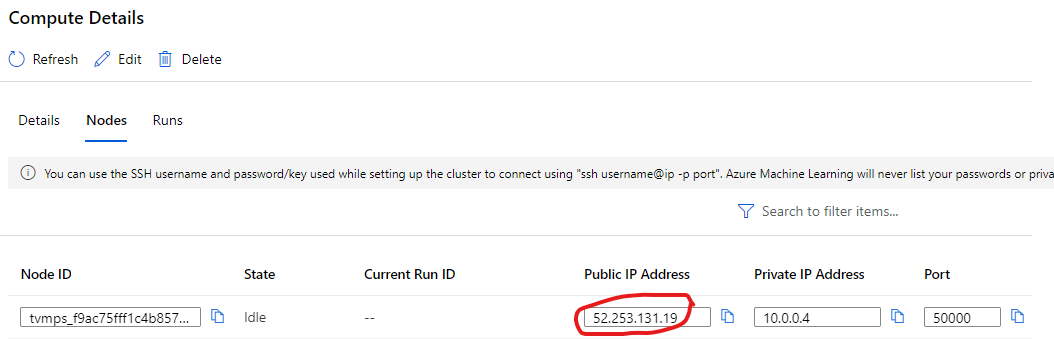
Is the IP of compute used to run training allowed to access the database via firewall?
The IP address of compute node can be checked here in Azure ML UI:
shuyums2
on 7 Jan 2020
@shuyums2
I have added the IP of my target compute to the firewall settings of the database. But still facing the same issue.
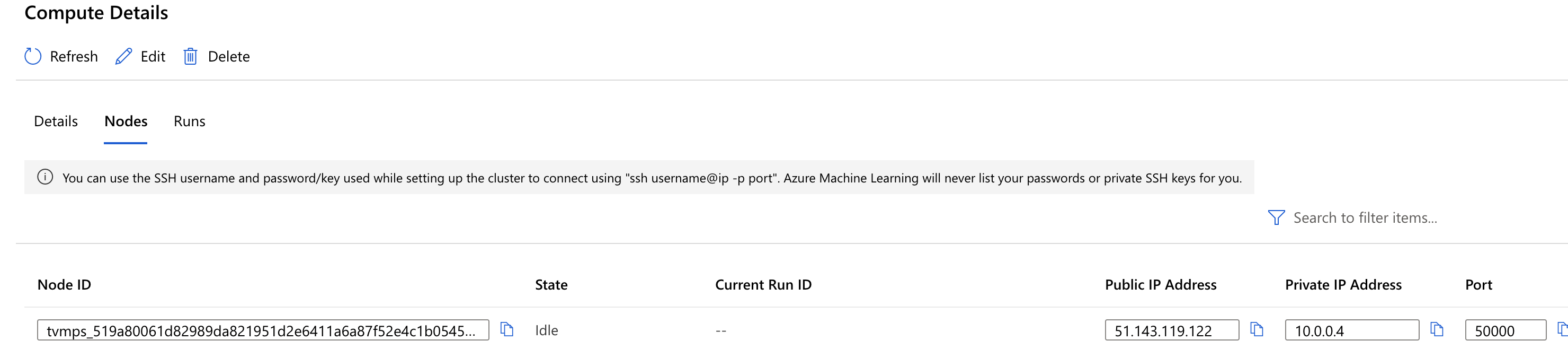
Below are the logs:
Starting the daemon thread to refresh tokens in background for process with pid = 153
Entering Run History Context Manager.
all args:
{'input_dir': 'C:\\temp',
'n_rows': 5,
'output_dir': '/mnt/batch/tasks/shared/LS_root/jobs/avadevitsmlsvc/azureml/5869d587-6b5c-438a-8b10-c75b78b453ec/mounts/deal_pipeline_blob/azureml/5869d587-6b5c-438a-8b10-c75b78b453ec/extracted_data',
'remote_run': True,
'sys_updates': True}
processing first 5 rows
Using ds_MLInsightsOppty_100 dataset version 1
start_time 2020-01-07 11:55:25
The experiment failed. Finalizing run...
Cleaning up all outstanding Run operations, waiting 300.0 seconds
2 items cleaning up...
Cleanup took 0.003189563751220703 seconds
Starting the daemon thread to refresh tokens in background for process with pid = 153
Traceback (most recent call last):
File "extract.py", line 276, in
main(args.output_dir, args.sys_updates, args.n_rows, dataset)
File "extract.py", line 99, in main
df_rawest = (dataset_sample.to_pandas_dataframe())
File "/azureml-envs/azureml_4761231293525920cf4da2f3508d873b/lib/python3.6/site-packages/azureml/data/_loggerfactory.py", line 78, in wrapper
return func(args, *kwargs)
File "/azureml-envs/azureml_4761231293525920cf4da2f3508d873b/lib/python3.6/site-packages/azureml/data/tabular_dataset.py", line 140, in to_pandas_dataframe
df = _try_execute(dataflow.to_pandas_dataframe)
File "/azureml-envs/azureml_4761231293525920cf4da2f3508d873b/lib/python3.6/site-packages/azureml/data/dataset_error_handling.py", line 85, in _try_execute
raise DatasetExecutionError(str(e))
azureml.data.dataset_error_handling.DatasetExecutionError: Could not connect to specified database.|session_id=87849996-e7eb-4aaa-aba4-7c6301629511
2020/01/07 11:55:35 mpirun version string: {
Intel(R) MPI Library for Linux* OS, Version 2018 Update 3 Build 20180411 (id: 18329)
Copyright 2003-2018 Intel Corporation.
}
2020/01/07 11:55:35 MPI publisher: intel ; version: 2018
swaticolab
on 7 Jan 2020
We do not support SQL DW. Added the feature request into our product backlog.
 MayMSFT
on 9 Jan 2020
MayMSFT
on 9 Jan 2020
@swaticolab
We will now proceed to close this thread. If there are further questions regarding this matter, please respond here and @YutongTie-MSFT and we will gladly continue the discussion.
 YutongTie-MSFT
on 26 Feb 2020
YutongTie-MSFT
on 26 Feb 2020
Related issues
 AakanchJoshi
·
4Comments
AakanchJoshi
·
4Comments
 casieo
·
4Comments
casieo
·
4Comments
 ahyerman
·
3Comments
ahyerman
·
3Comments
 tkawchak
·
5Comments
tkawchak
·
5Comments
 wagenrace
·
3Comments
wagenrace
·
3Comments
Most helpful comment