Machinelearningnotebooks: Retrieve best model from HyperDriveStep within pipeline
I'm trying to integrate hyperdrive into an end-to-end pipeline.
After HyperDriveStep step runs, I'd like to register the best run's model to the service.
Previously, I followed this notebook (snippet below), but I'm not sure how I'd go about doing this in a pipeline.
- It would have to be a downstream step right?
- What is the best practice way to fetch run data of one pipeline step from another? Similar to the below?
best_run = hyperdrive_run.get_best_run_by_primary_metric()
model = best_run.register_model(model_name = 'pytorch-hymenoptera', model_path = 'outputs/model.pt')
This notebook, Azure Machine Learning Pipeline with HyperDriveStep is a great intro, but is missing what I need.
 swanderz
All 15 comments
If you provide a blob for metrics_output parameter in HyperDriveStep, it'll create a json file containing metrics for all runs. You could then parse the file in a downstream step.
hd_step = HyperDriveStep(
    name="hyperdrive_module",
    hyperdrive_run_config=hd_config,
    estimator_entry_script_arguments=['--data-folder', data_folder],
    inputs=[data_folder],
    metrics_output=PipelineData("metrics", datastore=def_blob_store))
We have some work planned to improve this experience.
 akshay-0
on 26 Mar 2019
akshay-0
on 26 Mar 2019
@akshay-0 I spent all of yesterday and some of today trying to get the metrics_output working to no avail. Is anything here look off?
check out this commit where I try to implement using @rastala 's aml-pipelines-parameter-tuning-with-hyperdrive.ipynb
metrics.py is just printing cwd and listdir for the script dir and the input_dir.
this is the error message for 80_driver_log.txt
all args:  Namespace(input_dir='/mnt/batch/tasks/shared/LS_root/jobs/avadevitsmlsvc/azureml/e58c9df3-1cc4-4ba1-9c14-b7707a554efd/mounts/workspaceblobstore/azureml/e88e2b6b-53d6-4d95-bf8d-57a222164932/metrics', output_dir='/mnt/batch/tasks/shared/LS_root/jobs/avadevitsmlsvc/azureml/e58c9df3-1cc4-4ba1-9c14-b7707a554efd/mounts/workspaceblobstore/azureml/e58c9df3-1cc4-4ba1-9c14-b7707a554efd/output')
cwd: /mnt/batch/tasks/shared/LS_root/jobs/avadevitsmlsvc/azureml/e58c9df3-1cc4-4ba1-9c14-b7707a554efd/mounts/azureml_project_share/azureml/e58c9df3-1cc4-4ba1-9c14-b7707a554efd
dir of cwd ['.ipynb_checkpoints', '20news.pkl', 'aml-pipelines-data-transfer.ipynb', 'aml-pipelines-getting-started.ipynb', 'aml-pipelines-how-to-use-azurebatch-to-run-a-windows-executable.ipynb', 'aml-pipelines-parameter-tuning-with-hyperdrive.ipynb', 'aml-pipelines-publish-and-run-using-rest-endpoint.ipynb', 'aml-pipelines-setup-schedule-for-a-published-pipeline.ipynb', 'aml-pipelines-use-adla-as-compute-target.ipynb', 'aml-pipelines-use-databricks-as-compute-target.ipynb', 'aml-pipelines-with-data-dependency-steps.ipynb', 'aml_config', 'azureml-logs', 'azureml-setup', 'compare.py', 'data', 'extract.py', 'metrics.py', 'outputs', 'testdata.txt', 'tf-mnist', 'tf_mnist.py', 'train-db-dbfs.py', 'train-db-local.py', 'train.py', 'utils.py']
input_dir: /mnt/batch/tasks/shared/LS_root/jobs/avadevitsmlsvc/azureml/e58c9df3-1cc4-4ba1-9c14-b7707a554efd/mounts/workspaceblobstore/azureml/e88e2b6b-53d6-4d95-bf8d-57a222164932/metrics


The experiment failed. Finalizing run...
Logging experiment finalizing status in history service
Cleaning up all outstanding Run operations, waiting 300.0 seconds
1 items cleaning up...
Cleanup took 0.2506852149963379 seconds
Traceback (most recent call last):
  File "azureml-setup/context_manager_injector.py", line 161, in <module>
    execute_with_context(cm_objects, options.invocation)
  File "azureml-setup/context_manager_injector.py", line 90, in execute_with_context
    runpy.run_path(sys.argv[0], globals(), run_name="__main__")
  File "/azureml-envs/azureml_2ffb57cb85eac5669f4d09127f2be92f/lib/python3.6/runpy.py", line 263, in run_path
    pkg_name=pkg_name, script_name=fname)
  File "/azureml-envs/azureml_2ffb57cb85eac5669f4d09127f2be92f/lib/python3.6/runpy.py", line 96, in _run_module_code
    mod_name, mod_spec, pkg_name, script_name)
  File "/azureml-envs/azureml_2ffb57cb85eac5669f4d09127f2be92f/lib/python3.6/runpy.py", line 85, in _run_code
    exec(code, run_globals)
  File "metrics.py", line 21, in <module>
    print("dir of input_dir", os.listdir(args.input_dir))
NotADirectoryError: [Errno 20] Not a directory: '/mnt/batch/tasks/shared/LS_root/jobs/avadevitsmlsvc/azureml/e58c9df3-1cc4-4ba1-9c14-b7707a554efd/mounts/workspaceblobstore/azureml/e88e2b6b-53d6-4d95-bf8d-57a222164932/metrics'
Can you please share pipeline run id? We have identified one issue where metrics output was incorrectly produced as empty JSON. Fix for that issue is currently in deployment. But the error here seems different. Pipeline run id will help us investigate further.
edit: I looked at your notebook. It seems you're only providing metrics_step in pipeline
pipeline = Pipeline(workspace=ws, steps=[metrics_step])
You'd change it to include hd_step as well. Data dependency does not work for metrics.
akshay-0
on 2 Apr 2019
@akshay-0, I totally think I'm experiencing the first issue based on the stdoutlog.txt. This gist that has:
- the pipeline code and
- the
stdoutlog.txtfrom the Hyperdrive step, and - the relevant pipeline run id
The example you're sharing uses a DataReference object, have you ever gotten it to work as a PipelineData object? I'd like to do is have the metrics JSON saved into a PipelineData object, so that a downstream step can select the best iteration and use it's model to do batch scoring.
data_metrics = PipelineData("metrics", datastore=def_blob_store)

hd_step = HyperDriveStep(
    name="hyperdrive_module",
    hyperdrive_run_config=hd_config,
    estimator_entry_script_arguments=['--data-folder', data_folder],
    inputs=[data_folder],
    metrics_output = data_metrics,
    allow_reuse=True
)

metrics_step = PythonScriptStep(
    name='get_metrics',
    script_name='metrics.py',
    arguments=['--input_dir', data_metrics,
               '--output_dir', data_output],
    compute_target=compute_target,
    inputs=[data_metrics],
    outputs=[data_output],
    source_directory=os.getcwd(),
    allow_reuse=True
)
You're right. You're experiencing the same issue where metrics output was incorrectly produced as empty JSON. We're currently rolling out a fix for that, Will update here once it's available in all regions.
akshay-0
on 3 Apr 2019
Fix has been rolled out to few regions including westus2. You can try it now and let me know if you still face any issues.
Re: PipelineData, it works with PipelineData as well as DataReference.
akshay-0
on 4 Apr 2019
@akshay-0 thanks to you and your team for working to resolve this issue.
I can see the metrics json in the stdoutlog.txt but I can't access it using a PythonScriptStep or with a DataTransferStep.
Here's a gist with the error's from both.
DataTransferStep says ErrorCode=UserErrorSourceBlobNotExist
PythonScriptSteps says NotADirectoryError: [Errno 20] Not a directory: '/mnt/batch/tasks/shared/LS_root/jobs/avadevitsmlsvc/azureml/6bb6298b-6a5d-49d0-b2af-8a734c44f9c1/mounts/workspaceblobstore/azureml/3c76ab4e-51e5-46a8-bf36-ca9789c581ba/hyperdrive_metrics'
swanderz
on 5 Apr 2019
@akshay-0 when I try to do the same thing with the aml-pipelines-parameter-tuning-with-hyperdrive.ipynb like i had earlier, I still get the same as with my own experiment.
This is the same error that I get when attempt to write to a PipelineData without first running the following
os.makedirs(args.output_dir, exist_ok=True)
Is it possible that the json is saved in the dir of the PipelineRun run rather than run_id/metrics_data directory? I know there's a way to navigate to this and look, but I can't remember how to get there...
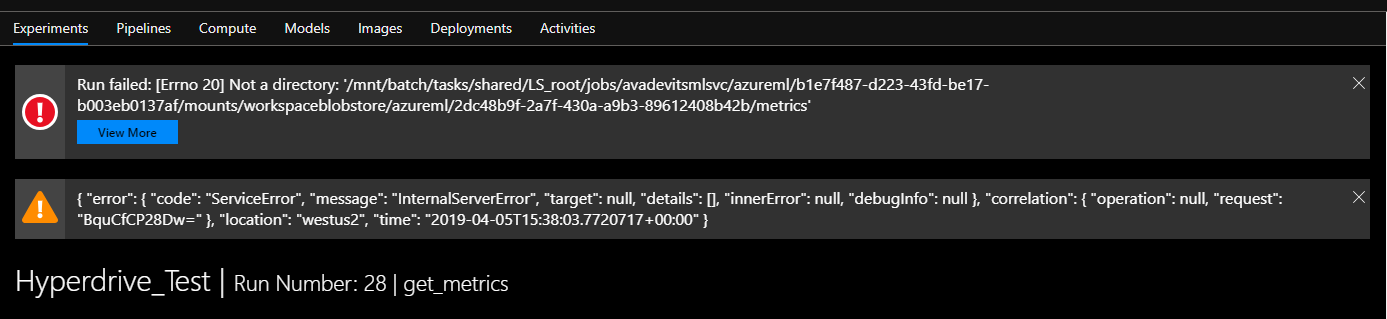
EDIT:
Stumbling around in the blob container of runs, I see this file
https://avadevitsmlsvc7139228118.blob.core.windows.net/azureml-blobstore-03cf9aa1-709e-403e-b403-860957096796/azureml/2dc48b9f-2a7f-430a-a9b3-89612408b42b/metrics.json where:
2cd48.... is the run id for the HyperDriveStep
EDIT2:
Using ye ole print statements, I've managed to get a weird error.
This code:
parent = os.path.dirname(args.input_dir)
print("input_dir_parent:", parent)
print("dir of input_dir_parent:", os.listdir( parent))
print("input_dir:", args.input_dir)
print("dir of input_dir", os.listdir( args.input_dir))
cwd: /mnt/batch/tasks/shared/LS_root/jobs/avadevitsmlsvc/azureml/898753b8-aa59-4401-9c64-1fc8ddcd7713/mounts/azureml_project_share/azureml/898753b8-aa59-4401-9c64-1fc8ddcd7713
dir of cwd ['.ipynb_checkpoints', '20news.pkl', 'aml-pipelines-data-transfer.ipynb', 'aml-pipelines-getting-started.ipynb', 'aml-pipelines-how-to-use-azurebatch-to-run-a-windows-executable.ipynb', 'aml-pipelines-parameter-tuning-with-hyperdrive.ipynb', 'aml-pipelines-publish-and-run-using-rest-endpoint.ipynb', 'aml-pipelines-setup-schedule-for-a-published-pipeline.ipynb', 'aml-pipelines-use-adla-as-compute-target.ipynb', 'aml-pipelines-use-databricks-as-compute-target.ipynb', 'aml-pipelines-with-data-dependency-steps.ipynb', 'aml_config', 'azureml-logs', 'azureml-setup', 'compare.py', 'data', 'extract.py', 'metrics.py', 'outputs', 'testdata.txt', 'tf-mnist', 'tf_mnist.py', 'train-db-dbfs.py', 'train-db-local.py', 'train.py', 'utils.py']
input_dir_parent: /mnt/batch/tasks/shared/LS_root/jobs/avadevitsmlsvc/azureml/898753b8-aa59-4401-9c64-1fc8ddcd7713/mounts/workspaceblobstore/azureml/e88e2b6b-53d6-4d95-bf8d-57a222164932
dir of input_dir_parent: ['metrics']
input_dir: /mnt/batch/tasks/shared/LS_root/jobs/avadevitsmlsvc/azureml/898753b8-aa59-4401-9c64-1fc8ddcd7713/mounts/workspaceblobstore/azureml/e88e2b6b-53d6-4d95-bf8d-57a222164932/metrics

  File "metrics.py", line 24, in <module>
    print("dir of input_dir", os.listdir( args.input_dir))
NotADirectoryError: [Errno 20] Not a directory: '/mnt/batch/tasks/shared/LS_root/jobs/avadevitsmlsvc/azureml/898753b8-aa59-4401-9c64-1fc8ddcd7713/mounts/workspaceblobstore/azureml/e88e2b6b-53d6-4d95-bf8d-57a222164932/metrics'
Can you please share the definition of hyperdrive_metrics and/or pipeline run id?
akshay-0
on 5 Apr 2019
I'm pretty confident that the JSON is being saved in the parent directory of the PipelineData reference. In this case, the JSON is empty, but I expect it to be because tf_mnist.py doesn't log any metrics.
Is this a sufficient amount of the run id for you?
8ae6cdfb-6bb6-4390-8647-34a21c16b06f
here's the exact code. basically it is a copy of @rastala's Azure Machine Learning Pipeline with HyperDriveStep except i've added the following:
data_metrics = PipelineData("metrics", datastore=def_blob_store)
data_output = PipelineData("output", datastore=def_blob_store)

hd_step = HyperDriveStep(
    name="hyperdrive_module",
    hyperdrive_run_config=hd_config,
    estimator_entry_script_arguments=['--data-folder', data_folder],
    inputs=[data_folder],
    metrics_output = data_metrics,
    allow_reuse=True
)

metrics_step = PythonScriptStep(
    name='get_metrics',
    script_name='metrics.py',
    arguments=['--input_dir', data_metrics,
               '--output_dir', data_output],
    compute_target=compute_target,
    inputs=[data_metrics],
    outputs=[data_output],
    source_directory=os.getcwd(),
    allow_reuse=True
)
this is metrics.py
import argparse
import os

parser = argparse.ArgumentParser()
parser.add_argument('--input_dir', dest="input_dir", default = "C://temp/attrition_pipe/output")
parser.add_argument('--output_dir', dest="output_dir", default = "C://temp/attrition_pipe/output")

args = parser.parse_args()
print("all args: ", args)

cwd = os.getcwd()
print("cwd:", cwd)
print("dir of cwd", os.listdir(cwd))
parent = os.path.dirname(args.input_dir)
print("input_dir_parent:", parent)
print("dir of input_dir_parent:", os.listdir( parent))


with open(os.path.join(parent, 'metrics')) as f:
    metrics = json.load(f)

print(metrics)
here's 80_driver_log.txt for the get_metrics step.
all args:  Namespace(input_dir='/mnt/batch/tasks/shared/LS_root/jobs/avadevitsmlsvc/azureml/e8e790e0-ca91-433f-b5ef-cf24399d38ea/mounts/workspaceblobstore/azureml/e88e2b6b-53d6-4d95-bf8d-57a222164932/metrics', output_dir='/mnt/batch/tasks/shared/LS_root/jobs/avadevitsmlsvc/azureml/e8e790e0-ca91-433f-b5ef-cf24399d38ea/mounts/workspaceblobstore/azureml/e8e790e0-ca91-433f-b5ef-cf24399d38ea/output')
cwd: /mnt/batch/tasks/shared/LS_root/jobs/avadevitsmlsvc/azureml/e8e790e0-ca91-433f-b5ef-cf24399d38ea/mounts/azureml_project_share/azureml/e8e790e0-ca91-433f-b5ef-cf24399d38ea
dir of cwd ['.ipynb_checkpoints', '20news.pkl', 'aml-pipelines-data-transfer.ipynb', 'aml-pipelines-getting-started.ipynb', 'aml-pipelines-how-to-use-azurebatch-to-run-a-windows-executable.ipynb', 'aml-pipelines-parameter-tuning-with-hyperdrive.ipynb', 'aml-pipelines-publish-and-run-using-rest-endpoint.ipynb', 'aml-pipelines-setup-schedule-for-a-published-pipeline.ipynb', 'aml-pipelines-use-adla-as-compute-target.ipynb', 'aml-pipelines-use-databricks-as-compute-target.ipynb', 'aml-pipelines-with-data-dependency-steps.ipynb', 'aml_config', 'azureml-logs', 'azureml-setup', 'compare.py', 'data', 'extract.py', 'metrics.py', 'outputs', 'testdata.txt', 'tf-mnist', 'tf_mnist.py', 'train-db-dbfs.py', 'train-db-local.py', 'train.py', 'utils.py']
input_dir_parent: /mnt/batch/tasks/shared/LS_root/jobs/avadevitsmlsvc/azureml/e8e790e0-ca91-433f-b5ef-cf24399d38ea/mounts/workspaceblobstore/azureml/e88e2b6b-53d6-4d95-bf8d-57a222164932
dir of input_dir_parent: ['metrics']
{}


The experiment completed successfully. Finalizing run...
Logging experiment finalizing status in history service
Cleaning up all outstanding Run operations, waiting 300.0 seconds
1 items cleaning up...
Cleanup took 0.2506706714630127 seconds
I believe the issue is that you're trying to treat data_metrics as directory whereas it's a file. For instance, the source_reference_type='directory', in below code.
transfer_metrics_step = DataTransferStep(
    name="transfer_metrics",
    source_data_reference=hyperdrive_metrics,
    destination_data_reference=output_dir,
    source_reference_type='directory',
    destination_reference_type='directory',
    compute_target=data_factory_compute,
    allow_reuse=pipeline_reuse
)
I just tried below code and it seems to work fine:
metrics_output = PipelineData("metrics_output", datastore=ds)

step1 = HyperDriveStep(
    name="hyperdrive_step",
    hyperdrive_run_config=hd_config,
    estimator_entry_script_arguments=['--data-folder', data_folder],
    inputs=[data_folder],
    metrics_output=metrics_output)

step2_output = DataReference(
    datastore=ds,
    data_reference_name='hd_metrics',
    path_on_datastore='hd_metrics')

step2 = DataTransferStep(
    name='hd_metrics_copy',
    source_data_reference=metrics_output,
    destination_data_reference=step2_output,
    compute_target=data_factory_compute)
I'm going to look at exact execution of your pipeline, but you may want to try it in the meantime.
akshay-0
on 5 Apr 2019
@akshay-0 yeah I'm seeing the same thing now.
Thanks for you help through all of this. It seems my takeaway is that:
- PipelineData objects are intended by default to save single objects, and
- the SDK will do exactly that if i come across a param like the
metrics_outputin the future.
What's the best way to make this clear to future users? Perhaps adding your output steps above to the Azure Machine Learning Pipeline with HyperDriveStep notebook?
Perhaps if i was a better dev, I could have figured this out more quickly, but I was lead astray by the following:
- every pipeline ipynb's in this repo only uses
PipelineDataobjects as directories to save files into, - the error message when I tried to pass a filename (
metrics_output.json) to thenameparameter ofPipelineData: "your cannot use.'s in the name parameter."
metrics_ouput = PipelineData("hd_metrics", datastore=def_blob_store), and - reading the documentation's description (see below) to mean:
"please tell us the folder where you would like the JSON to be saved"
metrics_output:
PipelineDataorazureml.data.data_reference.DataReferenceorazureml.pipeline.core.graph.OutputPortBinding
Optional value specifying the location to store HyperDrive run metrics as a JSON file
swanderz
on 5 Apr 2019
Thanks for your feedback! We have some work planned in near future to get rid of metrics_output and make it more streamlined. Including, in case of hyperdrive, making it easier to retrieve best run (inside the pipeline).
akshay-0
on 5 Apr 2019
@akshay-0 you're my hero. Any chance you've got 30 min on your calendar to sync with me? I have some question I haven't yet gotten an answer to that would really accelerate our adoption of the SDK. @heatherbshapiro I think could help set it up. Cheers!
swanderz
on 6 Apr 2019
@swanderz please send your questions to @heatherbshapiro or me. @akshay-0 is on call and may not be able to honor other commitments. But we will make sure he gets to see your questions.
 sanpil
on 9 Apr 2019
sanpil
on 9 Apr 2019
Related issues
 wagenrace
·
3Comments
wagenrace
·
3Comments
 jmwoloso
·
4Comments
jmwoloso
·
4Comments
 tylercmsft
·
4Comments
swanderz
·
5Comments
tylercmsft
·
4Comments
swanderz
·
5Comments
 ahyerman
·
3Comments
ahyerman
·
3Comments