Machinelearningnotebooks: RunDetails widget doesn't appear
Using jupyter notebook 5.7.4 with Python 3.6.8 and running through the azureml examples. The RunDetails Widget does not render when calling show().
For example, this is what I see when I attempt to show the RunDetails in the train-hyperparameter-tune-deploy-with-tensorflow example:

 tinkerer
All 15 comments
This looks like the extensions are not enabled. could you provide output of:
jupyter nbextension list
 ahcan76
on 7 Feb 2019
ahcan76
on 7 Feb 2019
Is this still an issue?
 archanpi
on 8 Feb 2019
archanpi
on 8 Feb 2019
No extensions come up when I run that command:
"C:\Users_____>jupyter nbextension list
Known nbextensions:
"
This is still an issue. What do I need to do to enable extensions? Are extensions enabled by default if you run through the installation using anaconda?
Otherwise, I don't see any information about enabling extensions prior to using the RunDetails widget in any of the documentation where such a clue might belong:
https://docs.microsoft.com/en-us/azure/machine-learning/service/quickstart-create-workspace-with-python
https://docs.microsoft.com/en-us/azure/machine-learning/service/tutorial-train-models-with-aml
https://docs.microsoft.com/en-us/azure/machine-learning/service/how-to-track-experiments
tinkerer
on 8 Feb 2019
@archanpi, I see the same behavior as @tinkerer and I below is my output.
Does it indicate that I don't have the azureml_train_widget in my azure_automl env?
(azure_automl) c:\Users\anders.swanson\Documents\attrition>jupyter nbextension list
Known nbextensions:
  config dir: C:\Users\anders.swanson\.jupyter\nbconfig
    notebook section
      azureml_train_widgets/extension enabled
      - Validating: ok
      azureml_widgets/extension enabled
      - Validating: ok
  config dir: C:\Users\anders.swanson\AppData\Local\Continuum\miniconda3\envs\azure_automl\etc\jupyter\nbconfig
    notebook section
      azureml_widgets/extension enabled
      - Validating: ok
      jupyter-js-widgets/extension enabled
      - Validating: ok
      nb_conda/main enabled
      - Validating: ok
    tree section
      nb_conda/tree enabled
      - Validating: ok
 swanderz
on 8 Feb 2019
swanderz
on 8 Feb 2019
@tinkerer It looks like you're not running this in conda.
Run this command in the conda environment
jupyter nbextension list
archanpi
on 8 Feb 2019
@swanderz It looks like you have some deprecated user widgets installed. You should first uninstall them by running this-
jupyter nbextension uninstall --py --user azureml.widgets
jupyter nbextension uninstall --py --user azureml.train.widgets
If the second command throws an exception, you can ignore it.
See if this works for you. If this doesn't work, send the console error from the browser
archanpi
on 8 Feb 2019
@tinkerer Also, #4259 issue doesn't seem to be connected to this issue.
archanpi
on 8 Feb 2019
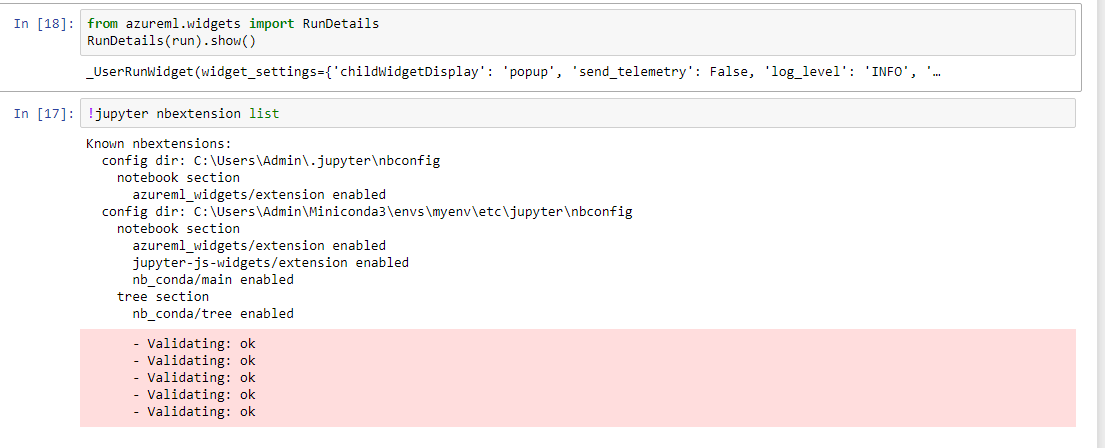
I reinstalled following the conda instructions on the quickstart for python. First executing the RunDetails line complains about azureml.widgets not being installed. RunDetails widget still doesn't appear after pip install azureml.widgets. Heres what comes up when I run !jupyter nbextension list
tinkerer
on 9 Feb 2019
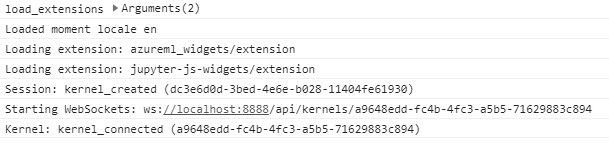
Your environment looks good. Try restarting the kernel and refresh the browser. Also, check if the Developer Console has this message displayed - "Loading extension: azureml_widgets/extension"
archanpi
on 9 Feb 2019
@archanpi uninstalled the extension like you said and I can now see the the widget in Jupyter Notebook.
To confirm: this extension will not work in either:
- Jupyter Lab, or
- VSCode Python extension's Jupyter server
swanderz
on 10 Feb 2019
Excellent!
Jupyter Lab - not working currently
VSCode - no, it never worked
archanpi
on 12 Feb 2019
closing this issue since uninstalling old widget and reinstalling it fixed the issue
 swatig007
on 4 Mar 2019
swatig007
on 4 Mar 2019
Just to share my situation: I had jupyter running in one conda environment but using a kernel from a different environment. The azureml-sdk[notebooks] package has to be installed in the environment where jupyter is installed, not the kernel you're running.
 scign
on 19 Oct 2020
scign
on 19 Oct 2020
@scign good to know! conda is amazing, but quirks like this can be maddening...
swanderz
on 19 Oct 2020
@scign good to know!
condais amazing, but quirks like this can be maddening...
More of a thing about jupyter environments than conda! It allows you to run kernels in other environments which is awesome but the widgets need to be installed in the environment in which you're running the notebook, not the environment in which you're running the code - which makes sense really. Definitely good practice to separate the two so it's a "quirk" I'm willing to live with.
scign
on 19 Oct 2020
Related issues
 tylercmsft
·
4Comments
tylercmsft
·
4Comments
 casieo
·
4Comments
casieo
·
4Comments
 AakanchJoshi
·
4Comments
AakanchJoshi
·
4Comments
 ashic
·
3Comments
ashic
·
3Comments
 chengyu-liu-cs
·
3Comments
chengyu-liu-cs
·
3Comments