Machinelearningnotebooks: Autentication problem
When I run the configuration.ipynb notebooks, at the cell containing:
```
from azureml.core import Workspace
Create the workspace using the specified parameters
ws = Workspace.create(name = workspace_name,
subscription_id = subscription_id,
resource_group = resource_group,
location = workspace_region,
create_resource_group = True,
exist_ok = True)
```
The following error is raised:
CLIError: No subscriptions were found for 'None'. If this is expected, use '--allow-no-subscriptions' to have tenant level accesses
How do I use the --allow-no-subscriptions flag to log in?
Thanks.
 RabbitJackTrade
All 13 comments
Can you login to your Azure subscription otherwise, for example using azure-cli "az login" command, or through portal.azure.com?
 rastala
on 12 Dec 2018
rastala
on 12 Dec 2018
Yes - just tried (at portal.azure.com) and logged in with no problem.
RabbitJackTrade
on 12 Dec 2018
If you have azure-cli installed, could you try following:
- Create a new code cell in notebook
- Run !az login
This should take you to authentication dialog - Run !az account show, and check that the Azure tenant and active subscription is what you'd expect
- If not, run !az account set -s my-subscription-id
rastala
on 12 Dec 2018
I tried many variations and it still doesn't work. I'll recreate my steps from the beginning:
I first run
!pip install azure-cli
results in a long list of Requirement already satisfied:; no error messages.
Next:
!az login
response:
To sign in, use a web browser to open the page https://microsoft.com/devicelogin and enter the code [some code] to authenticate.
Clicking on the link takes me to the Device Login, where I paste the code, after which I click 'Continue' and I'm taken to the 'Microsoft Azure Cross-platform Command Line Interface' page where I'm told I can close the window.
I close it and go back to the notebook cell where I entered !az login and now find the message:
No subscriptions were found for 'None'. If this is expected, use '--allow-no-subscriptions' to have tenant level accesses
I the same cell, I now run
!az login --allow-no-subscriptions
Same authtentication link as above, same procedure, close the final page, come back to the same cell and find the output
[]
In the next cell, I run
!az account show
response:
Please run 'az login' to setup account.
And the whole process starts again with a different code.
As per your suggestion, I also tried run in the next cell
!az account -s
response:
az account: error: the following arguments are required: _subcommand
usage: az account [-h]
                  {list,set,show,clear,list-locations,get-access-token,lock,management-group}
                  ...
Now what?
RabbitJackTrade
on 13 Dec 2018
I hit the same issue.
I create workspace from Azure portal and try to connect to workspace using Python SDK.
I got the below error.
AuthenticationException: You don't have access to xxxxxxx-cac3-xxxx-bxx1-xxxx7xx0d3xx subscription. All the subscriptions that you have access to = [SubscriptionInfo(subscription_name='Azure XXXX', subscription_id='xxxx-xxx-xx-xxx-xx91'), SubscriptionInfo(subscription_name='masked', subscription_id='masked'), SubscriptionInfo(subscription_name='masked', subscription_id='masked'), SubscriptionInfo(subscription_name='masked', subscription_id='masked')]. Please run 'az login' or set xxxxxxx-cac3-xxxx-bxx1-xxxx7xx0d3xx as default subscription and retry.
IMHO, Workspace class can't access the subscription(s) of different AD tenant.
 jiyongseong
on 28 Dec 2018
jiyongseong
on 28 Dec 2018
Hi @kenkadota, can you clarify why this issue has been closed? I have the same issue when using Workspace.from_config, in the default notebooks that have been generated when I create a new Machine Learning Services instances from the Azure portal (A config.json has also been automatically generated with the appropriate configuration to access my subscription, but it's missing a tenant id). I think the reason for the error is that I have access to multiple directories with my Azure login, and it's selecting the wrong tenant by default. However, I don't see any way in the documentation of Workspace (https://docs.microsoft.com/en-us/python/api/azureml-core/azureml.core.workspace.workspace?view=azure-ml-py) that would allow me to specify a different tenant in config.json.
 ckarras
on 13 Jun 2019
ckarras
on 13 Jun 2019
Thank you for the update @ckarras I shall reopen for you.
 kenkadota
on 13 Jun 2019
kenkadota
on 13 Jun 2019
I was able to workaround the issue by creating a new user in my subscription's Active Directory, and giving this user Owner rights to the Azure subscription where I have my machine learning workspace. Then I can use this user when I'm asked to login after calling Workspace.from_config. However, the issue should remain open, this workaround is good enough to build a PoC but the bug must be fixed. With a single login to Azure, I have access to several different Azure directories, and I don't think I'm an exception, having access to multiple Azure subscriptions and directories should be standard to anyone working for different customers.
ckarras
on 13 Jun 2019
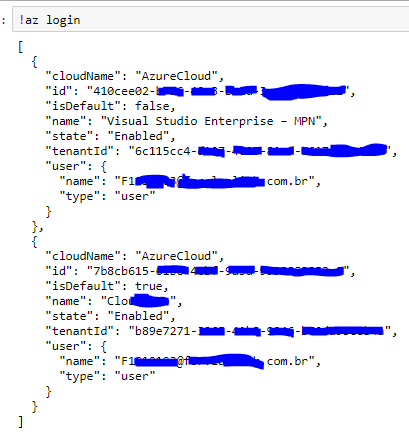
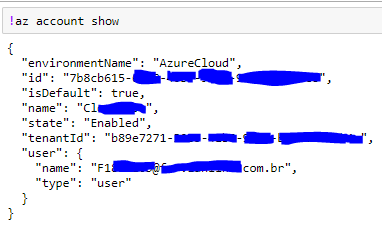
The following message shows that I'm logged in the same subscription that I'm wish to connect
But when I use " Workspace.from_config('config.json') " I get

 Wellington-Noberto
on 23 Aug 2019
Wellington-Noberto
on 23 Aug 2019
Is there any update on this? Providing "tenant_id": in config.json does not help
 claasnic
on 29 Aug 2019
claasnic
on 29 Aug 2019
I ran into the same issue when working on different tenants. Upon login azureml would always select the wrong one by default.
I found the following solution here:
https://notebooks.azure.com/azureml/projects/azureml-getting-started/html/how-to-use-azureml/automated-machine-learning/classification/auto-ml-classification.ipynb
make sure you have the correct config.json in your project root directory.
then use:
auth = InteractiveLoginAuthentication(tenant_id =
ws = Workspace.from_config(auth = auth)
in place of:
ws = Workspace.from_config()
 phonosync
on 1 Sep 2019
phonosync
on 1 Sep 2019
Thank you, it worked for me.
Wellington-Noberto
on 2 Sep 2019
If you're using the R SDK, the following code will solve a similar issue:
azuremlsdk::azureml$core$authentication$InteractiveLoginAuthentication(tenant_id = '<my-tenant-id>')

ws <- load_workspace_from_config()
 lucazav
on 26 Feb 2020
lucazav
on 26 Feb 2020
Related issues
 casieo
·
4Comments
casieo
·
4Comments
 dumbledad
·
3Comments
dumbledad
·
3Comments
 swanderz
·
5Comments
swanderz
·
5Comments
 jmwoloso
·
4Comments
jmwoloso
·
4Comments
 chengyu-liu-cs
·
3Comments
chengyu-liu-cs
·
3Comments
Most helpful comment
I ran into the same issue when working on different tenants. Upon login azureml would always select the wrong one by default.
I found the following solution here:
https://notebooks.azure.com/azureml/projects/azureml-getting-started/html/how-to-use-azureml/automated-machine-learning/classification/auto-ml-classification.ipynb
make sure you have the correct config.json in your project root directory.)
then use:
auth = InteractiveLoginAuthentication(tenant_id =
ws = Workspace.from_config(auth = auth)
in place of:
ws = Workspace.from_config()