Machinelearning: Using OnnxTransformer throws TypeInitializationException
System information
- OS version/distro: Windows 7
- .NET Version (eg., dotnet --info): core 3.1
Issue
When trying to use OnnxTransformer, the native libraries aren't loaded properly. I can see them under bin\Debug\netcoreapp3.1\runtimes(platform)\native.
If I use package version 1.4.0 of OnnxTransformer, without installing the runtime myself, it works.
I couldn't find any docs regarding the requirement to install the runtime manually (I figured it out by browsing all over the place, but not through docs really). I suppose this should be clear when you're not using the onnxruntime package explicitly, but rather the higher level API of OnnxTransformer?
On a separate note: Is it sufficient to install the GPU natives and use the fallbackToCpu flag of ApplyOnnxModel to be able to run inferencing on both CPU and GPU? I'm having a hard time finding this documented.
What did you do?
InstalledMicrosoft.ML.OnnxTransformer1.5.0 andMicrosoft.ML.OnnxRuntime1.3.0 and usedApplyOnnxModelin a pipeline.What happened?
CallingApplyOnnxModelthrowsSystem.TypeInitializationException.What did you expect?
That my ONNX model can be used.
Source code / logs
Inner exception message:
"Unable to load DLL 'onnxruntime' or one of its dependencies: The specified module could not be found. (0x8007007E)"
 yousiftouma
All 12 comments
Hi, @yousiftouma . I'm sorry to hear you're experiencing these problems, because there are indeed some problems with our OnnxTransformer's docs.
Long story short:
- When using ML.NET version 1.5.0, users also need to add OnnxRuntime 1.3.0 or OnnxRuntime.Gpu 1.3.0 if they want to use OnnxTransformer.
- The
fallbackToCpuparameter is pretty much only used when working with GPUs and the OnnxRuntime.Gpu nuget. If a Gpu isn't found, or if there's a problem with your CUDA installation, andfallbackToCpuis set to true, then OnnxTransformer will run on the Cpu instead of the Gpu. But to actually use the Gpu, you'll also need to set thegpuDeviceIdto a non-negative integer to identify the GPU you want to use. If you only have one GPU installed on your computer, then it would typically begpuDeviceId = 0. Installing CUDA is also necessary, as mentioned here.
Problems with our OnnxTransformer docs
There are some problems with our docs, some of which I'm just noticing now that you've reported this problem.
- In general, the docs for OnnxEscoringEstimator contain the most up-to-date info regarding how to use
OnnxTransformer(including info on dependencies, and some notes on how to use GPU). The only problem with it is that it was last updated on ML.NET's 1.5.0-preview2 release (on March), and it doesn't include the fact that on ML.NET's 1.5.0 release (on May) we now require OnnxRuntime 1.3.0 to make OnnxTransformer work. (I believed this got fixed on https://github.com/dotnet/machinelearning/pull/5175 , but for some reason those changes didn't make it to the official documentation found on docs.microsoft.com ). - The docs for OnnxTransformer are just wrong, since they don't clearly mention the need for OnnxRuntime, and the CUDA version mentioned there is wrong since ML.NET 1.4.0 I believe.
- The docs for ApplyOnnxModel() don't mention much about GPU, and the necessary dependencies. I think that's also needed.
I'll try to fix the problems I've mentioned. Thanks for reporting this problem.
 antoniovs1029
on 26 Jun 2020
antoniovs1029
on 26 Jun 2020
Hi and thanks for your response @antoniovs1029
Good to hear that the docs will be updated, hopefully it will help others with the same questions.
I’ve understood the part about gpu vs cpu so thanks for confirmation about the gpu nuget being sufficient to use the same application on both gpu (when available) and cpu!
I still don’t understand why my app is crashing when using my current setup described in OP when using the old version without the runtime nuget works fine. Any ideas?
Edit: I might add that this is local testing with cpu (gpuid set to null and fallbacktocpu true). 1.4.0 without runtime nuget works but 1.5.0 with runtime 1.3.0 gives the exception mentioned in OP)
yousiftouma
on 26 Jun 2020
Also: the sample end to end app with onnx uses ML.NET 1.4.0 so afaik there is no working example with onnxtransformer 1.5.0.
(Typing on Mobile now so sorry for bad formatting etc)
yousiftouma
on 26 Jun 2020
I still don’t understand why my app is crashing when using my current setup described in OP when using the old version without the runtime nuget works fine. Any ideas?
Edit: I might add that this is local testing with cpu (gpuid set to null and fallbacktocpu true). 1.4.0 without runtime nuget works but 1.5.0 with runtime 1.3.0 gives the exception mentioned in OP)
OnnxTransformer version 1.4.0 didn't require to install OnnxRuntime, as that was done automatically, so that's why it's working (also, notice that I believe that Onnx GPU support wasn't working on ML.NET 1.4.0 and that's precisely the reason why now in ML.NET 1.5.0 users are required to manually choose and install OnnxRuntime or OnnxRuntime.Gpu).
OnnxTransformer version 1.5.0 should work when manually installing the dependency for OnnxRuntime or OnnxRuntime.Gpu version 1.3.0. The exception you're getting shouldn't be caused by your choice of the gpuid or fallbacktocpu parameters.
Can you please provide a .zip file containing the solution of your project so that we can have a closer look? Thanks.
Also: the sample end to end app with onnx uses ML.NET 1.4.0 so afaik there is no working example with onnxtransformer 1.5.0.
Thanks for mentioning this. I believe the docs team that maintains the samples repository is working on updating the samples to newer ML.NET releases 😄
antoniovs1029
on 26 Jun 2020
I’ll get back to you with a minimal repro, this is a private app, can’t share the source. Shooting for Monday!
yousiftouma
on 26 Jun 2020
@antoniovs1029
Okay, so I used the sample project here.
Running it as-is works as expected (I ran the webapp and uploaded an image and got a result).
Updated the nuget packages for all projects in the solution to 1.5.0 and added Microsoft.ML.OnnxRuntime 1.3.0 to all projects as well. Tried running the webapp again and got the same exception when running the project when ApplyOnnxModel is hit on line 27 here.
Afaik the API's used here haven't changed, so this should work.
Let me know if this is a sufficient repro.
yousiftouma
on 29 Jun 2020
Hi, @yousiftouma . I wasn't able to reproduce your error with the sample you've pointed to.
I tried updating it to OnnxTransformer version 1.5.0 first, without adding OnnxRuntime 1.3.0, and, as expected, it failed with the exception you pointed to. Then I actually added OnnxRuntime 1.3.0 and now it runs as expected, and I was able to upload an image to the app and it worked.
Here are my dependencies for the webapp, please check that you have the same dependencies:
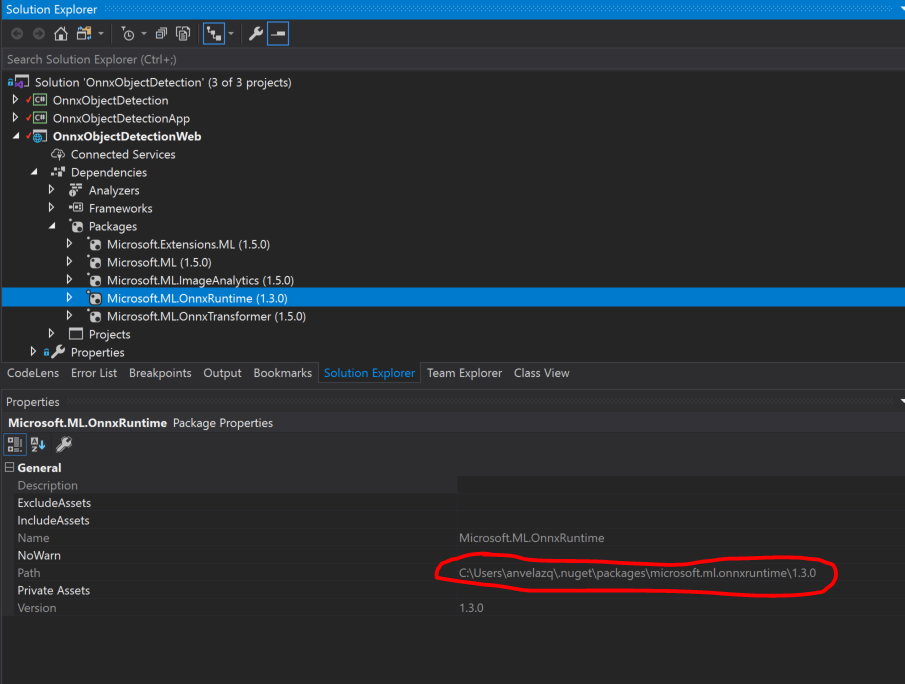
Also, notice that the nugets for this project are downloaded to your <username>\.nuget\packages\ folder. In the past, when working with other projects on VisualStudio, I've had problems that (for some reason), even after I manually updated the nuget, the project itself was still behaving as if it had the previous nuget. Please, check if using "Rebuild" or "Clean" followed by a "Build" on the WebApp project actually cleans and download the desired nuget. Check that the path shown on the package's properties (highlighted on the capture above) is correct.
If problem persists, please consider re-cloning the samples repository, and before you run the webapp, update the dependencies to OnnxTransformer 1.5.0 and OnnxRuntime 1.3.0, then run the webapp. Let us know if this works for you.
antoniovs1029
on 2 Jul 2020
Hi, @yousiftouma . Were you able to run OnnxTransformer 1.5.0?
I've created a couple of projects using OnnxTransformer 1.5.0 during the last week, and I haven't had any problems when using OnnxRuntime 1.3.0. So I'm still unsure as to what was causing your exception.
Thanks.
antoniovs1029
on 8 Jul 2020
Hi! Sorry for the bad response rate, I am currently on vacation and will get back to you in a couple of weeks!
yousiftouma
on 8 Jul 2020
So, in the meantime, I will close this issue. Please, feel free to reopen if you still face this problem after you return.
Thanks. 😄
antoniovs1029
on 11 Jul 2020
@antoniovs1029
Hi again.
I tried following your instructions. I re-cloned the repo, didn't run or anything before updating the packages to the same versions you have in your screnshot. When I try to run the project I get the exact same exception again.
Are there any known issues with Windows 7 when it comes to ML.NET 1.5.0 or OnnxRuntime 1.3.0?
yousiftouma
on 28 Jul 2020
Any feedback on this? @antoniovs1029
yousiftouma
on 10 Aug 2020
Related issues
 samueleresca
·
3Comments
samueleresca
·
3Comments
 frankhaugen
·
3Comments
frankhaugen
·
3Comments
 daholste
·
4Comments
daholste
·
4Comments
 OneCyrus
·
4Comments
daholste
·
3Comments
OneCyrus
·
4Comments
daholste
·
3Comments