Machinelearning: Problem with ML.NET RobustScaler
System information
- Windows 10 Enterprise 10.0 18363 Built 18363
- Visual Studio 2019, build 16.6.2
Source code
- I have put my reproduceable project on GitHUb at: https://github.com/CBrauer/Test_RobustScaler
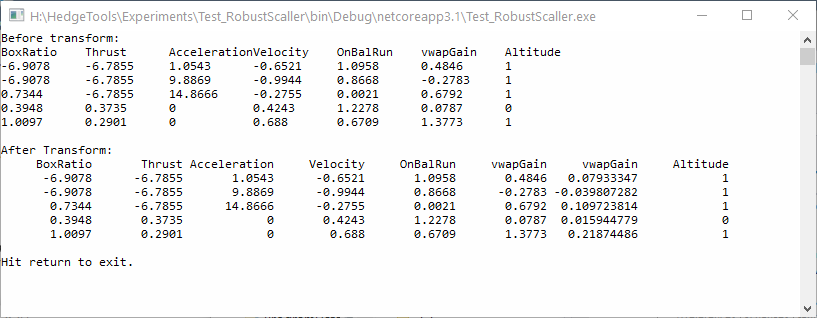
Program output. Notice that RobustScaler produced an extra column for "vwapGain"
Source code
My test program looks like:
namespace Test_RobustScaller {
  internal class Program {
    #region MyHead
    public static void MyHead(IDataView train, int numRows) {
      var trainPreview = train.Preview(maxRows: numRows);
      var nColumns = trainPreview.ColumnView.Length;
      var maxCharInHeaderName = 0;
      for (var k = 0; k < nColumns; k++) {
        var columnName = trainPreview.Schema[k].Name;
        maxCharInHeaderName = Math.Max(maxCharInHeaderName, columnName.Length);
      }
      var nSpaces = new int[nColumns];
      for (var k = 0; k < nColumns; k++) {
        var columnName = trainPreview.Schema[k].Name;
        for (var j = 0; j < maxCharInHeaderName - columnName.Length + 1; j++) {
          Console.Write(" ");
        }
        Console.Write("{0}", columnName);
        nSpaces[k] = maxCharInHeaderName - columnName.Length + 1;
      }
      Console.Write("\n");

      foreach (var row in trainPreview.RowView) {
        for (var k = 0; k < row.Values.Length; k++) {
          var field = string.Format("{0}", row.Values[k].Value);
          var nSpace = maxCharInHeaderName - field.Length + 1;
          for (var j = 0; j < nSpace; j++) {
            Console.Write(" ");
          }
          Console.Write(row.Values[k].Value);
        }
        Console.Write("\n");
      }

      Console.Write("\n");
    }
    #endregion
    public static void Run() {
      var mlContext = new MLContext(seed: 1);

      var df_full = DataFrame.LoadCsv("../../../data/model.csv");

      var header_names = new List<string> {
        "BoxRatio", "Thrust", "Acceleration", "Velocity",
        "OnBalRun", "vwapGain", "Altitude"
      };
      var nColumns = header_names.Count;
      var df_columns = new DataFrameColumn[nColumns];
      for (var k = 0; k < nColumns; k++) {
        var name = header_names[k];
        df_columns[k] = df_full.Columns[name];
      }

      var df = new DataFrame(df_columns);
      Console.WriteLine("Before transform:");
      Console.WriteLine(df.Head(5));

      var pipeline = mlContext.Transforms.RobustScaler("vwapGain");
      var model = pipeline.Fit(df);
      var transformed = model.Transform(df);
      Console.WriteLine("After Transform:");
      MyHead(transformed, 5);
    }

    static void Main() {
      Run();
      Console.WriteLine("Hit return to exit.");
      Console.ReadKey();
    }
  }
}
Charles
 CBrauer
All 4 comments
Hi @CBrauer ,
Thank you for reporting this issue. I see that you are using outdated libraries in your codebase. For example:
mlContext.Transforms.NormalizeRobustScalinginstead ofmlContext.Transforms.RobustScalermlContext.Data.CreateTextLoaderinstead ofDataFrame.LoadCsvIDataViewinstead ofDataFrame
Please check out the current ML.NET API to view more, and check if you obtain the same extra column for "vwapGain" with mlContext.Transforms.NormalizeRobustScaling.
I'm closing this issue for now, feel free to reopen if after updating your code you have the same issue. Thanks.
 mstfbl
on 13 Jun 2020
mstfbl
on 13 Jun 2020
I strongly object to your closing this issue. Your reply did not address my issue, and it is full of errors.
I went to a lot of trouble to build a test app that demonstrates the issue. I would like to make the following four points:
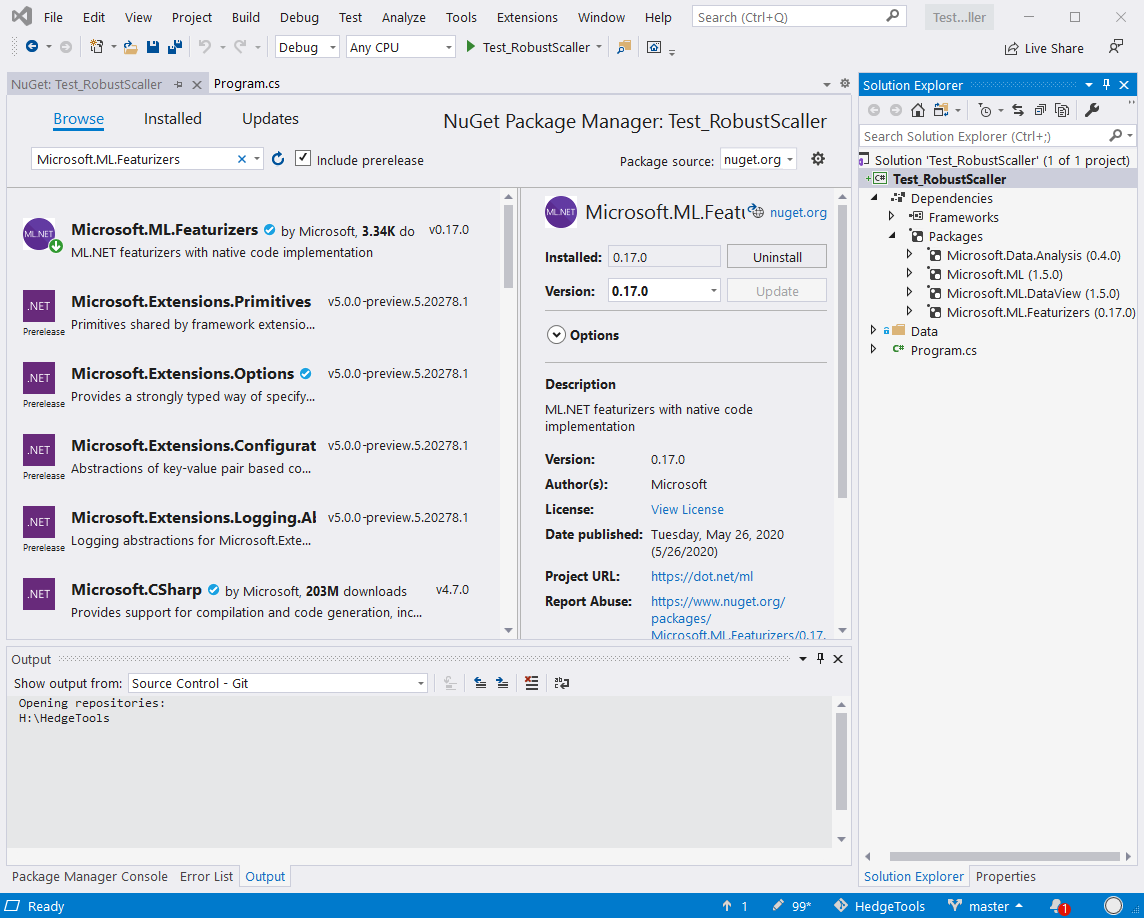
The test app was built with the latest release of ML.NET. I am not using outdated libraries, as you can see by the following screen capture
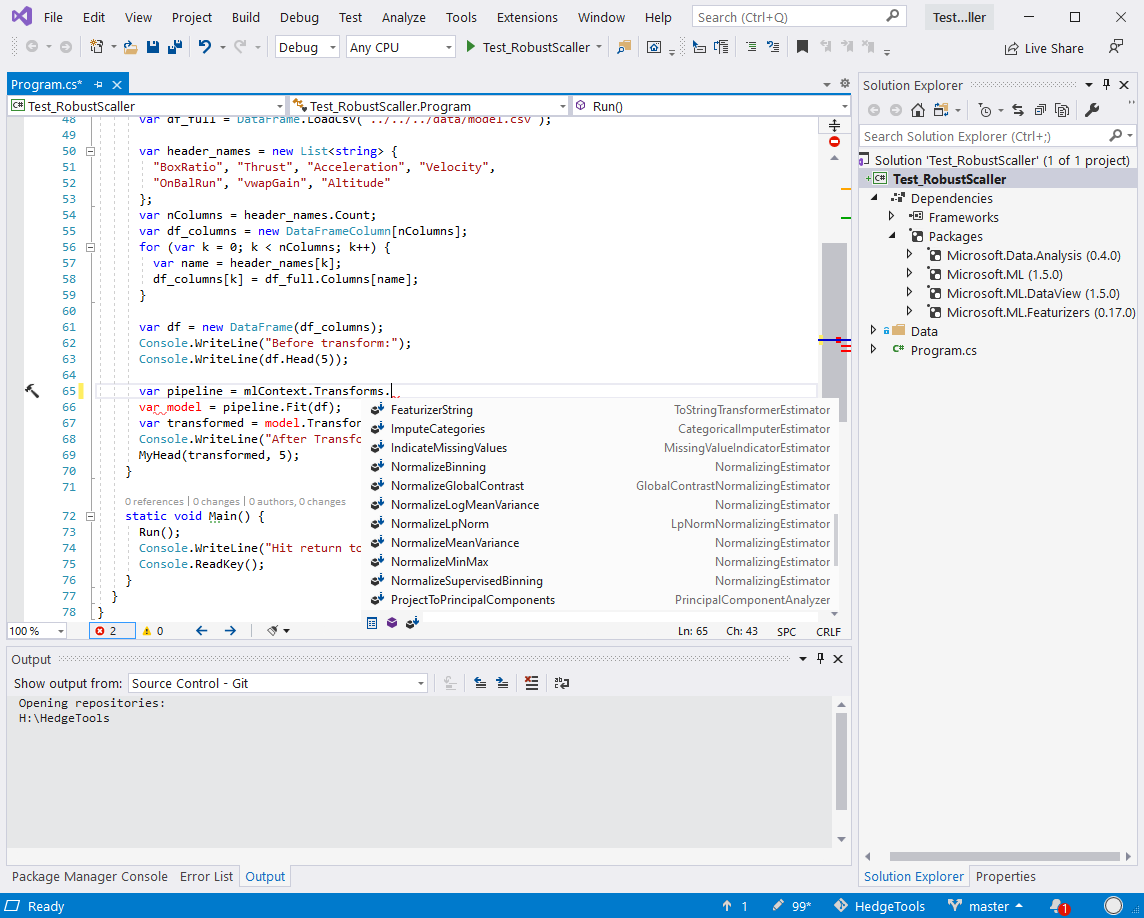
There is no such method as mlContext.Transforms.NormalizeRobustScaling. The following screen capture shows this:
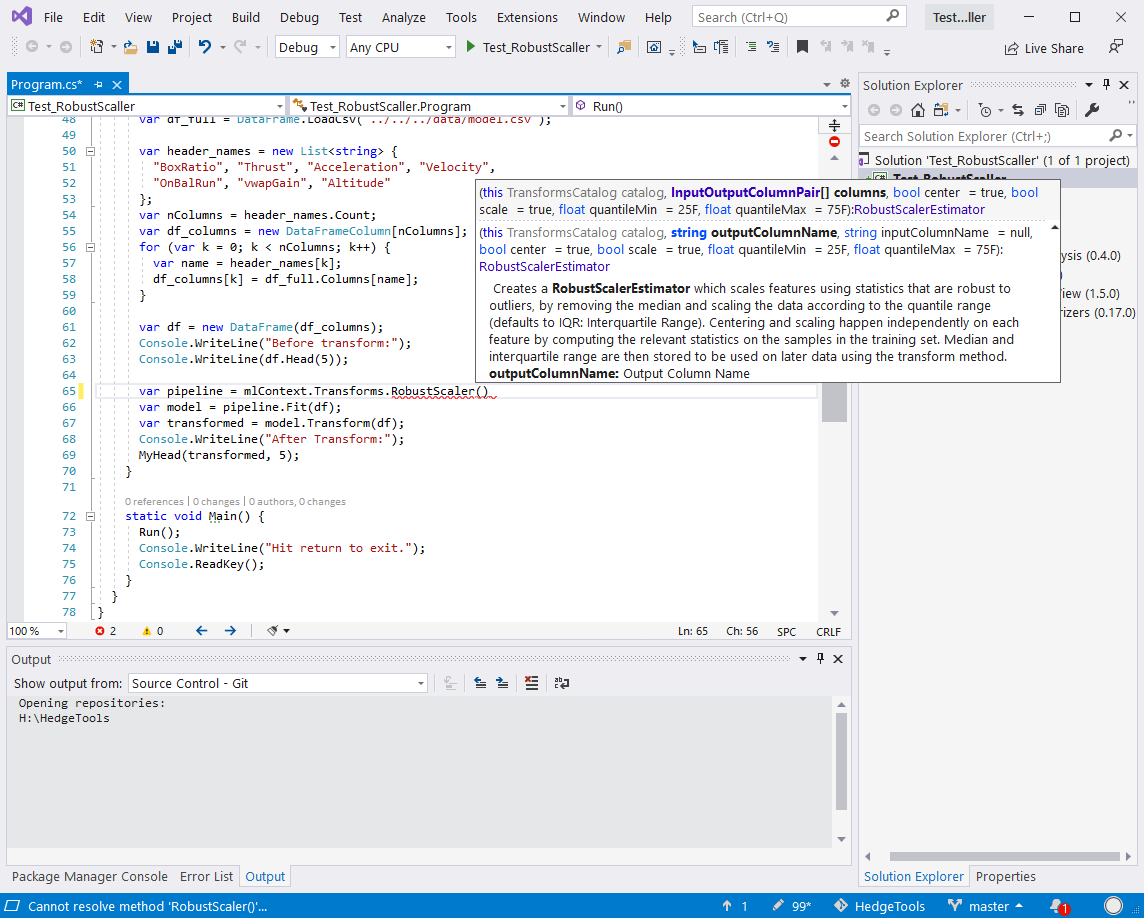
The argument for RobustScaller does not include "inplace". Coming from the SciKit-Learn world, it does not make sense to me to create a new column in my dataset.
If you are doing contract work for Microsoft, I would like the name and email address of your manager. I would like to send him/her a complaint.
Charles
CBrauer
on 13 Jun 2020
Hi @CBrauer ,
To address your point 1., what I meant by your usage of earlier libraries is that you are using functions like DataFrame.LoadCsv and classes like DataFrame that we no longer use, and recommended that you use mlContext.Data.CreateTextLoader and IDataView instead.
To address your point 2., we did indeed add mlContext.Transforms.NormalizeRobustScaling in our NormalizerCatalog with PR #5166. For your reference, here are the public declarations of these two NormalizeRobustScaling functions on our current codebase depending on how you would like to provide your input and output columns:
It is weird that you are not seeing the declared NormalizeRobustScaling functions, and I have confirmed that I also cannot see these functions with the installed NuGet packages Microsoft.MLFeaturizers v0.4.1, Microsoft.ML.Featurizers v0.17.0, and Microsoft.ML v1.5.0. I will check with the team on this, but this specific issue is outside the scope of the issue you originally reported here, which I will explain below.
To address your point 3., I do not know what exactly you mean here, but I believe I understand why you are seeing two "vwapGain" columns. The first "vwapGain" column you are seeing is hidden, where the hidden column is only accessible through providing its specific index in the output schema, which is exactly how you are accessing this column.
This hidden column(s) is there by design, and the logic behind hidden columns is explained in detail here. In short, the RobustScaler transformer you're using is using the 1st "vwapGain" column to simply compute and add a 2nd "vwapGain" column. As the 2nd "vwapGain" column is newer, the 1st "vwapGain" column is hidden. Both the 1st and 2nd "vwapGain" columns exist, and the hidden 1st "vwapGain" column is not removed on purpose, for savers and also diagnostics purposes.
For context, when there exists 2+ columns with the same name, the column with the higher index is visible, and other column(s) are marked as "hidden". If you use a IDataView cursor to properly iterate through rows (instead of using Microsoft.ML.Data.DataDebuggerPreview as you are in line 16), you will not see this hidden "vwapGain". For more information on using IDataView's and iterating through IDataView's, please follow this tutorial on using DataViewRowCursor's.
To explain my point above, I have added the following snippet of code in your MyHead(IDataView train, int numRows) function, where I am printing whether or not each of these columns are hidden:
nSpaces = new int[nColumns];
for (var k = 0; k < nColumns; k++)
{
    var isHidden = trainPreview.Schema[k].IsHidden;
    for (var j = 0; j < maxCharInHeaderName - isHidden.ToString().Length + 1; j++)
    {
        Console.Write(" ");
    }
    Console.Write("isHidden: {0}", isHidden);
    nSpaces[k] = maxCharInHeaderName - isHidden.ToString().Length + 1;
}
Console.Write("\n");
Here's the output with my added snippet:
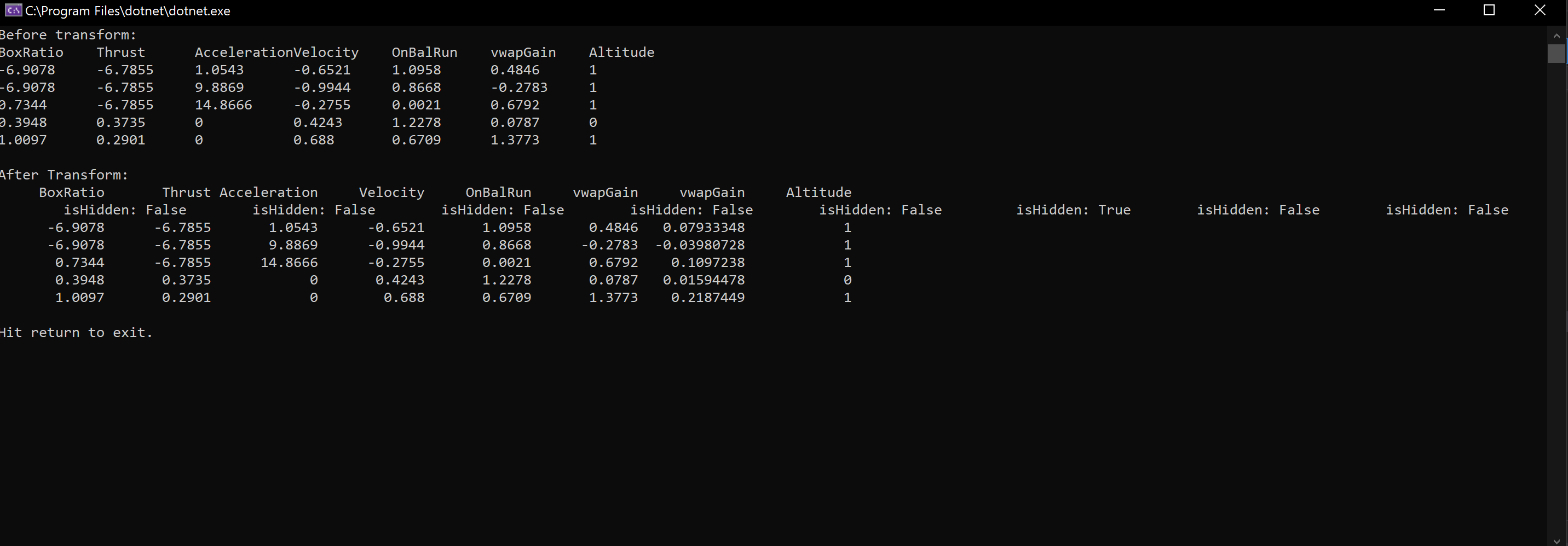
As you can see, the first "vwapGain" column is hidden, while the second "vwapGain" column is not, as befits the logic explained above.
So, in summary, the problem you're referring to with the extra "vwGain" column, is not a problem, but an intentional design choice.
To address your point 4., I am not doing contract work for Microsoft, but I am confused to exactly which errors you are referring to and what complaint you have. As I have done in this specific comment, I am happy to explain any other points you do not yet understand in ML.NET, and/or point you to the right resources.
However, as I have explained the reason why you are seeing two "vwapGain" Columns (1 hidden, 1 visible), how you are accessing the hidden column through its index (which is the only way to access this column), and how this hidden column is intended and by design, this issue will remain closed. The non-visibility of mlContext.Transforms.NormalizeRobustScaling, while indirectly related to this issue, if we determine it to be a real issue, shall be an issue opened separately. Thanks.
mstfbl
on 14 Jun 2020
Excellent explanations. I appreciate it.
CBrauer
on 14 Jun 2020
Related issues
 daholste
·
3Comments
daholste
·
3Comments
 rebecca-burwei
·
3Comments
rebecca-burwei
·
3Comments
 JakeRadMSFT
·
3Comments
JakeRadMSFT
·
3Comments
 maxt3r
·
3Comments
maxt3r
·
3Comments
 sfilipi
·
4Comments
sfilipi
·
4Comments
Most helpful comment
Hi @CBrauer ,
To address your point 1., what I meant by your usage of earlier libraries is that you are using functions like
DataFrame.LoadCsvand classes likeDataFramethat we no longer use, and recommended that you usemlContext.Data.CreateTextLoaderandIDataViewinstead.To address your point 2., we did indeed add
mlContext.Transforms.NormalizeRobustScalingin our NormalizerCatalog with PR #5166. For your reference, here are the public declarations of these twoNormalizeRobustScalingfunctions on our current codebase depending on how you would like to provide your input and output columns:https://github.com/dotnet/machinelearning/blob/4f90006d06dabc22404b8a538beda84aa5c52e5c/src/Microsoft.ML.Transforms/NormalizerCatalog.cs#L326-L383
It is weird that you are not seeing the declared
NormalizeRobustScalingfunctions, and I have confirmed that I also cannot see these functions with the installed NuGet packagesMicrosoft.MLFeaturizers v0.4.1,Microsoft.ML.Featurizers v0.17.0, andMicrosoft.ML v1.5.0. I will check with the team on this, but this specific issue is outside the scope of the issue you originally reported here, which I will explain below.To address your point 3., I do not know what exactly you mean here, but I believe I understand why you are seeing two "vwapGain" columns. The first "vwapGain" column you are seeing is hidden, where the hidden column is only accessible through providing its specific index in the output schema, which is exactly how you are accessing this column.
This hidden column(s) is there by design, and the logic behind hidden columns is explained in detail here. In short, the
RobustScalertransformer you're using is using the 1st "vwapGain" column to simply compute and add a 2nd "vwapGain" column. As the 2nd "vwapGain" column is newer, the 1st "vwapGain" column is hidden. Both the 1st and 2nd "vwapGain" columns exist, and the hidden 1st "vwapGain" column is not removed on purpose, for savers and also diagnostics purposes.For context, when there exists 2+ columns with the same name, the column with the higher index is visible, and other column(s) are marked as "hidden". If you use a
IDataViewcursor to properly iterate through rows (instead of usingMicrosoft.ML.Data.DataDebuggerPreviewas you are in line 16), you will not see this hidden "vwapGain". For more information on using IDataView's and iterating through IDataView's, please follow this tutorial on usingDataViewRowCursor's.To explain my point above, I have added the following snippet of code in your
MyHead(IDataView train, int numRows)function, where I am printing whether or not each of these columns are hidden:Here's the output with my added snippet:

As you can see, the first "vwapGain" column is hidden, while the second "vwapGain" column is not, as befits the logic explained above.
So, in summary, the problem you're referring to with the extra "vwGain" column, is not a problem, but an intentional design choice.
To address your point 4., I am not doing contract work for Microsoft, but I am confused to exactly which errors you are referring to and what complaint you have. As I have done in this specific comment, I am happy to explain any other points you do not yet understand in ML.NET, and/or point you to the right resources.
However, as I have explained the reason why you are seeing two "vwapGain" Columns (1 hidden, 1 visible), how you are accessing the hidden column through its index (which is the only way to access this column), and how this hidden column is intended and by design, this issue will remain closed. The non-visibility of
mlContext.Transforms.NormalizeRobustScaling, while indirectly related to this issue, if we determine it to be a real issue, shall be an issue opened separately. Thanks.