Machinelearning: maxExperimentTimeInSeconds - possible to make it deterministic across machines
We started using AutoML to classify about 15000 daily news articles into 50 topics (our early results with AutoML are excellent). We get a training set from a different pipeline that identifies with high precision topics (a community detection algorithm which works well in identifying natural daily topics but has poor recall). We use AutoML to train a multiclass classifier using the output from the first pipeline as the training set. We found that we get best recall by running AutoML a number of times (right now we use 9 times) and only use articles which are assigned to the same topic in a majority of cases with a threshold for the max score (our training set covers about 15% of articles in the daily corpus, a single run of Automl increases to about 25% and the multiple-run hack increases it to 35%).
One thing which we don't understand is the maxExperimentTimeInSeconds parameter when calling:
CreateMulticlassClassificationExperiment
We are running AutoML across different machines on Windows and Linux with different cores etc. We found that the depth of the experiment pipeline varies a lot across machines - maybe because things take longer on less powerful servers.
It would be great if one could control the depth of the AutoML search by another way than maxExperimentTimeInSeconds.
Possibly related issue: we found that when running AutoML as part of process that consumes about 60GB of memory the experiment take double as long as when we run it with the same data on its own. Moreover, when calling autoML successively (even when creating a new mlContext) the runtimes becomes longer and longer and the depth of the AutoML search becomes shorter (even with maxExperimentTimeInSeconds constant).
We therefore now run the AutoML pipeline in a separate child process (one run at a time, then destroy the child process and start fresh; memory consumption is about 2G per run) which produces similar runtimes and depth across runs. But it would be nice to avoid this.
 markusmobius
All 6 comments
@markusmobius: Glad you're having a positive experience w/ AutoML in ML.NET.
We're hoping to make the primary stopping mechanism to be convergence based auto-stopping. This will end the experiment when no meaningful gains are seen in N iterations.
Right now, you can stop the run at N iterations using the cancellation token within the progress handler. You can write any stopping criteria within the progress handler.
For your runtime concerns, this may be an example of a memory leak we saw previously. Are you setting the model output folder to null? If you provide an output folder for the models, I believe the memory leak is averted since the models are written to disk which removes references to the ML.NET training code. @daholste may know more.
Setting up progress handler:
https://github.com/dotnet/machinelearning-samples/blob/5831bdd9bea8e42e1d3e4967486653a5df1abe4c/samples/csharp/getting-started/MulticlassClassification_AutoML/MNIST/Program.cs#L61-L70
Progress handler class example:
https://github.com/dotnet/machinelearning-samples/blob/5831bdd9bea8e42e1d3e4967486653a5df1abe4c/samples/csharp/common/AutoML/ProgressHandlers.cs#L33-L57
Cancellation token example:
https://github.com/dotnet/machinelearning-samples/blob/5831bdd9bea8e42e1d3e4967486653a5df1abe4c/samples/csharp/getting-started/AdvancedExperiment_AutoML/AdvancedTaxiFarePrediction/Program.cs#L112-L113
Cancellation token docs: https://docs.microsoft.com/en-us/dotnet/api/microsoft.ml.automl.experimentsettings.cancellationtoken?view=automl-dotnet#Microsoft_ML_AutoML_ExperimentSettings_CancellationToken
 justinormont
on 21 May 2019
justinormont
on 21 May 2019
Thank you! The cancellation token with progress handler works great.
I am now setting the cachefolder - this was also necessary because we tried to run many AutoML pipelines in parallel on a large server and unless you set the cache folder there are conflicts because it appears to write to the user's temp folder otherwise.
We found that the pipelines parallelize well - on a 24 core server running 10 in parallel pretty much takes as much time as running a single one. Is the library using multiple cores or is it single-threaded by default?
markusmobius
on 23 May 2019
This is good feedback. Thanks!
Saturating the CPU is something we have yet to address.
What we're looking to do:
- Explicitly set the number of threads in trainers/transforms to control parallelism
- Externalize the sweeping process
Right now, all sweeping is done within the main process. Beyond not saturating the CPU, the single process sweeping is a bit fragile (e.g.: errors thrown in C++, OOM, etc) and exacerbates memory leaks.
@daholste: Do you know if we clobber the same temp folder?
justinormont
on 23 May 2019
Re: writing models to the temp folder -- when initializing experiments one after the other on a machine, each experiment would have its own unique model folder:
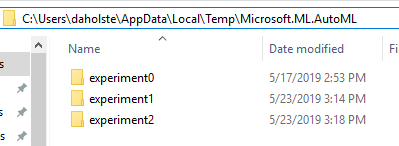
However, when initializing many experiments in parallel on the same machine, it is definitely possible to have a race condition that causes conflict here. Thanks for pointing this out
 daholste
on 24 May 2019
daholste
on 24 May 2019
I believe we used a named mutex in the word embedding's model downloader to ensure only one copy of the model is being downloaded per machine.
justinormont
on 24 May 2019
I found the word embedding's named mutex: https://github.com/dotnet/machinelearning/blob/b861b5d64841cbe0f2c866ee7586872aac450a51/src/Microsoft.ML.Core/Utilities/ResourceManagerUtils.cs#L237-L246
The lock is in the downloader class (resource manager).
Plus the finally unlock:
https://github.com/dotnet/machinelearning/blob/b861b5d64841cbe0f2c866ee7586872aac450a51/src/Microsoft.ML.Core/Utilities/ResourceManagerUtils.cs#L287-L291
We could do the same for the temp folder; if I recall I thought it was race free when the storage is local, but not for network shares due to lack of a remote atomic rename.
More simple approach is to use a GUID: Temp\Microsoft.ML.AutoML\experiment_9bdaa79e-8ceb-4103-988b-9d73aefd53c2\...
justinormont
on 24 May 2019
Related issues
 dev8546
·
3Comments
dev8546
·
3Comments
 darren-zdc
·
3Comments
darren-zdc
·
3Comments
 pgovind
·
3Comments
pgovind
·
3Comments
 aslotte
·
3Comments
aslotte
·
3Comments
 maxt3r
·
3Comments
maxt3r
·
3Comments
Most helpful comment
I found the word embedding's named mutex: https://github.com/dotnet/machinelearning/blob/b861b5d64841cbe0f2c866ee7586872aac450a51/src/Microsoft.ML.Core/Utilities/ResourceManagerUtils.cs#L237-L246
The lock is in the downloader class (resource manager).
Plus the
finallyunlock:https://github.com/dotnet/machinelearning/blob/b861b5d64841cbe0f2c866ee7586872aac450a51/src/Microsoft.ML.Core/Utilities/ResourceManagerUtils.cs#L287-L291
We could do the same for the temp folder; if I recall I thought it was race free when the storage is local, but not for network shares due to lack of a remote atomic rename.
More simple approach is to use a GUID:
Temp\Microsoft.ML.AutoML\experiment_9bdaa79e-8ceb-4103-988b-9d73aefd53c2\...