Machinelearning: Extension methods from TimeSeriesStatic.cs (A Typo and A Missing Nuget for Static Time Series)
System information
- Windows 10 Pro
- .NET 4.6.1
Issue
What did you do?
I am trying to use extension methodDetectSpikeBySsafrom classSsaSpikeDetecotStaticExtensions(there's a typo in the name btw). I'm using static API and TimeSeries package.What happened?
The extension method (and any other extension methods from that namespace) is not available to use on Scalar\SsaSpikeDetection()test fromTimeSeriesStaticTests.csas a reference.What did you expect?
Expected usage (from the referenced test):
var staticLearningPipeline = staticData.MakeNewEstimator()
                .Append(r => r.Value.DetectSpikeBySsa(80, ChangeHistoryLength, TrainingWindowSize, SeasonalityWindowSize));
but Included packages:DetectSpikeBySsa is not available on my Scalar\Source code / logs
using System;
using System.Collections.Generic;
using System.IO;
using System.Linq;
using Microsoft.ML;
using Microsoft.ML.Data;
using Microsoft.ML.Transforms;
using Microsoft.ML.Transforms.TimeSeries;
using Microsoft.ML.StaticPipe;
using Microsoft.ML.Trainers;

namespace xxx.Modules.Data.ML.Dev
{
    public class DataLoader
    {
        private sealed class SpikePrediction
        {
            [VectorType(3)]
            public double[] Data;
        }

        private class DataObject
        {
            public float Gain { get; set; }
        }

        public DataLoader()
        {
            MLContext mlContext = new MLContext(seed: 0);
            var loader = mlContext.Data.CreateTextLoader(ctx => (
                    Id: ctx.LoadText(0),
                    Begin: ctx.LoadText(1),
                    End: ctx.LoadText(2),
                    Gain: ctx.LoadFloat(3),
                    Confidence: ctx.LoadFloat(4)
                ), separator: ',', hasHeader: true);

            var data = loader.Load("output_intervals.csv");

            var preview = data.AsDynamic.Preview();

            var learningPipeline = loader.MakeNewEstimator()
                .Append(r => (
                    r.Gain.DetectSpikeBySsa(80, 800 / 4, 800 / 2, 800 / 8) // Cannot resolve symbol...
                ));
        }
    }
}
<packages>
  <package id="Castle.Core" version="4.2.1" targetFramework="net461" />
  <package id="Microsoft.ML" version="1.0.0-preview" targetFramework="net461" />
  <package id="Microsoft.ML.CpuMath" version="1.0.0-preview" targetFramework="net461" />
  <package id="Microsoft.ML.DataView" version="1.0.0-preview" targetFramework="net461" />
  <package id="Microsoft.ML.Experimental" version="0.12.0-preview" targetFramework="net461" />
  <package id="Microsoft.ML.FastTree" version="1.0.0-preview" targetFramework="net461" />
  <package id="Microsoft.ML.ImageAnalytics" version="1.0.0-preview" targetFramework="net461" />
  <package id="Microsoft.ML.Mkl.Redist" version="1.0.0-preview" targetFramework="net461" />
  <package id="Microsoft.ML.Recommender" version="0.12.0-preview" targetFramework="net461" />
  <package id="Microsoft.ML.StaticPipe" version="0.12.0-preview" targetFramework="net461" />
  <package id="Microsoft.ML.TimeSeries" version="0.12.0-preview" targetFramework="net461" />
  <package id="Newtonsoft.Json" version="10.0.3" targetFramework="net461" />
  <package id="NLog" version="4.6.1" targetFramework="net461" />
  <package id="System.Buffers" version="4.4.0" targetFramework="net461" />
  <package id="System.CodeDom" version="4.4.0" targetFramework="net461" />
  <package id="System.Collections.Immutable" version="1.5.0" targetFramework="net461" />
  <package id="System.Drawing.Common" version="4.5.0" targetFramework="net461" />
  <package id="System.Memory" version="4.5.1" targetFramework="net461" />
  <package id="System.Numerics.Vectors" version="4.4.0" targetFramework="net461" />
  <package id="System.Reactive" version="4.0.0" targetFramework="net461" />
  <package id="System.Reflection.Emit.Lightweight" version="4.3.0" targetFramework="net461" />
  <package id="System.Runtime.CompilerServices.Unsafe" version="4.5.0" targetFramework="net461" />
  <package id="System.Threading.Tasks.Dataflow" version="4.8.0" targetFramework="net461" />
  <package id="System.ValueTuple" version="4.4.0" targetFramework="net461" />
  <package id="WampSharp" version="19.3.1" targetFramework="net461" />
</packages>
 esso23
All 7 comments
Could you provide the full error message? You code can be compiled on my machine.
 wschin
on 4 Apr 2019
wschin
on 4 Apr 2019
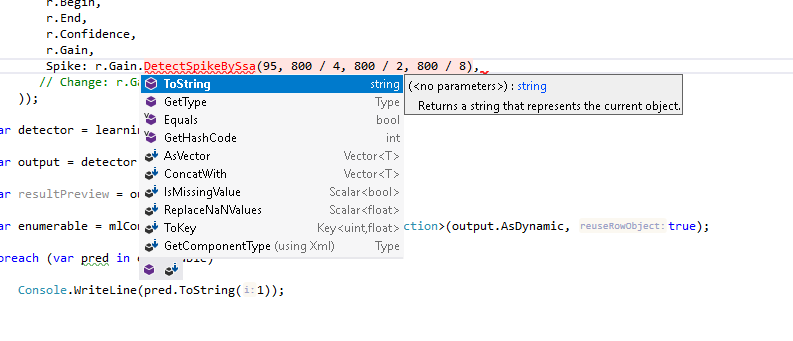
The problem is those methods are not found by IntelliSense. It's like if they weren't in any of the nuget packages that I have.
Compiler error (this is misleading I think):
1>...\src\Paragon.Modules.Data.ML\Dev\DataLoader.cs(71,35,71,51): error CS7036: There is no argument given that corresponds to the required formal parameter 'trainingWindowSize' of 'TimeSeriesCatalog.DetectSpikeBySsa(TransformsCatalog, string, string, int, int, int, int, AnomalySide, ErrorFunction)'
When I mouse over it says Cannot resolve symbol 'DetectSpikeBySsa'
When I copy and paste this code directly from ML.NET repo, everything works fine and I get the correct results:
using System.Collections.Generic;
using Microsoft.ML;
using Microsoft.ML.Runtime;
using Microsoft.ML.StaticPipe;
using Microsoft.ML.Transforms.TimeSeries;

/// <summary>
/// Static API extension methods for <see cref="SsaSpikeEstimator"/>.
/// </summary>
public static class SsaSpikeDetecotStaticExtensions
{
    private sealed class OutColumn : Vector<double>
    {
        public PipelineColumn Input { get; }

        public OutColumn(Scalar<float> input,
            int confidence,
            int pvalueHistoryLength,
            int trainingWindowSize,
            int seasonalityWindowSize,
            AnomalySide side,
            ErrorFunction errorFunction)
            : base(new Reconciler(confidence, pvalueHistoryLength, trainingWindowSize, seasonalityWindowSize, side, errorFunction), input)
        {
            Input = input;
        }
    }

    private sealed class Reconciler : EstimatorReconciler
    {
        private readonly int _confidence;
        private readonly int _pvalueHistoryLength;
        private readonly int _trainingWindowSize;
        private readonly int _seasonalityWindowSize;
        private readonly AnomalySide _side;
        private readonly ErrorFunction _errorFunction;

        public Reconciler(
            int confidence,
            int pvalueHistoryLength,
            int trainingWindowSize,
            int seasonalityWindowSize,
            AnomalySide side,
            ErrorFunction errorFunction)
        {
            _confidence = confidence;
            _pvalueHistoryLength = pvalueHistoryLength;
            _trainingWindowSize = trainingWindowSize;
            _seasonalityWindowSize = seasonalityWindowSize;
            _side = side;
            _errorFunction = errorFunction;
        }

        public override IEstimator<ITransformer> Reconcile(IHostEnvironment env,
            PipelineColumn[] toOutput,
            IReadOnlyDictionary<PipelineColumn, string> inputNames,
            IReadOnlyDictionary<PipelineColumn, string> outputNames,
            IReadOnlyCollection<string> usedNames)
        {
            //Contracts.Assert(toOutput.Length == 1);
            var outCol = (OutColumn)toOutput[0];
            return new MLContext().Transforms.DetectSpikeBySsa(
                outputNames[outCol],
                inputNames[outCol.Input],
                _confidence,
                _pvalueHistoryLength,
                _trainingWindowSize,
                _seasonalityWindowSize,
                _side,
                _errorFunction);
        }
    }

    /// <summary>
    /// Perform SSA spike detection over a column of time series data. See <see cref="SsaSpikeEstimator"/>.
    /// </summary>
    public static Vector<double> DetectSpikeBySsa(
        this Scalar<float> input,
        int confidence,
        int changeHistoryLength,
        int trainingWindowSize,
        int seasonalityWindowSize,
        AnomalySide side = AnomalySide.TwoSided,
        ErrorFunction errorFunction = ErrorFunction.SignedDifference
        ) => new OutColumn(input, confidence, changeHistoryLength, trainingWindowSize, seasonalityWindowSize, side, errorFunction);

}
I can repro this error. Looks like either we didn't make the nuget dependency right. @codemzs, any input please?
It turns out that static pipeline is not fully supported in external world (it requires Microsoft.ML.TimeSeries.StaticPipe nuget but we haven't uploaded it to nuget.org). Would you consider to use dynamic APIs? Here are some examples: https://github.com/dotnet/machinelearning/tree/master/docs/samples/Microsoft.ML.Samples/Dynamic/Transforms/TimeSeries
wschin
on 4 Apr 2019
Thanks for the answer.
In the meantime I will use it from source (I think it's a matter of taste, but dynamic API looks very confusing to me, and doesn't really suit my use case).
Hope the package will be released soon ;)
esso23
on 5 Apr 2019
Thank you, @esso23! Basically, dynamic API can do everything static API can do. Could you elaborate about your scenario a bit more? That might be something we need to improve?
wschin
on 5 Apr 2019
We're using ML.NET for simple (for now) predictions and calculations in HVAC field. I know the types of all the data ahead of time (like temperature, pump/valve modes, power consumption etc.) so I see no reason to use dynamic API. I know dynamic sounds cool and all, but imo the static typing is a good feature of C# and I want to keep that. Dynamic API feels like a mess to me, but I understand it's a matter of preference.
esso23
on 8 Apr 2019
@esso23, unfortunately, Static APIs will likely be deprecated soon. :(
As a result, we can close this issue for now until the static APIs becomes alive again.
wschin
on 2 Jul 2019
Related issues
 darren-zdc
·
3Comments
darren-zdc
·
3Comments
 daholste
·
4Comments
daholste
·
4Comments
 dev8546
·
3Comments
dev8546
·
3Comments
 OneCyrus
·
4Comments
OneCyrus
·
4Comments
 sethreidnz
·
3Comments
sethreidnz
·
3Comments
Most helpful comment
The problem is those methods are not found by IntelliSense. It's like if they weren't in any of the nuget packages that I have.
Compiler error (this is misleading I think):
1>...\src\Paragon.Modules.Data.ML\Dev\DataLoader.cs(71,35,71,51): error CS7036: There is no argument given that corresponds to the required formal parameter 'trainingWindowSize' of 'TimeSeriesCatalog.DetectSpikeBySsa(TransformsCatalog, string, string, int, int, int, int, AnomalySide, ErrorFunction)'When I mouse over it says
Cannot resolve symbol 'DetectSpikeBySsa'When I copy and paste this code directly from ML.NET repo, everything works fine and I get the correct results: