Machinelearning: StochasticDualCoordinateAscent not work For Multiclass after migrate to 0.10.0
System information
- OS version/distro: W10
- .NET Version (eg., dotnet --info): 4.6.1
Issue
- What did you do? Migrated my code from 0.9.0 to 0.10.0
- What happened? StochasticDualCoordinateAscent Algorithm was working fine for multi class and binary trainer before move to 0.10 after updating its working only for binary and freeze on
trainingPipeline.Fit(trainingDataView); for Multiclass take a while - What did you expect?
it should work fine
Source code / logs
`var mlContext = new MLContext(seed: 1);
region "STEP 1: Common data loading configuration"
IDataView trainingDataView = GetNormalDataSet(mlContext, allFeatures, mLFeatures);

if (trainingDataView.GetRowCount() == 0)
{

    return;
}

textFeatures = GetTextFeatures(normalFeatures);

numericFeatures = GetNumericFeatures(normalFeatures).ToArray();
endregion
region "STEP 2: Common data process configuration with pipeline data transformations"
// STEP 2: Common data process configuration with pipeline data transformations
var textFeaturesProcessPipeline = mlContext.Transforms.Text.FeaturizeText(DefaultColumnNames.Features, textFeatures);
var numericFeaturesProcessPipeline = mlContext.Transforms.Concatenate(DefaultColumnNames.Features, numericFeatures);
var dataProcessPipeline = numericFeaturesProcessPipeline.Append(textFeaturesProcessPipeline).AppendCacheCheckpoint(mlContext);
endregion
region "STEP 3: Set the training algorithm, then create and configure the modelBuilder"
ITransformer trainedModel = null;
//"StochasticDualCoordinateAscent"
var trainingPipeline = mlContext.Transforms.Conversion.MapValueToKey(DefaultColumnNames.Label)
.Append(dataProcessPipeline)
.Append(mlContext.MulticlassClassification.Trainers.StochasticDualCoordinateAscent(labelColumn: DefaultColumnNames.Label, featureColumn: DefaultColumnNames.Features))
.Append(mlContext.Transforms.Conversion.MapKeyToValue(DefaultColumnNames.PredictedLabel));
region STEP 4: Train the model fitting to the DataSet
//Take a while and no responce when call fit method

trainedModel = trainingPipeline.Fit(trainingDataView);
endregion`
you can see some screen for values and when change from
"StochasticDualCoordinateAscent" to "Naive Bayes" Working fine
what wrong on my code


also those my Data Structure Classes
`[Serializable]
public class NormalTagsModelFeatures
{
//[Column(ordinal: "0", name: "Label")] public string Label;
[LoadColumn(0)]
public string Label;
[LoadColumn(1)]
public float fontSize;
[LoadColumn(2)]
public float isBold;
[LoadColumn(3)]
public float isItalic;
[LoadColumn(4)]
public float isUnderLine;
[LoadColumn(5)]
public float containsDot;
[LoadColumn(6)]
public float containsQuestionMark;
[LoadColumn(7)]
public string fontColor;
[LoadColumn(8)]
public float isAllCaps;
[LoadColumn(9)]
public string tagText;
[LoadColumn(10)]
public string firstWord;
[LoadColumn(11)]
public string FontName;
[LoadColumn(12)]
public float verticalText;
[LoadColumn(13)]
public float trdLeft;
[LoadColumn(14)]
public float trdRight;
[LoadColumn(15)]
public float trdTop;
[LoadColumn(16)]
public float trdBottom;
[LoadColumn(17)]
public float pageNo;
}

public class NormalTagsPrediction
{
    [ColumnName("PredictedLabel")]
    public string PredictedLabel;

    [ColumnName("Score")]
    public float[] Score { get; set; }

}`
Please paste or attach the code or logs or traces that would be helpful to diagnose the issue you are reporting.
 DevLob-zz
All 19 comments
Hint My dataView Contain 250K rows
Also worked fine within Naive Bayes and LogisticRegression
DevLob-zz
on 9 Feb 2019
@DevLob-zz Thanks for reporting this! I'll take a look at this!
Marking as need info until I repro it.
 rogancarr
on 9 Feb 2019
rogancarr
on 9 Feb 2019
is there is info can i provide you with it , thank you for interest
best regards
DevLob-zz
on 10 Feb 2019
Hi @DevLob-zz ,
I've run a multiclass classification sample, GitHubIssueClassification in 0.9 and 0.10, and they get very similar times, so I don't think the problem is related to the SDCA trainer or it's API. Plus we haven't done any work on SDCA between the releases.
One thing that did change between 0.9 and 0.10 is the order of arguments to transforms. Do you do any featurization in GetNormalDataSet(mlContext, allFeatures, mLFeatures)? Is it possible that your column names have changed between the releases, and the learners are building features on different data?
rogancarr
on 10 Feb 2019
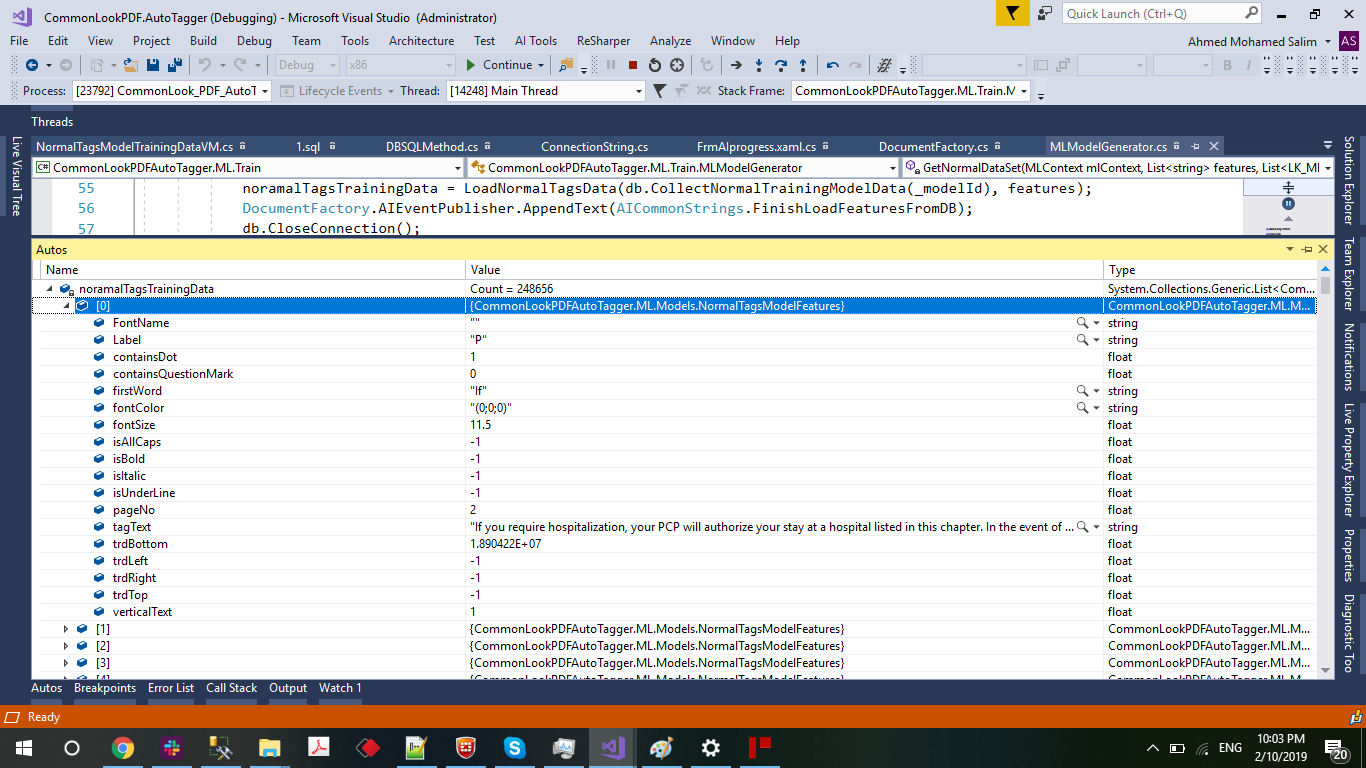

No the code never changed between 0.9 and 0.10 and still work fine for Naive Bayes and Logistic Regression for Multi class
SDCA Still work fine for Binary Classification but seem to deep into infinite loop wile Multi class
DevLob-zz
on 10 Feb 2019

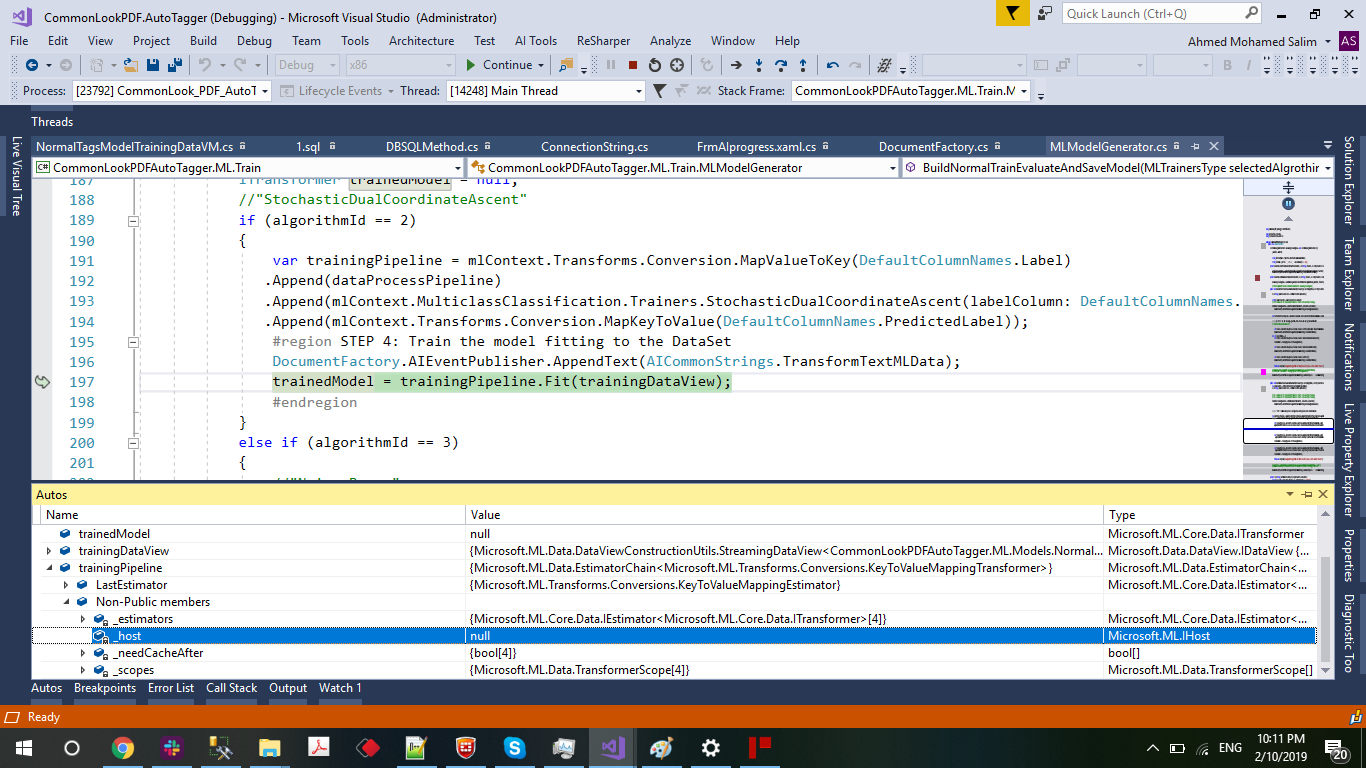
the code stop and no response in Fit Method in this line however if code going to other case same code just change algorithm working well
DevLob-zz
on 10 Feb 2019

any help would be appreciated
DevLob-zz
on 10 Feb 2019
mlContext has Log event.
 mlContext.Log += MlContext_Log;
private static void MlContext_Log(object sender, LoggingEventArgs e)
{
    Console.WriteLine(e.Message);
}
If we can look on this messages, it can be helpful to diagnose at what state it get stuck at least.
Do you get any success if you setup NumThreads in SDCA to 1?
We had this change https://github.com/dotnet/machinelearning/pull/2152 which can be reason why it worked in 0.9 but stopped in 0.10, but as @rogancarr mentioned it works for us on some datasets, so your case can be quite tricky. It's hard to fix problem without ability to reproduce it.
 Ivanidzo4ka
on 11 Feb 2019
Ivanidzo4ka
on 11 Feb 2019
mlContext has Log event.
 mlContext.Log += MlContext_Log;
private static void MlContext_Log(object sender, LoggingEventArgs e)
{
    Console.WriteLine(e.Message);
}
If we can look on this messages, it can be helpful to diagnose at what state it get stuck at least.
Do you get any success if you setup NumThreads in SDCA to 1?We had this change #2152 which can be reason why it worked in 0.9 but stopped in 0.10, but as @rogancarr mentioned it works for us on some datasets, so your case can be quite tricky. It's hard to fix problem without ability to reproduce it.
this what the logger stop at

Do you get any success if you setup NumThreads in SDCA to 1?
how can i set this value do you mean this
var mlContext = new MLContext(seed: 1,conc:1);
if yes i did and same
It's hard to fix problem without ability to reproduce it.
yes sure i will try to debug through The ML Source
and keep you posted
best regards
DevLob-zz
on 11 Feb 2019
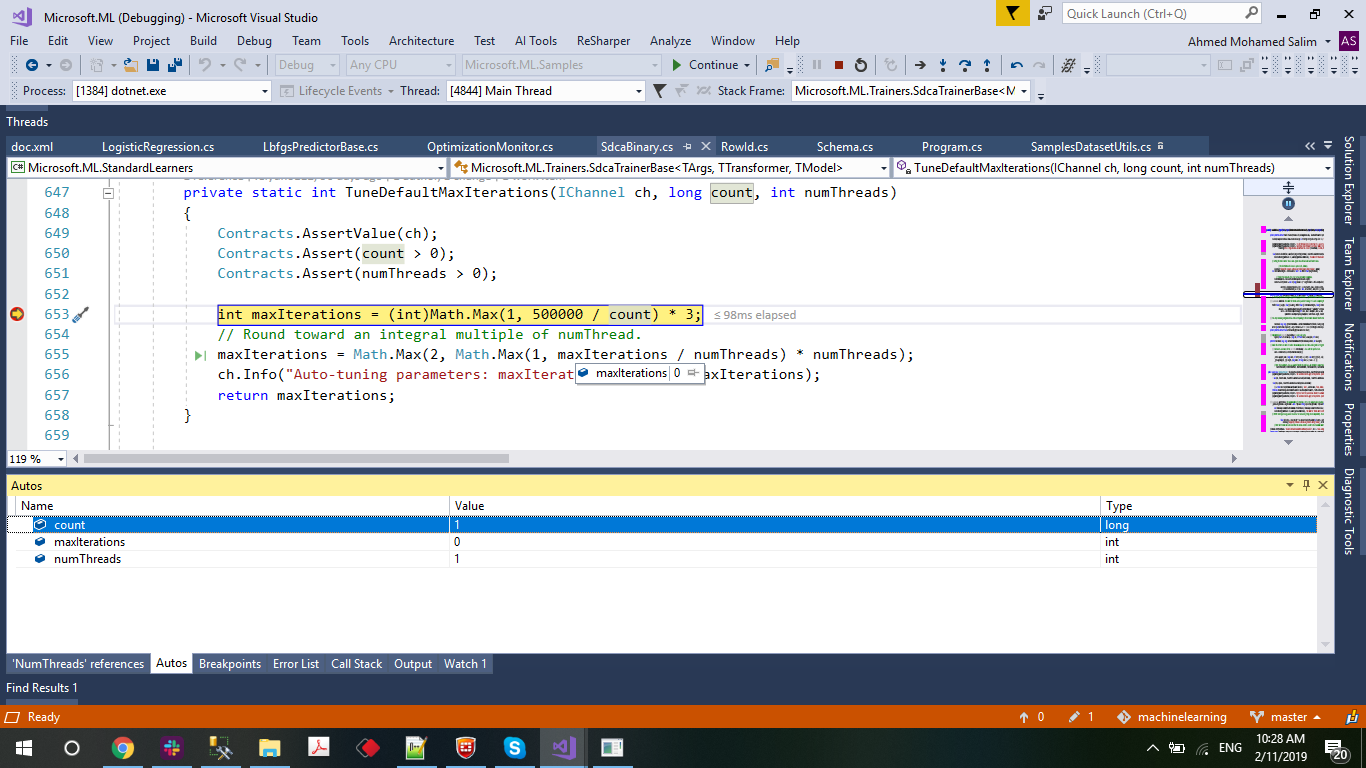
after integrate my code with the source i can see that the code stick here

and he stick here as he get numThreads = 2 so if i can set it to 1 i think he will never stick again
NumofCycle = 750000
DevLob-zz
on 11 Feb 2019
i replace the trainer line with
var trainner = mlContext.MulticlassClassification.Trainers.StochasticDualCoordinateAscent(new SdcaMultiClassTrainer.Options
{ FeatureColumn = DefaultColumnNames.Features ,
LabelColumn = DefaultColumnNames.Label,
NumThreads = 1
});
and same issue
this is my program .cs code i usesd
using System.Collections.Generic;
using Microsoft.Data.DataView;
using Microsoft.ML.Core.Data;
using Microsoft.ML.Data;
using Microsoft.ML.Samples.Dynamic;
using Microsoft.ML.Trainers;

namespace Microsoft.ML.Samples
{
    internal static class Program
    {
        static void Main(string[] args)
        {
            List<NormalTagsModelFeatures> noramalTagsTrainingData = new List<NormalTagsModelFeatures>();
            noramalTagsTrainingData.Add(
                        new NormalTagsModelFeatures()
                        {
                            //Label = TagListDictionary.GetTagId(label),
                            Label = "Tag Test",
                            pageNo =  -1,
                            fontSize =  -1,
                            isBold =  -1,
                            isItalic =  -1,
                            isUnderLine =  -1,
                            containsDot =  -1,
                            containsQuestionMark =  -1,
                            isAllCaps =  -1,
                            fontColor =  "Ss",
                            FontName =  "Ss",
                            tagText =  "dd  dd",
                            firstWord = "dd",
                            trdBottom =  -1,
                            trdLeft =  -1,
                            trdRight = -1,
                            trdTop = -1,
                            verticalText = -1,
                        }
                    );
            List<string> textFeatures = new List<string>() { "firstWord", "tagText", "FontName", "fontColor" };
            string[] numericFeatures = new string[] { "pageNo", "fontSize", "isBold", "isItalic", "isUnderLine",
                "containsDot", "containsQuestionMark","isAllCaps","trdBottom","trdLeft","trdRight","trdTop","verticalText" } ;
            var mlContext = new MLContext(seed: 1);
            IDataView trainingDataView =mlContext.Data.ReadFromEnumerable(noramalTagsTrainingData);
            var textFeaturesProcessPipeline = mlContext.Transforms.Text.FeaturizeText(DefaultColumnNames.Features, textFeatures,new Transforms.Text.TextFeaturizingEstimator.Options());
            var numericFeaturesProcessPipeline = mlContext.Transforms.Concatenate(DefaultColumnNames.Features, numericFeatures);
            var dataProcessPipeline = numericFeaturesProcessPipeline.Append(textFeaturesProcessPipeline).AppendCacheCheckpoint(mlContext);
            var trainner = mlContext.MulticlassClassification.Trainers.StochasticDualCoordinateAscent(new SdcaMultiClassTrainer.Options
            {
                FeatureColumn = DefaultColumnNames.Features,
                LabelColumn = DefaultColumnNames.Label,
                NumThreads = 1
            });
            trainner.AppendCacheCheckpoint(mlContext);
            var trainingPipeline = mlContext.Transforms.Conversion.MapValueToKey(DefaultColumnNames.Label)
           .Append(dataProcessPipeline)
           .Append(trainner)
           .Append(mlContext.Transforms.Conversion.MapKeyToValue(DefaultColumnNames.PredictedLabel));
            ITransformer trainedModel = trainingPipeline.Fit(trainingDataView);
            //TakeRows.Example();
        }
    }

    public class NormalTagsModelFeatures
    {
        //[Column(ordinal: "0", name: "Label")] public string Label;
        [LoadColumn(0)]
        public string Label;
        [LoadColumn(1)]
        public float fontSize;
        [LoadColumn(2)]
        public float isBold;
        [LoadColumn(3)]
        public float isItalic;
        [LoadColumn(4)]
        public float isUnderLine;
        [LoadColumn(5)]
        public float containsDot;
        [LoadColumn(6)]
        public float containsQuestionMark;
        [LoadColumn(7)]
        public string fontColor;
        [LoadColumn(8)]
        public float isAllCaps;
        [LoadColumn(9)]
        public string tagText;
        [LoadColumn(10)]
        public string firstWord;
        [LoadColumn(11)]
        public string FontName;
        [LoadColumn(12)]
        public float verticalText;
        [LoadColumn(13)]
        public float trdLeft;
        [LoadColumn(14)]
        public float trdRight;
        [LoadColumn(15)]
        public float trdTop;
        [LoadColumn(16)]
        public float trdBottom;
        [LoadColumn(17)]
        public float pageNo;

    }

    public class NormalTagsPrediction
    {
        [Column(ordinal: "0", name: "PredictedLabel")]
        public string Label;


        [ColumnName("Score")]
        public float[] Score { get; set; }

    }
}
maxIterations = 1,500,000
what is the best value for maxIterations can i set and not affect the accuracy
DevLob-zz
on 11 Feb 2019
var trainner = mlContext.MulticlassClassification.Trainers.StochasticDualCoordinateAscent(new SdcaMultiClassTrainer.Options
{
FeatureColumn = DefaultColumnNames.Features,
LabelColumn = DefaultColumnNames.Label,
NumThreads = 1,
MaxIterations= 1000
});
so this solve my issue but
which MaxIterations will be recommenced based on your
DevLob-zz
on 11 Feb 2019
Number of iterations is data-dependent. You can try 10, 20, 40, 80, 160, ..., 640 to find the value leading to the best test accuracy. In addition, a small regularization coefficient may lead to overfitting so you need to terminate the training very early (e.g., just 1, 2, 4, 8, 16 iterations are enough).
 wschin
on 14 Feb 2019
wschin
on 14 Feb 2019
It doesn't justify our auto selecting code to put 1 500 000 iterations over dataset.
Ivanidzo4ka
on 14 Feb 2019

the code seem to be wait while here and never out from while when testing on 500K rows
i wait on this iteration more than one hour and never move to next
is we can add timeout or something that guarantee that he will out from while Loop
DevLob-zz
on 15 Feb 2019
@rogancarr @Ivanidzo4ka @TomFinley - the above deadlock looks to be the same as #1095.
 eerhardt
on 15 Feb 2019
eerhardt
on 15 Feb 2019
Hello @DevLob-zz thank you for sharing all this information.
I have a few questions for you:
- Does it just take a long time but eventually finish training, or is it stuck training?
- Is the issue showing only on v0.10 or did you have the same issue on v0.9? Are you building off of master? Or using the nuget for v0.10?
- Is this reproducible 100% of the time?
The above questions can be very helpful in identifying what's wrong.
Also, I am trying to reproduce this issue locally to fix it, and if you are willing to share the dataset I can take a closer look, no problem of course otherwise.
 artidoro
on 16 Feb 2019
artidoro
on 16 Feb 2019
Hello @DevLob-zz thank you for sharing all this information.
I have a few questions for you:
- Does it just take a long time but eventually finish training, or is it stuck training?
it never finish when it stuck- Is the issue showing only on v0.10 or did you have the same issue on v0.9? Are you building off of master? Or using the nuget for v0.10?
for 0.9 everything is OK but for 0.10 i issued this
i try by nuget and the master this what show me this dead lock- Is this reproducible 100% of the time?
NoThe above questions can be very helpful in identifying what's wrong.
Also, I am trying to reproduce this issue locally to fix it, and if you are willing to share the dataset I can take a closer look, no problem of course otherwise.
here is a program.cs that i used to generate more than 400K and try to generate the model
Hint : it work fine with small data set
DevLob-zz
on 16 Feb 2019
Related issues
 jkotas
·
23Comments
jkotas
·
23Comments
 mairaw
·
18Comments
wschin
·
26Comments
mairaw
·
18Comments
wschin
·
26Comments
 iSatishYadav
·
18Comments
iSatishYadav
·
18Comments
 katterfelto
·
18Comments
katterfelto
·
18Comments
Most helpful comment
@rogancarr @Ivanidzo4ka @TomFinley - the above deadlock looks to be the same as #1095.