Machinelearning: LearningPipeline.Execute must have a Data step as the last step
System information
- OS version/distro: windows 10
- .NET Version (eg., dotnet --info):
.Net 7.1
Issue
I am getting this error: LearningPipeline.Execute must have a Data step as the last step
When trying to create my pipeline following along the "Tutorial: Use ML.NET to predict New York Taxi Fares (Regression)" tutorial.
Source code / logs
Here is my class and main program code:
TermDate.cs
public class TerminationDate
{
[Column(ordinal: "0")]
public float age;
[Column(ordinal: "1")]
public float gender;
[Column(ordinal: "2")]
public float married;
[Column(ordinal: "3")]
public float salary;
[Column(ordinal: "4")]
public float TermYear;
}
public class TermDatePrediction
{
    [Column("Score")]
    public float TermYear;
}
part of Program.cs
class Program
{
const string _datapath = @"......\Data\Book1.csv";
const string _testdatapath = @"......\Data\Book2.csv";
const string _modelpath = @"......\Models\Model.zip";
static async Task Main(string[] args)
{
PredictionModel
Evaluate(modelTerm);
var predictionTerm = modelTerm.Predict(TestTerminations.Term1);
Console.WriteLine("Predicted Year: {0}", predictionTerm.TermYear);
Console.ReadLine();
}
    public static async Task<PredictionModel<TerminationDate, TermDatePrediction>> Train()
    {
        var pipeline = new LearningPipeline
        {
            new TextLoader<TerminationDate>(_datapath, useHeader: true, separator: ","),
            new ColumnCopier(("TermYear","Label")),
            new ColumnConcatenator("Features", "age", "gender", "married", "salary"),
            new FastTreeRegressor()
        };
        PredictionModel<TerminationDate, TermDatePrediction> modelTerm = pipeline.Train<TerminationDate, TermDatePrediction>();
        await modelTerm.WriteAsync(_modelpath);
        return modelTerm;
    }

    private static void Evaluate(PredictionModel<TerminationDate, TermDatePrediction> model)
    {
        var testData = new TextLoader<TerminationDate>(_testdatapath, useHeader: true, separator: ",");
        var evaluator = new RegressionEvaluator();
        RegressionMetrics metrics = evaluator.Evaluate(model, testData);
        Console.WriteLine("RMS=" + metrics.Rms);
        Console.WriteLine("R^2=" + metrics.RSquared);
    }
}
 Btjones711
All 16 comments
@Btjones711 Did this happen when you tried the debugger extension?
 codemzs
on 1 Jun 2018
codemzs
on 1 Jun 2018
I am not sure what you mean by that. My visual studio is in debug mode and if I step through I can see the error if I view pipeline after it is initialized. If I remove all the async stuff the program works.
Thanks!
Btjones711
on 1 Jun 2018
I was trying out something similar. I see the same error in pipeline.Rows after I add trainer to the pipeline. I am using visual studio code for debugging.
This is the code after I see the error:
pipeline.Add(new FastTreeRegressor());
This is the error message:
"System.InvalidOperationException: LearningPipeline.Execute must have a Data step as the last step.\n at Microsoft.ML.LearningPipeline.Execute(IHostEnvironment environment)\n at Microsoft.ML.LearningPipelineDebugProxy.ExecutePipeline()"
Also, I only see first 10 rows even though the dataset is much larger.
Is LearningPipelineDebugProxy some kind of view on actual data which is simply here to help during debugging? Does it stop showing data after you add a step that is not data step? Does running pipeline in debugging mode effect the final model in anyway?
LearningPipelineDebugProxy.cs
 rasodu
on 4 Jun 2018
rasodu
on 4 Jun 2018
I'm seeing this as well and my pipeline is exactly the same as @Btjones711 but with different data.
If it helps, when viewing the pipeline in the debugger I get the below:
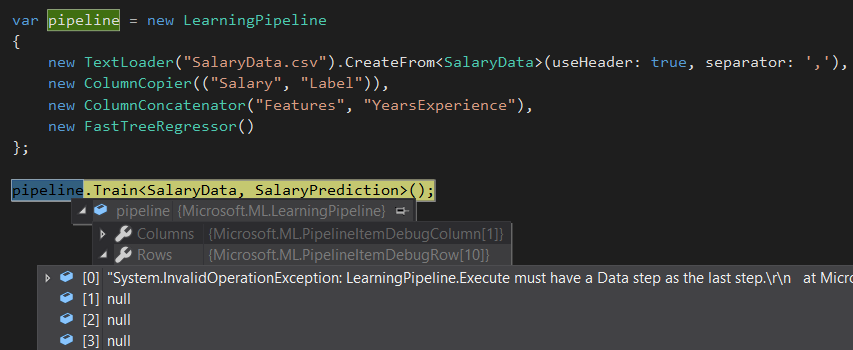
 jwood803
on 11 Jun 2018
jwood803
on 11 Jun 2018
I am getting the Same Error: System.InvalidOperationException: LearningPipeline.Execute must have a Data step as the last step.
at Microsoft.ML.LearningPipeline.Execute(IHostEnvironment environment)
at Microsoft.ML.LearningPipelineDebugProxy.ExecutePipeline()
Any Hints why !
 yehia2amer
on 13 Jun 2018
yehia2amer
on 13 Jun 2018
I am also getting this error:
pipeline.Rows[0] = "System.InvalidOperationException: LearningPipeline.Execute must have a Data step as the last step.\r\n at Microsoft.ML.LearningPipeline.Execute(IHostEnvironment environment)\r\n at Microsoft.ML.LearningPipelineDebugProxy.ExecutePipeline()"
 shriganesh1987
on 21 Jun 2018
shriganesh1987
on 21 Jun 2018
Same for me:

It happens when i'm debug my code step-by-step.
If i trying run my code i'm getting exception:
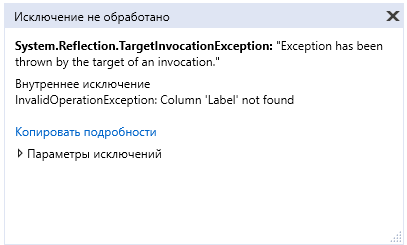
 otsomkalov
on 27 Jun 2018
otsomkalov
on 27 Jun 2018
@shauheen seems several people are stuck here.
 danmoseley
on 27 Jun 2018
danmoseley
on 27 Jun 2018
Looking at this.
codemzs
on 27 Jun 2018
I hit the same issue. Cloned the repo and debugged it. It occurs when the trainer (new FastTreeRegressor() in my case) is added to the list of ILearningPipelineItem items.
Training the model and evaluating it appears to work from the output below:
Processed 768 instances
Binning and forming Feature objects
Reserved memory for tree learner: 107536 bytes
Starting to train ...
Not training a calibrator because it is not needed.
Rms = 1.00680682114123
RSquared = 0.995004854767641
It is the Rows and Columns variables that are disappearing from the DebuggerTypeProxy values attached to the LearningPipeline instance in VS.
I found this note on MSDN in regards to the DebuggerTypeProxyAttribute. _Use this attribute when you need to significantly and fundamentally change the debugging view of a type, but not change the type itself._
Build: 0.4-preview-26705
 doughutchens
on 9 Jul 2018
doughutchens
on 9 Jul 2018
I am still having the problem described above.
| Name | Value | Type
-- | -- | -- | --
▶ | [0] | "System.InvalidOperationException: LearningPipeline.Execute must have a Data step as the last step.\r\n at Microsoft.ML.LearningPipeline.Execute(IHostEnvironment environment)\r\n at Microsoft.ML.LearningPipelineDebugProxy.ExecutePipeline()" | Microsoft.ML.PipelineItemDebugRow
is there any update on the fix?
My code:
using System;
using System.Collections.Generic;
using System.Linq;
using System.Text;
using System.Threading.Tasks;
using Microsoft.ML.Runtime.Api;
using Microsoft.ML.Models;
using Microsoft.ML.Trainers;
using Microsoft.ML.Transforms;
using Microsoft.ML;
using Microsoft.ML.Data;
using System;
namespace ConsoleApp1
{
class Program
{
static void Main(string[] args)
{
var pipeline = new LearningPipeline();
pipeline.Add(new TextLoader("TestDataCSV.csv").CreateFrom<SalaryData>(useHeader: true, separator:char.Parse(",")));
pipeline.Add(new ColumnConcatenator("Features", "years"));
pipeline.Add(new GeneralizedAdditiveModelRegressor()); //<-- Error occurs on this line
var model = pipeline.Train<SalaryData,PredictedSalary>();
var testdata = new TextLoader("TestDataCSVtestdata.csv").CreateFrom<SalaryData>(useHeader: true, separator: char.Parse(","));
var evaluator = new RegressionEvaluator();
var metrics = evaluator.Evaluate(model, testdata);
}
}
class SalaryData
{
[Column("0")]
public double years;
[Column("1")]
public double wage;
}
class PredictedSalary
{
[Column("0")]
public double score;
}
}
 Pat02
on 27 Jul 2018
Pat02
on 27 Jul 2018
Found this in the source code, that's where the Error is thrown. None of the tutorials or videos I've seen are having this issue, but I can't tell what I'm doing differently.
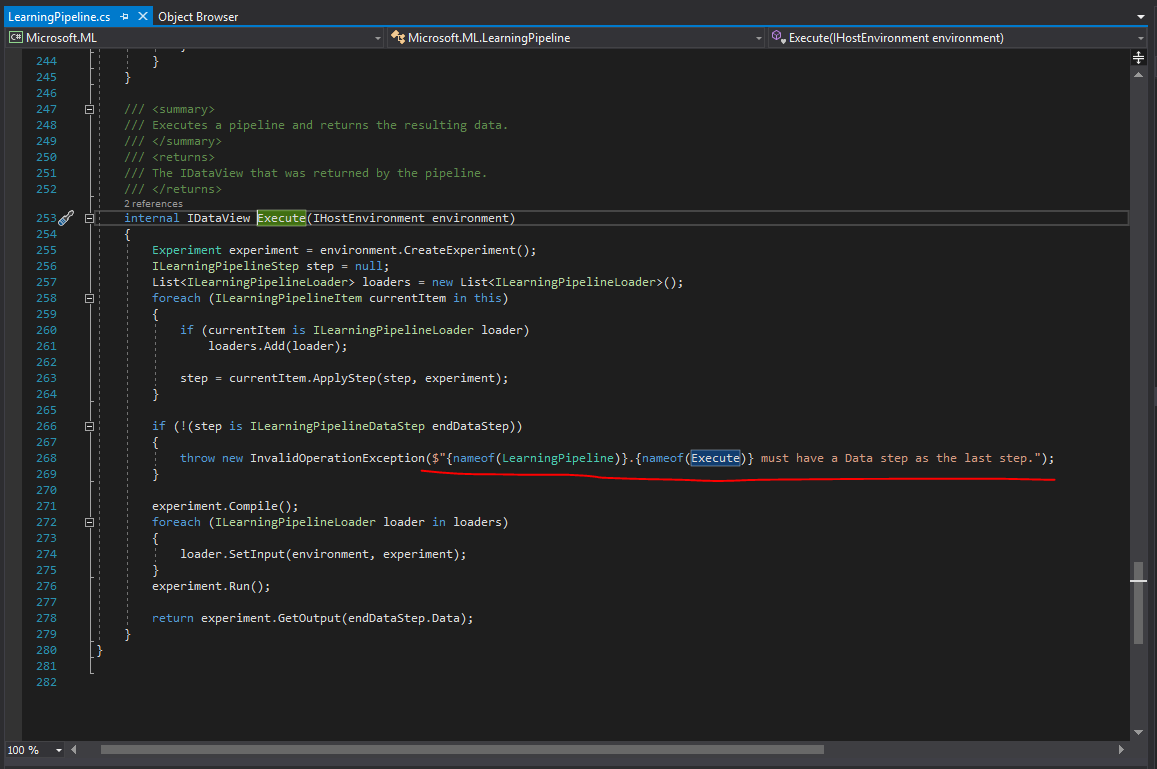
Pat02
on 1 Aug 2018
Same issue. Any updates on this guys? Stuck while taking my first step towards ML.Net.
 priyank218
on 6 Aug 2018
priyank218
on 6 Aug 2018
Hi, I get the same error (on adding Regressor) with build 0.5
System.InvalidOperationException: LearningPipeline.Execute must have a Data step as the last step.
   at Microsoft.ML.LearningPipeline.Execute(IHostEnvironment environment)
   at Microsoft.ML.LearningPipelineDebugProxy.ExecutePipeline()
Stuck to use ML.NET, how to avoid this ?
 jcberto
on 14 Aug 2018
jcberto
on 14 Aug 2018
Update for me, I had a few simple errors that once resolved got rid of the issue. looking at my code above, I made the following changes:
using System;
using System.Collections.Generic;
using System.Linq;
using System.Text;
using System.Threading.Tasks;
using Microsoft.ML.Runtime.Api;
using Microsoft.ML.Models;
using Microsoft.ML.Trainers;
using Microsoft.ML.Transforms;
using Microsoft.ML;
using Microsoft.ML.Data;
namespace ConsoleApp1
{
class Program
{
static void Main(string[] args)
{
var pipeline = new LearningPipeline();
        // Try
        pipeline.Add(new TextLoader("TestDataCSV.csv").CreateFrom<SalaryData>(useHeader: true, separator: ','));
        pipeline.Add(new ColumnConcatenator("Features", "years"));
        // I need to add something inbetween these 2 steps. needs a Microsoft.ML.Data operation as the last operation
        pipeline.Add(new GeneralizedAdditiveModelRegressor());

        PredictionModel<SalaryData, PredictedSalary> model = pipeline.Train<SalaryData, PredictedSalary>();

        var TestData = new TextLoader("TestDataCSVtestdata.csv").CreateFrom<SalaryData>(useHeader: true, separator: ',');

        var eval = new RegressionEvaluator();
        var metrics = eval.Evaluate(model, TestData);

        Console.WriteLine(metrics.Rms.ToString());
        Console.WriteLine(metrics.RSquared.ToString());
        Console.ReadLine();
    }
}
}
public class SalaryData
{
[Column("0")]
public float years;
[Column("1", "Label")]
public float wage;
}
public class PredictedSalary
{
[ColumnName("Score")]
public float wage;
}
Pat02
on 14 Aug 2018
Closing as the LearningPipeline API is obsolete, and will be removed in the next release.
 eerhardt
on 6 Dec 2018
eerhardt
on 6 Dec 2018
Related issues
 aslotte
·
3Comments
aslotte
·
3Comments
 neven10
·
3Comments
neven10
·
3Comments
 rebecca-burwei
·
3Comments
rebecca-burwei
·
3Comments
 frankhaugen
·
3Comments
frankhaugen
·
3Comments
 maxt3r
·
3Comments
maxt3r
·
3Comments