Mac-precision-touchpad: MacBookPro8,3 (17" Late 2011) Support
Greetings,
I'm following this project with great interest and will absolutely be donating to your fine work. Would love to see support for this model. There are two devices in device manager - not sure if you need both, but here is a screenshot with associated info:

Apple Multitouch:
HID\VID_05AC&PID_0252&REV_0118&MI_01
Apple Multitouch Mouse:
HID\VID_05AC&PID_0252&REV_0118&MI_02
Thanks!
 kurtzy
All 15 comments
On-going.
 imbushuo
on 28 Feb 2018
imbushuo
on 28 Feb 2018
@imbushuo Is MacBookPro8,1 13" supported or considered?
Thanks
 khalidchawtany
on 28 Feb 2018
khalidchawtany
on 28 Feb 2018
@khalidchawtany Not in repository now, but MacBookPro8,x support will be added in a single batch.
imbushuo
on 28 Feb 2018
It's working on my early 2011 17" MacBook Pro. You have to update both the multitouch driver and the multitouch mouse driver under human interface devices. Use the same precision driver for both.
 montajd
on 28 Feb 2018
montajd
on 28 Feb 2018
hey montajd, would you mind giving details on how you instaled the drivers? i have the same Macbook pro (13" though) and the device diddnt start
 AlvaroMartinezB
on 28 Feb 2018
AlvaroMartinezB
on 28 Feb 2018
Sure, I installed the certificate first for everyone, under trusted root. Then I updated both the "Apple Multitouch" and "Apple Multitouch Mouse" drivers under "Human Interface Devices". Reboot and you are good to go. The "HID-" drivers updated automatically after updating the multitouch drivers so do not touch those. I've attached a screenshot to show what my "Human Interface Devices" section looks like now, as well as the touchpad settings that are now enabled.

montajd
on 28 Feb 2018
Did you install the x64 driver/certificate?
when you updated the driver, did you browse manually for it? any specific order?
Sorry for all the questions, its just that i tried this before and didnt work... so i want to kink our any variations on our process
Also, did you have to disable driver signature enforcement? Its not allowing me to install without it disabled, even after I install the certificate
AlvaroMartinezB
on 28 Feb 2018
Yeah I installed the x64 driver/certificate. Install the certificate first, choose everyone, and then install it to Trusted Root, don't choose the automatic option. After you've installed the certificate, then go to device manager, right click on the drivers, choose update drivers, choose "browse my computer for driver software", browse to the Driver folder you downloaded, don't choose the inf file you first see, open the folder and choose that one. Also make sure you are using the latest release of drivers. I was facing the same issues as you with the release prior to this one.
montajd
on 28 Feb 2018
other than that, Maybe our hardware is different enough to where it wont work.
montajd
on 28 Feb 2018
I guess our hardware is different enough to break it... Sad... Still getting error code 10, although i was actually able to install without disabling driver signature enforcement.
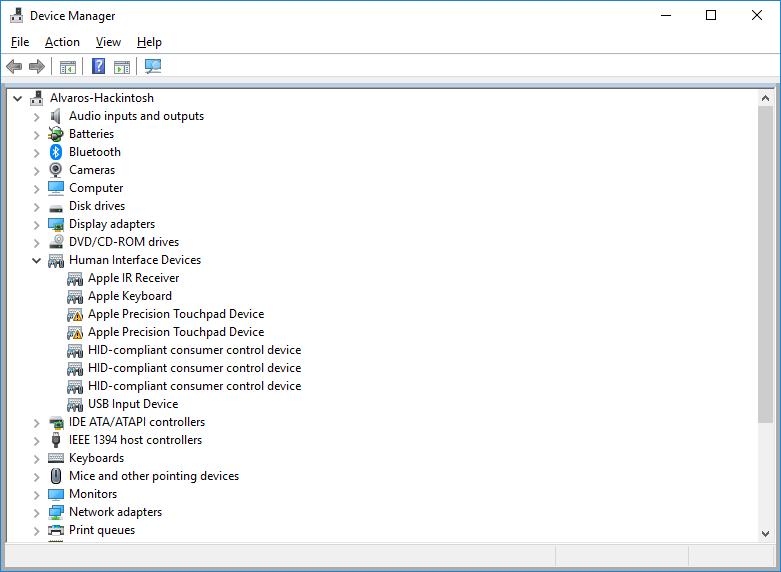
I dont know if having trackpad ++ installed (yet, disabled) might be ruining things...
AlvaroMartinezB
on 28 Feb 2018
Its only a matter of time before he gets it working for them all. Believe me, I've been waiting a while for it to work. Just make sure you are following this project so you'll know the moment there's an update. Also, The dev wasn't even aware that the latest release would work with my Macbook Pro, so now that he does, it could as simple as changing one value, one argument, whatever. And Trackpad++ sucks, its basically malware, requiring you to install another app just to use it? I don't think so.
montajd
on 28 Feb 2018
@kurtzy Try the latest driver. If it doesn't work, see #62 for collecting a trace log to me.
@AlvaroMartinezB See my reply in #62.
imbushuo
on 28 Feb 2018
Hi, done and received cannot start error for both devices. Followed instructions you referenced - here's the trace file:
Note that I first disabled/enabled USB\VID_05AC&PID_0252&REV_0118&MI_01 followed by USB\VID_05AC&PID_0252&REV_0118&MI_02. If it matters at all, I noticed the .inf file doesn't have matching strings for the hardware. Thanks again and please let me know if I can help any further!
kurtzy
on 28 Feb 2018
https://github.com/imbushuo/mac-precision-touchpad/releases/tag/univ-b1-i3
Please give it a try!
imbushuo
on 28 Feb 2018
Genius...it works! Only had to install for MI_01 (Apple Multitouch) as well. You should write drivers for the army of awful PC touchpads out there. :)
Thank you so much!
kurtzy
on 28 Feb 2018
Related issues
 kazenoai
·
6Comments
kazenoai
·
6Comments
 zakhaj
·
4Comments
zakhaj
·
4Comments
 jourdant
·
3Comments
jourdant
·
3Comments
 chaopeng
·
6Comments
imbushuo
·
6Comments
chaopeng
·
6Comments
imbushuo
·
6Comments
Most helpful comment
@khalidchawtany Not in repository now, but MacBookPro8,x support will be added in a single batch.