Lwjgl3: LWJGL does not report some supported display resolutions
I own a 3440x1440p monitor and I am looking to run a game (Minecraft) in 2560x1080p in full screen mode to get a performance increase with path-tracing compatible shaders. I currently use the Optifine mod which provides several resolutions to change the game to but none of which are 2560x1080. I scoured through the internet to find a way to accomplish this and I eventually stumbled upon another GitHub issue stating that Minecraft (specifically the Optifine mod) grabs the compatible resolutions from the LWJGL library. Anyway, I'm wondering if there's a way, if any, to add this resolution to the LWJGL library and how exactly to do it.
I'm sorry if this isn't the correct location to ask this, I just wasn't able to access the LWJGL forums as it requires some coding knowledge to register.
 TheJaake
All 13 comments
LWJGL 3 just uses GLFW to obtain the video modes (if that is what Optifine might be using). And GLFW itself just asks the operating system which video modes it supports and that itself asks the video driver, which in turn asks the display. If your desired resolution does not appear in your display adapter's (or OS'es) display resolution selection dialog, then this is just a solution not supported by your monitor.
There is no way into _fooling_ any part of this chain into thinking that this solution is supported.
 httpdigest
on 31 Aug 2019
httpdigest
on 31 Aug 2019
Both the Nvidia control panel and Windows display settings allow for the 2560x1080 resolution. When I manually change my monitor to that resolution, Optifine defaults to the closest resolution under 2560x1080 that it supports.
Here is a list of resolutions that Optifine displays even with my resolution at 2560x1080:
https://youtu.be/woQzXFwvkZA
TheJaake
on 31 Aug 2019
If it helps, here is the direct explanation from the developer:
https://github.com/sp614x/optifine/issues/2147#issuecomment-453281043
Thanks for the response though.
TheJaake
on 31 Aug 2019
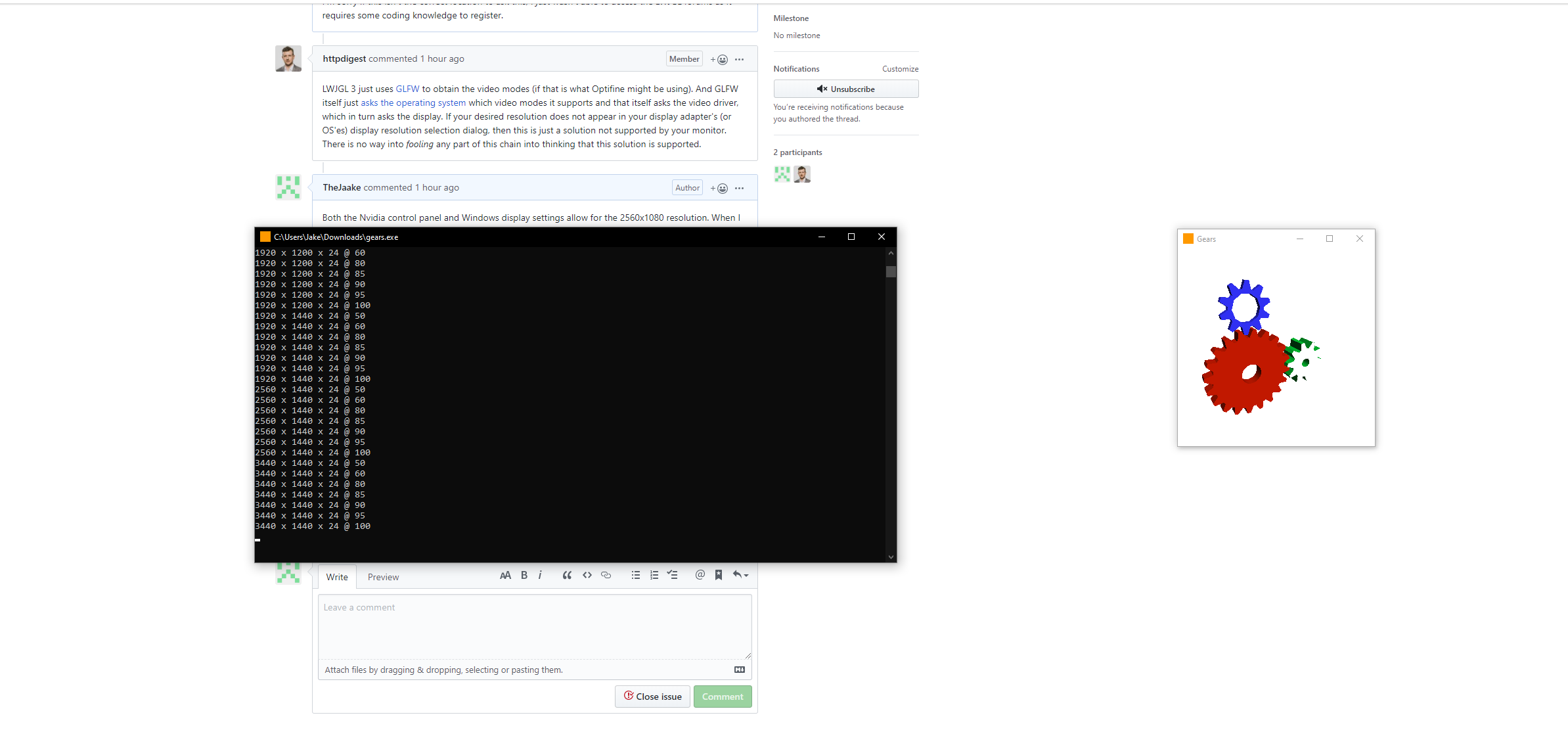
Well, there is not much that can be done here from LWJGL's side. Sadly, Optifine is closed-source, so we can't even see how Optifine uses LWJGL/GLFW exactly and how it _might_ filter out display modes reported by GLFW. I've uploaded a GLFW demo executable that outputs all supported video modes as would LWJGL do: https://www.dropbox.com/s/purgxj04ez6egti/gears.exe?dl=1
If you execute it, it will open a cmd shell and output the video modes as well as render the "gears" demo in a transparent window.
httpdigest
on 31 Aug 2019
I downloaded the .exe file and ran it. In the cmd shell, it didn't list the 2650x1080 resolution. I'm assuming the problem is that GLFW doesn't recognize the resolution in the first place? Is there anyway we could change that?
TheJaake
on 31 Aug 2019
I investigated and debugged GLFW a bit further and there is indeed a bug in GLFW causing the resolution 2560 x 1080 to not be reported. The reason is that GLFW checks whether the same resolution is reported more than once.
And it does so by not checking for width and height separately, but by checking for the screen area (which is width x height). And when your monitor reports 1920x1440 and _also_ reports 2560x1080 then only the former will be returned by GLFW (and subsequently by LWJGL3), since width x height in both cases is the same...
I'll report this bug to GLFW.
Functions responsible for this:
httpdigest
on 31 Aug 2019
GLFW bug report: https://github.com/glfw/glfw/issues/1555
Thanks for reporting this!
httpdigest
on 31 Aug 2019
Thanks so much for your help. So all we can really do is wait for the bug to be patched?
TheJaake
on 31 Aug 2019
Yes.
httpdigest
on 31 Aug 2019
Okay. Again, thanks. Your help means a lot to me. 👍
TheJaake
on 31 Aug 2019
I am going to reword this issue and keep it open so we can track the progress of this bug in GLFW and when a new fixed GLFW version is shipped with a new LWJGL3 build.
httpdigest
on 31 Aug 2019
Thank you @TheJaake for the report and @httpdigest for the investigation! 3.2.3 is being released tomorrow and it would be nice to have this fixed, so I've pushed the change to LWJGL-CI/glfw.
 LWJGL-CI
on 31 Aug 2019
LWJGL-CI
on 31 Aug 2019
The GLFW issue https://github.com/glfw/glfw/issues/1555 has been fixed now with https://github.com/glfw/glfw/pull/1556 and the change is already integrated in the current LWJGL 3 release. So, closing this now.
httpdigest
on 7 Sep 2019
Related issues
 Theikon
·
5Comments
Theikon
·
5Comments
 voidburn
·
5Comments
voidburn
·
5Comments
 Zamundaaa
·
4Comments
Zamundaaa
·
4Comments
 baileysostek
·
4Comments
baileysostek
·
4Comments
 Hugobros3
·
7Comments
Hugobros3
·
7Comments