Lutris: "sudo add-apt-repository ppa:lutris-team/lutris" stays stuck on Ubuntu 20.04
Describe the bug
The terminal (bash or zsh) gets stuck after running
sudo add-apt-repository ppa:lutris-team/lutris
Nothing happens. If I press Ctrl+C, I get the output:
Traceback (most recent call last):
  File "/usr/bin/add-apt-repository", line 136, in <module>
    shortcut = shortcut_handler(line)
  File "/usr/lib/python3/dist-packages/softwareproperties/SoftwareProperties.py", line 884, in shortcut_handler
    ret = factory(shortcut)
  File "/usr/lib/python3/dist-packages/softwareproperties/ppa.py", line 469, in shortcut_handler
    return PPAShortcutHandler(shortcut)
  File "/usr/lib/python3/dist-packages/softwareproperties/ppa.py", line 426, in __init__
    info = get_ppa_info(self.shortcut)
  File "/usr/lib/python3/dist-packages/softwareproperties/ppa.py", line 380, in get_ppa_info
    ret = get_ppa_info_from_lp(user, ppa)
  File "/usr/lib/python3/dist-packages/softwareproperties/ppa.py", line 110, in get_ppa_info_from_lp
    return get_info_from_lp(lp_url)
  File "/usr/lib/python3/dist-packages/softwareproperties/ppa.py", line 104, in get_info_from_lp
    return get_info_from_https(lp_url, True)
  File "/usr/lib/python3/dist-packages/softwareproperties/ppa.py", line 96, in get_info_from_https
    data = func(lp_url=url, accept_json=accept_json, retry_delays=retry_delays)
  File "/usr/lib/python3/dist-packages/softwareproperties/ppa.py", line 138, in _get_https_content_py3
    lp_page = urllib.request.urlopen(request,
  File "/usr/lib/python3.8/urllib/request.py", line 222, in urlopen
    return opener.open(url, data, timeout)
  File "/usr/lib/python3.8/urllib/request.py", line 525, in open
    response = self._open(req, data)
  File "/usr/lib/python3.8/urllib/request.py", line 542, in _open
    result = self._call_chain(self.handle_open, protocol, protocol +
  File "/usr/lib/python3.8/urllib/request.py", line 502, in _call_chain
    result = func(*args)
  File "/usr/lib/python3.8/urllib/request.py", line 1362, in https_open
    return self.do_open(http.client.HTTPSConnection, req,
  File "/usr/lib/python3.8/urllib/request.py", line 1319, in do_open
    h.request(req.get_method(), req.selector, req.data, headers,
  File "/usr/lib/python3.8/http/client.py", line 1230, in request
    self._send_request(method, url, body, headers, encode_chunked)
  File "/usr/lib/python3.8/http/client.py", line 1276, in _send_request
    self.endheaders(body, encode_chunked=encode_chunked)
  File "/usr/lib/python3.8/http/client.py", line 1225, in endheaders
    self._send_output(message_body, encode_chunked=encode_chunked)
  File "/usr/lib/python3.8/http/client.py", line 1004, in _send_output
    self.send(msg)
  File "/usr/lib/python3.8/http/client.py", line 944, in send
    self.connect()
  File "/usr/lib/python3.8/http/client.py", line 1392, in connect
    super().connect()
  File "/usr/lib/python3.8/http/client.py", line 915, in connect
    self.sock = self._create_connection(
  File "/usr/lib/python3.8/socket.py", line 796, in create_connection
    sock.connect(sa)
KeyboardInterrupt
Currently using Ubuntu 20.04.
I can use Lutris by downloading the non-install version (.tar).
 SrBrahma
All 3 comments
It works for me. Is something wrong with your network configuration? Do other PPAs not work?
 xordspar0
on 24 Apr 2020
xordspar0
on 24 Apr 2020
This is an issue with add-apt-repository and not lutris.
 strycore
on 25 Apr 2020
strycore
on 25 Apr 2020
Managed to fix it. Here I will show how to fix the problem for any application that may show similar errors:
1) Open Programs and Updates (not sure about the exact name in english, but search for 'update' in the menu)
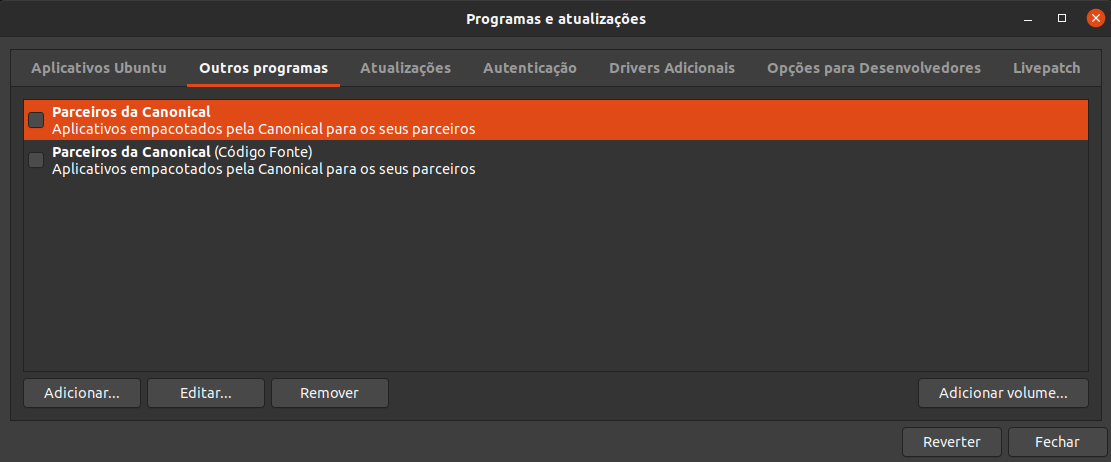
2) Click on Add
3) On https://lutris.net/downloads/, in the Ubuntu session, there is a link to the PPA . Click on techincal details, select the Ubuntu version. This will appear:
deb http://ppa.launchpad.net/lutris-team/lutris/ubuntu focal main
4) Put that line on the Add box, and add it.

4) Do sudo apt update. If you are getting the same error as I did, it will throw _NO_PUBKEY 37B90EDD4E3EFAE4_. (that key ID can also be found on the ppa link we opened above, by clicking on Signing key link. The key will appear after the 'sig sig'.
5) Do the following. If it's a different key ID, you have to change it.
sudo apt-key adv --keyserver keyserver.ubuntu.com --recv-keys 37B90EDD4E3EFAE4
6)
sudo apt-get update
sudo apt-get install lutris
:)
SrBrahma
on 25 Apr 2020
Related issues
 telanus
·
4Comments
telanus
·
4Comments
 RiantAnda
·
4Comments
RiantAnda
·
4Comments
 testman42
·
4Comments
testman42
·
4Comments
 raulcraveiro
·
4Comments
strycore
·
4Comments
raulcraveiro
·
4Comments
strycore
·
4Comments
Most helpful comment
Managed to fix it. Here I will show how to fix the problem for any application that may show similar errors:
1) Open Programs and Updates (not sure about the exact name in english, but search for 'update' in the menu)
2) Click on Add
3) On https://lutris.net/downloads/, in the Ubuntu session, there is a link to the PPA . Click on techincal details, select the Ubuntu version. This will appear:
deb http://ppa.launchpad.net/lutris-team/lutris/ubuntu focal main4) Put that line on the Add box, and add it.

4) Do
sudo apt update. If you are getting the same error as I did, it will throw _NO_PUBKEY 37B90EDD4E3EFAE4_. (that key ID can also be found on the ppa link we opened above, by clicking on Signing key link. The key will appear after the 'sig sig'.5) Do the following. If it's a different key ID, you have to change it.
sudo apt-key adv --keyserver keyserver.ubuntu.com --recv-keys 37B90EDD4E3EFAE4
6)
sudo apt-get update
sudo apt-get install lutris
:)