Ludwig: Training a BERT model on Colab using GPU
Describe the bug
I'm trying to use the pre-trained BERT model for text classification as mentioned here https://uber.github.io/ludwig/user_guide/#bert-encoder . I wanted to check if I'm doing something wrong. Thanks in advance for your time!
To Reproduce
Steps to reproduce the behavior:
- I use the following command to run an experiment
ludwig experiment --experiment_name bert-uncaselarge --data_csv /path/to/mydataset.csv --model_definition_file /my/model_definition_bert.yaml - Here is the YAM file 'http://linkedvocabs.org/dataset/model_definition_bert.yaml'
- You can find the log after running the command here 'http://linkedvocabs.org/dataset/log-runningBert.txt
- See the output error `2020-02-28 14:57:28.712274: I tensorflow/core/platform/cpu_feature_guard.cc:142] Your CPU supports instructions that this TensorFlow binary was not compiled to use: AVX2 FMA
2020-02-28 14:57:28.756657: I tensorflow/core/platform/profile_utils/cpu_utils.cc:94] CPU Frequency: 2300000000 Hz
2020-02-28 14:57:28.756922: I tensorflow/compiler/xla/service/service.cc:168] XLA service 0x2ad4840 executing computations on platform Host. Devices:
2020-02-28 14:57:28.756960: I tensorflow/compiler/xla/service/service.cc:175] StreamExecutor device (0):,
2020-02-28 14:57:32.899945: W tensorflow/compiler/jit/mark_for_compilation_pass.cc:1412] (One-time warning): Not using XLA:CPU for cluster because envvar TF_XLA_FLAGS=--tf_xla_cpu_global_jit was not set. If you want XLA:CPU, either set that envvar, or use experimental_jit_scope to enable XLA:CPU. To confirm that XLA is active, pass --vmodule=xla_compilation_cache=1 (as a proper command-line flag, not via TF_XLA_FLAGS) or set the envvar XLA_FLAGS=--xla_hlo_profile.
Epoch 1
Training: 0% 0/40 [00:00
Expected behavior
I expect to have the experiment finishing with the results like with the other encoder I've tested so far.
Environment (please complete the following information):
- OS: Google Colab
- Python version: v3.6
- Ludwig version: v0.2.1
 gatemezing
All 17 comments
That doesn't look like an error to me, It looks like regular tensorflow session setup output.
At the end I see a ^C which sounds like you interrupted the training manually. What is the error again?
If you interrupt it manually, i suspect you did it because it was hanging, but as you are trying to train a BERT model on CPU, it must really well be the case that it is actually trainin,g but it's just really slow (because BERT is huge). So if you stopped it manually, could you please just wait (potentially several minutes) and see if the progress bar starts to report something? Also, please reduce the batch_size to something small, like 8, to see updates on the progress bar more often.
 w4nderlust
on 29 Feb 2020
w4nderlust
on 29 Feb 2020
Hi @w4nderlust Thanks for your answer. I didn't stop the process. I just realized it stopped in my Colab notebook. I'll restart the training with a smaller size and we'll see if I'm lucky.
gatemezing
on 1 Mar 2020
Sure keep me posted. In colab you can have a GPU which will make training much faster.
w4nderlust
on 2 Mar 2020
I've tried twice the experiments. The last one with GPU set up disconnected from Colab after only the first epoch as below: (Note: I've tried to follow this advice to prevent colab from disconnecting using this function at https://medium.com/@shivamrawat_756/how-to-prevent-google-colab-from-disconnecting-717b88a128c0)
Epoch 1
Training: 100% 632/632 [2:34:03<00:00, 13.46s/it]
Evaluation train: 100% 632/632 [1:15:18<00:00, 6.72s/it]
Evaluation vali : 100% 84/84 [09:59<00:00, 6.70s/it]
Evaluation test : 100% 180/180 [21:30<00:00, 6.61s/it]
Took 4h 20m 51.1860s
╒═════════╤════════╤════════════╤═════════════╕
│ label │ loss │ accuracy │ hits_at_k │
╞═════════╪════════╪════════════╪═════════════╡
│ train │ 0.7492 │ 0.4945 │ 1.0000 │
├─────────┼────────┼────────────┼─────────────┤
│ vali │ 0.7315 │ 0.5224 │ 1.0000 │
├─────────┼────────┼────────────┼─────────────┤
│ test │ 0.7488 │ 0.4955 │ 1.0000 │
╘═════════╧════════╧════════════╧═════════════╛
It's strange because if I use a fine-tune model directly from Tensorflow, it takes less than 20 minutes for the training. So, yes from my original question, you gave me the right answer. I don't know if I'll finish this experiment. I'm eager to hear from others who used this model. Thanks.
gatemezing
on 2 Mar 2020
@gatemezing I don't have enough information to be able to help you a lot, if you want me to try to help you you have to make it reproducible for me.
I can only have suspitions, and here the suspicion is that you are not running on a GPU, but without seeing the code and the output of the training is really difficult for me to confirm that or not.
based on this part of the output you previously provided
tensorflow/core/platform/cpu_feature_guard.cc:142] Your CPU supports instructions that this TensorFlow binary was not compiled to use: AVX2 FMA
2020-02-28 14:57:28.756657: I tensorflow/core/platform/profile_utils/cpu_utils.cc:94] CPU Frequency: 2300000000 Hz
2020-02-28 14:57:28.756922: I tensorflow/compiler/xla/service/service.cc:168] XLA service 0x2ad4840 executing computations on platform Host. Devices:
2020-02-28 14:57:28.756960: I tensorflow/compiler/xla/service/service.cc:175] StreamExecutor device (0): ,
2020-02-28 14:57:32.899945: W tensorflow/compiler/jit/mark_for_compilation_pass.cc:1412] (One-time warning): Not using XLA:CPU for cluster because envvar TF_XLA_FLAGS=--tf_xla_cpu_global_jit was not set. If you want XLA:CPU, either set that envvar, or use experimental_jit_scope to enable XLA:CPU. To confirm that XLA is active, pass --vmodule=xla_compilation_cache=1 (as a proper command-line flag, not via TF_XLA_FLAGS) or set the envvar XLA_FLAGS=--xla_hlo_profile.
It looks like you are running on CPU and not on GPU. I image you installed tensorflow instead of tensorflow-gpu, but without knowing more I can't really tell unfortunately. Can you share the colab or a version of with just a small subset of the data?
w4nderlust
on 5 Mar 2020
@w4nderlust I just realized what you meant by using GPU. I was setting it from the execution menu of Colab, without actually testing in the code. The output looks like this now (full version)
2020-03-07 10:04:43.508251: I tensorflow/core/platform/cpu_feature_guard.cc:142] Your CPU supports instructions that this TensorFlow binary was not compiled to use: AVX2 AVX512F FMA
2020-03-07 10:04:43.512800: I tensorflow/core/platform/profile_utils/cpu_utils.cc:94] CPU Frequency: 2000170000 Hz
2020-03-07 10:04:43.512975: I tensorflow/compiler/xla/service/service.cc:168] XLA service 0x1bb3d40 initialized for platform Host (this does not guarantee that XLA will be used). Devices:
2020-03-07 10:04:43.513003: I tensorflow/compiler/xla/service/service.cc:176] StreamExecutor device (0): Host, Default Version
2020-03-07 10:04:43.514730: I tensorflow/stream_executor/platform/default/dso_loader.cc:44] Successfully opened dynamic library libcuda.so.1
2020-03-07 10:04:43.598801: I tensorflow/stream_executor/cuda/cuda_gpu_executor.cc:983] successful NUMA node read from SysFS had negative value (-1), but there must be at least one NUMA node, so returning NUMA node zero
2020-03-07 10:04:43.599575: I tensorflow/compiler/xla/service/service.cc:168] XLA service 0xb73ee00 initialized for platform CUDA (this does not guarantee that XLA will be used). Devices:
2020-03-07 10:04:43.599606: I tensorflow/compiler/xla/service/service.cc:176] StreamExecutor device (0): Tesla P100-PCIE-16GB, Compute Capability 6.0
2020-03-07 10:04:43.599781: I tensorflow/stream_executor/cuda/cuda_gpu_executor.cc:983] successful NUMA node read from SysFS had negative value (-1), but there must be at least one NUMA node, so returning NUMA node zero
2020-03-07 10:04:43.600280: I tensorflow/core/common_runtime/gpu/gpu_device.cc:1639] Found device 0 with properties:
name: Tesla P100-PCIE-16GB major: 6 minor: 0 memoryClockRate(GHz): 1.3285
So, it seems now it is working.
For reproducibility, Please find the files at the following location:
- The dataset for testing used in the experiment at http://linkedvocabs.org/dataset/ludwig/claims-spacy-train.csv
- The code used in Colab at http://linkedvocabs.org/dataset/ludwig/ludwig_bert_Claims.ipynb. Note that I use Google drive to store the Bert models.
- The model at http://linkedvocabs.org/dataset/ludwig/model_definition_bert.yaml
Please, let me know if you need more details. Thanks in advance for your time.
[Update:] I can finally get some results of the run, although it needs more tuning to have good F1-score.
gatemezing
on 7 Mar 2020
This sounds good to me. You can play around with the hyperparameters of the output feature and with the the learning rate and other pars of training parameters to squeeze more performance. As the loss is abouncing quite a bit, consider reducing the learning rate and increasing the number of epochs and the patience.
Anyway, I consider the issue solved, so I'm closing this. If you would be so kind to write a final post summarizing what you had to do to make training work on GPU on Colab that would be a great contribution so that other people with the same issue can take advantage of your experience.
w4nderlust
on 7 Mar 2020
Any idea still how can we connect a GPU while training on Colab, can't find much resources around it.
I have set the --gpus argument as 0 and the colab interface prompts that the GPU is not in use.
!ludwig experiment --comet\
--output_directory result \
--data_csv processed_df.csv \
--model_definition_file train_new.yml \
--gpus 0
 rajatjain2310
on 24 Jun 2020
rajatjain2310
on 24 Jun 2020
This may help you: https://colab.research.google.com/notebooks/gpu.ipynb
w4nderlust
on 24 Jun 2020
I tried to check the GPU available in my environment and found the following:
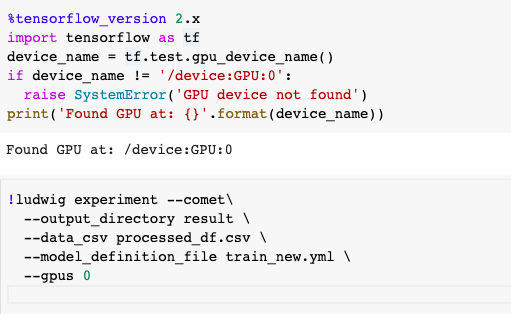
The command executes without any issues but still the GPU is not utilized (iter/s = 1.1). Sorry to bother but do you have any idea on what can cause this issue?
rajatjain2310
on 24 Jun 2020
Before starting the training of epoch 1, it should print a bunch of tensorflow log information, can you poste it here for me to see? make sue to use --logging_level debug.
Something that looks like:
╒══════════╕
│ TRAINING │
╘══════════╛
2020-06-24 16:16:20.551069: I tensorflow/core/platform/cpu_feature_guard.cc:142] Your CPU supports instructions that this TensorFlow binary was not compiled to use: AVX2 FMA
2020-06-24 16:16:20.580768: I tensorflow/compiler/xla/service/service.cc:168] XLA service 0x7f8a24ed7800 initialized for platform Host (this does not guarantee that XLA will be used). Devices:
2020-06-24 16:16:20.580790: I tensorflow/compiler/xla/service/service.cc:176] StreamExecutor device (0): Host, Default Version
Epoch 1
2020-06-25 08:31:25.899317: I tensorflow/core/platform/cpu_feature_guard.cc:142] Your CPU supports instructions that this TensorFlow binary was not compiled to use: AVX2 FMA
2020-06-25 08:31:25.905057: I tensorflow/core/platform/profile_utils/cpu_utils.cc:94] CPU Frequency: 2300000000 Hz
2020-06-25 08:31:25.905273: I tensorflow/compiler/xla/service/service.cc:168] XLA service 0x9994e00 initialized for platform Host (this does not guarantee that XLA will be used). Devices:
2020-06-25 08:31:25.905323: I tensorflow/compiler/xla/service/service.cc:176] StreamExecutor device (0): Host, Default Version
These 4 lines are printed when I give the command:
!ludwig experiment --comet\
--output_directory result \
--data_csv processed_df.csv \
--model_definition_file train_new.yml \
--gpus 0 \
--logging_level debug
Also, here is my model definition file:
model_definition['input_features'] = [{'name': 'order_queue', 'type': 'category','num_fc_layers':1,'fc_size' :32,'dropout':True},{'name': 'feature_agent', 'type': 'text','encoder':'parallel_cnn'},{'name': 'feature_user', 'type': 'text','encoder':'parallel_cnn'}]
model_definition['output_features'] = [{'name': 'level1', 'type': 'category','num_fc_layers':1,'fc_size':128},{'name': 'level2', 'type': 'category','dependencies': ['level1'], 'num_fc_layers':1,'fc_size':128}]
model_definition['training'] = {'early_stop': 20, 'batch_size': 32, 'epochs':200, 'optimizer':{'type': 'momentum', 'momentum':0.05, 'use_nesterov':True}}
rajatjain2310
on 25 Jun 2020
Looked into it and it looks like in Colab they removed the GPU option for TesnorFlow 1:
%tensorflow_version 1.x
import tensorflow as tf
device_name = tf.test.gpu_device_name()
if device_name != '/device:GPU:0':
raise SystemError('GPU device not found')
print('Found GPU at: {}'.format(device_name))
Even if you try to uninstall and reinstall manually, it still doesn't work:
! pip uninstall -y tensorflow
! pip install -y tensorflow-gpu==1.15.2
import tensorflow as tf
device_name = tf.test.gpu_device_name()
if device_name != '/device:GPU:0':
raise SystemError('GPU device not found')
print('Found GPU at: {}'.format(device_name))
The problem is with Colab, not with Ludwig.
Anyway, the next version of Ludwig will work with TF2 so there will not be any problem in this regard anymore.
w4nderlust
on 25 Jun 2020
As suggested, Ludwig works completely fine with GPU in Colab with TensorFlow v1. Just making a minor amendment to the above suggestion worked for me while manually uninstalling and installing TensorFlow v1.15: !pip install tensorflow-gpu==1.15 Perhaps this might be because Colab doesn't come pre-installed with tensorflow-gpu v1.15.
 kanishk16
on 1 Jul 2020
kanishk16
on 1 Jul 2020
As suggested, Ludwig works completely fine with GPU in Colab with TensorFlow v1. Just making a minor amendment to the above suggestion worked for me while manually uninstalling and installing TensorFlow v1.15:
!pip install tensorflow-gpu==1.15Perhaps this might be because Colab doesn't come pre-installed with tensorflow-gpu v1.15.
Testing your suggestion out. The following code did not work for me on colab:
!pip install tensorflow-gpu==1.15.2
import tensorflow as tf
device_name = tf.test.gpu_device_name()
if device_name != '/device:GPU:0':
raise SystemError('GPU device not found')
print('Found GPU at: {}'.format(device_name))
with the following error:
SystemError Traceback (most recent call last)
<ipython-input-2-a2d81cd9fa85> in <module>()
3 device_name = tf.test.gpu_device_name()
4 if device_name != '/device:GPU:0':
----> 5 raise SystemError('GPU device not found')
6 print('Found GPU at: {}'.format(device_name))
SystemError: GPU device not found
Can you please share either the content of a setup cell that works or an entire example Colab? That would be very useful.
w4nderlust
on 1 Jul 2020
After switching to GPU in colab (in the menu Runtime > Change runtime type > None to GPU) and installing Ludwig, simply follow as suggested previously also:
!pip uninstall -y tensorflow
!pip install tensorflow-gpu==1.15.3

import tensorflow as tf
device_name = tf.test.gpu_device_name()
if device_name != '/device:GPU:0':
  raise SystemError('GPU device not found')
print('Found GPU at: {}'.format(device_name))
- There is no need of using
%tensorflow_version 1.xin the code cell while importing tf as installing Ludwig simply uninstalls the pre-installed tf v2.2.x and installs the v1.15.3 (cpu), making the latter default tf version to be used which further changes to be tf v1.15.3 (gpu) on manual installation :)
kanishk16
on 2 Jul 2020
Tested and it works. This is great news, thank you @kanishk16 !
w4nderlust
on 2 Jul 2020
Related issues
 carlogrisetti
·
5Comments
carlogrisetti
·
5Comments
 jenishah
·
5Comments
jenishah
·
5Comments
 tweak-wtf
·
4Comments
tweak-wtf
·
4Comments
 BenMacKenzie
·
7Comments
BenMacKenzie
·
7Comments
 allenkao
·
3Comments
allenkao
·
3Comments
Most helpful comment
After switching to GPU in colab (in the menu Runtime > Change runtime type > None to GPU) and installing Ludwig, simply follow as suggested previously also:
%tensorflow_version 1.xin the code cell while importing tf as installing Ludwig simply uninstalls the pre-installed tf v2.2.x and installs the v1.15.3 (cpu), making the latter default tf version to be used which further changes to be tf v1.15.3 (gpu) on manual installation :)