Hi,
Currently there is no syntax coloring in preview popup (when you hover a type with the mouse)
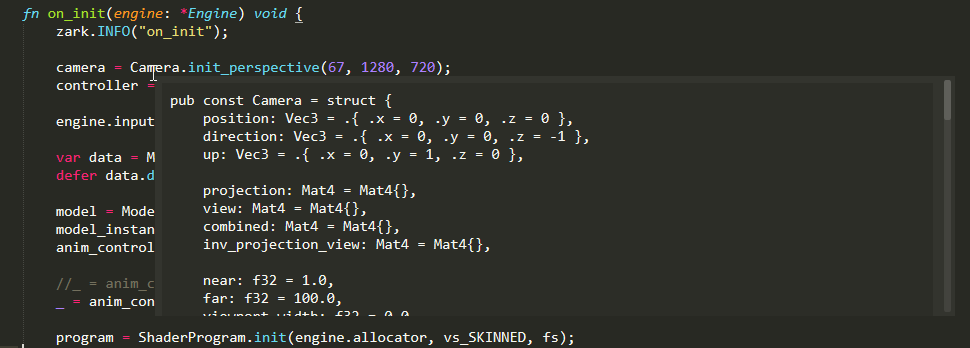
 RUSshy
All 10 comments
Hello,
Can you open up that file, and open the sublime console(ctrl+`) and type view.settings().get('syntax'). And copy paste the result you got?
 predragnikolic
on 19 Nov 2020
predragnikolic
on 19 Nov 2020
I get:
>>> view.settings().get('syntax')
'Packages/Zig.tmLanguage'
It's up to the server how it "formats" the code it sends (more precisely, how it specifies that the content should be formatted). So it's likely just the server's "fault" here.
Which server is that? Is it open source? If yes then you should probably report this over in its repo.
 rchl
on 19 Nov 2020
rchl
on 19 Nov 2020
Thanks @rchl i have reported the issue on the server repo https://github.com/zigtools/zls/issues/196
RUSshy
on 19 Nov 2020
Actually, I've just realized something that might be the reason this doesn't work.
Even if the server properly specifies that this block should be rendered in certain syntax, the markdown library that we are using has a hardcoded list of languages and syntaxes that it supports. Since your syntax is something custom and likely not in that list, it likely is the reason why it doesn't work.
The list is here: https://github.com/facelessuser/sublime-markdown-popups/blob/master/st3/mdpopups/st_mapping.py
You can customize the list with this setting: https://facelessuser.github.io/sublime-markdown-popups/settings/#mdpopupssublime_user_lang_map
You just need to figure out the language identifier that this server is using (but it's probably zig).
rchl
on 19 Nov 2020
Thanks i will give that a try, and maybe an opportunity for me to send a PR to support zig over there out of the box (there is a plugin for zig syntax https://github.com/ziglang/sublime-zig-language)
RUSshy
on 19 Nov 2020
I don't understand what i have to put in my settings file
    "mdpopups.sublime_user_lang_map": {
        "zig": [ ["zig"], ["Zig"] ]
    },
This doesn't work
The identifier is Zig

RUSshy
on 20 Nov 2020
You have to specify the path to the syntax file. Something like that:
    "mdpopups.sublime_user_lang_map": {
        "zig": [ ["zig"], ["Zig/Zig"] ]
    },
Although that path doesn't look correct to me. Check the exact path to the syntax file with https://github.com/sublimelsp/LSP/issues/1472#issuecomment-730650277 and put it here, skipping the Packages/ and the file extension parts.
rchl
on 20 Nov 2020
I was using my local package, i reinstalled everything from the package manager, and now it works
    "mdpopups.sublime_user_lang_map": {
        "zig": [ ["zig"], ["Zig Language/Syntaxes/Zig"] ]
    },
Thanks for the help!
RUSshy
on 20 Nov 2020
I sent a PR here: https://github.com/facelessuser/sublime-markdown-popups/pull/113
RUSshy
on 20 Nov 2020
Related issues
 olegbl
·
5Comments
olegbl
·
5Comments
 lsmenicucci
·
3Comments
predragnikolic
·
7Comments
lsmenicucci
·
3Comments
predragnikolic
·
7Comments
 tomv564
·
4Comments
tomv564
·
4Comments
 ryanpcmcquen
·
4Comments
ryanpcmcquen
·
4Comments
Most helpful comment
Actually, I've just realized something that might be the reason this doesn't work.
Even if the server properly specifies that this block should be rendered in certain syntax, the markdown library that we are using has a hardcoded list of languages and syntaxes that it supports. Since your syntax is something custom and likely not in that list, it likely is the reason why it doesn't work.
The list is here: https://github.com/facelessuser/sublime-markdown-popups/blob/master/st3/mdpopups/st_mapping.py
You can customize the list with this setting: https://facelessuser.github.io/sublime-markdown-popups/settings/#mdpopupssublime_user_lang_map
You just need to figure out the language identifier that this server is using (but it's probably
zig).