LSP starts w/o an error but being not functional
Abstract
Following https://github.com/tomv564/LSP/issues/27 and https://lsp.readthedocs.io/en/latest/#php, the LSP seems to start felixfbecker/php-language-server successfully but nothing happens since then (no autocomplete, no go to definition, no diagnosis). log_debug is turned on but still nothing in the console. I do not know how to debug this so post here for requesting some helps.
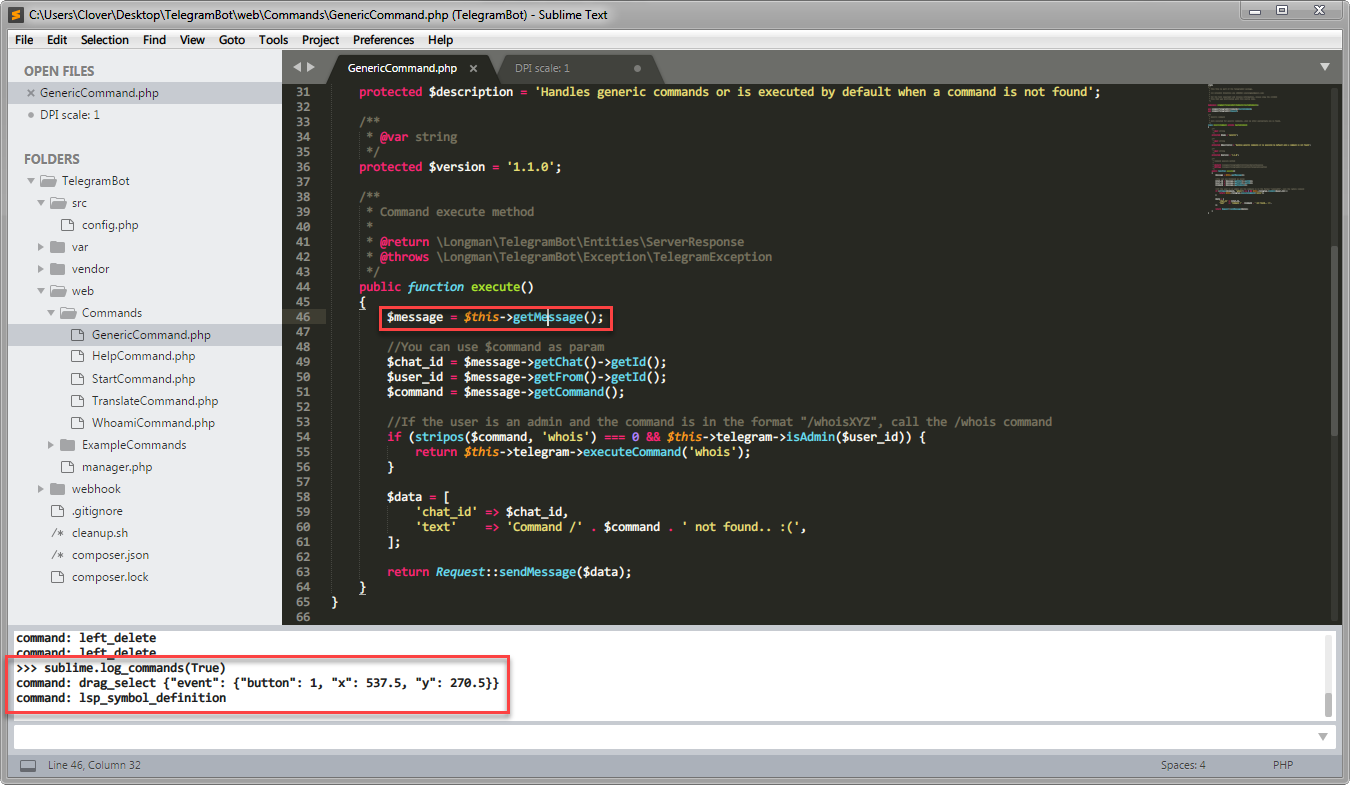
In the screenshot above, lsp_symbol_definition is not working here as well and not even fall back to ST's go_to_definition.
Environments
ST: 3143 x64 Portable (Only Package Control and LSP are installed.)
OS: Windows 7 x64
PHP:
[Clover@Clover-NB Desktop]$ php -v
PHP 7.2.0RC3 (cli) (built: Sep 26 2017 15:28:01) ( NTS MSVC15 (Visual C++ 2017) x86 )
Copyright (c) 1997-2017 The PHP Group
Zend Engine v3.2.0-dev, Copyright (c) 1998-2017 Zend Technologies
    with Zend OPcache v7.2.0RC3, Copyright (c) 1999-2017, by Zend Technologies

[Clover@Clover-NB Desktop]$ php -m
[PHP Modules]
bcmath
bz2
calendar
Core
ctype
curl
date
dom
ds
filter
gd
hash
iconv
igbinary
json
libxml
mbstring
msgpack
mysqli
mysqlnd
openssl
pcre
PDO
pdo_mysql
PDO_ODBC
pdo_sqlite
Phar
readline
redis
Reflection
session
SimpleXML
SPL
sqlite3
standard
tokenizer
wddx
xml
xmlreader
xmlwriter
xsl
Zend OPcache
zip
zlib

[Zend Modules]
Zend OPcache
LSP.sublime-settings:
{
  "clients":
  {
    "phpls": {
      "command": ["php", "C:/Users/Clover/AppData/Roaming/Composer/vendor/felixfbecker/language-server/bin/php-language-server.php", "--memory-limit=512M"],
      "scopes": ["source.php"],
      "syntaxes": ["Packages/PHP/PHP.sublime-syntax"],
      "languageId": "php"
    }
  },
  "show_status_messages": true,
  "show_view_status": true,
  "auto_show_diagnostics_panel": true,
  "show_diagnostics_phantoms": true,
  "show_diagnostics_in_view_status": true,
  // highlight style of code diagnostics: "underline" or "box"
  "diagnostics_highlight_style": "underline",
  // gutter marker for code diagnostics: "dot", "circle", "bookmark", "cross" or ""
  "diagnostics_gutter_marker": "dot",
  "complete_all_chars": true,
  "only_show_lsp_completions": true,
  "resolve_completion_for_snippets": false,
  "log_debug": true,
  "log_server": true,
  "log_stderr": true
}
ST startup messages
DPI scale: 1
startup, version: 3143 windows x64 channel: stable
executable: /D/_Download/Sublime Text Build 3143 x64/sublime_text.exe
working dir: /D/_Download/Sublime Text Build 3143 x64
packages path: /D/_Download/Sublime Text Build 3143 x64/Data/Packages
state path: /D/_Download/Sublime Text Build 3143 x64/Data/Local
zip path: /D/_Download/Sublime Text Build 3143 x64/Packages
zip path: /D/_Download/Sublime Text Build 3143 x64/Data/Installed Packages
ignored_packages: ["Vintage"]
pre session restore time: 0.0731971
startup time: 0.158197
first paint time: 0.161197
reloading plugin Default.auto_indent_tag
reloading plugin Default.block
reloading plugin Default.comment
reloading plugin Default.convert_syntax
reloading plugin Default.copy_path
reloading plugin Default.delete_word
reloading plugin Default.detect_indentation
reloading plugin Default.duplicate_line
reloading plugin Default.echo
reloading plugin Default.exec
reloading plugin Default.fold
reloading plugin Default.font
reloading plugin Default.goto_line
reloading plugin Default.history_list
reloading plugin Default.indentation
reloading plugin Default.install_package_control
reloading plugin Default.kill_ring
reloading plugin Default.mark
reloading plugin Default.new_templates
reloading plugin Default.open_context_url
reloading plugin Default.open_in_browser
reloading plugin Default.pane
reloading plugin Default.paragraph
reloading plugin Default.paste_from_history
reloading plugin Default.profile
reloading plugin Default.quick_panel
reloading plugin Default.run_syntax_tests
reloading plugin Default.save_on_focus_lost
reloading plugin Default.scroll
reloading plugin Default.set_unsaved_view_name
reloading plugin Default.settings
reloading plugin Default.show_scope_name
reloading plugin Default.side_bar
reloading plugin Default.sort
reloading plugin Default.swap_line
reloading plugin Default.switch_file
reloading plugin Default.symbol
reloading plugin Default.transform
reloading plugin Default.transpose
reloading plugin Default.trim_trailing_white_space
reloading plugin Default.ui
reloading plugin CSS.css_completions
reloading plugin Diff.diff
reloading plugin HTML.encode_html_entities
reloading plugin HTML.html_completions
reloading plugin 0_package_control_loader.00-package_control
reloading plugin 0_package_control_loader.01-pygments
reloading plugin 0_package_control_loader.50-markupsafe
reloading plugin 0_package_control_loader.50-python-markdown
reloading plugin 0_package_control_loader.51-python-jinja2
reloading plugin 0_package_control_loader.55-mdpopups
reloading plugin LSP.main
reloading plugin Package Control.1_reloader
reloading plugin Package Control.2_bootstrap
reloading plugin Package Control.Package Control
plugins loaded
LSP: Config added: phpls (enabled)
Package Control: Skipping automatic upgrade, last run at 2017-10-05 21:31:30, next run at 2017-10-05 22:31:30 or after
LSP: no clients found for window 2
LSP: no clients found for window 2
LSP: starting in C:\Users\Clover\Desktop\TelegramBot
LSP: starting ['php', 'C:/Users/Clover/AppData/Roaming/Composer/vendor/felixfbecker/language-server/bin/php-language-server.php', '--memory-limit=512M']
LSP: request 1: initialize
LSP: client registered for window 2 {'phpls': <LSP.main.Client object at 0x0000000004031860>}
 jfcherng
All 20 comments
Do you see a php instance running in the task manager?
It looks like the initialization routine is not finished. The request LSP: request 1: initialize seems not to be answered by the server. The console should show lines like the following ones.
LSP: got json:  {"result":{"capabilities":{"codeActionProvider":true,"codeLensProvider":{"resolveProvider":false},"completionProvider":{"resolveProvider":false,"triggerCharacters":["."]},"documentFormattingProvider": ...
LSP: notify: initialized
 deathaxe
on 5 Oct 2017
deathaxe
on 5 Oct 2017
Besides @deathaxe's excellent suggestion, I would suggest investigating the PHP language server's own logging output.
You will also want to add the embedding.php to scopes in your client configuration, it was just recently added to the default settings (see https://github.com/tomv564/LSP/commit/5b08c84cdc6e156a58f9f15df4d79ee82a4de388)
 tomv564
on 5 Oct 2017
tomv564
on 5 Oct 2017
Do you see a php instance running in the task manager?
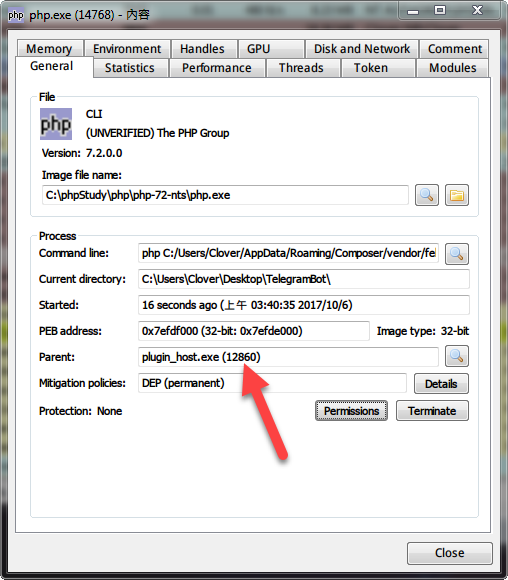
@deathaxe Yes. There is a php process started by plugin_host.exe.
I would suggest investigating the PHP language server's own logging output.
@tomv564
That could be helpful but how? I did not see a log file somewhere and if I run php "C:/Users/Clover/AppData/Roaming/Composer/vendor/felixfbecker/language-server/bin/php-language-server.php" in either git-bash or cmd.exe, it shows nothing (waiting for input?).

jfcherng
on 5 Oct 2017
I found it working under my Ubuntu VM. Do not know why it does not work on my Windows host though...
jfcherng
on 6 Oct 2017
Good to hear it works on ubuntu, the waiting for input is also correct. You could try setting LSP's log_stderr setting to true?
tomv564
on 6 Oct 2017
You could try setting LSP's log_stderr setting to true?
@tomv564
All 3 logs have been turned on already. But nothing shows in ST console.
jfcherng
on 6 Oct 2017
I found that there is a sentence in https://github.com/felixfbecker/php-language-server#--tcphostport-optional.
- Strongly recommended on Windows because of blocking STDIO.
So maybe felixfbecker/php-language-server do not work well with STDIO under Windows.
jfcherng
on 6 Oct 2017
LSP doesn't support a TCP layer currently. With a look into the PythonDebugger package, it should not be too difficult to support both, by using some kind of abstraction class, but I am not sure whether it should be the very next step to do. I guess this will require some structure changes.
deathaxe
on 6 Oct 2017
TCP support is now merged into master, I tested the php language server with these settings:
"phpls":
        {
            "command": [
                "php",
                "~/vendor/felixfbecker/language-server/bin/php-language-server.php",
                "--tcp-server=0.0.0.0:5555"
            ],
            "enabled": true,
            "tcp_port": 5555
        }
Can you let me know if it works for you?
tomv564
on 2 Feb 2018
@tomv564
Environment
- Windows 7 x64
- ST 3156 x64 portable (fresh, only Package Control and LSP are installed)
I could see a php.exe child started by plugin_host.exe but LSP is still not working properly here somehow.
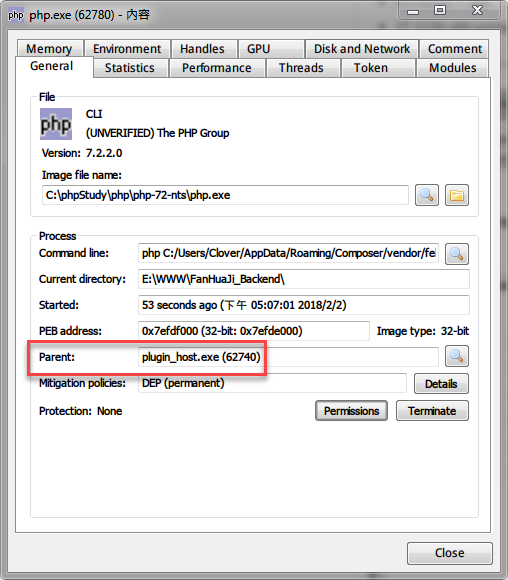
Console Log
LSP: global clients: phpls=True
LSP: starting active= E:\WWW\XXX\app\app_real.php other= 0
LSP: starting in E:\WWW\XXX
LSP: starting ['php', 'C:/Users/Clover/AppData/Roaming/Composer/vendor/felixfbecker/language-server/bin/php-language-server.php', '--memory-limit=512M', '--tcp-server=0.0.0.0:5555']
LSP:  --> initialize
PCNTL is not available. Only a single connection will be accepted:
LSP: Already starting on this window: phpls
LSP: phpls not available for view E:\WWW\XXX\app\app_real.php in window 2
LSP: Already starting on this window: phpls
LSP: phpls not available for view E:\WWW\XXX\app\app_real.php in window 2
LSP: phpls not available for view E:\WWW\XXX\app\app_real.php in window 2
LSP Config
{
    "clients":
    {
        "phpls": {
            "enabled": true,
            "tcp_port": 5555,
            "command": [
                "php",
                "C:/Users/Clover/AppData/Roaming/Composer/vendor/felixfbecker/language-server/bin/php-language-server.php",
                "--memory-limit=512M",
                "--tcp-server=0.0.0.0:5555"
            ],
            "scopes": ["source.php"],
            "syntaxes": ["Packages/PHP/PHP.sublime-syntax"],
            "languageId": "php"
        }
    },
    "show_status_messages": true,
    "show_view_status": true,
    "auto_show_diagnostics_panel": false,
    "show_diagnostics_phantoms": false,
    "show_diagnostics_in_view_status": true,
    // highlight style of code diagnostics: "underline" or "box"
    "diagnostics_highlight_style": "underline",
    // gutter marker for code diagnostics: "dot", "circle", "bookmark", "cross" or ""
    "diagnostics_gutter_marker": "dot",
    "complete_all_chars": true,
    "only_show_lsp_completions": false,
    "resolve_completion_for_snippets": false,
    "log_debug": true,
    "log_server": true,
    "log_stderr": true
}
Thanks for trying - I got it working but not without some effort.
The following showed up in Sublime Text's status bar:
file_get_contents(C:\\Users\\tomva\\AppData\\Roaming\\Composer\\vendor\\felixfbecker\\language-server\\src\\Index/../../stubs): failed to open stream: No such file or directory in C:\\Users\\tomva\\AppData\\Roam...
Somewhere in the php-language-server readme there are instructions to run the parse-stubs script. Did you do this on your php-language-server install?
Parsing the stubs also failed for me until I deleted the Solr stubs from jetbrains\phpstorm-stubs
Perhaps this helps:
- Turn on this LSP setting:
log_payloads: true - Kill any zombie phpcli processes after each attempt
I'll make a change to ensure error responses are logged (even if log_payloads is off).
Best of luck!
tomv564
on 3 Feb 2018
@tomv564
Still no luck here.
Somewhere in the php-language-server readme there are instructions to run the parse-stubs script. Did you do this on your php-language-server install?
Yes, I did.
Perhaps this helps:
Turn on this LSP setting: log_payloads: true
Kill any zombie phpcli processes after each attempt
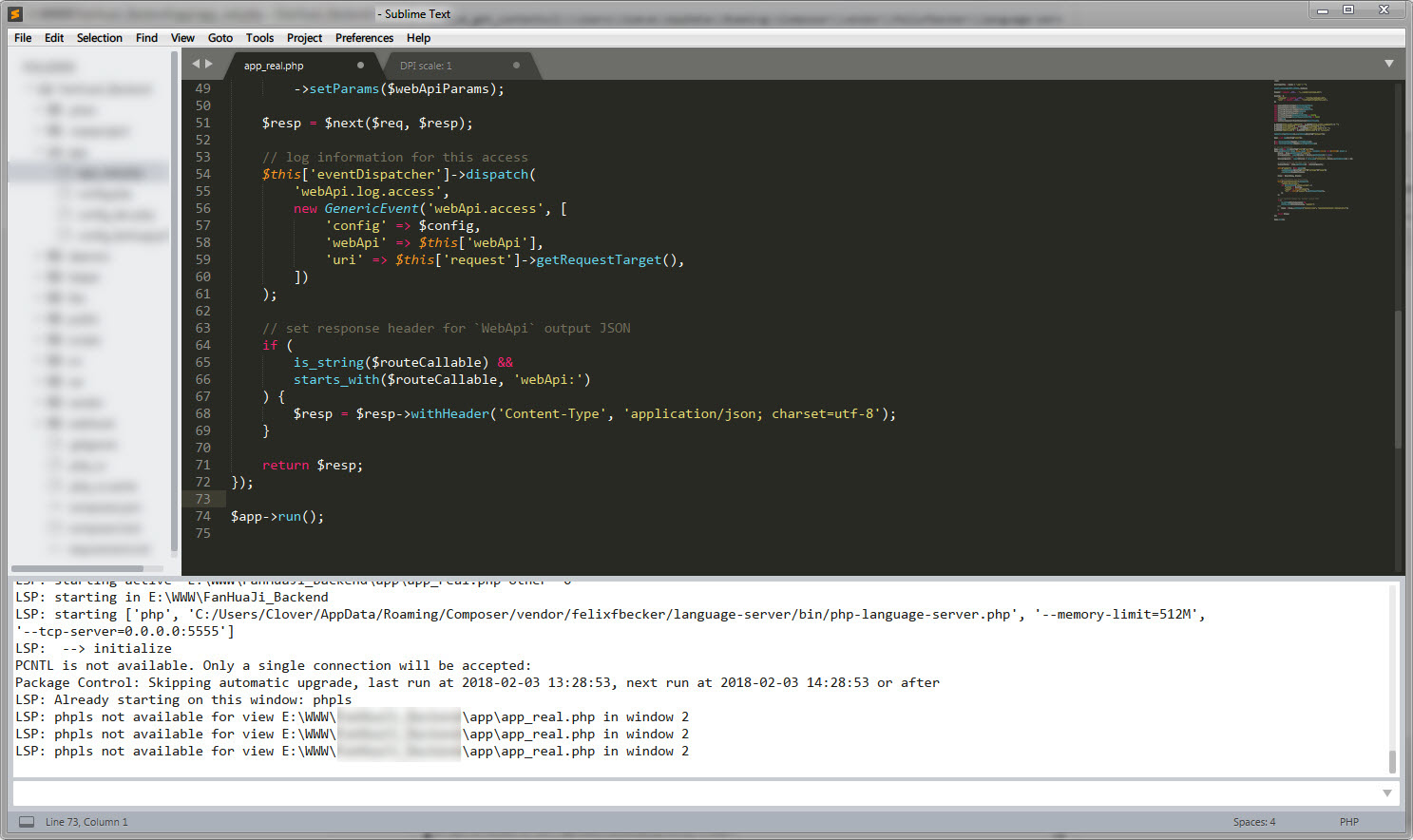
I add "log_payloads": true into config, kill php.exe processes and then restart ST.
No extra messages got as shown in the following screenshot.
jfcherng
on 3 Feb 2018
It looks like you are not on the latest master for LSP, as your config specifies tcp_port but it is not attempting to use TCP:
LSP: global clients: jsts=True, phpls=True
LSP: starting active= C:\Users\tomva\AppData\Roaming\Composer\vendor\felixfbecker\language-server\src\Protocol\SymbolInformation.php other= 0
LSP: initialize on open 2 C:\Users\tomva\AppData\Roaming\Composer\vendor\felixfbecker\language-server\src\Protocol\SymbolInformation.php
LSP: starting in C:\Users\tomva\AppData\Roaming\Composer\vendor\felixfbecker\language-server
LSP: starting ['php', 'c:\\Users\\tomva\\AppData\\Roaming\\Composer\\vendor\\felixfbecker\\language-server\\bin\\php-language-server.php', '--tcp-server=0.0.0.0:5555']
LSP: connecting to localhost:5555
LSP:  --> initialize
LSP: socket send
LSP:      {'capabilities': {'referencesProvider': True, 'codeLensProvider': None, 'definitionProvider': True, 'documentRangeFormattingProvider': None, 'hoverProvider': True, 'xworkspaceReferencesProvider': True, 'xdefinitionProvider': True, 'textDocumentSync': 1, 'documentHighlightProvider': None, 'dependenciesProvider': None, 'documentFormattingProvider': None, 'completionProvider': {'resolveProvider': False, 'triggerCharacters': ['$', '>']}, 'codeActionProvider': None, 'signatureHelpProvider': {'triggerCharacters': ['(', ',']}, 'documentSymbolProvider': True, 'xdependenciesProvider': True, 'documentOnTypeFormattingProvider': None, 'workspaceSymbolProvider': True, 'renameProvider': None}}
LSP:  --> initialized
LSP: socket send
LSP: phpls client registered for window 2
LSP:  --> textDocument/didOpen
I'll be sure to make a proper release once the TCP functionality has been tested, but for now could you try installing reinstalling LSP by cloning the repo into Packages or reinstalling after adding this github repo as a Package Control Repository (see https://packagecontrol.io/docs/usage)?
The first time I started php-language-server I had to allow networking access in a popup presented by Windows Firewall, I assume you did the same.
tomv564
on 3 Feb 2018
@tomv564 LGTM. Using the master branch LSP does the job. Everything looks working now.
I add "--memory-limit=2048M" to PHP LSP's config btw.
Some files would cause PHP LSP to be stall and the process no response but I guess it's a upstream issue.
jfcherng
on 3 Feb 2018
@tomv564 Could I disable the diagnose feature? I have my own linter.
jfcherng
on 3 Feb 2018
Ah, great to hear!
LSP has no control about enabling / receiving diagnostics, that is something to take up with the language server. But there are some settings to control how they are displayed:
  // Open and close the diagnostics panel automatically,
  // depending on available diagnostics.
  "auto_show_diagnostics_panel": true,

  // Show in-line diagnostics using phantoms for unchanged files.
  "show_diagnostics_phantoms": false,

  // Show the diagnostics description of the code
  // under the cursor in status bar if available.
  "show_diagnostics_in_view_status": true,

  // Gutter marker for code diagnostics.
  // Valid values are "bookmark", "circle", "cross", "dot" or ""
  "diagnostics_gutter_marker": "dot",
I'd recommend keeping an eye on https://github.com/tomv564/LSP/issues/259 as there are two other language servers that may provide LSP support in the near future.
tomv564
on 3 Feb 2018
@tomv564 Thanks for information. Much appreciated!
jfcherng
on 3 Feb 2018
Thanks a lot for this!
I've been really struggling to set this for the exact same reasons, luckily I've found this thread.
I'd suggest to put a notice on the general instructions for Windows users with PHP LSP pointing to this issue.
I guess also that the STDIN issue is something that should be remarked generally for Windows users as I think it can be applied to many other LSP implementations.
 GlassGruber
on 21 Jul 2019
GlassGruber
on 21 Jul 2019
@GlassGruber Just a FYI. I had moved to intelephense because I felt felixfbecker/language-server was slow when doing auto completion at that moment. But I haven't check it for a long time since then.
        "intelephense": {
            // https://github.com/bmewburn/intelephense-docs
            // npm -g i intelephense
            // yarn global add intelephense
            "enabled": true,
            "command": [
                "intelephense",
                "--stdio",
            ],
            "scopes": ["source.php", "embedding.php"],
            "syntaxes": ["Packages/PHP/PHP.sublime-syntax"],
            "languageId": "php",
            "initializationOptions": {
                // cache file path
                "storagePath": "E:/_Data/intelephense",
            },
        },
@jfcherng I see thank you for your update and the config snippet, very appreciated! I'll definetely give it a try!
GlassGruber
on 23 Jul 2019
Related issues
tomv564
·
4Comments
 predragnikolic
·
3Comments
predragnikolic
·
3Comments
 arsham
·
4Comments
arsham
·
4Comments
 niosus
·
4Comments
niosus
·
4Comments
 JeremyBois
·
6Comments
JeremyBois
·
6Comments