Lsp: [Feature request] Override ST's default goto definition?
I was wondering why ST's Goto definition didn't work. I didn't get that LSP uses its own system and doesn't plug into ST's. Would it be possible for Goto definition to first consult LSP, and if a definition isn't found, fall back to the default string-based behavior?
 chenglou
All 10 comments
The fallback already exists: https://github.com/tomv564/LSP/blob/master/main.py#L1093
You can create for overrides of ST's keybindings (like F12) to point to lsp_symbol_definition as described in the documentation (https://lsp.readthedocs.io/en/latest/#features)
How do you trigger ST's Goto Definition? Please share if you use the context menu and found a better solution than going down to the LSP Symbol Definition item.
 tomv564
on 6 Sep 2017
tomv564
on 6 Sep 2017
I trigger it via a shortcut.
Correct me if I'm wrong but for files that don't trigger LSP, I'd have to use ST's fallback goto definition, right? Since lsp_symbol_definition would be unavailable. And then on LSP-enabled files, I'd use a different shortcut?
chenglou
on 6 Sep 2017
@chenglou in your general User file (e.g. Default (OSX).sublime-keymap) you can define a binding using the same key, that is only conditionally activated. e.g.
{
"keys": ["f12"],
"command": "somelang_aware_jump_to_def",
"context": [
{
"key": "selector",
"operator": "equal",
"operand": "source.somelang"
}
]
},
 frou
on 7 Sep 2017
frou
on 7 Sep 2017
I would like to discuss how we can provide @rmccue's improved experience while being "a good Sublime Text citizen" as a package.
Sublime Text's package submission tool warns against overriding built-in keybindings, overriding built-in commands is a step beyond that.
It might be hard to install the override optionally, but we could consider building a companion package that enables these kinds of overrides. Some other candidates are the "List symbols in document" (cmd+R) and List symbols in workspace commands.
If creating a new package is too much work, we could in the meantime add this override in the documentation so people can paste it into their User Packages if desired.
tomv564
on 9 Sep 2017
FWIW, I think a better design from Sublime's end would have been for packages to provide "providers" for autocompletion so we don't have to override, but such is life. :)
As a user, I want an experience where I install the package and it just works without needing a bunch of configuration. I want it to take control of the cross-referencing/goto bits of Sublime, because that's most of the reason that I installed the package in the first place.
That said, a separate package might be a good compromise, if not just a single preference.
It might be hard to install the override optionally
Depends on what "install the override" means; we can easily check prefs in the event handler and skip custom behaviour if it's not enabled, from what I can see.
 rmccue
on 10 Sep 2017
rmccue
on 10 Sep 2017
As a user, I want an experience where I install the package and it just works without needing a bunch of configuration
True, but LSP needs some setup anyway because you need to install the servers for it to work. Also, I want it to just-work™, but I don't want to lose configurability and I don't want packages that hijack or take away the default behavior. If a package has something that's better than the default I would expect most users won't mind copy-pasting something from a readme to get it.
Providing out of the box functionality in a plugin for an fully customizable editor is super tricky. At Atom they quickly ran into a situation where more packages offered key bindings than there are keys (* modifiers) on the keyboard. Instead of configuring how you want your editor to work, you'd have to spend time undoing whatever package devs thought would be a good ootb experience. Better to provide the features, some copy-pastable config stuff to enable the shortcuts, and don't assume too much about the environment your package is going to be inserted into.
If I can get the enhanced goto definition for the scopes I have configured for LSP by editing key bindings, I'd say that looks better from a package maintenance point of view, makes the behavior predictable, and also empowers me to tweak it to my preferences.
Edit: this setup works excellently for me:
{ "keys": ["super+alt+down"], "command": "goto_definition" },
{
    "keys": ["super+alt+down"],
    "command": "lsp_symbol_definition",
    "context": [
        {
            "key": "selector",
            "operator": "equal",
            "operand": "source.ts, source.js"
        }
    ]
}
 braver
on 15 Sep 2017
braver
on 15 Sep 2017
For the context menu, you could use @rmccue's approach of intercepting the context_goto_definition commands with an EventListener if a language server with definition support is available for a given view (see #83)
If you're comfortable overriding the Context menu instead, I found instructions here: https://forum.sublimetext.com/t/altering-default-context-menu/28766
Essentially, create a Default/Context.sublime-menu under Packages and paste the contents of https://github.com/twolfson/sublime-files/blob/master/Packages/Default/Context.sublime-menu into it.
Then replace the context-goto-definition with an lsp_symbol_definition
We can revisit adding a built-in override in the future.
tomv564
on 2 Oct 2017
Could be possible to override the f12 and menu only if the setting for the current environment (whether it's a project or not) has the LSP enabled?
 3v1n0
on 26 Oct 2017
3v1n0
on 26 Oct 2017
What about show a link "Show (or Go to) definitions" in LSP popup, like ColorHelper do?
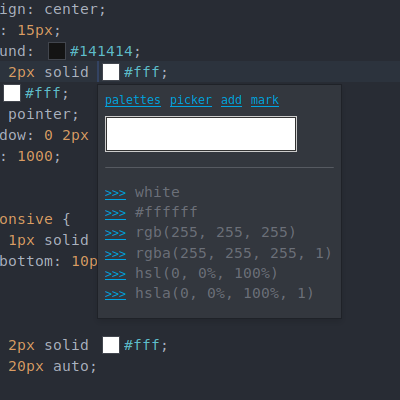
 natanfelles
on 12 Nov 2017
natanfelles
on 12 Nov 2017
This can now be achieved by updating the lsp_symbol_definition binding to have a context:
"context": [{"key": "setting.lsp_active", "operator": "equal", "operand": true}]
Related issues
 ayoub-benali
·
3Comments
ayoub-benali
·
3Comments
 JonasPf
·
6Comments
chenglou
·
4Comments
JonasPf
·
6Comments
chenglou
·
4Comments
 olegbl
·
5Comments
olegbl
·
5Comments
 ryanpcmcquen
·
4Comments
ryanpcmcquen
·
4Comments
Most helpful comment
True, but LSP needs some setup anyway because you need to install the servers for it to work. Also, I want it to just-work™, but I don't want to lose configurability and I don't want packages that hijack or take away the default behavior. If a package has something that's better than the default I would expect most users won't mind copy-pasting something from a readme to get it.
Providing out of the box functionality in a plugin for an fully customizable editor is super tricky. At Atom they quickly ran into a situation where more packages offered key bindings than there are keys (* modifiers) on the keyboard. Instead of configuring how you want your editor to work, you'd have to spend time undoing whatever package devs thought would be a good ootb experience. Better to provide the features, some copy-pastable config stuff to enable the shortcuts, and don't assume too much about the environment your package is going to be inserted into.
If I can get the enhanced goto definition for the scopes I have configured for LSP by editing key bindings, I'd say that looks better from a package maintenance point of view, makes the behavior predictable, and also empowers me to tweak it to my preferences.
Edit: this setup works excellently for me: