Lsd: ⚠ OS ERROR 1332 - Windows PowershellCore Installation
I have installed LSD using release tag → 0.17.0 → (lsd-0.17.0-x86_64-pc-windows-msvc.zip)
and using scoop later as mentioned in #389.
Expected behavior
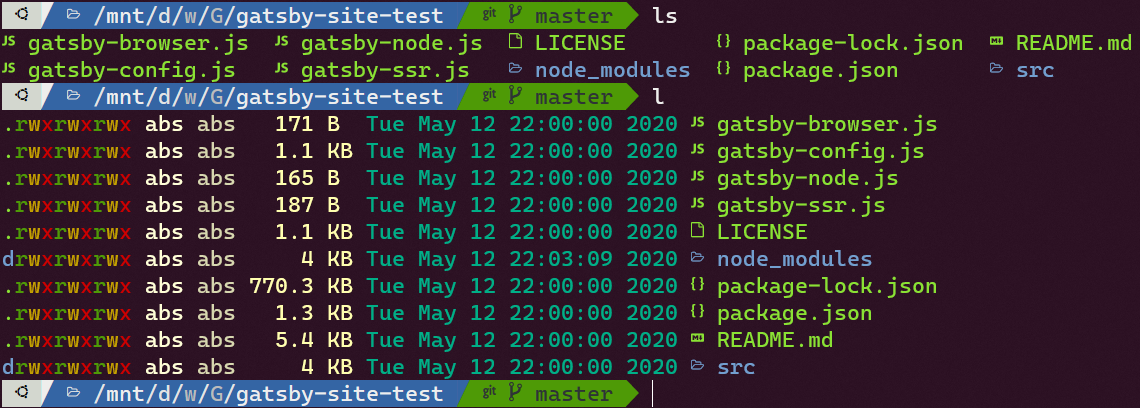
I have installed the latest release on Ubuntu WSL, output looks:
(ls and l are aliases as they are mentioned in the docs)
Actual behavior
But on Windows, this happens as mentioned in #356
- I tried including
lsd.exepath in Environment Variables - Second time I installed using
scoop

Please tell me what do I do to make it work on Powershell Core 7.0.3
 ABSphreak
All 8 comments
@ABSphreak
Hey bro, how you install it on «Windows» tried 100 times but nothing? ʅ_(ツ)_ʃ
I have WSL > Ubuntu 20.04
 rediffusion
on 7 Aug 2020
rediffusion
on 7 Aug 2020
@rediffusion You want to install it on Windows (Powershell) or WSL?
ABSphreak
on 7 Aug 2020
@ABSphreak
WSL 2 > Windows Terminal > Ubuntu-20.04
rediffusion
on 9 Aug 2020
@rediffusion I just downloaded lsd-musl_0.17.0_amd64.deb from Releases - 0.17.0 Page using wget and installed using dpkg.
# Downloads the release as .deb package
wget https://github.com/Peltoche/lsd/releases/download/0.17.0/lsd-musl_0.17.0_amd64.deb

# Installs it using dpkg
sudo dpkg -i lsd-musl_0.17.0_amd64.deb
Specify any errors you get, will try to help.
ABSphreak
on 9 Aug 2020
@ABSphreak
OMG so easy. Bro, you are RAMBO! 😵
📍 Find another way too, check it:
export RUSTUP_IO_THREADS=1
curl --proto '=https' --tlsv1.2 -sSf https://sh.rustup.rs | sh
cargo install lsd
_Have a good day!_ 👍
rediffusion
on 9 Aug 2020
_Awesome!_ 🦄
ABSphreak
on 9 Aug 2020
@Peltoche can you point me to the solution of this issue?
ABSphreak
on 14 Aug 2020
Related issues
 hawkw
·
5Comments
hawkw
·
5Comments
 Gerrit-K
·
8Comments
Gerrit-K
·
8Comments
 jfernandz
·
6Comments
jfernandz
·
6Comments
 cengizIO
·
3Comments
cengizIO
·
3Comments
 Koovu
·
7Comments
Koovu
·
7Comments
Most helpful comment
@rediffusion I just downloaded
lsd-musl_0.17.0_amd64.debfrom Releases - 0.17.0 Page usingwgetand installed usingdpkg.Specify any errors you get, will try to help.