Lsd: Files and directories all show up using same color
Expected behavior
Files and directories to be colored according to type.
Actual behavior
Files and folders are all displayed using the same color (foreground / white).
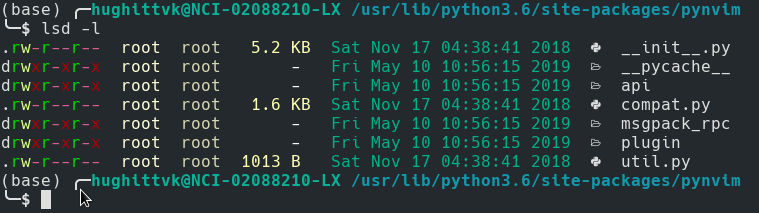
System info
- Arch Linux
- lsd 0.14.0 (installed via pacman)
 khughitt
All 9 comments
Hi @khughitt , thanks for the report.
First, can you update to the 0.15.1 in order to see if the bug is still here?
 Peltoche
on 27 May 2019
Peltoche
on 27 May 2019
I checked and the issue appears the same with 0.15.1.
Upon further inspection, it seems the issue might be specific to termite -- the output for lsd appears fine in xterm, but is lacking color as above when I use it in termite, even with the default configuration.
khughitt
on 27 May 2019
I'm having the same issue, after adding export TERM="termite" to my .zshrc file in order to fix an unrelated bug, i lost the folder/file colors too. Previously it worked out fine even in termite, but it does appear to be a termite bug for me aswell.
 jpmvferreira
on 21 Jul 2019
jpmvferreira
on 21 Jul 2019
Curious... I haved tried on termite v15 and it works well for me.
That said my TERM env variable value is xterm-termite. You should try with this value.
Peltoche
on 22 Jul 2019
My term is set to xterm-termite and issue still appears in v15.
Can you think of any other factors that might be influencing the output?
I doubt this is helpful because of differing implementations, but just as a note, colorls does handle colors correctly in my case.
khughitt
on 22 Jul 2019
Do you have an env variable LS_COLORS or LSCOLORS? These variables override the default colors behavior
Peltoche
on 24 Jul 2019
I do! And indeed, unsetting them fixed the issue. Going to close the issue. Good catch!
khughitt
on 24 Jul 2019
FYI - in case anyone else runs into this issue, oh-my-zsh sets LS_COLORS and LSCOLORS by default. There appears to be a configuration option to control this behavior, although it didn't work for me.
Instead, simply add something like this near the bottom of your ~/.zshrc:
unset LSCOLORS
unset LS_COLORS
FYI - in case anyone else runs into this issue, oh-my-zsh sets
LS_COLORSandLSCOLORSby default. There appears to be a configuration option to control this behavior, although it didn't work for me.Instead, simply add something like this near the bottom of your
~/.zshrc:unset LSCOLORS unset LS_COLORS
Worked for alacritty term (i was using urxvt before and didn't come across this problem)
 guidiamond
on 6 Jul 2020
guidiamond
on 6 Jul 2020
Related issues
 saumyajyoti
·
7Comments
saumyajyoti
·
7Comments
 meain
·
8Comments
meain
·
8Comments
 Phuker
·
5Comments
Phuker
·
5Comments
 rediffusion
·
5Comments
rediffusion
·
5Comments
 cengizIO
·
3Comments
cengizIO
·
3Comments
Most helpful comment
FYI - in case anyone else runs into this issue, oh-my-zsh sets
LS_COLORSandLSCOLORSby default. There appears to be a configuration option to control this behavior, although it didn't work for me.Instead, simply add something like this near the bottom of your
~/.zshrc: