Tell us about your environment
win10
- Browser and Browser Version:
chrome 73.0.3683.86 - After Effects Version:
What did you do? Please explain the steps you took before you encountered the problem.
- yarn add lottie-web
2.
import React, { Component } from 'react';
import { connect } from 'dva';
import Lottie from 'lottie-web';

class Home extends Component {
  constructor(props) {
    super(props)
    this.state = {

    }
  }
  componentDidMount(){
    Lottie.loadAnimation({
      container: document.getElementById('svgcontainer'),
      renderer: 'svg',
      loop: true,
      autoplay: true,
      path: './svgjson/data.json',
    })
  }
  render() {

    return (
      <div >
        <div  id='svgcontainer'></div>
      </div>
    )
  }
}
export default Home;

What did you expect to happen?
show animation in home page
What actually happened? Please include as much _relevant_ detail as possible.

Please provide a download link to the After Effects file that demonstrates the problem.
link: https://pan.baidu.com/s/1P8yxcrqmSc1rQ-N_i8VW7g code: rgfy
 niukui
All 10 comments
I'm facing the same issue when I use react-create-app. Webpack-dev-server returns Content-Type: text/html; instead of Content-Type: application/json; for data.json. That breaks lottie with the exception you mentioned.
Update: for the react-create-app data files should be placed into public folder. In that case everything works like a charm :)
 sergej-s
on 4 Jun 2019
sergej-s
on 4 Jun 2019
@niukui the strange part is that if responseType is json, it shouldn't reach that line and go through line 4309.
Would you be willing to add a breakpoint in that lottie function and check what are the properties and their types?
 bodymovin
on 5 Jun 2019
bodymovin
on 5 Jun 2019
You are Chinese, I answer in Chinese:
- 百度网盘对我们真的不太友好... pc端竟然强制我安装客户端...
- 你的这个问题跟加载过程对json使用的协议有关系,你的服务器没有对json的类型设置返回“Content-Type: application/json;”,我建议你把这类的文件上传到cdn上,我给你一个cdn地址你试试:
https://gw.alipayobjects.com/os/finxbff/2bdd4e9f-99e6-45e7-9b78-80ffe5b2c360/data.json
我顺便把你的文件合并成一个,并对体积做了优化:
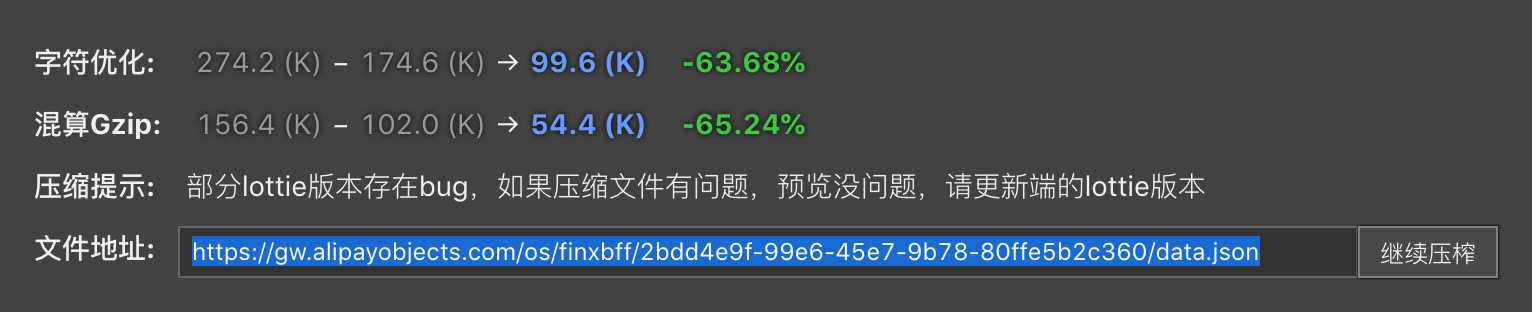
 weiesky
on 10 Jun 2019
weiesky
on 10 Jun 2019
@weiesky Not only Chinese wants to read the answer.
sergej-s
on 10 Jun 2019
You are Chinese, I answer in Chinese:
- 百度网盘对我们真的不太友好... pc端竟然强制我安装客户端...
- 你的这个问题跟加载过程对json使用的协议有关系,你的服务器没有对json的类型设置返回“Content-Type: application/json;”,我建议你把这类的文件上传到cdn上,我给你一个cdn地址你试试:
https://gw.alipayobjects.com/os/finxbff/2bdd4e9f-99e6-45e7-9b78-80ffe5b2c360/data.json
我顺便把你的文件合并成一个,并对体积做了优化:
非常感谢,有用。之前有紧急项目这个暂停了未能及时响应,抱歉。能不能稍微说下如何合并成一个json并优化体积的思路?直接转base64吗?目前json中的图片地址因为引用不对无法显示,我想把动效都合成只一个json,然后传到阿里云上
niukui
on 17 Jun 2019
@weiesky Not only Chinese wants to read the answer.
He said that your server should set “Content-Type: application/json;” for json;
Or you can upload the json to cdn
niukui
on 17 Jun 2019
same issue, @niukui i got this problem, even only import the lottie-web.
 bao76296
on 28 Jun 2019
bao76296
on 28 Jun 2019
How about you just import the JSON with import statement like this:
import Data from "./svgjson/data.json";
 Lotafak
on 14 Aug 2019
Lotafak
on 14 Aug 2019
Did someone find a solution?
 andrenm
on 11 Oct 2019
andrenm
on 11 Oct 2019
Just import the json as @Lotafak said and use animationData setting instead the path setting
 JoxieMedina
on 1 Apr 2020
JoxieMedina
on 1 Apr 2020
Related issues
 cpdt
·
4Comments
cpdt
·
4Comments
 Ipaulsen
·
4Comments
Ipaulsen
·
4Comments
 ochanje210
·
3Comments
ochanje210
·
3Comments
 samiam2017
·
3Comments
samiam2017
·
3Comments
 casillasluisn12
·
4Comments
casillasluisn12
·
4Comments