Lottie-react-native: Animation not showing up on device iOS
I cant get the animation to show up on my device, I'm not getting any errors but just a blank screen. When opening the inspector on my device (iphone 6) I can see that there are 2 animations but nothing is displaying.
Don't know what i'm doing wrong!
attaching my code and screenshots from device. Any help would be great!


 kyleleite
👍5
All 4 comments
Experiencing the same issue, have you made any progress with this?
 jonathancopperstone
on 20 Apr 2017
jonathancopperstone
on 20 Apr 2017
This worked for me actually https://github.com/airbnb/lottie-react-native/issues/82#issuecomment-290963691
jonathancopperstone
on 20 Apr 2017
👍1
Closing this because it's probably not relevant with the latest version. Feel free to reopen if it is.
 gpeal
on 21 Nov 2017
gpeal
on 21 Nov 2017
I was facing same issue, I did following things and it worked fine on both iOS and Android
- First I install pod file in iOS folder by using pod init
- Then install npm i --save lottie-react-native
- After installing lottie-react-native run link command
* react-native link lottie-ios
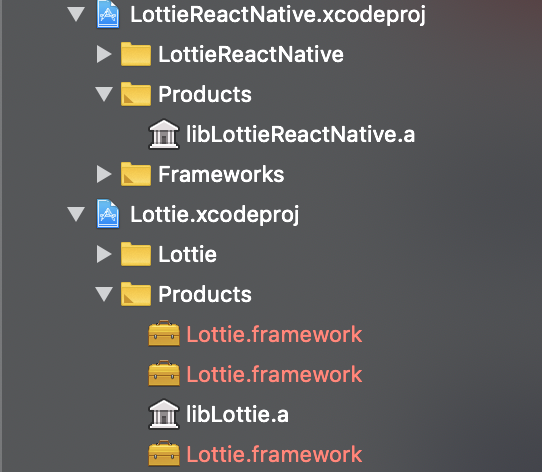
*react-native link lottie-react-native - Go to Xcode and in libraries folder add lottie-ios and lottie-react-native xcode project like attached screenshot from node_modules
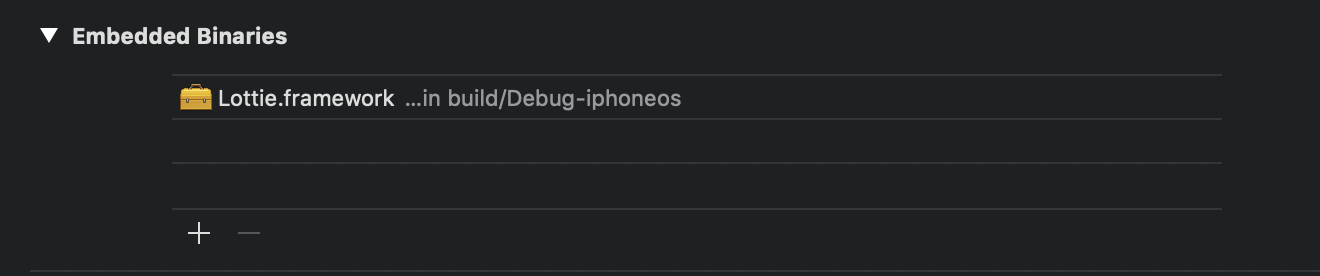
- Then add Lottie.framework from Lottie products to Embedded Binaries
- add libLottieReactNative.a and libLottie.a to Linked frameworks and libraries. That .a file you can find in Libraries product folder. See enclosed screenshot 2

 kaushal9678
on 6 Jan 2019
kaushal9678
on 6 Jan 2019
❤1
🎉1
👍1
Was this page helpful?
0 / 5 - 0 ratings
Related issues
 suraneti
·
3Comments
suraneti
·
3Comments
 Nitaaq
·
4Comments
Nitaaq
·
4Comments
 willedanielsson
·
5Comments
willedanielsson
·
5Comments
 sushrut-desora
·
5Comments
sushrut-desora
·
5Comments
 apetitje
·
4Comments
apetitje
·
4Comments
Most helpful comment
I was facing same issue, I did following things and it worked fine on both iOS and Android
* react-native link lottie-ios
*react-native link lottie-react-native