Lottie-ios: Setting Animation Property Crashes In 3.0.2
Check these before submitting:
- [x] The issue doesn't involve an Unsupported Feature
- [x] This issue isn't related to another open issue
This issue is a:
- [ ] Non-Crashing Bug (Visual or otherwise)
- [x] Crashing Bug
- [ ] Feature Request
- [x] Regression (Something that once worked, but doesn't work anymore)
Which Version of Lottie are you using?
Lottie 3.0.2
What Platform are you on?
- [ ] MacOS
- [x] iOS
What Language are you in?
- [x] Swift
- [ ] Objective-C
Expected Behavior
I placed an AnimationView in a storyboard and connected it to the view controller via outlet. In the view controller's viewDidLoad method, I load the animation and set the animation object and set the animation property of the AnimationView. I expect the the animation to appear in the AnimationView. When using a 2.X version of the library, this behavior functioned properly, though the syntax of setting the animation property was different.
Actual Behavior
The app compiles and runs. The view controller loads. The viewDidLoad method runs. Then, the app crashes with "EXC_BAD_ACCESS" on the line where the animation property of the AnimationView is set. The highlighted line is let pauseFrame = realtimeAnimationFrame in the removeCurrentAnimation method.

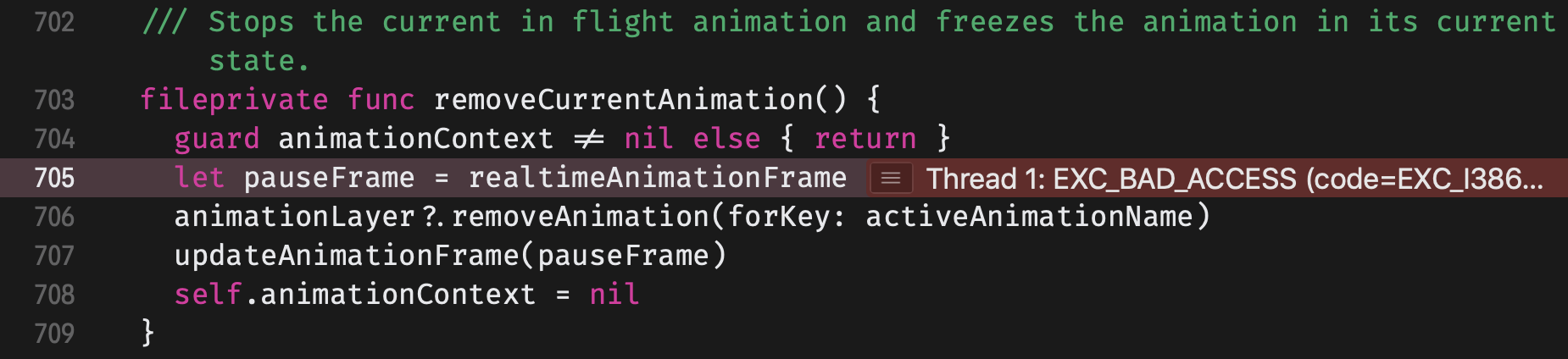

Code Example
override func viewDidLoad() {
    super.viewDidLoad()

    animationView.animation = Animation.named("Onboarding_1")
    animationView.play()
}
Animation JSON
Unavailable for public display. Please let me know if it's relevant.
 Baconthorpe
All 8 comments
@Baconthorpe I recreated your setup and it is not crashing on my end. Is there anymore context you can give me to recreate the crash? Are you making any other calls to animationView in the view controller? Any settings in the storyboard that might affect it?
 buba447
on 21 Mar 2019
buba447
on 21 Mar 2019
@buba447 Sent an email with the animation file. The only references in the view controller code to the AnimationView are its outlet and the screenshot above. The settings of the view in the storyboard are this:
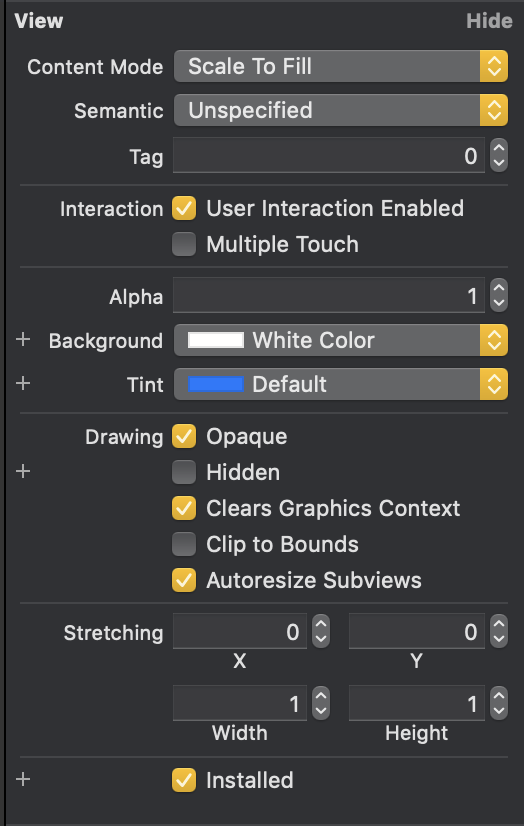
Here is the view's XML in the storyboard file:
<view contentMode="scaleToFill" translatesAutoresizingMaskIntoConstraints="NO" id="O90-YE-6HB" customClass="AnimationView">
                                <rect key="frame" x="54" y="40" width="267" height="267"/>
                                <color key="backgroundColor" white="1" alpha="1" colorSpace="custom" customColorSpace="genericGamma22GrayColorSpace"/>
                                <constraints>
                                    <constraint firstAttribute="width" secondItem="O90-YE-6HB" secondAttribute="height" multiplier="1:1" id="Eq5-LY-seD"/>
                                </constraints>
                            </view>
@Baconthorpe I had this crash yesterday and fixed by adding "Lottie" as module name to AnimationView outlet on the storyboard. May be it helps you too
 kaannesinn
on 22 Mar 2019
kaannesinn
on 22 Mar 2019
Can verify that it will crash is Lottie is not set as the module name. For some reason when the the library is installed with cocoapods it will not autofill the module name. Im going to close this. Reopen it if you have further issues.
buba447
on 22 Mar 2019
I set module name for AnimationView in my storyboard, but it not help me. Same crash.
 Matsepura
on 25 Mar 2019
Matsepura
on 25 Mar 2019
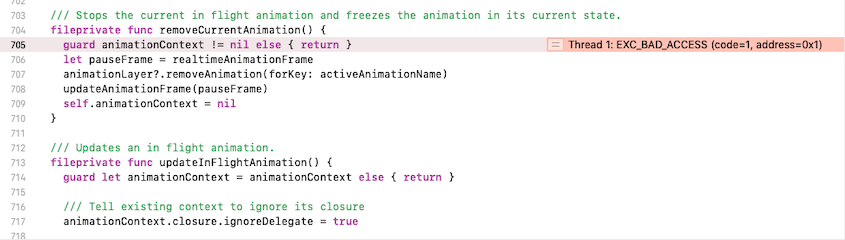
Same crash
if I set animationView.animation = Animation.named("MyAnimationName") in viewDidLoad, I get:
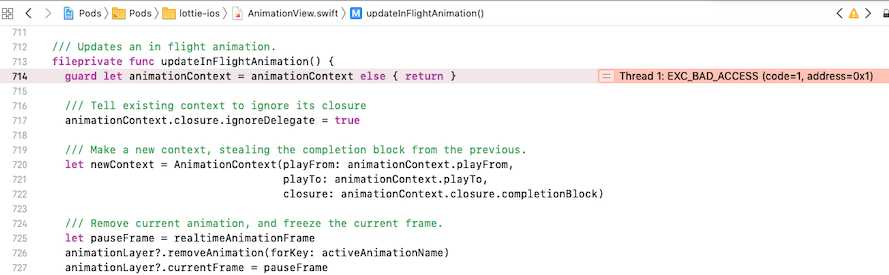
If I set the name of animation in the IB, I get:
 mashaf
on 28 Mar 2019
mashaf
on 28 Mar 2019
Setting the module name in storyboard worked for me.
Baconthorpe
on 28 Mar 2019
Setting module name worked for me as well. I had the same crash
 digimarktech
on 25 May 2019
digimarktech
on 25 May 2019
Related issues
 rdd7
·
4Comments
rdd7
·
4Comments
 chrisballinger
·
4Comments
chrisballinger
·
4Comments
 Mushrankhan
·
4Comments
Mushrankhan
·
4Comments
 Ushaka
·
5Comments
Ushaka
·
5Comments
 petoye
·
3Comments
petoye
·
3Comments
Most helpful comment
@Baconthorpe I had this crash yesterday and fixed by adding "Lottie" as module name to AnimationView outlet on the storyboard. May be it helps you too