Lottie-android: Support centered text
I am testing with a simple text layer but the alignment of the text is different in lottie app from the preview in after effects. I haven't done any changes to a new project expect for a text layer
I am attaching screenshots and json file
Ae preview

in lottie app

As you can see the text is aligned differently on app
json
data.zip
 farazahmed7
All 22 comments
I am having the same problem, looks perfect the bodymovin JS player web version, but on android everything is shifted over to the right (but correct vertical alignment)
 tehfailsafe
on 12 Aug 2017
tehfailsafe
on 12 Aug 2017
same here... i was able to modify some values in the json and get them to render correctly, but the additional "padding" was also added to the js web player
 ijunes
on 22 Aug 2017
ijunes
on 22 Aug 2017
Same here. I'm trying now with bodymovin 4.11.1 and lottie 2.2.5. Basically, what AE and bodymovin considers the center of the text, lottie considers the bottom left corner as far as I can tell.
 luciancioroga
on 6 Oct 2017
luciancioroga
on 6 Oct 2017
I have same issue.It looks perfect in AE but not when I render it with bodymovin. Any idea how we can solve this issue?
 mammademin
on 30 Nov 2017
mammademin
on 30 Nov 2017
same issue, any solution?
 skinnypojo
on 5 Dec 2017
skinnypojo
on 5 Dec 2017
Same issue here, any update?
 RoyGuanyu
on 11 Jan 2018
RoyGuanyu
on 11 Jan 2018
I can reproduce this bug:
- Create a text layer in AE by selecting Layer/New/Text.
- Create another text layer by selecting the Horizontal Type Tool and dragging a text box in the composition.
- Position both text layers so that they are aligned.
When you render via bodymovin you will see that the 2nd text layer has been shifted to the right and is now out of alignment with the 1st layer.
AE Version: 15.0.0 (Build 180)
Bodymovin Version: 5.1.3
 perky
on 17 Jan 2018
perky
on 17 Jan 2018
Any update on this and #481 (seems to be a duplicate)? Or any suggestion on how to work around the issue is greatly appreciated too!
 mxia
on 18 May 2018
mxia
on 18 May 2018
RESOLVED: You need to convert text to Shape in order to render the text correctly.
 karanmintzip
on 15 Jun 2018
karanmintzip
on 15 Jun 2018
Not a solution... text mostly is dynamic and should be rendered on the fly
 TacB0sS
on 15 Jun 2018
TacB0sS
on 15 Jun 2018
Re: @TacB0sS But it's not rendering with proper allignment as a text. It worked for me after converting to shape.
karanmintzip
on 15 Jun 2018
True, this solves the problem.. but it is not a solution for the bug.. they have a bug and it needs a real fix
TacB0sS
on 15 Jun 2018
Converting text to shape just defeats the purpose of text feature. Plus the size also increases a lot.
farazahmed7
on 15 Jun 2018
I am still facing alignment issue with lottie 3.0.1
<com.airbnb.lottie.LottieAnimationView
            android:id="@+id/completed_animation_view"
            app:lottie_fileName="topic_completed.json"
            android:layout_width="match_parent"
            android:layout_height="match_parent"
            android:layout_gravity="center"
            android:scaleType="centerInside"
            android:visibility="@{viewModel.isCompleted ? View.VISIBLE : View.GONE}"
            tools:visibility="visible"/>
result:
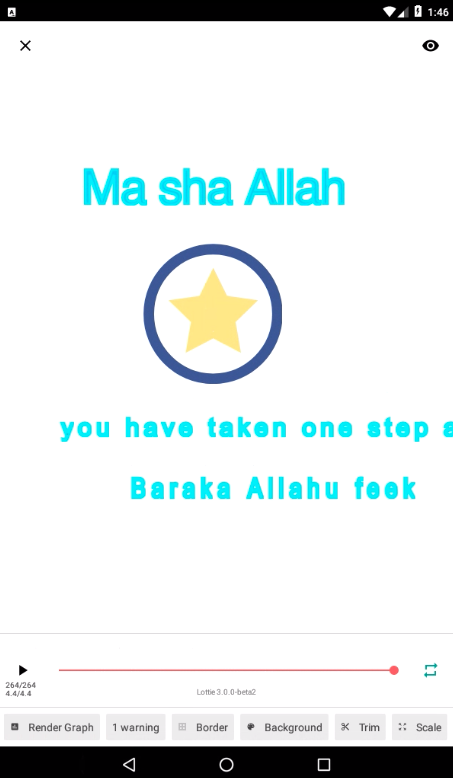
I have tried with centerCrop also but there is no effect on alignment. The complete text is _you have taken one step ahead_, but it get cropped due to misalignment. On web it appears perfectly, even if I resize the browser, the width get auto adjusted and there is not misalignment of text.
 zishanj
on 28 May 2019
zishanj
on 28 May 2019
What's the solution???
 chanjungkim
on 15 Jul 2019
chanjungkim
on 15 Jul 2019
IMHO still not fixed!
Chnaging the texts to shapes is a woekartound at best. But we still had to do that.
 Pitel
on 7 Jul 2020
Pitel
on 7 Jul 2020
unlike everyone here, I'm actually seeing left aligned text, but this must be related
 crackjack
on 9 Jul 2020
crackjack
on 9 Jul 2020
RESOLVED: You need to convert text to Shape in order to render the text correctly.
This solves my problem.
 sherrychen1202
on 17 Jul 2020
sherrychen1202
on 17 Jul 2020
we are facing the same issue currently. has no one ever found any (even hacky) solution to this problem (except for converting to shape)?
 JahnKoutrios
on 21 Jul 2020
JahnKoutrios
on 21 Jul 2020
you can convert your text to an image in code, then use setImageAssetDelegate to replace it.
 aishang5wpj
on 11 Aug 2020
aishang5wpj
on 11 Aug 2020
@gpeal has a solution for the alignment of dynamic text been arrived at for android? We need the text to be editable in code, so the create outlines option won't work in this context.
 samiam2020
on 17 Nov 2020
samiam2020
on 17 Nov 2020
I actually gave up, and moved to a native textview.
Instead of having text within animation, it is in a textview. Sure does not have the same flexibility of just dropping your animation to xm, but with Lottie providing current frame, we can time the conditions to show/hide/replace text in the textview.
crackjack
on 19 Nov 2020
Related issues
 leleliu008
·
4Comments
leleliu008
·
4Comments
 dfpalomar
·
5Comments
dfpalomar
·
5Comments
 Qamar4P
·
3Comments
Qamar4P
·
3Comments
 11hhlin1
·
3Comments
11hhlin1
·
3Comments
 AndroidDeveloperLB
·
4Comments
AndroidDeveloperLB
·
4Comments
Most helpful comment
Not a solution... text mostly is dynamic and should be rendered on the fly