Lottie-android: Gradient fill doesn't work in Lotti application
I made a simple shape layer for gradient fill for test and I exported it by bodymovin.
But, it didn't work properly what I expected about color.
It just showed black & white gradient.
So, I tried to change it with tint effect(map black to color, map white to color).
It also didn't work at Animation view in Lottie application as well.
How can I use it?
 PeterKim87
All 11 comments
@PeterKim87 Try saving your project before exporting it with bodymovin. Gradients only get picked up after saving.
 gpeal
on 22 Jun 2017
gpeal
on 22 Jun 2017
@gpeal I exported my project after saving. But results are same..
I think gradient is fine. Because I can see the gradient with black and white color. The problem is color. I can't change black and white color to what I want.
I tried changing gradient color in shape layer, but didn't work. I tried appling tint effect that map black&white to other color, it didn't work, too.
Plus, I tried alpha matte for changing color using a layer with gradient wipe effected. It didn't work.
What else can I try to change the color?
ps. I'm using bodymovin 4.7.1(the lastest version).
PeterKim87
on 23 Jun 2017
Can you attach your aep file?
On Thu, Jun 22, 2017, 5:20 PM PeterKim87 notifications@github.com wrote:
@gpeal https://github.com/gpeal I think gradient is fine. Because I can
see the gradient with black and white color. The problem is color. I can't
change black and white color to what I want.I tried changing gradient color in shape layer, but didn't work. I tried
appling tint effect that map black&white to other color, it didn't work,
too.What else can I try to change the color?
—
You are receiving this because you were mentioned.
Reply to this email directly, view it on GitHub
https://github.com/airbnb/lottie-android/issues/344#issuecomment-310536909,
or mute the thread
https://github.com/notifications/unsubscribe-auth/ABP0YfWeP3sCHTbLXixUkQcac9sQWMU5ks5sGwTUgaJpZM4OB_fi
.
gpeal
on 23 Jun 2017
@PeterKim87 ^
gpeal
on 25 Jun 2017
Here it is..
It is nothing special indeed.. Very very simple project(I just made it for test).
Thanks
PeterKim87
on 26 Jun 2017
@PeterKim87 When I export your aep with bodymovin, it looks fine:
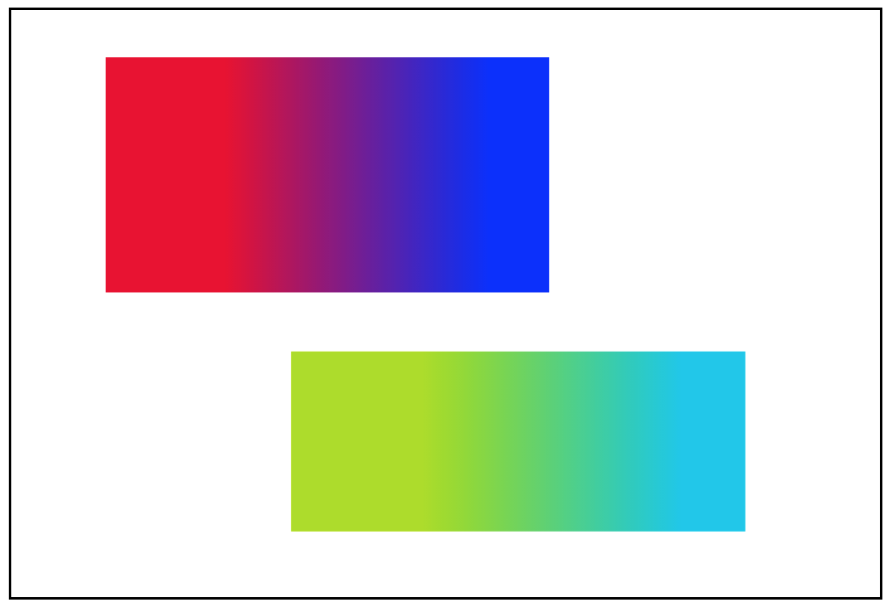
Gradient.json.zip
Dragging my json vs yours into lottiefiles.com which will render it with bodymovin yields the same, color for mine b&w for yours. This makes me thing that there is something about the way that you're exporting the json. Feel free to file a bug on the bodymovin repo but this doesn't seem like a lottie issue.
gpeal
on 26 Jun 2017
Hey guys, I know why it's black and white !!
I spent 2 hours playing with the json file.
which renders
"k":[0,1,1,1,1,1,1,1]
=> positionColor1,r,g,b,positionColor2,r,g,b
I replaced that using my RGB colors:
Taking R / 255, then G / 255 etc...
I got that:
"k":[0,0.85,0.27,0.98,1,0.26,0.93,0.99]

It worked...
=> Next step was understanding why ae/bodymovin output for my gradient was black&white
ANSWER:
In after effects, Go to your gradient colors and make sure you clicked RGB instead of TSL. Do a render again and you're all set. No more black and white!!

Hope that will help you :)
 MadGraph
on 11 Feb 2018
MadGraph
on 11 Feb 2018
Ha, this really helped. I have been checking the json without saving the AE project file. After reading this, I saved the file and rendered a new json which renders gradient without any issue. Thanks a ton!!
 amKrish
on 1 Jun 2018
amKrish
on 1 Jun 2018
Hey guys, I know why it's black and white !!
I spent 2 hours playing with the json file.
which renders
"k":[0,1,1,1,1,1,1,1]
=> positionColor1,r,g,b,positionColor2,r,g,bI replaced that using my RGB colors:
Taking R / 255, then G / 255 etc...
I got that:
"k":[0,0.85,0.27,0.98,1,0.26,0.93,0.99]
It worked...
=> Next step was understanding why ae/bodymovin output for my gradient was black&white
ANSWER:
In after effects, Go to your gradient colors and make sure you clicked RGB instead of TSL. Do a render again and you're all set. No more black and white!!
Hope that will help you :)
Thank you so much MadGraph, Really appreciated 🙌
 eslamshereef
on 25 Dec 2019
eslamshereef
on 25 Dec 2019
Hi, Guys.
Actually I resolved this issue few months ago without editing json files(among complicating characters!)
The way is.. changing computer's system locale to English (in my case)from Korean.
I hope this way helps your unexpected gradient fill problems(black & white)!
PeterKim87
on 2 Jan 2020
Hi, Guys.
Actually I resolved this issue few months ago without editing json files(among complicating characters!)
The way is.. changing computer's system locale to English (in my case)from Korean.I hope this way helps your unexpected gradient fill problems(black & white)!
Yes, that's indeed a locale issue but I find it more tedious to change the system's locale for that if you don't want to have your system in english. That works fine though :)
MadGraph
on 2 Jan 2020
Related issues
 hkchakladar
·
3Comments
hkchakladar
·
3Comments
 nick1Jian
·
3Comments
nick1Jian
·
3Comments
 mateusgrb
·
5Comments
mateusgrb
·
5Comments
 AndroidDeveloperLB
·
4Comments
AndroidDeveloperLB
·
4Comments
 Nabeel-khalid
·
4Comments
Nabeel-khalid
·
4Comments
Most helpful comment
Hey guys, I know why it's black and white !!
I spent 2 hours playing with the json file.
which renders
"k":[0,1,1,1,1,1,1,1]
=> positionColor1,r,g,b,positionColor2,r,g,b
I replaced that using my RGB colors:
Taking R / 255, then G / 255 etc...

I got that:
"k":[0,0.85,0.27,0.98,1,0.26,0.93,0.99]
It worked...
=> Next step was understanding why ae/bodymovin output for my gradient was black&white
ANSWER:
In after effects, Go to your gradient colors and make sure you clicked RGB instead of TSL. Do a render again and you're all set. No more black and white!!
Hope that will help you :)