Loris: [instrument_builder] Loading existing instrument corrupts Date element
Describe the bug
When loading an existing instrument and resaving the linst into a new file, the Date element's status field is lost and "undefined" is concatenated to the end of the date element line
To Reproduce
Steps to reproduce the behavior (attach screenshots if applicable):
- Go to 'Instrument Builder module', Build tab and build an instrument with date elements
- Click on 'Save' tab and save the instrument.
- Read the linst file and see the output.
- Refresh the instrument builder, and go to the 'Load' tab. Load the instrument linst file that you just created.
- You can add extra fields to the build if you like, but without editing the date fields, resave the instrument.
- Read the linst file and notice changes made to the otherwise untouched file.
What did you expect to happen?
Reloading an existing instrument without editing the date fields should not modify the date field lines in the linst file
 zaliqarosli
All 8 comments
@zaliqarosli does the merged PR solve the issue. If yes please close this issue.
 ridz1208
on 2 Jul 2020
ridz1208
on 2 Jul 2020
no, this issue was discovered while testing the merged PR, the reason why this issue was mentioned there. this issue still needs a fix
zaliqarosli
on 2 Jul 2020
@maltheism Can you fix this issue?
 cmadjar
on 15 Jul 2020
cmadjar
on 15 Jul 2020
@zaliqarosli I just looked into the issue and it doesn't even require a save and load. I created an instrument in the builder as seen in the image below. when saved (even first save), it generates the following LINST. As you can see even the second standard date in the LINST is undefined.
table{@}bla
title{@}BLA
date{@}Date_taken{@}Date of Administration{@}2006{@}2012
static{@}Candidate_Age{@}Candidate Age (Months)
static{@}Window_Difference{@}Window Difference (+/- Days)
select{@}Examiner{@}Examiner{@}NULL=>''
date{@}standard_date{@}STANDARD{@}{@}{@}
select{@}standard_date_status{@}{@}NULL=>''{-}'not_answered'=>'Not Answered'
date{@}standard2{@}STANDARD TWO{@}{@}{@}undefined
date{@}basic{@}BASIC{@}{@}{@}BasicDate
date{@}basic2{@}BASIC TWO{@}{@}{@}BasicDate
date{@}monthyear{@}MONTH YEAR{@}{@}{@}MonthYear
date{@}monthyear2{@}MONTH YEAR TWO{@}{@}{@}MonthYear
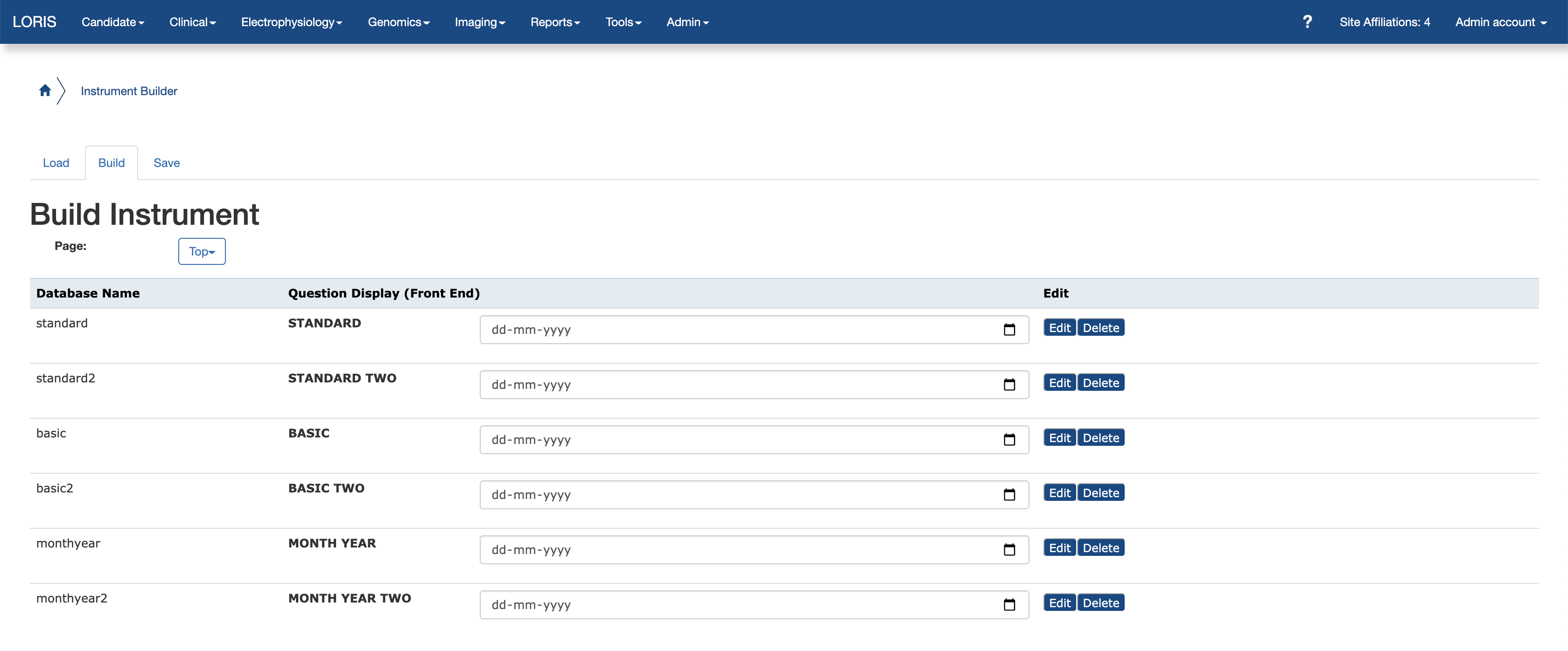
After a second LOAD/SAVE cycle we get this:
table{@}bla
title{@}BLA
date{@}Date_taken{@}Date of Administration{@}2006{@}2012
static{@}Candidate_Age{@}Candidate Age (Months)
static{@}Window_Difference{@}Window Difference (+/- Days)
select{@}Examiner{@}Examiner{@}NULL=>''
date{@}standard_date{@}STANDARD{@}{@}{@}undefined
date{@}standard2{@}STANDARD TWO{@}{@}{@}undefined
date{@}basic{@}BASIC{@}{@}{@}undefined
date{@}basic2{@}BASIC TWO{@}{@}{@}undefined
date{@}monthyear{@}MONTH YEAR{@}{@}{@}undefined
date{@}monthyear2{@}MONTH YEAR TWO{@}{@}{@}undefined
Third load/save keeps it as is.
ridz1208
on 17 Dec 2020
@ridz1208 can you test #7147
 maltheism
on 17 Dec 2020
maltheism
on 17 Dec 2020
@maltheism its not backwards compatible because you created new types for dates instead of simply modifying the date formats.
If you wanna keep working on it I can comment directly on the PR, otherwise I'll issue my own... your call
oh and also, you issued it to main, i think it should go to 23
ridz1208
on 17 Dec 2020
@ridz1208 unsure what you mean about new types. I'm too confused about 23 instrument builder and so you can keep working on 23 fix. 😅
maltheism
on 17 Dec 2020
This was resolved by #7247 according to the description of it. If I'm mistaken, please re-open..
 driusan
on 22 Dec 2020
driusan
on 22 Dec 2020
Related issues
 johnsaigle
·
4Comments
maltheism
·
4Comments
johnsaigle
·
5Comments
driusan
·
3Comments
johnsaigle
·
4Comments
maltheism
·
4Comments
johnsaigle
·
5Comments
driusan
·
3Comments
 h-karim
·
3Comments
h-karim
·
3Comments