Loris: [Issue Tracker] Filtered results and tab labels can disagree
In the Issue Tracker v23, it is possible to select the Closed Issues tab, then play with the filters to select issues with other status. The results will be updated under the Closed Issues tab, where active issues can now be listed.
Steps to reproduce the behavior:
- Go to Issue Tracker
- Select a tab to filter the results (ex: Closed Issues)
- Change the status filter for New
- All new issues are displayed under the Closed Issues tab
 laemtl
All 7 comments
@HenriRabalais, do you have any suggestion?
laemtl
on 13 May 2020
@laemtl I guess this falls under a design decision. Currently, the way the tabs are working are as filter "presets" that will filter the data according to predetermined filter parameters. The user then has the option of altering those parameters as they see fit, independently of what tab they are on.
The solution to this issue could occur in a couple of ways that I can think of:
- The defined presets are no longer tabs and are instead replaced by some sort of button/link/selection dropdown/etc. that can be clicked without being "active". These would trigger the preset filter, and then the user could change the filters afterward as they see fit.
- When clicking on the tabs, the filter field that they alter becomes "deactivated". For example, if clicking on the "Closed" Tab, the user would not be able to alter the Status Field on that tab because it will have disappeared/been disabled.
- We take away the tabs and filter presets since they are usually a single click away from the necessary filter.
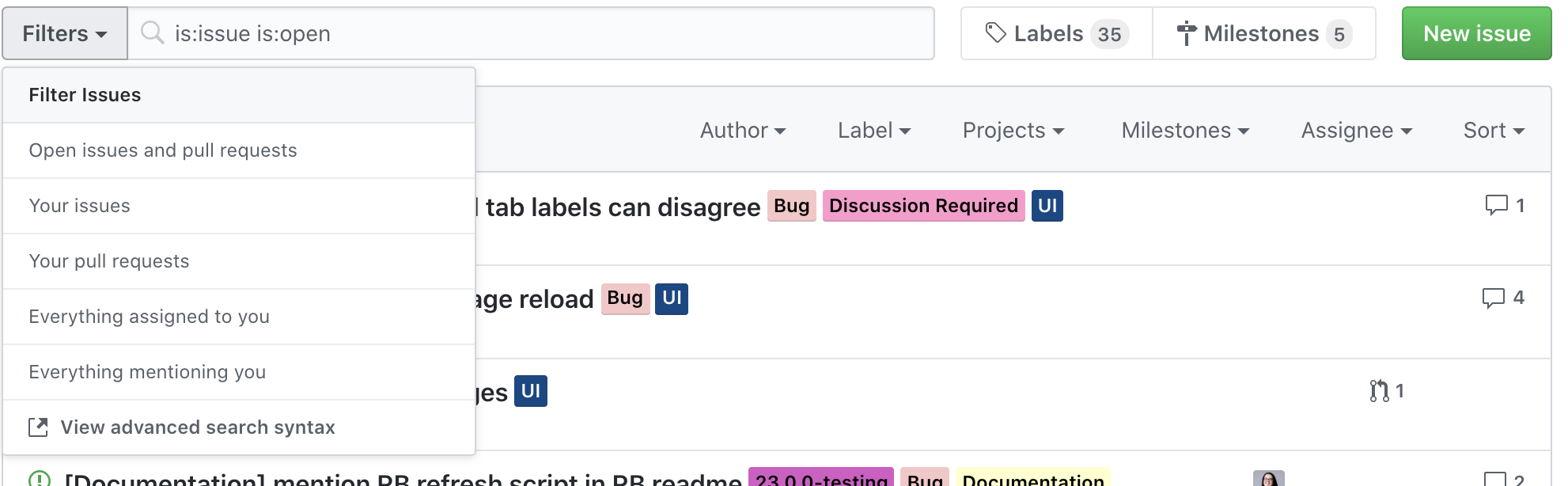
I personally like option 1, because to me it is more inline with allowing users to create their own personal presets in the future which they can then quickly select. It's also similar to what websites like github have.
 HenriRabalais
on 14 May 2020
HenriRabalais
on 14 May 2020
I like option 1 too! It seems to be an effective and easy way to avoid the confusion of the tabs. Let see what others' opinion will be.
laemtl
on 14 May 2020
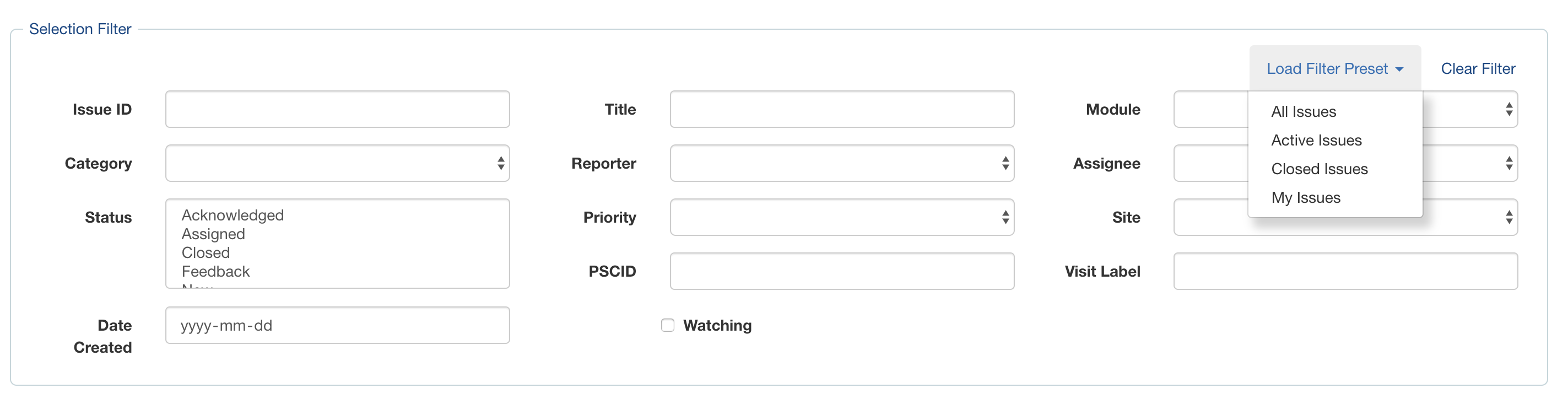
I've created a PR that should resolve this issue as well as #6532.
@laemtl @christinerogers Let me know your thoughts on the design. I've moved the "Clear Filters" button up as well for consistency of placement across all modules. Ideally, there will soon be another button that says: "Save Current Filter"
HenriRabalais
on 14 May 2020
I will pull and test shortly.
From the screenshot, I can already tell that this design is way clearer to me. I love it!
laemtl
on 14 May 2020
I'm fine with adding filter presets -- great idea -- given it makes sense to invest time implementing this across most modules. I can think of IssueTracker, ConflictResolver, and maybe the Bvl and Img Feedback modules (someday) that would use this, off the top of my head...
It's sort of like saved queries - would also need mechanisms to edit/delete presets, and a button to "save current filter settings as a preset", and maybe a way to share/control presets across users.
 christinerogers
on 15 May 2020
christinerogers
on 15 May 2020
@pierre-p-s this is the Issue Tracker bug you just raised -
It was found for 23 and this basically stalled on a re-design question :
When the Module was updated for the DataFramework in 2019 the filter logic couldn't select for "_not Closed_" issues.
christinerogers
on 7 Jul 2020
Related issues
 kongtiaowang
·
3Comments
kongtiaowang
·
3Comments
 driusan
·
3Comments
driusan
·
3Comments
 CamilleBeau
·
3Comments
CamilleBeau
·
3Comments
 jesscall
·
6Comments
laemtl
·
3Comments
jesscall
·
6Comments
laemtl
·
3Comments